scrollTo
Scroll the window or an element to a named position, such as bottom, or to
pixel or percentage coordinates.
It is unsafe to
chain further commands that rely on the subject after .scrollTo().
Syntax
cy.scrollTo(position)
cy.scrollTo(x, y)
cy.scrollTo(position, options)
cy.scrollTo(x, y, options)

  // ---or---

  .scrollTo(position)
  .scrollTo(x, y)
  .scrollTo(position, options)
  .scrollTo(x, y, options)
Usage
Correct Usage
cy.scrollTo(0, 500) // Scroll the window 500px down
cy.get('.sidebar').scrollTo('bottom') // Scroll 'sidebar' to its bottom
Incorrect Usage
cy.title().scrollTo('My App') // Errors, 'title' does not yield DOM element
Arguments
position (String)
A specified position to scroll the window or element to. Valid positions are
topLeft, top, topRight, left, center, right, bottomLeft, bottom,
and bottomRight.
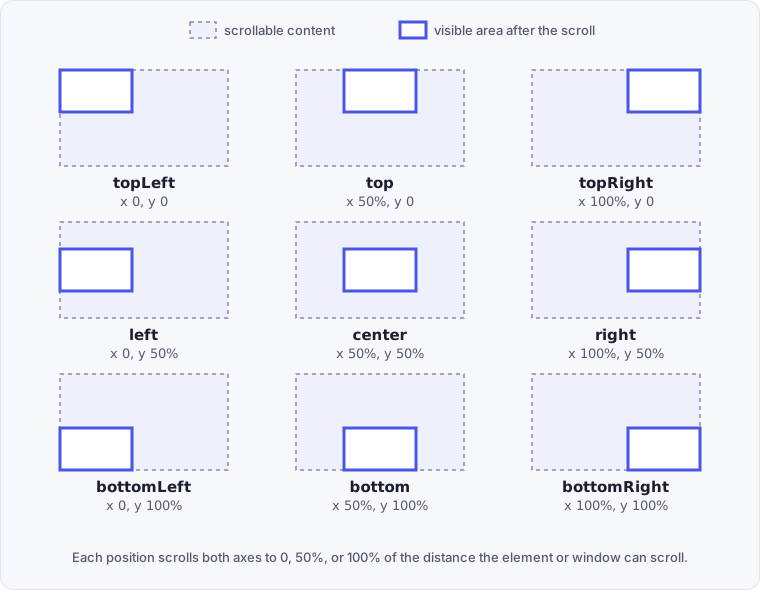
x (Number, String)
Where to scroll to horizontally, measured from the left edge. Pass a number
of pixels (500), a pixel string ('500px'), or a percentage of the
scrollable distance ('25%').
y (Number, String)
Where to scroll to vertically, measured from the top edge. Pass a number
of pixels (500), a pixel string ('500px'), or a percentage of the
scrollable distance ('25%').
options (Object)
Pass in an options object to change the default behavior of cy.scrollTo().
| Option | Default | Description |
|---|---|---|
duration | 0 | Scrolls over the duration (in ms). Accepts a number or a numeric string. |
easing | swing | Easing animation for the scroll. Accepts swing or linear. |
ensureScrollable | true | Checks that the element can scroll, and errors if it can't. |
log | true | Displays the command in the Command Log. |
timeout | defaultCommandTimeout | Time to wait for .scrollTo() to resolve before timing out. |
Yields
.scrollTo()yields the same subject it was given.cy.scrollTo()yields thewindowwhen it starts a chain.- It is unsafe
to chain further commands that rely on the subject after
.scrollTo().
Examples
Position
Scroll to the bottom of the window
cy.scrollTo('bottom')
Scroll to the center of the list
cy.get('#movies-list').scrollTo('center')
Coordinates
Scroll 500px down the list
cy.get('#infinite-scroll-list').scrollTo(0, 500)
Scroll the window 500px to the right
cy.scrollTo('500px')
Scroll 25% of the way down the element
cy.get('.user-photo').scrollTo('0%', '25%')
Options
Use linear easing animation to scroll
cy.get('.documentation').scrollTo('top', { easing: 'linear' })
Scroll to the right over 2000ms
cy.get('#slider').scrollTo('right', { duration: 2000 })
Do not error if element is not scrollable
When an element is scrollable only some of the time, such as a table that
scrolls with 2,000 rows but not with 5, pass ensureScrollable: false.
.scrollTo() then skips the scrollable check instead of erroring.
// Moves on to the next command even if the table is not scrollable
cy.get('table').scrollTo('bottom', { ensureScrollable: false })
cy.get('table').find('tr:last-child').should('be.visible')
Workflows
Assert the scroll position after scrolling
.scrollTo() yields the window or element it scrolled, not the scroll position.
To check the position, query it after the scroll: scrollY on the window, or
scrollTop on an element.
cy.scrollTo(0, 500)
cy.window().its('scrollY').should('equal', 500)

cy.get('#feed').scrollTo('bottom')
cy.get('#feed').invoke('scrollTop').should('be.gt', 0)
Load more items in an infinite scroll list
Scroll to the bottom of the list, then assert on the new item count. The assertion retries until the next page of items renders.
cy.get('#feed .item').should('have.length', 20)
cy.get('#feed').scrollTo('bottom')
cy.get('#feed .item').should('have.length.gt', 20)
Show a back-to-top button after scrolling
Some elements appear only once the page scrolls, such as a back-to-top button, a sticky header, or a lazy-loaded image. Scroll first, then assert on the element.
cy.scrollTo('bottom')
cy.get('[data-cy="back-to-top"]').should('be.visible')
Notes
Actionability
cy.scrollTo() does not run the
actionability checks that
commands like .click() do. It scrolls an element even
when the element is hidden, disabled, or covered by another element. Before it
scrolls, cy.scrollTo() retries until the subject is attached to the DOM and is
scrollable. Pass ensureScrollable: false to skip the scrollable check.
Scopes
cy.scrollTo() acts differently whether it's starting a series of commands or
being chained off of an existing one.
When starting a series of commands
This scrolls the window.
cy.scrollTo('bottom')
When chained to an existing series of commands
This scrolls the #checkout-items element.
cy.get('#checkout-items').scrollTo('right')
When chained off cy.window()
This scrolls the window, the same as starting a series of commands.
cy.window().scrollTo('bottom')
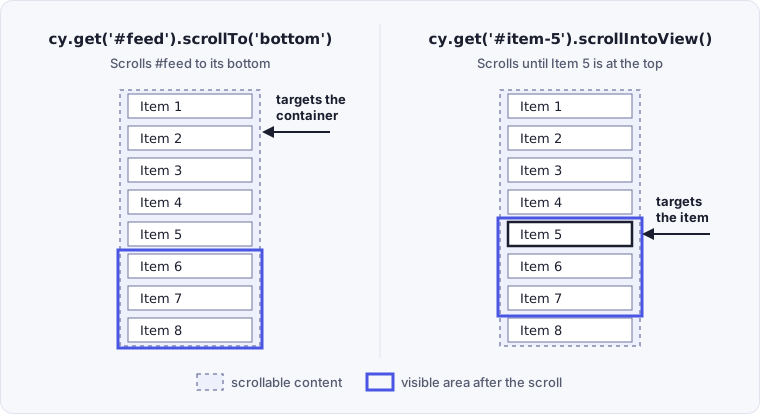
Choosing between .scrollTo() and .scrollIntoView()
.scrollTo() scrolls a container, either the window or a scrollable element, to
a position. .scrollIntoView() scrolls whatever contains an element until that
element is in view. To reach a specific item, use .scrollIntoView() on the
item rather than .scrollTo() on its container.
cy.get('#feed').scrollTo('bottom') // scrolls the container itself
cy.get('#item-5').scrollIntoView() // scrolls until this item is in view
Compare where each call leaves the list:
Fixing the "element is not scrollable" error
.scrollTo() errors with failed because this element is not scrollable when
the element you target can't scroll: either its content doesn't overflow it, or
its overflow isn't auto or scroll. This usually means the scrolling
happens on a different element, often the window, while the targeted wrapper
grows to fit its content. Target the element whose overflow is auto or
scroll instead, or scroll the window.
// Errors: .page-wrapper grows with its content, so the window scrolls instead
cy.get('.page-wrapper').scrollTo('bottom')

// Scroll the window instead
cy.scrollTo('bottom')
Pass ensureScrollable: false only when an element is sometimes scrollable and
sometimes not, as in
Do not error if element is not scrollable.
Snapshots don't show scroll positions
Cypress does not reflect the accurate scroll positions of any elements within
snapshots. If you want to see the actual scrolling behavior in action, we
recommend using .pause() to walk through each command
or
watching the video of the test run.
Rules
Requirements
.scrollTo()requires being chained off a command that yields a DOM element or thewindow..scrollTo()requires a single element. It errors when the subject contains more than one element..scrollTo()requires the element to be scrollable, unless you passensureScrollable: false.
Assertions
.scrollTo()automatically waits for the element to be scrollable, unless you passensureScrollable: false..scrollTo()itself is not retried. It scrolls once. Assertions chained after.scrollTo()are retried until they pass or time out. See Only queries are retried.
Timeouts
.scrollTo()can time out waiting for the element to become scrollable..scrollTo()can time out waiting for assertions you've added to pass.
Command Log
Scroll to the bottom of the window then scroll the element to the "right"
cy.scrollTo('bottom')
cy.get('#scrollable-horizontal').scrollTo('right')
The Command Log shows the commands above as:

Click scrollTo in the Command Log to print its details to the console:

History
| Version | Changes |
|---|---|
| 4.11.0 | Added support for ensureScrollable option. |
See also
.scrollIntoView()cy.window()cy.viewport()- Set the window size, which decides whether the window can scroll- Scrolling in Interacting with Elements - How action commands scroll elements into view on their own