log
Print a message to the Cypress Command Log.
Syntax
cy.log(message)
cy.log(message, args...)
Usage
Correct Usage
cy.log('created new user')
Arguments
message (String)
Message to print to the Cypress Command Log. The Command Log renders inline
Markdown, such as **bold**, _italic_, and `code`, across the whole
line it displays, including any arguments. HTML tags display as plain text.
args...
Additional values to print after the message. See Formatting arguments in the Command Log for how each value is displayed.
Yields
cy.log()yieldsnull.
Examples
Message
Print a message to the Command Log
cy.contains('button', 'Login').click()
cy.log('Login successful')
Format a message with Markdown
cy.log('**Checkout** started for `standard` shipping')
Args
Print a message with arguments to the Command Log
const events = ['click', 'focus', 'blur']

cy.log('events triggered', events)
Common workflows
Mark the steps of a longer test
Step markers turn the Command Log into an outline of the test, which makes it faster to find where a failure happened in the Command Log, a screenshot, or Test Replay.
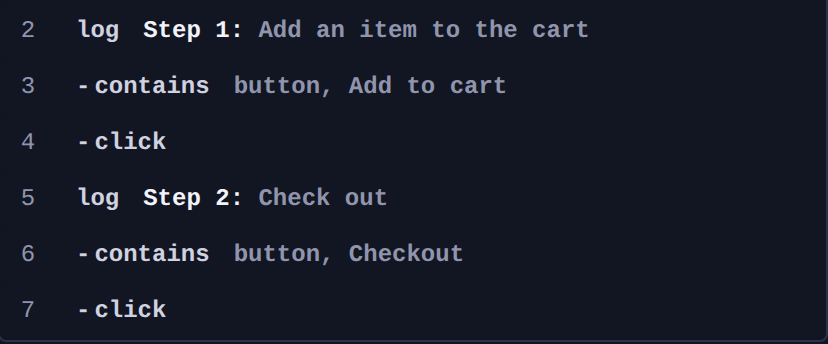
cy.log('**Step 1:** Add an item to the cart')
cy.contains('button', 'Add to cart').click()

cy.log('**Step 2:** Check out')
cy.contains('button', 'Checkout').click()
The bold step markers stand out from the commands that follow them:
Log a network response
Log values from a request that cy.intercept()
aliased, once cy.wait() yields it.
cy.intercept('GET', '/api/user').as('getUser')
cy.contains('button', 'Load profile').click()

cy.wait('@getUser').then(({ response }) => {
  cy.log('status', response?.statusCode)
  cy.log('user', response?.body.name)
})
Log an element's text
Read the text with .invoke(), then log it inside
.then() so the value is current.
cy.get('[data-cy=cart-total]')
  .invoke('text')
  .then((total) => {
    cy.log('cart total', total)
  })
Print a message to the terminal during cypress run
cy.log() writes only to the Command Log, so its messages don't appear in the
terminal output of cypress run or in CI logs. To print to the terminal,
register a task that calls console.log():
- cypress.config.js
- cypress.config.ts
const { defineConfig } = require('cypress')

module.exports = defineConfig({
  // setupNodeEvents can be defined in either
  // the e2e or component configuration
  e2e: {
    setupNodeEvents(on, config) {
      on('task', {
        log(message) {
          console.log(message)

          return null
        },
      })
    },
  },
})
import { defineConfig } from 'cypress'

export default defineConfig({
  // setupNodeEvents can be defined in either
  // the e2e or component configuration
  e2e: {
    setupNodeEvents(on, config) {
      on('task', {
        log(message: string) {
          console.log(message)

          return null
        },
      })
    },
  },
})
Then call it with cy.task():
cy.task('log', 'Checkout finished')
The message prints in the terminal alongside the spec's test results:
  Checkout
Checkout finished
    ✓ completes an order (72ms)


  1 passing (112ms)
Log the browser and configuration for a run
Logging the run's context at the start of a spec helps explain a test that passes locally and fails in CI.
before(() => {
  cy.log('browser', `${Cypress.browser.name} ${Cypress.browser.majorVersion}`)
  cy.log('baseUrl', Cypress.config('baseUrl'))
})
Trace each item in a loop
Log inside .each() to see which item a test was on when
it failed.
cy.get('li').each(($item, index) => {
  cy.log(`item ${index}`, $item.text())
})
Notes
Formatting arguments in the Command Log
cy.log() joins the message and every argument with a comma and a space.
Strings, numbers, and booleans print as they are, and Markdown in a string
renders the same way it does in the message. Arrays with more than 3 items
and objects with more than 2 keys are summarized so the Command Log stays
readable:
| Argument | Shown in the Command Log |
|---|---|
['a', 'b', 'c'] | [a, b, c] |
[1, 2, 3, 4, 5] | Array[5] |
{ a: 1, b: 2, c: 3 } | Object{3} |
() => {} | function(){} |
undefined | Left out |
The full values are always available in the console. Click the log command in
the Command Log to print its message and args to the Developer Tools
console.
Values are captured when the command is queued
cy.log() is enqueued like every other Cypress command, so its arguments are
evaluated when the test code runs, before any commands execute. A variable that
an earlier command changes still holds its old value when cy.log() receives
it. Call cy.log() inside .then() to print a value
that an earlier command produces.
cy.get('li').then(($items) => {
  cy.log('item count', $items.length)
})
Read Variables and Aliases for more on how Cypress queues commands.
Rules
Requirements
cy.log()requires being chained off ofcy.
Assertions
cy.log()yieldsnull, so there's nothing to assert on.
Timeouts
cy.log()cannot time out.
Command Log
Print messages with arguments to the Command Log.
cy.log('log out any message we want here')
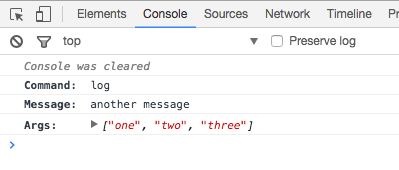
cy.log('another message', ['one', 'two', 'three'])
The commands above display in the Command Log as:
![Command Log showing two log rows: a plain message, and a message followed by the array [one, two, three]](/img/api/log/custom-command-log-with-any-message.png)
Clicking the second log row in the Command Log prints its details to the
console:
History
| Version | Changes |
|---|---|
| 7.3.0 | All arguments display in the Command Log, not only the first 2 |
| 0.18.3 | cy.log() command added |