check
Check checkbox(es) or radio(s).
It is unsafe to
chain further commands that rely on the subject after .check().
This element must be an <input> with type checkbox or radio.
Syntax
.check()
.check(value)
.check(values)
.check(options)
.check(value, options)
.check(values, options)
Usage
Correct Usage
cy.get('[type="checkbox"]').check() // Check checkbox element
cy.get('[type="radio"]').first().check() // Check first radio element
Incorrect Usage
cy.check('[type="checkbox"]') // Errors, cannot be chained off 'cy'
cy.get('p:first').check() // Errors, '.get()' does not yield checkbox or radio
Arguments
value (String)
Value of checkbox or radio that should be checked.
values (Array)
Values of checkboxes or radios that should be checked.
options (Object)
Pass in an options object to change the default behavior of .check().
| Option | Default | Description |
|---|---|---|
animationDistanceThreshold | animationDistanceThreshold | The distance in pixels an element must exceed over time to be considered animating. |
log | true | Displays the command in the Command log |
force | false | Forces the action, disables waiting for actionability |
scrollBehavior | scrollBehavior | Viewport position to where an element should be scrolled before executing the command. Accepts a single alignment, a per-axis { block, inline } object, or false. |
timeout | defaultCommandTimeout | Time to wait for .check() to resolve before timing out |
waitForAnimations | waitForAnimations | Whether to wait for elements to finish animating before executing the command. |
Yields
.check()yields the same subject it was given.- Passing a
valueorvaluesnarrows the yielded subject to the matching elements. - It is unsafe
to chain further commands that rely on the subject after
.check().
Examples
No Args
Check all checkboxes
cy.get('[type="checkbox"]').check()
Check each radio in a set
.check() acts on the elements in the subject one at a time. Radios that share
a name are mutually exclusive, so the last one checked is the one that stays
checked.
cy.get('[type="radio"]').check()
Check the element with id of 'saveUserName'
cy.get('#saveUserName').check()
Value
Select the radio with the value of 'US'
<form>
  <input type="radio" id="ca-country" value="CA" />
  <label for="ca-country">Canada</label>
  <input type="radio" id="us-country" value="US" />
  <label for="us-country">United States</label>
</form>
cy.get('[type="radio"]').check('US')
Values
Check the checkboxes with the values 'subscribe' and 'accept'
<form>
  <input type="checkbox" id="subscribe" value="subscribe" />
  <label for="subscribe">Subscribe to newsletter?</label>
  <input type="checkbox" id="acceptTerms" value="accept" />
  <label for="acceptTerms">Accept terms and conditions.</label>
</form>
cy.get('form input').check(['subscribe', 'accept'])
Options
Check an invisible checkbox
Setting force to true skips the
actionability checks, so Cypress
clicks the element without first requiring it to be visible, enabled, and
unobstructed.
cy.get('.action-checkboxes')
  .should('not.be.visible') // Passes
  .check({ force: true })
  .should('be.checked') // Passes
Find checked option
You can get the currently checked option using jQuery's :checked selector.
<form id="pick-fruit">
  <input type="radio" name="fruit" value="orange" id="orange" />
  <input type="radio" name="fruit" value="apple" id="apple" checked="checked" />
  <input type="radio" name="fruit" value="banana" id="banana" />
</form>
cy.get('#pick-fruit :checked').should('be.checked').and('have.value', 'apple')
Notes
Actionability
The element must first reach actionability
.check() is an "action command" that follows all the rules of
Actionability.
Value matching
A value argument filters the subject
.check() compares each argument against the element's value and acts only on
the elements that match, yielding that narrowed set. Elements that don't match
are left untouched, and a value that matches nothing is dropped without an
error.
// If no checkbox has the value 'purple', this checks and yields only 'blue'
cy.get('[type="checkbox"]').check(['blue', 'purple'])
A checkbox or radio with no value attribute reports a value of on, so
passing 'on' to such an element fails with an error rather than checking it.
Checked state
Checking an element that is already checked does nothing
.check() skips the click when the element is already checked, so no change
event fires and the console output notes that no operation took place. The
element still has to be visible unless you pass force: true.
A checkbox in an indeterminate state leaves that state when you check it, whether or not the click happens.
Rules
Requirements
.check()requires being chained off a command that yields DOM element(s)..check()requires the element to have typecheckboxorradio.
Assertions
.check()will automatically wait for the element to reach an actionable state..check()will automatically retry until all chained assertions have passed.
Timeouts
.check()can time out waiting for the element to reach an actionable state..check()can time out waiting for assertions you've added to pass.
Command Log
check the element with name of 'emailUser'
cy.get('form').find('[name="emailUser"]').check()
The commands above will display in the Command Log as:

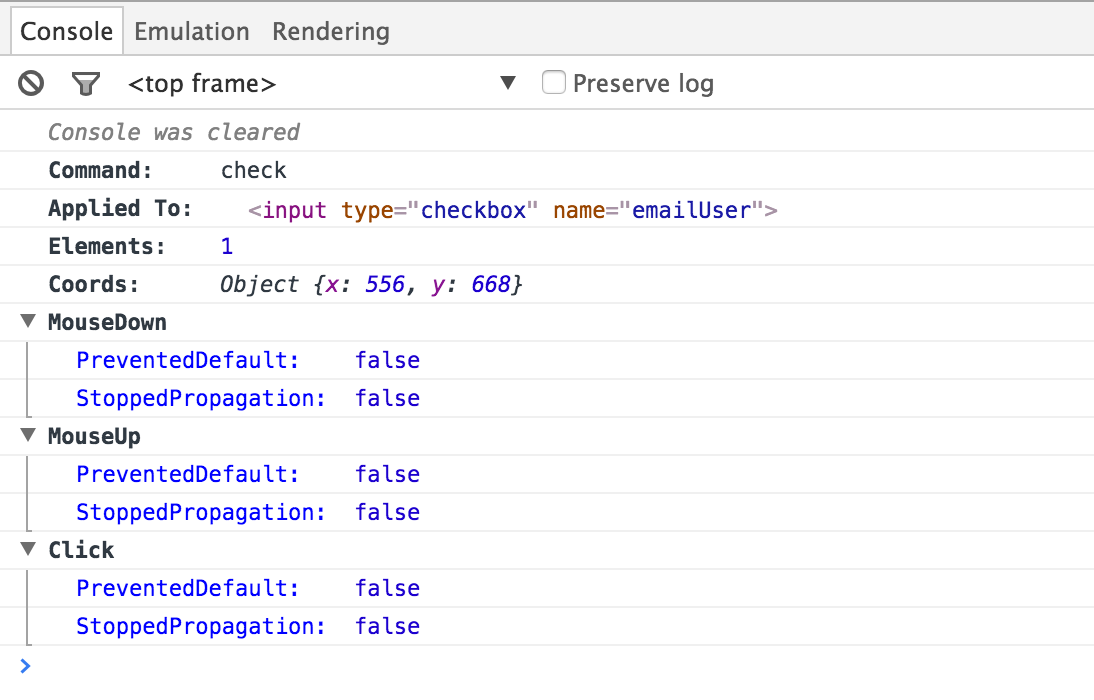
When clicking on check within the command log, the console outputs the
following:
History
| Version | Changes |
|---|---|
| 15.20.0 | Option scrollBehavior now accepts a per-axis { block, inline } object and the 'start' and 'end' alignments |
| 10.0.1 | .check() removes the indeterminate state from a checkbox |
| 8.4.0 | Clearer error when a value is passed and the element has no value attribute |
| 6.1.0 | Added option scrollBehavior |
| 0.14.0 | .check() narrows the yielded subject to the elements matching the passed value |
| 0.6.12 | Added option force |