Cypress Configuration
When you launch Cypress for the first time, a wizard guides you through
creating a Cypress configuration file. This file is
cypress.config.js for JavaScript apps or cypress.config.ts for
TypeScript apps. This file stores
any configuration specific to Cypress.
Cypress additionally supports config files with .mjs and .cjs extensions.
A .mjs file supports
ESM
syntax in your config without the need of a transpiler step.
A .cjs file uses CommonJS module
syntax, which is the default for JavaScript files. All JavaScript config
examples in our docs use the CommonJS format.
For TypeScript config files (.ts, .mts, .cts), see
TypeScript Support.
If you configure your tests to record the
results to Cypress Cloud, Cypress
stores the projectId in the config file as well.
ESM vs CommonJS
Starting in Cypress 15.17.0, Cypress
determines whether your config loads as ESM or CommonJS before running
it, using the same rules as Node.js. Cypress then loads the file with only
import() (ESM) or require() (CommonJS) and does not fall back to the
other format if loading fails.
The same rules apply to plugin code in setupNodeEvents — Cypress evaluates your
config and plugins in a Node.js child process, so the module system for that
file determines which APIs are available (for example import.meta.resolve in
ESM or require() in CommonJS).
| Config file extension | Nearest package.json "type" | Loaded as |
|---|---|---|
.mjs | (any) | ESM |
.cjs | (any) | CommonJS |
.js | "module" | ESM |
.js | omitted or "commonjs" | CommonJS |
Cypress walks up from the config file to find the nearest package.json.
If a parent directory has its own package.json without "type": "module", that
scope wins over an ancestor that is ESM-only.
Use the file extension and package.json "type" that match how the config is
written:
- ESM config — use
import/export defaultand ESM-only APIs such asimport.meta.resolveandimport.meta.dirname:
import { defineConfig } from 'cypress'

export default defineConfig({
  e2e: {
    setupNodeEvents(on, config) {
      // import.meta is available in ESM configs
      return config
    },
  },
})
- CommonJS config — use
require()andmodule.exports:
const { defineConfig } = require('cypress')

module.exports = defineConfig({
  e2e: {
    setupNodeEvents(on, config) {
      // require() is available in CommonJS configs
      return config
    },
  },
})
If your project has "type": "module" but you need CommonJS syntax in the
config, rename the file to cypress.config.cjs. If your project is CommonJS
but you want ESM syntax, use cypress.config.mjs or set "type": "module"
in package.json.
To call CommonJS-only dependencies from an ESM config (or the reverse), use
Node's interoperability helpers — for example createRequire(import.meta.url)
to require() from an ESM file.
Configs that previously loaded only because Cypress retried the alternate module
format may now fail with a clear load error. That behavior is intentional: it
matches Node.js and ensures ESM-only APIs such as import.meta.resolve work
reliably in config and plugin code.
Intelligent Code Completion
Cypress exports the defineConfig helper function, which provides
automatic code completion for configuration in many popular code editors. While
it's not strictly necessary for Cypress to parse your configuration, we
recommend wrapping your config object with defineConfig() like this:
- cypress.config.js
- cypress.config.ts
const { defineConfig } = require('cypress')

module.exports = defineConfig({
  e2e: {
    baseUrl: 'http://localhost:1234',
  },
})
import { defineConfig } from 'cypress'

export default defineConfig({
  e2e: {
    baseUrl: 'http://localhost:1234',
  },
})
Options
You can modify the default behavior of Cypress by supplying any of the following configuration options. Below is a list of available options and their default values.
Global
| Option | Default | Description |
|---|---|---|
clientCertificates | [] | An optional array of client certificates. |
env | {} | Any secret values to be set as environment variables. |
expose | {} | Any public values to be set as exposed variables. |
forceHttp1 deprecated | false | Whether Cypress routes all browser traffic through the legacy network path instead of using the native browser network in Chrome, Chromium, and Edge. Read the forceHttp1 notes on using this. |
includeShadowDom | false | Whether to traverse shadow DOM boundaries and include elements within the shadow DOM in the results of query commands (e.g. cy.get()). |
manageBrowserMemory | true | Whether Cypress monitors browser memory and collects garbage when usage crosses a threshold, so memory-heavy suites don't crash the browser. Chromium-based browsers only; no effect in Firefox or WebKit. See manageBrowserMemory. |
numTestsKeptInMemory | Default based on run or open mode | The number of tests for which snapshots and command data are kept in memory. numTestsKeptInMemory defaults to 50 during cypress open and 0 during cypress run. Reduce this number if you are experiencing high memory consumption in your browser during a test run. |
port | null | Port used to host Cypress. Normally this is a randomly generated port. |
projectId | null | The unique ID used to record test results to Cypress Cloud. Set automatically when you connect your project to Cypress Cloud. |
redirectionLimit | 20 | The number of times that the application under test can redirect before erroring. |
reporter | spec | The reporter used during cypress run. |
reporterOptions | null | The reporter options used. Supported options depend on the reporter. |
retries | { "runMode": 0, "openMode": 0 } | The number of times to retry a failing test. You can configure retries for cypress run and cypress open separately. As of Cypress 13.4.0, you can also configure the experimental Flake Detection strategy. See Test Retries for more information. |
watchForFileChanges | Default based on run or open mode | Whether Cypress watches and restarts tests on test file changes. watchForFileChanges defaults to true during cypress open and false during cypress run. |
Timeouts
Timeouts are a core concept you should understand well. The default values listed here are meaningful.
| Option | Default | Description |
|---|---|---|
defaultCommandTimeout | 4000 | Time, in milliseconds, to wait until most DOM based commands are considered timed out. |
taskTimeout | 60000 | Time, in milliseconds, to wait for a task to finish executing during a cy.task() command. |
pageLoadTimeout | 60000 | Time, in milliseconds, to wait for page transition events or cy.visit(), cy.go(), cy.reload() commands to fire their page load events. Network requests are limited by the underlying operating system, and may still time out if this value is increased. |
requestTimeout | 5000 | Time, in milliseconds, to wait for a request to go out in a cy.wait() command. |
responseTimeout | 30000 | Time, in milliseconds, to wait until a response in a cy.request(), cy.wait(), cy.fixture(), cy.setCookie(), cy.clearCookie(), cy.clearCookies(), cy.clearAllCookies(), and cy.screenshot() commands. |
Folders / Files
| Option | Default | Description |
|---|---|---|
downloadsFolder | cypress/downloads | Path to folder where Cypress saves files downloaded during a test. |
fileServerFolder | root project folder | Path to folder Cypress serves application files from. |
fixturesFolder | cypress/fixtures | Path to folder containing fixture files (Pass false to disable). |
screenshotsFolder | cypress/screenshots | Path to folder where Cypress saves screenshots from the cy.screenshot() command or after a test fails during cypress run. |
videosFolder | cypress/videos | Path to folder where Cypress saves videos during cypress run. |
Screenshots
| Option | Default | Description |
|---|---|---|
screenshotOnRunFailure | true | Whether Cypress takes a screenshot when a test fails during cypress run. |
screenshotsFolder | cypress/screenshots | Path to folder where Cypress saves screenshots from the cy.screenshot() command or after a test fails during cypress run. |
trashAssetsBeforeRuns | true | Whether Cypress trashes assets within the downloadsFolder, screenshotsFolder, and videosFolder before tests run with cypress run. Trashing clears the entire contents of those folders, including all files and nested subfolders. |
For more options regarding screenshots, view the Cypress.Screenshot API.
Videos
| Option | Default | Description |
|---|---|---|
trashAssetsBeforeRuns | true | Whether Cypress trashes assets within the downloadsFolder, screenshotsFolder, and videosFolder before tests run with cypress run. Trashing clears the entire contents of those folders, including all files and nested subfolders—not only screenshots and videos. Read the trashAssetsBeforeRuns notes for more details. |
videoCompression | false | The quality setting for the video compression, in Constant Rate Factor (CRF). The value can be false or 0 to disable compression or a CRF between 1 and 51, where a lower value results in better quality (at the expense of a higher file size). Setting this option to true results in a default CRF of 32. |
videosFolder | cypress/videos | Where Cypress automatically saves the video of the test run when tests run with cypress run. |
video | false | Whether Cypress captures a video of the tests run with cypress run. |
Downloads
| Option | Default | Description |
|---|---|---|
downloadsFolder | cypress/downloads | Path to folder where Cypress saves files downloaded during a test. |
trashAssetsBeforeRuns | true | Whether Cypress trashes assets within the downloadsFolder, screenshotsFolder, and videosFolder before tests run with cypress run. Trashing clears the entire contents of those folders, including all files and nested subfolders—not only screenshots and videos. Read the trashAssetsBeforeRuns notes for more details. |
Browser
| Option | Default | Description |
|---|---|---|
defaultBrowser | null | The default browser to launch if the "--browser" command line option is not provided. This option only affects the first browser launch; changing this option after the browser is already launched has no effect. Set this to an installed browser (for example, 'chrome') to stop relying on the deprecated bundled Electron default — see the note below. |
chromeWebSecurity | true | Whether to enable Chromium-based browser's Web Security for same-origin policy and insecure mixed content. |
blockHosts | null | A String or Array of hosts that you wish to block traffic for. Read the blockHosts notes for examples on using this. |
hosts | null | An Object of hostname patterns to IP addresses. Acts like a Cypress-specific /etc/hosts file, letting Cypress resolve custom hostnames within tests. Read the hosts notes for examples on using this. |
modifyObstructiveCode | true | Whether Cypress searches for and replaces obstructive JS code in .js or .html files. Read the modifyObstructiveCode notes for more information on this setting. |
removeSRIAttributes | false | Whether Cypress removes Subresource Integrity (SRI) integrity attributes from <script> and <link> elements so that first-party resources rewritten by Cypress are not blocked. Read the removeSRIAttributes notes for more information on this setting. |
trustedCertificates | [] | Certificates your application presents that the browser should trust, such as a self-signed or private-CA certificate. Applies only on the native browser network path (Chrome, Chromium, and Edge with forceHttp1: false), where it lets the browser cache that origin's assets across navigations. Read the trustedCertificates notes for more details. |
userAgent | null | Overrides the default user agent the browser sends in all request headers. Servers typically use user agent values to help identify the operating system, browser, and browser version. See User-Agent MDN Documentation for example user agent values. |
Electron is deprecated as a test
browser and will be removed in a future version of Cypress. If you don't pass
--browser and have no
defaultBrowser set, Cypress falls back to the bundled Electron browser. Set
defaultBrowser to an installed browser to make your runs explicit and to avoid
a breaking change when you upgrade:
import { defineConfig } from 'cypress'

export default defineConfig({
  defaultBrowser: 'chrome',
})
Viewport
| Option | Default | Description |
|---|---|---|
viewportHeight | 660 | Default height in pixels for the application under tests' viewport. (Override with cy.viewport() command) |
viewportWidth | 1000 | Default width in pixels for the application under tests' viewport. (Override with cy.viewport() command) |
Actionability
| Option | Default | Description |
|---|---|---|
animationDistanceThreshold | 5 | The distance in pixels an element must exceed over time to be considered animating. |
waitForAnimations | true | Whether to wait for elements to finish animating before executing commands. |
scrollBehavior | top | Viewport position to which Cypress scrolls an element before executing commands. Accepts a single alignment ('top', 'bottom', 'start', 'end', 'center', or 'nearest'), an object that aligns each axis independently with block and inline (each set to 'start', 'end', 'center', or 'nearest'), or false to disable scrolling. 'top' and 'bottom' align the vertical axis only, while 'start' and 'end' align both. See Scrolling. |
visibilityStrategy | modern | Selects the algorithm Cypress uses to check element visibility. 'modern' (the default) delegates to the browser's native Element.checkVisibility() API. 'legacy' opts back into the ancestor-walking algorithm from Cypress 15 and earlier. This option is deprecated — the 'legacy' value and the option itself will be removed in a future major version. |
For more information, see the docs on actionability.
Keyboard
| Option | Default | Description |
|---|---|---|
keystrokeDelay | null | The delay, in milliseconds, between keystrokes while typing with .type(). Must be a non-negative number. |
As of Cypress 16, typing has no keystroke delay unless you ask for one, which makes typing-heavy suites noticeably faster. Cypress reads the resolved keystrokeDelay value from this configuration first, then from Cypress.Keyboard.defaults(), and falls back to 0 if neither is set. A per-command delay passed to .type() is independent of this and overrides the resolved value for that single call.
If you relied on the pre-16 default of 10, set keystrokeDelay: 10 here or via Cypress.Keyboard.defaults() in a support file.
System
Cypress sets these values at startup, and the values are read-only: you can't change them in your Cypress configuration file. You can access the values with Cypress.config(). The browsers property is an exception: you can also modify browsers in setupNodeEvents to filter or add custom browsers.
| Option | Default | Description |
|---|---|---|
arch | os.arch() | The underlying OS CPU architecture. Common values are x64, arm, and arm64. |
browsers | [] | A list of browsers found on your system. Cypress populates the list at startup. You can filter or extend the list in setupNodeEvents. |
isInteractive | true | Whether Cypress is running in interactive mode (cypress open). Set to false during cypress run. See Notes for usage. |
platform | os.platform() | The underlying OS platform name (e.g. linux, darwin, win32). |
resolvedNodePath | null | The path to the Node.js binary used for cy.task() commands. Set by Cypress at startup. |
resolvedNodeVersion | null | The version of Node.js used by Cypress. Set by Cypress at startup. |
Experiments
Configuration might include experimental options currently being tested. See Experiments page.
Testing Type-Specific Options
You can provide configuration options for either E2E or Component Testing by
creating e2e and component objects inside your Cypress configuration.
e2e
You can specify these options inside the e2e configuration
object:
| Option | Default | Description |
|---|---|---|
baseUrl | null | URL used as prefix for cy.visit() or cy.request() command's URL. |
setupNodeEvents | null | Function in which you can register node events and modify config. Takes the place of the (removed) pluginFile option. Read the setupNodeEvents notes for examples on using this. |
supportFile | cypress/support/e2e.{js,jsx,ts,tsx} | Path to file to load before spec files load. Cypress compiles and bundles this file. (Pass false to disable) |
specPattern | cypress/e2e/**/*.cy.{js,jsx,ts,tsx} | A String or Array of glob patterns of the test files to load. |
excludeSpecPattern | *.hot-update.js | A String or Array of glob patterns used to ignore test files that would otherwise be shown in your list of tests. Read the excludeSpecPattern notes on using this. |
slowTestThreshold | 10000 | Time, in milliseconds, to consider a test "slow" during cypress run. A slow test displays in orange text in the default reporter. |
testIsolation | true | Whether or not test isolation is enabled to ensure a clean browser context between tests. |
injectDocumentDomain deprecated | false | Instructs Cypress to use the document.domain property to reduce the need for cy.origin. Read the injectDocumentDomain notes on using this. |
- cypress.config.js
- cypress.config.ts
const { defineConfig } = require('cypress')

module.exports = defineConfig({
  e2e: {
    // e2e options here
  },
})
import { defineConfig } from 'cypress'

export default defineConfig({
  e2e: {
    // e2e options here
  },
})
component
You can specify these options inside the component configuration
object:
| Option | Default | Description |
|---|---|---|
devServer | null | Required option used to configure the component testing dev server. Read the devServer notes for examples on using this. |
indexHtmlFile | cypress/support/component-index.html | The HTML file where Cypress renders your components and where you add global assets, such as styles, fonts, and external scripts. |
justInTimeCompile | true | Compile resources directly related to your spec for webpack, compiling them 'just-in-time' before spec execution. |
setupNodeEvents | null | Function in which you can register node events and modify config. Takes the place of the (removed) plugins file. Read the setupNodeEvents notes for examples on using this. |
supportFile | cypress/support/component.{js,jsx,ts,tsx} | Path to file to load before spec files load. Cypress compiles and bundles this file. (Pass false to disable) |
specPattern | **/*.cy.{js,jsx,ts,tsx} | A glob pattern String or Array of glob pattern Strings of the spec files to load. Any files found matching the e2e.specPattern value are automatically excluded. |
excludeSpecPattern | ['/snapshots/*', '/image_snapshots/*'] | A String or Array of glob patterns used to ignore spec files that would otherwise be shown in your list of specs. Read the excludeSpecPattern notes on using this. |
experimentalSingleTabRunMode | false | Run all specs in a single tab, instead of creating a new tab per spec. Running in a single tab can improve run mode performance, but can impact spec isolation and reliability on large test suites. This experiment currently only applies to Component Testing. |
slowTestThreshold | 250 | Time, in milliseconds, to consider a test "slow" during cypress run. A slow test displays in orange text in the default reporter. |
devServerPublicPathRoute | /__cypress/src | The public path of the dev server in use. Use caution overriding the default value as it can have unintended consequences. See Framework Configuration or dev server specific documentation (in particular @cypress/vite-dev-server). |
- cypress.config.js
- cypress.config.ts
const { defineConfig } = require('cypress')

module.exports = defineConfig({
  component: {
    // component options here
  },
})
import { defineConfig } from 'cypress'

export default defineConfig({
  component: {
    // component options here
  },
})
Overriding Options
Cypress gives you the option to dynamically alter configuration options. Overriding options is helpful when running Cypress in multiple environments and on multiple developer machines.
Overriding Individual Options
When running Cypress from the command line you can pass a --config flag to
override individual config options.
For example, to override viewportWidth and viewportHeight, you can run:
cypress run --browser firefox --config viewportWidth=1280,viewportHeight=720
Specifying an Alternative Config File
In the Cypress CLI, you can change which config file Cypress uses with the
--config-file
flag.
cypress run --config-file tests/cypress.config.js
See the Command Line guide for more examples.
Testing Type-Specific Overrides
In addition to setting Testing Type-Specific options, you can override other configuration options for either the E2E Testing or Component Testing.
For example:
- cypress.config.js
- cypress.config.ts
const { defineConfig } = require('cypress')

module.exports = defineConfig({
  // These settings apply everywhere unless overridden
  defaultCommandTimeout: 5000,
  viewportWidth: 1000,
  viewportHeight: 600,
  // Viewport settings overridden for component tests
  component: {
    viewportWidth: 500,
    viewportHeight: 500,
  },
  // Command timeout overridden for E2E tests
  e2e: {
    defaultCommandTimeout: 10000,
  },
})
import { defineConfig } from 'cypress'

export default defineConfig({
  // These settings apply everywhere unless overridden
  defaultCommandTimeout: 5000,
  viewportWidth: 1000,
  viewportHeight: 600,
  // Viewport settings overridden for component tests
  component: {
    viewportWidth: 500,
    viewportHeight: 500,
  },
  // Command timeout overridden for E2E tests
  e2e: {
    defaultCommandTimeout: 10000,
  },
})
Environment Variables
You can override configuration options with environment variables. Environment variable overrides are especially useful in Continuous Integration or when working locally. Environment variable overrides give you the ability to change configuration options without modifying any code or build scripts.
For example, these environment variables in the command line override any
viewportWidth or viewportHeight options set in the Cypress configuration:
export CYPRESS_VIEWPORT_WIDTH=800
export CYPRESS_VIEWPORT_HEIGHT=600
Test Configuration
We provide two options to override the configuration while your test are
running, Cypress.config() and suite-specific or test-specific configuration
overrides.
⚠️ Note: The configuration values below are all writeable and can be changed via test configuration. Any other configuration values are readonly and cannot be changed at run time.
animationDistanceThresholdbaseUrlblockHosts- you can't override this option withCypress.config()while a test is executingdefaultCommandTimeoutincludeShadowDomkeystrokeDelaynumTestsKeptInMemorypageLoadTimeoutredirectionLimitrequestTimeoutresponseTimeoutretriesscreenshotOnRunFailurescrollBehaviorslowTestThresholdtaskTimeouttestIsolation- you can only override this option at the suite-specific override levelviewportHeight- you can't override this option withCypress.config()while a test is executingviewportWidth- you can't override this option withCypress.config()while a test is executingwaitForAnimations
Cypress.config()
You can also override configuration values within your test using
Cypress.config().
Cypress.config() changes the configuration for the remaining execution of the current spec
file. The values reset to the previous default values after the spec has
complete.
Cypress.config('pageLoadTimeout', 100000)

Cypress.config('pageLoadTimeout') // => 100000
You can't override blockHosts, viewportHeight, and viewportWidth with
Cypress.config() while a test is executing, because doing so would affect the
next test rather than the current one. Set them in
test-specific configuration instead, or use
cy.viewport() to change the viewport during a test.
Test-specific Configuration
To apply specific Cypress configuration values to a suite or test, pass a configuration object to the test or suite function as the second argument.
The configuration values passed in only take effect during the suite or test where they are set. The values then reset to the previous default values after the suite or test is complete.
You can also pass an expose object so plugins can declare public configuration
per suite or test with Cypress.expose(). Cypress
merges expose overrides across nested suites and tests, with test-level keys taking
precedence. Cypress applies override keys at test start and restores them after each test
without affecting unrelated values set in hooks.
Syntax
describe(name, config, fn)
context(name, config, fn)
it(name, config, fn)
specify(name, config, fn)
Suite configuration
If you want to target a suite of tests to run or be excluded when run in a
specific browser, you can override the browser configuration within the suite
configuration. The browser option accepts the same arguments as
Cypress.isBrowser().
You can configure the number of times to retries a suite of tests if they fail
during cypress run and cypress open separately.
describe(
  'login',
  {
    retries: {
      runMode: 3,
      openMode: 2,
    },
  },
  () => {
    it('should redirect unauthenticated user to sign-in page', () => {
      // ...
    })

    it('allows user to login', () => {
      // ...
    })
  }
)
Single test configuration
If you want to target a test to run or be excluded when run in a specific
browser, you can override the browser configuration within the test
configuration. The browser option accepts the same arguments as
Cypress.isBrowser().
it('Show warning outside Chrome', { browser: '!chrome' }, () => {
  cy.get('.browser-warning').should(
    'contain',
    'For optimal viewing, use Chrome browser'
  )
})
Resolved Configuration
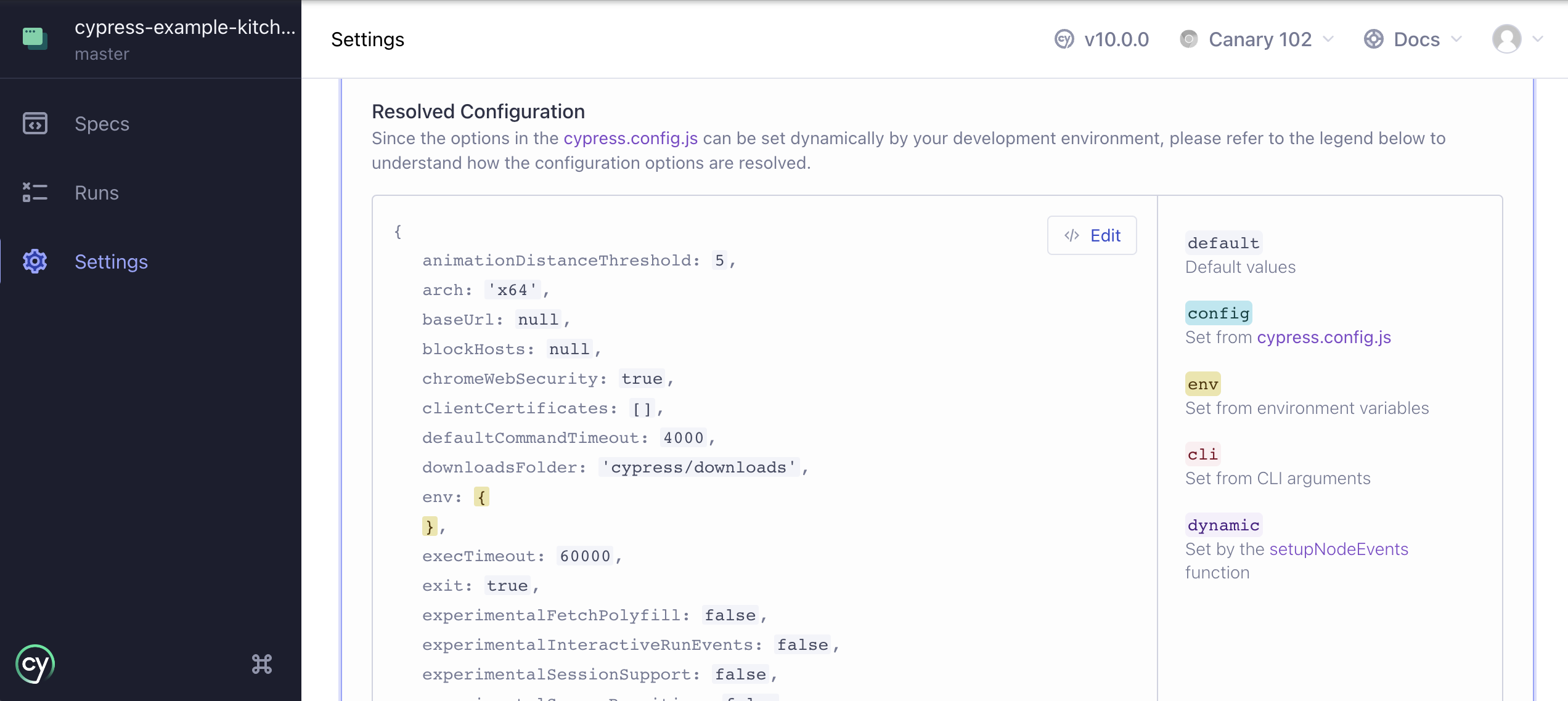
When you open a Cypress project, expanding the Project Settings panel under Settings displays the resolved configuration to you. The resolved configuration helps you to understand and see where different values came from. The panel highlights each set value to show where the value has been set via the following ways:
- Default value
- Cypress configuration file
- The
cypress.env.jsonfile (if present) - System set environment variables prefixed with
CYPRESS_ - Command Line arguments
- setupNodeEvents
Notes
blockHosts
By passing a string or array of strings you can block requests made to one or more hosts.
To block a host:
- ✅ Pass only the host
- ✅ Use wildcard
*patterns - ✅ Include the port other than
80and443 - ❌ Do NOT include protocol:
http://orhttps://
Not sure what a part of the URL a host is? See the Node.js guide to URL strings and URL objects.
When blocking a host, we use minimatch to check
the host. When in doubt you can test whether something matches yourself.
Given the following URLs:
https://www.google-analytics.com/ga.js

http://localhost:1234/some/user.json
These URLs would match the following blocked hosts:
www.google-analytics.com
*.google-analytics.com
*google-analytics.com

localhost:1234
Because localhost:1234 uses a port other than 80 and 443 it must be
included.
Be cautious for URL's which have no subdomain.
For instance given a URL: https://google.com/search?q=cypress
- ✅ Matches
google.com - ✅ Matches
*google.com - ❌ Does NOT match
*.google.com
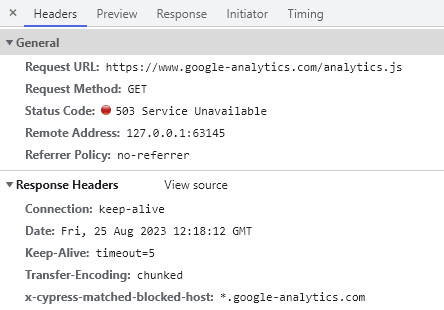
When Cypress blocks a request made to a matching host, it automatically
sends a 503 status code. As a convenience it also sets a
x-cypress-matched-blocked-host header so you can see which rule it
matched.
hosts
By passing an object with hostname patterns as keys and IP addresses as values,
you can resolve custom hostnames to specific IP addresses within Cypress. Setting hosts
is the equivalent of adding entries to your machine's /etc/hosts file, but
scoped to Cypress — no changes to your OS are required.
To map a hostname:
- ✅ Pass an exact hostname
- ✅ Use wildcard
*patterns (e.g.,*.example.com) - ❌ Do NOT include protocol:
http://orhttps://
Wildcard patterns use the same glob syntax supported by
minimatch. When in doubt you can test whether a
pattern matches yourself.
- cypress.config.js
- cypress.config.ts
const { defineConfig } = require('cypress')

module.exports = defineConfig({
  hosts: {
    'not.public.host.com': '191.1.191.111',
    '*.loc': '127.0.0.1',
  },
})
import { defineConfig } from 'cypress'

export default defineConfig({
  hosts: {
    'not.public.host.com': '191.1.191.111',
    '*.loc': '127.0.0.1',
  },
})
Setting hosts is useful when testing against hostnames that have no public DNS entries,
or when you need multiple domain names to resolve to local test servers without
editing your system hosts file.
devServer
The devServer option is required for component testing, and
registers a component testing dev server.
Typically, you specify a framework and bundler options in devServer
for your framework and UI library like so:
- cypress.config.js
- cypress.config.ts
const { defineConfig } = require('cypress')

module.exports = defineConfig({
  component: {
    devServer: {
      framework: 'create-react-app',
      bundler: 'webpack',
    },
  },
})
import { defineConfig } from 'cypress'

export default defineConfig({
  component: {
    devServer: {
      framework: 'create-react-app',
      bundler: 'webpack',
    },
  },
})
See
Framework Configuration
guide for more info on all the available framework and bundler options, as
well as additional configuration options.
Custom Dev Server
It is possible to customize the devServer and provide your own function for custom or advanced setups.
The devServer function receives a cypressConfig argument:
- cypress.config.js
- cypress.config.ts
const { defineConfig } = require('cypress')

module.exports = defineConfig({
  component: {
    devServer(cypressConfig) {
      // return dev server instance or a promise that resolves to
      // a dev server instance here
    },
  },
})
import { defineConfig } from 'cypress'

export default defineConfig({
  component: {
    devServer(cypressConfig) {
      // return dev server instance or a promise that resolves to
      // a dev server instance here
    },
  },
})
See the Custom Dev Server guide for more info.
excludeSpecPattern
Cypress uses minimatch with the options: {dot: true, matchBase: true}. We
suggest using https://globster.xyz to test what files
would match.
Cypress automatically adds the **/node_modules/** pattern to excludeSpecPattern,
and you don't need to specify it (and can't override it). See e2e
or component testing-specific options.
forceHttp1
This option is deprecated, and will be removed in a future version of Cypress.
As of Cypress 16, Cypress intercepts network traffic inside Chrome, Chromium, and Edge on the native browser network. Your application connects to your server directly and negotiates whatever protocol the server supports (HTTP/1.1, HTTP/2, or HTTP/3), the same way it does in production, so requests are no longer always downgraded to HTTP/1.1.
| Browser | forceHttp1: false (default) | forceHttp1: true |
|---|---|---|
| Chrome, Chromium, Edge | Native browser network | Legacy network path |
| Firefox, WebKit | Legacy network path | Legacy network path |
| Electron | Legacy network path | Legacy network path |
Firefox and WebKit continue to use the legacy network path because Cypress has not implemented a native browser network path for them yet. Electron also uses the legacy network path; see Electron is deprecated as a test browser.
Set forceHttp1 to true to route every browser through the legacy network path, the way
Cypress worked before version 16. See
Native network interception for the full list of
differences and how to update tests that rely on them. If undocumented behavior is what
makes your suite pass, open an issue.
Setting it to true restarts the Cypress server when changed, and cannot be set per test
or per suite. Runs using forceHttp1: true route through the legacy network path and are
unaffected by trustedCertificates.
forceHttp1 is both introduced and deprecated in Cypress 16. forceHttp1 exists only to give suites time to migrate, or as a temporary escape hatch while Cypress fixes an issue you have filed, and it will be removed once the native browser network is supported long term. Do not set it to true only to avoid updating tests for the native browser network, such as skipping Cypress.isBrowser() gates. Treat it as a temporary aid, not a permanent setting.
- cypress.config.js
- cypress.config.ts
const { defineConfig } = require('cypress')

module.exports = defineConfig({
  forceHttp1: true,
})
import { defineConfig } from 'cypress'

export default defineConfig({
  forceHttp1: true,
})
injectDocumentDomain
This option is deprecated, and will be removed in a future version of Cypress.
Set this configuration option to true to instruct Cypress to
inject document.domain
into your test application.
Injecting document.domain can reduce the need for cy.origin()
when navigating between subdomains,
but comes with compatibility caveats for some sites.
Cypress provides this configuration option to ease the transition between cy.origin()'s behavior
in Cypress 13 and the default behavior in Cypress 14.
Read the Cypress 14 migration guide to understand how to update your tests to remove
the need to set this flag.
You must set this configuration value to true if you are running tests with experimental
WebKit support, as cy.origin() is not yet supported in WebKit.
Known Incompatibilities
Setting this configuration value to true can cause the application you are testing
to behave in unexpected ways. The risk is especially high if a site your tests visit
sets the Origin-Agent-Cluster
header.
At this point in time, we are aware of the following sites that cannot be tested properly
if this option is set to true:
- Azure AD B2C authentication workflows
- Salesforce
- cypress.config.js
- cypress.config.ts
const { defineConfig } = require('cypress')

module.exports = defineConfig({
  e2e: {
    injectDocumentDomain: true,
  },
})
import { defineConfig } from 'cypress'

export default defineConfig({
  e2e: {
    injectDocumentDomain: true,
  },
})
isInteractive
You can open Cypress in the interactive mode via the cypress open command, and
in run mode via the cypress run command. To detect the mode from your test
code you can query the isInteractive property on
Cypress.config.
if (Cypress.config('isInteractive')) {
  // interactive "cypress open" mode!
} else {
  // "cypress run" mode
}
manageBrowserMemory
In a long-running Cypress test suite, the browser accumulates memory across tests. References to DOM nodes, event listeners, and application state from earlier tests can linger in the browser's heap even after Cypress clears the page. As memory pressure builds, the browser can slow down and in severe cases crash mid-run.
As of Cypress 16, manageBrowserMemory defaults to true, so Cypress handles this for you without any configuration. Cypress samples the browser's memory usage on an interval while your tests run, and forces a garbage collection before the next test only when a sample has crossed a memory threshold.
manageBrowserMemory only applies to Chromium-based browsers (Chrome, Edge) and has no effect in Firefox or WebKit.
This flag is not a blanket speed improvement. Clearing memory between tests takes time, paid on every test transition. If your suite is not under meaningful memory pressure, you can opt out to potentially save the overhead. You should measure the performance impact before and after disabling the flag.
- cypress.config.js
- cypress.config.ts
const { defineConfig } = require('cypress')

module.exports = defineConfig({
  manageBrowserMemory: false,
})
import { defineConfig } from 'cypress'

export default defineConfig({
  manageBrowserMemory: false,
})
modifyObstructiveCode
With this option enabled - Cypress searches through the response streams
coming from your server on .html and .js files and replaces code that matches
patterns commonly found in framebusting.
These script patterns are antiquated and deprecated security techniques to prevent clickjacking and framebusting. These patterns are a relic of the past and are no longer necessary in modern browsers. However many sites and applications still implement them.
These techniques prevent Cypress from working, and Cypress can safely remove them without altering any of your application's behavior.
Cypress modifies these scripts at the network level, and therefore there is a tiny performance cost to search the response streams for these patterns.
You can turn this option off if the application or site you're testing does not implement these security measures. Additionally it's possible that the patterns we search for may accidentally rewrite valid JS code. If that's the case, disable this option.
You can find details for experimentalModifyObstructiveThirdPartyCode in
Modifying Obstructive Third Party Code.
Because rewriting these scripts changes their bytes, any pinned
Subresource Integrity (SRI)
hash on the resource no longer matches and the browser blocks it. If your
application uses SRI, enable removeSRIAttributes so the
browser doesn't block the rewritten resources.
removeSRIAttributes
When this option is enabled, Cypress removes
Subresource Integrity (SRI)
integrity attributes from <script> and <link> elements as they are served
to the browser.
Cypress rewrites obstructive JS and HTML (see
modifyObstructiveCode) before it reaches the browser.
Rewriting changes the resource's bytes, which invalidates any pinned SRI hash, so
the browser refuses to execute or apply the resource and reports an error such
as:
Failed to find a valid digest in the 'integrity' attribute for resource '…' …
The resource has been blocked.
Enabling removeSRIAttributes strips the integrity attribute so these
resources load normally under test. removeSRIAttributes applies to first-party resources, and
covers integrity defined in any of the following ways:
- a static HTML attribute (for example,
<script src="app.js" integrity="sha384-…">) - a JavaScript string literal assigned to the attribute
- a runtime DOM property assignment (for example,
webpack-subresource-integrity'sscript.integrity = sriHashes[chunkId])
removeSRIAttributes is the first-party counterpart to
experimentalModifyObstructiveThirdPartyCode,
which removes SRI only for third-party resources. Enable both options to strip
SRI across first- and third-party resources.
This option defaults to false, so existing behavior is unchanged. Enable it
only if your application uses SRI and you see first-party resources blocked under
test. Because removing SRI disables a check that protects against tampered
resources, enable it only for applications under test.
setupNodeEvents
The setupNodeEvents function taps into, modifies, or extends the
internal behavior of Cypress using the on
and config arguments, and is valid as
an e2e or component testing specific option.
- cypress.config.js
- cypress.config.ts
const { defineConfig } = require('cypress')

module.exports = defineConfig({
  e2e: {
    setupNodeEvents(on, config) {
      // e2e testing node events setup code
    },
  },
  component: {
    setupNodeEvents(on, config) {
      // component testing node events setup code
    },
  },
})
import { defineConfig } from 'cypress'

export default defineConfig({
  e2e: {
    setupNodeEvents(on, config) {
      // e2e testing node events setup code
    },
  },
  component: {
    setupNodeEvents(on, config) {
      // component testing node events setup code
    },
  },
})
See the plugins guide for more information.
trashAssetsBeforeRuns
When trashAssetsBeforeRuns is true (the default), Cypress clears out old
assets before each cypress run so that the results you collect only come from
the current run. Trashing only happens during cypress run. Assets are never
trashed when using cypress open.
Cypress trashes the following three folders:
downloadsFolder(cypress/downloadsby default)screenshotsFolder(cypress/screenshotsby default)videosFolder(cypress/videosby default)
For each of these folders, Cypress removes the entire contents of the folder, every file and every nested subfolder. Cypress preserves the folder itself and clears only its contents.
How Cypress removes the contents depends on the operating system:
- On macOS and Windows, Cypress moves each item to the system trash / Recycle Bin, so you can recover it if needed.
- On Linux, Cypress empties the folders directly and permanently deletes the contents.
trustedCertificates
trustedCertificates (Object[])
An optional array of certificates for the browser to trust on the native browser network path.
Cypress launches every Chromium-based browser with --ignore-certificate-errors so that origins with self-signed or private-CA certificates can load under test. However, Chromium treats overridden certificate errors as clicked-through warnings and deliberately does not write responses from those origins to its HTTP disk cache. For an HTTPS application presenting an untrusted certificate, the browser disk cache remained empty, causing asset-heavy test suites to re-download every static asset on each cy.visit.
Declaring certificates in trustedCertificates adds their SubjectPublicKeyInfo (SPKI) fingerprints to the --ignore-certificate-errors-spki-list flag, which Cypress passes only on the native browser network path (Chrome, Chromium, and Edge). Chromium honors the SPKI list over the blanket ignore flag, treating connections to declared origins as genuinely trusted rather than merely tolerated. As a result, the browser writes static assets from those origins to its HTTP disk cache and serves them from cache across navigations, matching production behavior.
trustedCertificates is purely additive. Cypress continues passing the blanket --ignore-certificate-errors flag, so origins that you do not declare continue to load exactly as before.
trustedCertificates applies only to Chrome, Chromium, and Edge on the native browser network path, and has no effect on Firefox, WebKit, Electron, or runs where forceHttp1 is set to true (which continue using the legacy network path).
To provide client certificates for mutual TLS (mTLS) authentication where Cypress presents certificates to an endpoint, use clientCertificates instead.
Configuration syntax
Each item in the trustedCertificates array must be an object with exactly one of the following keys:
| Property | Type | Description |
|---|---|---|
filePath | String | Path to a PEM-encoded certificate file. A relative path resolves against the project root. |
pem | String | Inline PEM-encoded certificate text. |
spki | String | Precomputed base64-encoded SHA-256 fingerprint of the certificate's SubjectPublicKeyInfo (SPKI). Must be exactly 44 characters ending in = (matching ^[A-Za-z0-9+/]{43}=$). |
Cypress trusts every certificate in a PEM file or inline pem string, so you can declare a bundle that holds a leaf certificate and its issuing CA as a single entry.
Providing zero keys, multiple keys in one entry, unknown keys, empty strings, or a malformed spki value causes a configuration validation error. Validation only checks the shape of each entry: a filePath that cannot be read, or a PEM that cannot be parsed, fails at browser launch with an error naming the entry.
Changing trustedCertificates restarts the browser but not the Cypress server.
Certificate matching
Chromium matches each SPKI fingerprint against any certificate in the TLS chain the server presents:
- If your server sends the full certificate chain (for example, a leaf certificate and an intermediate or private CA certificate), you can declare either the leaf certificate or the CA certificate included in that chain.
- If your server presents only the leaf certificate and no chain, you must declare the leaf certificate, because a CA fingerprint does not match if the server does not present the CA in its handshake.
Generating an SPKI fingerprint
To precompute a certificate's SPKI fingerprint for use with the spki property, run the following OpenSSL command:
openssl x509 -in cert.pem -pubkey -noout \
  | openssl pkey -pubin -outform der \
  | openssl dgst -sha256 -binary | base64
Examples
Point at a certificate file on disk with filePath:
- cypress.config.js
- cypress.config.ts
const { defineConfig } = require('cypress')

module.exports = defineConfig({
  trustedCertificates: [{ filePath: 'certs/dev-server.crt' }],
})
import { defineConfig } from 'cypress'

export default defineConfig({
  trustedCertificates: [{ filePath: 'certs/dev-server.crt' }],
})
Paste the certificate text inline with pem:
- cypress.config.js
- cypress.config.ts
const { defineConfig } = require('cypress')

module.exports = defineConfig({
  trustedCertificates: [
    {
      pem: `-----BEGIN CERTIFICATE-----
MIIDXjCCAkYCFH2GWLVnyyzmK8b9/0pw89/+/pqDMA0GCSqGSIb3DQEBCwUAMHQx
...
-----END CERTIFICATE-----`,
    },
  ],
})
import { defineConfig } from 'cypress'

export default defineConfig({
  trustedCertificates: [
    {
      pem: `-----BEGIN CERTIFICATE-----
MIIDXjCCAkYCFH2GWLVnyyzmK8b9/0pw89/+/pqDMA0GCSqGSIb3DQEBCwUAMHQx
...
-----END CERTIFICATE-----`,
    },
  ],
})
Declare a precomputed fingerprint with spki when you would rather not ship the
certificate itself:
- cypress.config.js
- cypress.config.ts
const { defineConfig } = require('cypress')

module.exports = defineConfig({
  trustedCertificates: [
    { spki: 'YsaxHIp/FAcE7ClDGQW6MmEJry1/BD50ardH3b/NMbo=' },
  ],
})
import { defineConfig } from 'cypress'

export default defineConfig({
  trustedCertificates: [
    { spki: 'YsaxHIp/FAcE7ClDGQW6MmEJry1/BD50ardH3b/NMbo=' },
  ],
})
Test files not found when using spec parameter
When using the --spec <path or mask> argument, make it relative to the
project's folder.
The --spec argument only runs specs that also match the configured
specPattern. Cypress computes the intersection of the
--spec value and specPattern, so Cypress doesn't find any spec file outside the configured
specPattern — even if you pass its exact path.
For example, the default e2e.specPattern is
cypress/e2e/**/*.cy.{js,jsx,ts,tsx}. If your spec lives outside
cypress/e2e/, passing its path via --spec does not run it until you also
update specPattern in your Cypress config to include that location:
// cypress.config.js
module.exports = defineConfig({
  e2e: {
    specPattern: [
      'cypress/e2e/**/*.cy.{js,jsx,ts,tsx}',
      'tests/**/*.cy.{js,jsx,ts,tsx}',
    ],
  },
})
If the specs are still missing after verifying the path and specPattern, run
Cypress with DEBUG logs
with the following setting to see how Cypress is looking for spec files:
DEBUG=cypress:cli,cypress:data-context:sources:FileDataSource,cypress:data-context:sources:ProjectDataSource
History
| Version | Changes |
|---|---|
| 16.1.0 | Added trustedCertificates option. |
| 16.0.0 | Added forceHttp1 option. |
| 16.0.0 | Updated blockHosts, viewportHeight, and viewportWidth to no longer be settable with Cypress.config() during test execution. |
| 16.0.0 | Removed allowCypressEnv option. |
| 16.0.0 | Replaced the experimentalMemoryManagement option with manageBrowserMemory, which defaults to true. |
| 16.0.0 | Replaced the experimentalFastVisibility option with visibilityStrategy, which defaults to 'modern'. |
| 16.0.0 | Removed experimentalSourceRewriting option. |
| 16.0.0 | keystrokeDelay resolved fallback changed from 10 to 0 when unset in configuration and Cypress.Keyboard.defaults(). |
| 16.0.0 | Removed execTimeout option alongside cy.exec(). Use taskTimeout with cy.task() instead. |
| 15.21.0 | Deprecated execTimeout alongside cy.exec(). Use taskTimeout with cy.task() instead. |
| 15.20.0 | Added per-axis { block, inline } values and the 'start' and 'end' alignments to scrollBehavior, and restored 'top' and 'bottom' to aligning the vertical axis only. |
| 15.18.0 | Added removeSRIAttributes option. |
| 15.17.0 | Cypress config and plugin files now load as ESM or CommonJS using Node.js module semantics (file extension and nearest package.json "type"), with no cross-format fallback. |
| 15.17.0 | Added support for overriding Cypress.expose() values via test configuration. |
| 15.10.0 | Added allowCypressEnv option. |
| 15.10.0 | Updated env to no longer be settable via test configuration. |
| 15.10.0 | Added expose option for exposing public configuration values. |
| 14.0.0 | Added support for re-enabling superdomain navigation with the injectDocumentDomain configuration option |
| 13.16.0 | Added defaultBrowser option. |
| 13.4.0 | Added support for configuring the Experimental Flake Detection strategy via retries.experimentalStrategy and retries.experimentalOptions. |
| 13.0.0 | Removed nodeVersion option. |
| 13.0.0 | Removed videoUploadOnPasses option. |
| 11.0.0 | Removed e2e.experimentalSessionAndOrigin option. |
| 10.4.0 | Added e2e.testIsolation option. |
| 10.0.0 | Reworked page to support new cypress.config.js and deprecated cypress.json files. |
| 8.7.0 | Added slowTestThreshold option. |
| 8.0.0 | Added clientCertificates option and removed firefoxGcInterval configuration. |
| 7.0.0 | Added e2e and component options. |
| 7.0.0 | Added redirectionLimit option. |
| 6.1.0 | Added scrollBehavior option. |
| 5.2.0 | Added includeShadowDom option. |
| 5.0.0 | Added retries configuration. |
| 5.0.0 | Renamed blacklistHosts configuration to blockHosts. |
| 4.1.0 | Added screenshotOnRunFailure configuration. |
| 4.0.0 | Added firefoxGcInterval configuration. |
| 3.5.0 | Added nodeVersion configuration. |
See also
- Cypress.config()
- cy.env() - Command for accessing environment variables
- Cypress.expose() - API for public configuration values
- Environment Variables recipe