origin
cy.origin() runs Cypress commands on a page at a different
origin
than the one your test is running in, such as a sign-in page on another domain
or subdomain. You put the commands in a callback, Cypress runs them against the
page in that origin, and your test carries on in its own origin afterward.
Use it to test flows that cross origins, such as:
- signing in through an SSO or OAuth provider
- moving between your app's subdomains
- checking a value on another site, such as the latest version on a help site
Syntax
cy.origin(url, callbackFn)
cy.origin(url, options, callbackFn)
Usage
Correct Usage
const email = 'fake@email.com'

cy.visit('https://app.cypress.io')

// Pass values in with args, and receive them as the callback's argument
cy.origin('https://example.cypress.io', { args: { email } }, ({ email }) => {
  // Relative URLs resolve against the cy.origin() URL
  cy.visit('/commands/actions')
  cy.get('.action-email').type(email)
})
Incorrect Usage
const email = 'fake@email.com'

cy.visit('https://app.cypress.io')
cy.visit('https://example.cypress.io/commands/actions')

// Fails: this page is at another origin, so the command goes inside cy.origin()
cy.get('.action-email').type(email)
const email = 'fake@email.com'

cy.origin('https://example.cypress.io', () => {
  cy.visit('/commands/actions')
  // Fails: the callback can't see email, because it's declared outside it
  cy.get('.action-email').type(email)
})
Arguments
url (String)
The URL (https://example.cypress.io/commands/actions) or domain name
(example.cypress.io) of the secondary origin, where the callback runs. The URL or domain needs
at least a hostname, and can include a scheme and port. The scheme defaults to
https. A path or hash is fine, but query parameters are not.
The URL must match the secondary origin's scheme, hostname, and port exactly, and be a different origin than the one the test is running in. See What counts as a different origin for cy.origin().
Inside the callback, the URL replaces your configured
baseUrl, so cy.visit() and
cy.request() resolve relative URLs against it.
options (Object)
Pass in an options object to control the behavior of cy.origin().
| option | description |
|---|---|
args | A plain object that Cypress serializes, sends to the secondary origin, and passes to the callback as its only argument. The object's values must be serializable. |
args is the only supported option. Passing any other key throws an error.
callbackFn (Function)
The function whose commands run in the secondary origin. Write it like any
other test code: it runs Cypress commands and assertions, custom commands and npm
packages loaded with Cypress.require(),
and secrets read with cy.env(). Pass in values from your
test with args, and the callback receives them as its only argument.
A few commands belong outside the callback. See Where to call cy.intercept(), cy.session(), and cy.origin().
Yields
cy.origin()yields the value yielded by the last Cypress command in the callback. If the callback also returns a Promise, the command's value takes precedence.- If the callback runs no Cypress commands,
cy.origin()yields the callback's return value, or the value a returned Promise resolves to. - If the callback runs Cypress commands and also returns a truthy value that
isn't a Promise,
cy.origin()fails, because it mixes synchronous and asynchronous code. - The yielded value crosses back to your test serialized. If it can't be serialized, such as a DOM element, accessing it throws an error. See Yielding a value from cy.origin() back to your test.
Examples
Passing data into cy.origin() with the args option
Pass the values the callback needs through args. Cypress serializes them and
hands them to the callback:
const couponCode = 'HALFOFF'

cy.origin(
  'https://example.cypress.io',
  // Send values in through args...
  { args: { couponCode } },
  // ...and receive them as the callback's argument
  ({ couponCode }) => {
    cy.visit('/commands/actions')
    cy.get('#couponCode1').type(couponCode)
    cy.get('.action-form').submit()
    cy.get('.action-form')
      .next()
      .should('contain', 'Your form has been submitted!')
  }
)
Yielding a value from cy.origin() back to your test
Yield a value from the last command in the callback, and chain assertions onto
cy.origin() in your test. Yield data, such as an element's text, and it
serializes back to your test:
cy.origin('https://example.cypress.io', () => {
  cy.visit('/')
  // Yield the element's text, which serializes back to your test
  cy.get('h1').invoke('text')
}).should('equal', 'Kitchen Sink')
To use the value in later commands, pick it up with
.then(). Here, a help site lists the latest release, and
the test checks that the app shows the same version:
cy.visit('https://app.cypress.io')

cy.origin('https://help.cypress.io', () => {
  cy.visit('/releases')
  // Yields a string, which serializes back to your test
  cy.get('#latest-version').invoke('text')
}).then((version) => {
  cy.visit('https://app.cypress.io/about')
  cy.get('#app-version').should('have.text', version)
})
Read values from the page with Cypress commands, as above. Plain JavaScript in the callback runs before the commands it queues, before the page has loaded.
Visiting a secondary origin with cy.visit()
Visit the secondary origin inside the cy.origin() callback, or before it.
Navigating to another origin on the same scheme works anywhere in the test.
Commands that interact with that page, such as cy.get(), go inside the
callback.
Visit inside the callback, with a URL relative to the cy.origin() URL:
cy.visit('https://app.cypress.io')

cy.origin('https://example.cypress.io', () => {
  // Visits https://example.cypress.io/commands/actions
  cy.visit('/commands/actions')
  cy.get('h1').should('have.text', 'Actions')
})
Or visit first, then run the commands for that page inside the callback:
cy.visit('https://app.cypress.io')
cy.visit('https://example.cypress.io/commands/actions')

// Commands on the page at the other origin go inside cy.origin()
cy.origin('https://example.cypress.io', () => {
  cy.get('h1').should('have.text', 'Actions')
})
Clicking a link or button that goes to another origin works the same way, as in Navigating between subdomains with cy.origin().
cy.url(), cy.location(), and
cy.title() work outside the callback, whichever origin
the page is on, so you can check where a navigation landed without
cy.origin():
cy.visit('https://app.cypress.io')
cy.contains('a', 'Log in').click()

// No cy.origin() needed to check where the link went
cy.location('hostname').should('eq', 'auth.cypress.io')
Navigating between subdomains with cy.origin()
Two subdomains of the same domain, such as app.cypress.io and
auth.cypress.io, are different origins. Commands that run on a page at the
other subdomain go inside cy.origin(), the same as for any other domain:
Correct Usage
cy.visit('https://app.cypress.io')
// The "Log in" link goes to https://auth.cypress.io/login
cy.contains('a', 'Log in').click()

cy.origin('https://auth.cypress.io', () => {
  cy.get('#username').type('jane')
  cy.contains('button', 'Sign in').click()
})

// The login page redirects back to the app
cy.url().should('eq', 'https://app.cypress.io/dashboard')
Incorrect Usage
cy.visit('https://app.cypress.io')
cy.contains('a', 'Log in').click()
// Fails: auth.cypress.io is a different origin than app.cypress.io
cy.get('#username').type('jane')
The command fails with an error that names both origins: it was expected to run
against https://app.cypress.io, but the application is at
https://auth.cypress.io.
Navigating to multiple secondary origins in succession
To work in several origins, call cy.origin() once for each, one after another
at the top level of the test:
cy.origin('auth.cypress.io', () => {
  cy.visit('/')
  cy.url().should('contain', 'auth.cypress.io')
})

cy.origin('help.cypress.io', () => {
  cy.visit('/')
  cy.url().should('contain', 'help.cypress.io')
})
Using cy.origin() with a local http server
Local development servers usually run on http. Include the scheme and port in
the cy.origin() URL so it matches the server exactly:
// The app runs at http://localhost:3000 and the auth server at http://localhost:3001
cy.visit('http://localhost:3000')
cy.contains('a', 'Log in').click()

// Include http://, since the scheme defaults to https
cy.origin('http://localhost:3001', () => {
  cy.get('#username').type('jane')
  cy.contains('button', 'Sign in').click()
})

cy.url().should('eq', 'http://localhost:3000/dashboard')
Handling uncaught exceptions in a secondary origin
Third-party pages, such as an identity provider's login page, sometimes throw
errors you can't fix. Cypress fails the test on an uncaught exception from the
secondary origin, the same as from your own app. To ignore an error you expect,
register an uncaught:exception
handler inside the cy.origin() callback, before the page loads:
cy.visit('https://app.cypress.io')

cy.origin('https://auth.cypress.io', () => {
  cy.on('uncaught:exception', (err) => {
    // Ignore only the error you expect, so anything else still fails the test
    if (err.message.includes('Third-party widget failed to load')) {
      return false
    }
  })

  cy.visit('/legacy-login')
  cy.get('h1').should('have.text', 'Sign in')
})
If you navigate to the page outside the callback, register the handler in a
cy.origin() block that runs before the navigation:
cy.visit('https://app.cypress.io')

// Register the handler in the secondary origin before its page loads
cy.origin('https://auth.cypress.io', () => {
  cy.on('uncaught:exception', (err) => {
    if (err.message.includes('Third-party widget failed to load')) {
      return false
    }
  })
})

cy.visit('https://auth.cypress.io/legacy-login')

cy.origin('https://auth.cypress.io', () => {
  cy.get('h1').should('have.text', 'Sign in')
})
Stubbing secondary origin requests with cy.intercept()
Register cy.intercept() in your test, before the
cy.origin() block, and it matches requests the secondary origin's page makes.
Wait on its alias after the block:
cy.visit('https://app.cypress.io')

cy.intercept('GET', 'https://auth.cypress.io/api/config', {
  body: { mfaRequired: false },
}).as('authConfig')

cy.origin('https://auth.cypress.io', () => {
  cy.visit('/login')
  cy.get('#mfa').should('have.text', 'MFA off')
})

cy.wait('@authConfig')
Building an SSO login custom command with cy.origin()
When signing in isn't what a test is about, wrap the sign-in flow in a login
custom command, so each test signs in with
one line. This command signs in on a separate auth origin. The command reads the password
with cy.env() inside the callback, so the secret never
passes through args:
- JavaScript
- TypeScript
Cypress.Commands.add('login', (username) => {
  cy.visit('https://app.cypress.io')
  cy.contains('a', 'Log in').click()

  cy.origin(
    'https://auth.cypress.io',
    { args: { username } },
    ({ username }) => {
      cy.get('#username').type(username)
      // Read the secret inside the callback instead of passing it through args
      cy.env(['ssoPassword']).then(({ ssoPassword }) => {
        cy.get('#password').type(ssoPassword, { log: false })
      })
      cy.contains('button', 'Sign in').click()
    }
  )

  // The auth origin redirects back to the app
  cy.location('pathname').should('eq', '/dashboard')
})
export {}
declare global {
  namespace Cypress {
    interface Chainable {
      login(username: string): Chainable<void>
    }
  }
}

Cypress.Commands.add('login', (username: string) => {
  cy.visit('https://app.cypress.io')
  cy.contains('a', 'Log in').click()

  cy.origin(
    'https://auth.cypress.io',
    { args: { username } },
    ({ username }) => {
      cy.get('#username').type(username)
      // Read the secret inside the callback instead of passing it through args
      cy.env(['ssoPassword']).then(({ ssoPassword }) => {
        cy.get('#password').type(ssoPassword, { log: false })
      })
      cy.contains('button', 'Sign in').click()
    }
  )

  // The auth origin redirects back to the app
  cy.location('pathname').should('eq', '/dashboard')
})

export {}
Signing in through the UI before every test takes time. With
test isolation
on, the default, Cypress clears cookies and storage between tests, so the next
test can't reuse the session. Wrap the sign-in in
cy.session(), which caches the session after the
first sign-in and restores it in later tests:
- JavaScript
- TypeScript
Cypress.Commands.add('login', (username) => {
  cy.session(
    // The username is the cache key, so each user gets their own session
    username,
    () => {
      cy.visit('https://app.cypress.io')
      cy.contains('a', 'Log in').click()

      cy.origin(
        'https://auth.cypress.io',
        { args: { username } },
        ({ username }) => {
          cy.get('#username').type(username)
          cy.env(['ssoPassword']).then(({ ssoPassword }) => {
            cy.get('#password').type(ssoPassword, { log: false })
          })
          cy.contains('button', 'Sign in').click()
        }
      )

      cy.location('pathname').should('eq', '/dashboard')
    },
    {
      // Checks the session works after signing in and after each restore
      validate() {
        cy.request('https://app.cypress.io/api/me')
          .its('status')
          .should('eq', 200)
      },
    }
  )
})
export {}
declare global {
  namespace Cypress {
    interface Chainable {
      login(username: string): Chainable<void>
    }
  }
}

Cypress.Commands.add('login', (username: string) => {
  cy.session(
    // The username is the cache key, so each user gets their own session
    username,
    () => {
      cy.visit('https://app.cypress.io')
      cy.contains('a', 'Log in').click()

      cy.origin(
        'https://auth.cypress.io',
        { args: { username } },
        ({ username }) => {
          cy.get('#username').type(username)
          cy.env(['ssoPassword']).then(({ ssoPassword }) => {
            cy.get('#password').type(ssoPassword, { log: false })
          })
          cy.contains('button', 'Sign in').click()
        }
      )

      cy.location('pathname').should('eq', '/dashboard')
    },
    {
      // Checks the session works after signing in and after each restore
      validate() {
        cy.request('https://app.cypress.io/api/me')
          .its('status')
          .should('eq', 200)
      },
    }
  )
})

export {}
Video walkthrough of testing multiple origins with Cypress
This video walks through testing several origins in one test, and caching the
session with cy.session(). The video turns on experimentalSessionAndOrigin,
which cy.origin() no longer needs.
Notes
What counts as a different origin for cy.origin()
An origin is a URL's scheme, hostname, and port. Two URLs that differ in any of
the three are different origins, and commands that run on a page at the other
one go inside cy.origin(). The path doesn't count.
For a test that starts on https://app.cypress.io:
| URL | Needs cy.origin()? | Why |
|---|---|---|
https://app.cypress.io/settings | No | Only the path differs |
https://app.cypress.io:443 | No | 443 is the default https port |
https://app.cypress.io:8443 | Yes | The port differs |
https://auth.cypress.io | Yes | The subdomain differs |
http://app.cypress.io | Yes, but an https test can't reach it | The scheme differs |
Keep both origins on the same scheme. The browser blocks an http page inside
an https one, so an https test can't reach an http origin.
Commands on a page at the same origin as the test run without cy.origin(),
and passing that origin to cy.origin() throws an error.
Before Cypress 14.0.0, Cypress injected document.domain by default, so
subdomains of the same domain didn't need cy.origin(). To keep that behavior
while you migrate, set
injectDocumentDomain to
true, and Cypress compares superdomains instead of origins. The option is
deprecated and will be removed in a future version of Cypress.
Serialization
Cypress copies args to the secondary origin, and the yielded value back, with
the structured clone algorithm.
Strings, numbers, booleans, arrays, plain objects, dates, maps, and sets all copy
across. Functions and DOM elements
don't copy,
so pass data rather than behavior: an element's text instead of the element, or
a page object's selectors instead of the instance.
Pass every value the callback needs through args. A variable you don't pass in
throws a ReferenceError that names the variable and points you to args,
as in Usage.
Using dependencies and shared code in cy.origin()
Inside the callback, Cypress.require() includes npm
packages and your own files, the same way
CommonJS require() works in
browser code. Use it in place of require() and
import()
in the callback, and turn on the
experimentalOriginDependencies option to enable
it.
cy.origin('https://auth.cypress.io', () => {
  const _ = Cypress.require('lodash')

  cy.visit('/login')
  cy.get('#username').type(_.capitalize('jane'))
})
Sharing custom commands with cy.origin() callbacks
Load your custom commands into the secondary origin with Cypress.require(),
and the same commands work in both origins. Define them in their own file:
- JavaScript
- TypeScript
Cypress.Commands.add('clickLink', (label) => {
  cy.get('a').contains(label).click()
})
export {}
declare global {
  namespace Cypress {
    interface Chainable {
      clickLink(label: string): Chainable<JQuery<HTMLElement>>
    }
  }
}

Cypress.Commands.add('clickLink', (label: string) => {
  cy.get('a').contains(label).click()
})

export {}
Import that file in your support file, so tests get the commands outside
cy.origin() callbacks:
import './commands'
Then load the commands into the secondary origin once, in a before() hook:
before(() => {
  // Makes the custom commands available to every later cy.origin() callback
  // for this origin in this spec
  cy.origin('https://auth.cypress.io', () => {
    Cypress.require('../support/commands')
  })
})

it('clicks a link in the secondary origin', () => {
  cy.origin('https://auth.cypress.io', () => {
    cy.visit('/page')
    cy.clickLink('Click Me')
  })
})
Loaded code stays available across cy.origin() calls
Code you load in a cy.origin() callback stays loaded until the spec file ends,
so it's still there in later callbacks for the same origin, including in later
tests. Each origin loads code separately, and each spec file starts fresh. To share code with cy.origin() callbacks in every
spec, put the before() hook in your support file.
Continuing the spec above:
it('clicks a link in a later test', () => {
  // cy.clickLink() is still loaded from the before() hook
  cy.origin('https://auth.cypress.io', () => {
    cy.visit('/page')
    cy.clickLink('Click Me')
  })

  cy.origin('https://help.cypress.io', () => {
    // Each origin loads code separately, so load the commands here too
    Cypress.require('../support/commands')
  })
})
Using page objects inside cy.origin()
Import the page object inside the callback with Cypress.require(), and create
the instance there. The class keeps its methods, which an instance passed
through args would lose in serialization:
- JavaScript
- TypeScript
export class SignInPage {
  enterUsername(username) {
    cy.get('#username').type(username)
  }

  submit() {
    cy.contains('button', 'Sign in').click()
  }
}
export class SignInPage {
  enterUsername(username: string) {
    cy.get('#username').type(username)
  }

  submit() {
    cy.contains('button', 'Sign in').click()
  }
}
- JavaScript
- TypeScript
it('signs in on a secondary origin', () => {
  const username = 'jane'

  cy.origin(
    'https://auth.cypress.io',
    { args: { username } },
    ({ username }) => {
      const { SignInPage } = Cypress.require('../support/SignInPage')
      const signInPage = new SignInPage()

      cy.visit('/login')
      signInPage.enterUsername(username)
      signInPage.submit()
    }
  )
})
it('signs in on a secondary origin', () => {
  const username = 'jane'

  cy.origin(
    'https://auth.cypress.io',
    { args: { username } },
    ({ username }) => {
      const { SignInPage } = Cypress.require('../support/SignInPage')
      const signInPage = new SignInPage()

      cy.visit('/login')
      signInPage.enterUsername(username)
      signInPage.submit()
    }
  )
})
Data the methods need, such as the username above, still goes in through
args.
To skip the class, pass only the serializable data the page object holds, such
as a map of selectors, through args, and call the Cypress commands directly in
the callback:
{
  "username": "#username"
}
import selectors from '../support/selectors.json'

it('signs in with selectors passed through args', () => {
  cy.origin(
    'https://auth.cypress.io',
    { args: { selectors } },
    ({ selectors }) => {
      cy.visit('/login')
      cy.get(selectors.username).type('jane')
    }
  )
})
Where to call cy.intercept(), cy.session(), and cy.origin()
These commands work alongside cy.origin() from your test, around the callback:
| Command | Where it goes | Example |
|---|---|---|
cy.intercept() | Before the cy.origin() block | Stubbing secondary origin requests |
cy.session() | Around the whole sign-in flow | Building an SSO login custom command |
cy.origin() | One after another, at the top level of the test | Navigating to multiple secondary origins |
Cypress.session.* methods | In your test, outside the callback |
Called inside the callback, each of these throws an error.
Framebusting code in third-party origins
Some pages run framebusting code that stops them from loading inside a frame,
where Cypress runs your app. By default, Cypress rewrites code that matches
common framebusting patterns in your own .html and .js responses. For
third-party pages you test with cy.origin(), such as an identity provider's,
set
experimentalModifyObstructiveThirdPartyCode to
true so Cypress rewrites theirs too. See
Modifying Obstructive Third Party Code.
Testing windows, tabs, and iframes alongside cy.origin()
cy.origin() runs commands against the page your test visits, in any origin.
For other browsing contexts, use these approaches:
- Links that open a new tab: test them in the same tab, as in Can I test anchor links that open in a new tab?
- Multiple tabs: use the
@cypress/puppeteerplugin - Content inside an
<iframe>: see How do I test elements inside an iframe?
Rules
Requirements
cy.origin()requires being chained off ofcy.cy.origin()must be invoked from the spec file or support file.cy.origin()requires the first argument to be a URL or domain name string without query parameters.cy.origin()requires the first argument to be a different origin than the one the test is running in. WheninjectDocumentDomainistrue, it must be a different superdomain.cy.origin()requires theoptionsargument, when passed, to be a plain object whose only key isargs.cy.origin()requires the last argument to be a function.cy.origin()isn't supported in experimental WebKit.
Timeouts
cy.origin()has no timeout of its own.cy.origin()runs for as long as the commands in the callback run, and each of those commands uses its own timeout.cy.origin()fails if Cypress can't set up communication with the secondary origin within thedefaultCommandTimeout. This failure can happen when anhttpspage tries to reach an insecurehttporigin.
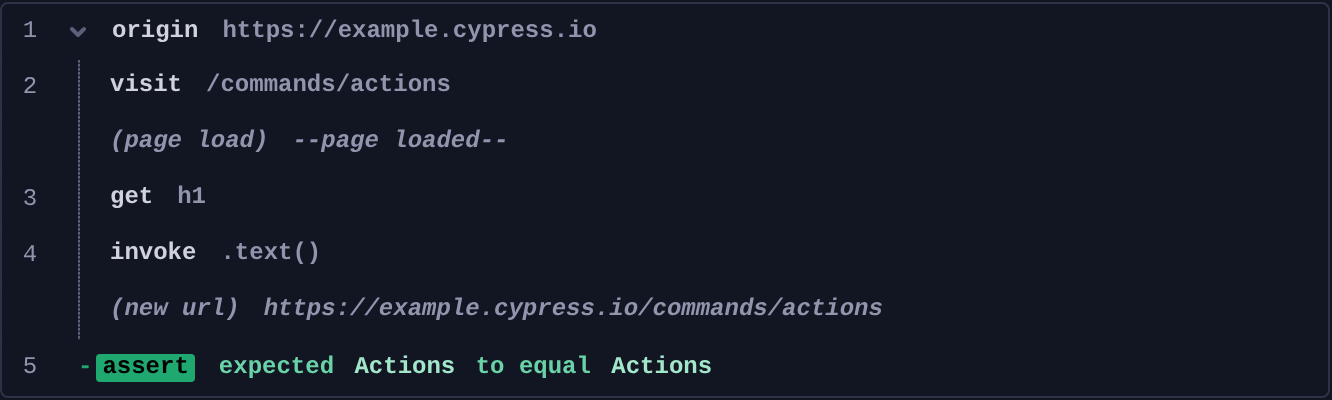
Command Log
This example visits a page in a secondary origin, passing the path in through
args, and asserts on the text the callback yields:
cy.origin(
  'https://example.cypress.io',
  { args: { path: '/commands/actions' } },
  ({ path }) => {
    cy.visit(path)
    cy.get('h1').invoke('text')
  }
).should('equal', 'Actions')
The commands above display in the Command Log as a collapsible origin group,
with the commands run in the secondary origin nested inside it:
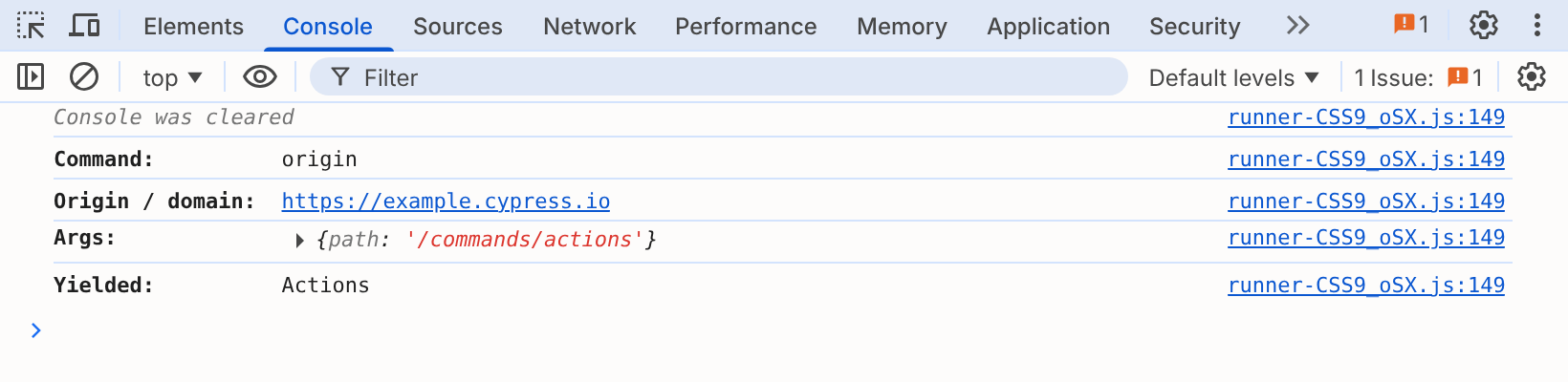
When you click origin in the Command Log, the console outputs the origin, the
args passed to the callback, and the value it yielded:
History
| Version | Changes |
|---|---|
| 14.0.0 | cy.origin() is required to run commands on a page at any other origin, including subdomains |
| 12.6.0 | Support for Cypress.require() added and support for CommonJS require() and ES module import() removed |
| 12.0.0 | cy.origin() generally available. Dependencies in the callback require experimentalOriginDependencies |
| 10.11.0 | Support for CommonJS require() and ES module import() added and support for Cypress.require() removed |
| 10.9.0 | Support for Cypress.require() added |
| 9.6.0 | cy.origin() added behind the experimentalSessionAndOrigin flag |