hash
Get the current URL hash of the page that is currently active.
cy.hash() yields the same value as
cy.location('hash').
Syntax
cy.hash()
cy.hash(options)
Usage
Correct Usage
cy.hash() // Get the url hash
Incorrect Usage
cy.get('a').hash() // Ignores the link, yields the page's hash
cy.hash() reads the page's URL, not an element's href. To check the hash a
link points to, assert on the link's hash property instead:
cy.get('a').should('have.prop', 'hash', '#/users/1')
Arguments
options (Object)
Pass in an options object to change the default behavior of cy.hash().
cy.hash( options )
| Option | Default | Description |
|---|---|---|
log | true | Displays the command in the Command log |
timeout | defaultCommandTimeout | Time to wait for cy.hash() to resolve before timing out |
Yields
- When the current URL contains a hash,
cy.hash()yields the current URL's hash (including the#character). - When the current URL does not contain a hash, or ends in a
#with nothing after it,cy.hash()yields an empty string. cy.hash()is a query, and it is safe to chain further commands.
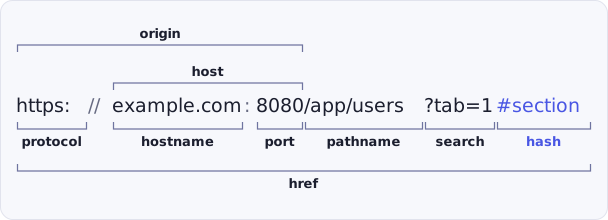
cy.hash() yields the part of the URL labeled hash in these diagrams:
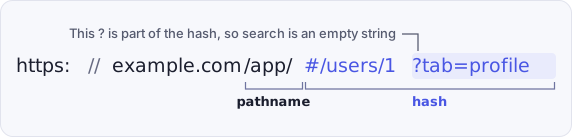
In a hash-based route, a query string after the # is part of the hash:
Examples
No Args
Assert that hash is #/users/1 given remote URL: http://localhost:8000/app/#/users/1
// yields #/users/1
cy.hash().should('eq', '#/users/1') // => true
Assert that the hash matches via RegExp
<ul id="users">
  <li>
    <a href="#/users/8fc45b67-d2e5-465a-b822-b281d9c8e4d1">Fred</a>
  </li>
</ul>
cy.get('#users li').find('a').click()
cy.hash().should('match', /users\/.+$/) // => true
Assert that the hash is empty after closing a view
A link to a bare # clears the hash, so cy.hash() yields an empty string.
<nav>
  <a href="#/users/1">Open profile</a>
  <a href="#">Close profile</a>
</nav>
cy.contains('a', 'Open profile').click()
cy.hash().should('eq', '#/users/1')

cy.contains('a', 'Close profile').click()
cy.hash().should('be.empty')
Hash-based routing
Wait for a hash route to change after a click
cy.hash() retries until its assertions pass, so the test waits for your
application's router to update the URL without a cy.wait().
<nav>
  <a href="#/">Home</a>
  <a href="#/settings">Settings</a>
</nav>
cy.contains('a', 'Settings').click()
cy.hash().should('eq', '#/settings')
Query strings inside a hash route
In a hash-based route, everything after the # belongs to the hash, including a
? query string. cy.location('search') reads only
the query string before the #.
// given remote URL: http://localhost:8000/#/users/1?tab=profile
cy.hash().should('eq', '#/users/1?tab=profile')
cy.location('search').should('eq', '')
In-page anchor links
Assert the hash after following a jump link
<a href="#pricing">Pricing</a>

<section id="pricing" style="margin-top: 2000px">
  <h2>Pricing</h2>
</section>
cy.contains('a', 'Pricing').click()
cy.hash().should('eq', '#pricing')
cy.window().its('scrollY').should('be.greaterThan', 0)
Notes
Cross-origin pages and cy.hash()
cy.hash() reads the URL from the browser rather than from the page's
window, so it yields the hash after your application navigates to another
origin, without wrapping the command in cy.origin().
Percent-encoded characters in the hash
cy.hash() yields the hash as the browser's URL parser serializes it, so
characters such as spaces are percent-encoded. A hash set to #first name
yields #first%20name.
cy.hash().should('eq', '#first%20name')
To compare against the readable text, decode the hash inside a
.should() callback, which keeps the retry:
cy.hash().should((hash) => {
  expect(decodeURIComponent(hash)).to.eq('#first name')
})
Rules
Requirements
cy.hash()requires being chained off ofcy.
Assertions
cy.hash()will automatically retry until all chained assertions have passed
Timeouts
cy.hash()can time out waiting for assertions you've added to pass.
Command Log
Assert that the hash matches #users/new
cy.hash().should('eq', '#users/new')
The commands above will display in the Command Log as:

When clicking on hash within the Command Log, the console outputs the
following:

History
| Version | Changes |
|---|---|
| 15.18.1 | Reads the URL through the automation client in experimental WebKit |
| 15.0.0 | Reads the URL through the browser's automation client instead of the page's window in Chromium-based browsers and Firefox |