clock
cy.clock() overrides native global functions related to time allowing them to
be controlled synchronously via cy.tick() or the yielded
clock object. By default, this includes controlling:
setTimeoutandclearTimeoutsetIntervalandclearIntervalrequestAnimationFrameandcancelAnimationFramerequestIdleCallbackDateobjectsperformance, such asperformance.now()Intl.DateTimeFormat, which formats the faked current time when no date is passed
The clock starts at the unix epoch (timestamp of 0) unless you pass a now
value. Without a now value, new Date in your application returns a time of
January 1st, 1970.
Syntax
cy.clock()
cy.clock(now)
cy.clock(now, functionNames)
cy.clock(options)
cy.clock(now, options)
cy.clock(now, functionNames, options)
Usage
Correct Usage
cy.clock()
Arguments
now (number, Date)
A timestamp or Date object specifying where the clock should start. Pass 0
(or null) to start at the unix epoch while still passing functionNames.
functionNames (Array)
Names of the native functions the clock should override. When omitted, or when
passed an empty array, cy.clock() overrides the default set listed above.
Valid names are setTimeout, clearTimeout, setInterval, clearInterval,
Date, requestAnimationFrame, cancelAnimationFrame, requestIdleCallback,
cancelIdleCallback, performance, and Intl.
options (Object)
Pass in an options object to change the default behavior of cy.clock().
| Option | Default | Description |
|---|---|---|
log | true | Displays the command in the Command log |
Yields
cy.clock() yields a clock object with the following methods. If a clock
already exists in the current test, cy.clock() yields that existing clock and
ignores any arguments passed to it.
-
clock.tick(milliseconds)Move the clock the specified number of
milliseconds. Any timers within the affected range of time are called. -
clock.restore()Restore all overridden native functions. This is automatically called between tests, so should not generally be needed.
clock.restore()returns native timer APIs (setTimeout,setInterval, etc.) to thewindow. New timers created afterrestore()run in real time. Timers registered while the fake clock was active are discarded and don't resume automatically. -
clock.setSystemTime(now)Change the system time to the new
now. Now can be a timestamp, date object, or not passed in which defaults to 0. It doesn't call any timers or change the time left before they trigger.
You can also access the clock object via this.clock in a
.then() callback, as long as the test is written with a
function () {} callback rather than an arrow function, so this refers to the
test context.
Examples
No Args
Create a clock and use it to trigger a setInterval
let seconds = 0

setInterval(() => {
  $('#seconds-elapsed').text(++seconds + ' seconds')
}, 1000)
cy.clock()
cy.visit('/index.html')
cy.tick(1000)
cy.get('#seconds-elapsed').should('have.text', '1 seconds')
cy.tick(1000)
cy.get('#seconds-elapsed').should('have.text', '2 seconds')
Test a debounced search input with cy.clock()
A debounced input waits for the user to stop typing before it acts. With
cy.clock(), you control exactly when that wait ends, so you can assert both
that nothing happens too early and that the request fires on time.
let debounceTimer

$('#search').on('input', (e) => {
  clearTimeout(debounceTimer)
  debounceTimer = setTimeout(() => {
    fetch(`/api/search?q=${e.target.value}`)
  }, 300)
})
cy.intercept('GET', '/api/search*').as('search')
cy.clock()
cy.visit('/products')
cy.get('#search').type('shoes')
// the debounce hasn't elapsed, so no request has been sent
cy.get('@search.all').should('have.length', 0)
cy.tick(300)
cy.wait('@search')
Test an inactivity timeout with cy.clock()
Session expiry warnings and automatic logouts often wait many minutes before they trigger. Move the clock forward instead of waiting in real time.
cy.clock()
cy.visit('/dashboard')
cy.tick(15 * 60 * 1000) // 15 minutes
cy.contains('Your session has expired').should('be.visible')
Access the clock object to synchronously move time
In most cases, it's easier to use cy.tick() to move
time, but you can also use the clock object yielded by cy.clock().
cy.clock().then((clock) => {
  clock.tick(1000)
})
You can call cy.clock() again for this purpose later in a chain if necessary.
It yields the clock that already exists and ignores any arguments, so it can't
change now or functionNames. Use clock.setSystemTime() to change the
current time.
cy.clock()
cy.get('input').type('Jane Lane')
cy.clock().then((clock) => {
  clock.tick(1000)
})
The clock object is also available via this.clock in any
.then() callback. Use a function () {} test callback
so this refers to the test context.
it('ticks the clock', function () {
  cy.clock()
  cy.get('form').then(($form) => {
    this.clock.tick(1000)
    // do something with $form ...
  })
})
Access the clock object to restore native functions
In general, it should not be necessary to manually restore the native functions
that cy.clock() overrides since this is done automatically between tests. But
if you need to, the clock object yield has a .restore() method.
cy.clock().then((clock) => {
  clock.restore()
})
Or via this.clock:
it('restores the clock', function () {
  cy.clock()
  cy.get('.timer').then(($timer) => {
    this.clock.restore()
    // do something with $timer ...
  })
})
Now
Specify a now timestamp
- End-to-End Test
- Component Test
const now = new Date(2021, 3, 14) // month is 0-indexed

cy.clock(now)
cy.visit('/index.html')
cy.get('#date').should('have.value', '04/14/2021')
const now = new Date(2021, 3, 14) // month is 0-indexed

cy.clock(now)
cy.mount(<DatePicker id="date" />)
cy.get('#date').should('have.value', '04/14/2021')
Start every test on the same date with cy.clock()
Call cy.clock() in a beforeEach() hook so every test sees the same current
date. Cypress restores the clock automatically after each test, so each test
starts with a fresh clock set to the same now.
beforeEach(() => {
  cy.clock(Date.UTC(2026, 0, 15))
  cy.visit('/reports')
})
Test a midnight date rollover with cy.clock()
Combine a now value with cy.tick() to test what
happens when time crosses a boundary, such as midnight. This example assumes
the app updates its displayed date on a timer.
cy.clock(new Date(2026, 0, 31, 23, 59, 59)) // one second before midnight
cy.visit('/calendar')
cy.get('#today').should('contain', 'January 31')
cy.tick(1000)
cy.get('#today').should('contain', 'February 1')
Function names
Specify which functions to override
This example overrides only setTimeout and clearTimeout and leaves
the other time-related functions as they are.
cy.clock(null, ['setTimeout', 'clearTimeout'])
You must specify Date to override the current datetime. The
example below affects the current datetime without affecting scheduled timers.
cy.clock(Date.UTC(2018, 10, 30), ['Date'])
Freeze the date and keep animations running with cy.clock()
By default, cy.clock() also overrides requestAnimationFrame, so JavaScript
animations and any rendering that relies on animation frames only advance when
you call cy.tick(). To freeze the date and control
timeouts while leaving animation frames running in real time, list only the
functions you want to override.
cy.clock(Date.UTC(2026, 0, 1), ['Date', 'setTimeout', 'clearTimeout'])
Using cy.clock() with cy.tick()
Restore clock
You can restore the clock and allow your application to resume normally without manipulating native global functions related to time. This is automatically called between tests.
clock.restore() returns native timer APIs (setTimeout, setInterval, etc.)
to the window. New timers created after restore() run in real time.
Timers registered while the fake clock was active are discarded and don't
resume automatically. If your application code needs to keep running after
restore(), it must re-register those timers itself. Timers your application
registered before cy.clock() was called were never faked, so they keep running
in real time.
cy.clock()
cy.visit('http://localhost:3333')
cy.get('#search').type('Acme Company')
cy.tick(1000)
// more test code here

// restore the clock
cy.clock().then((clock) => {
  clock.restore()
})
// more test code here
You could also restore by using .invoke() to invoke the
restore function.
cy.clock().invoke('restore')
Change current system time
This example tests that a timer still displays correctly after it has run for
an hour, without triggering an hour's worth of setInterval or
requestAnimationFrame callbacks and overloading your CPU.
cy.clock(0)
cy.visit('http://localhost:3333')
cy.clock().then((clock) => {
  clock.setSystemTime(60 * 60 * 1000 - 60)
  // setSystemTime doesn't trigger any timers, so we run the last frame
  // with tick to trigger a callback to update the timer.
  clock.tick(60)
})
// the timer shows an hour has passed and still fits on the page
cy.get('#timer').should('contain', '1:00:00').and('be.visible')
// more test code here
You could also change the system time by using .invoke()
to invoke the setSystemTime function.
cy.clock().invoke('setSystemTime', 60 * 60 * 1000)
Notes
iframes
iframes not supported
cy.clock() only applies to the top window on a web page. It doesn't override
the time functions of any iframe embedded on the page.
Behavior
CSS animations and transitions ignore cy.clock()
cy.clock() overrides JavaScript time functions only. CSS animations and CSS
transitions run on the browser's own clock, so they keep playing in real time
and cy.tick() doesn't move them forward.
clock behavior before cy.mount()
Using the cy.mount() command in a Cypress Component
Test renders your component but doesn't affect the behavior of the page or
window object. This means you can mount directly after calling cy.clock() to
test the component against any changes you've made to the yielded clock object.
clock behavior before cy.visit()
If you call cy.clock() before visiting a page with
cy.visit(), Cypress overrides the page's native global
functions on window load, before any of your app code runs. So even if
setTimeout, for example, is called on page load, it can still be controlled
via cy.tick(). This also applies if, during the course
of a test, the page under test is reloaded or changed.
Each new page gets a fresh fake clock that starts again at the original now
value (or the unix epoch). Time you advanced with cy.tick() on the previous
page and timers it registered don't carry over to the new page.
Rules
Requirements
cy.clock()requires being chained off ofcy.
Assertions
cy.clock()is a utility command.cy.clock()will not run assertions. Assertions will pass through as if this command did not exist.
Timeouts
cy.clock()cannot time out.
Command Log
Create a clock and tick it 1 second
cy.clock()
cy.tick(1000)
The command above displays in the Command Log as:
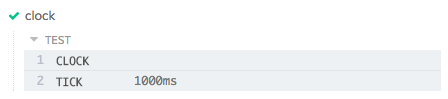
When clicking on the clock command within the command log, the console outputs
the following:

History
| Version | Changes |
|---|---|
| 10.7.0 | Added setSystemTime to yielded clock object |