dblclick
Double-click a DOM element.
It is unsafe to
chain further commands that rely on the subject after .dblclick().
Syntax
.dblclick()
.dblclick(options)
.dblclick(position)
.dblclick(position, options)
.dblclick(x, y)
.dblclick(x, y, options)
Usage
Correct Usage
cy.get('button').dblclick() // Double-click on button
cy.focused().dblclick() // Double-click on element with focus
cy.contains('Welcome').dblclick() // Double-click on first element containing 'Welcome'
Incorrect Usage
cy.dblclick('button') // Errors, cannot be chained off 'cy'
cy.window().dblclick() // Errors, 'window' does not yield DOM element
Arguments
position (String)
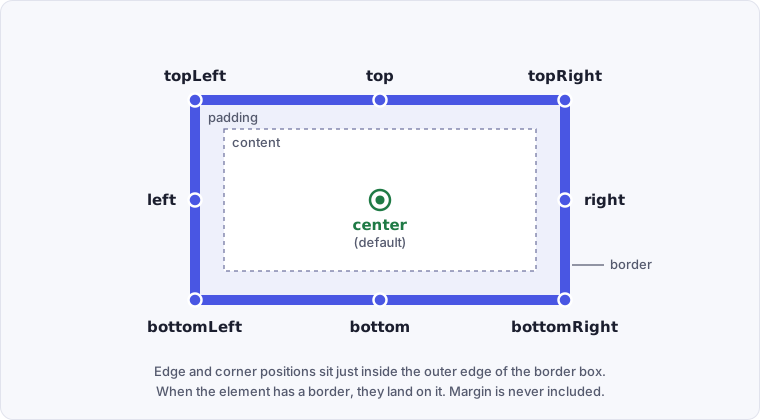
The position where Cypress issues the double-click. The center position is the
default position. Valid positions are topLeft, top, topRight, left,
center, right, bottomLeft, bottom, and bottomRight.
x (Number)
The distance in pixels from the element's left to issue the double-click.
y (Number)
The distance in pixels from the element's top to issue the double-click.
options (Object)
Pass in an options object to change the default behavior of .dblclick().
| Option | Default | Description |
|---|---|---|
altKey | false | Activates the alt key (option key for Mac). Aliases: optionKey. |
animationDistanceThreshold | animationDistanceThreshold | The distance in pixels an element must exceed over time to be considered animating. |
ctrlKey | false | Activates the control key. Aliases: controlKey. |
log | true | Displays the command in the Command Log |
force | false | Forces the action, disables waiting for actionability |
metaKey | false | Activates the meta key (Windows key or command key for Mac). Aliases: commandKey, cmdKey. |
multiple | true | Serially double-click multiple elements |
scrollBehavior | scrollBehavior | Viewport position to where an element should be scrolled before executing the command. Accepts a single alignment, a per-axis { block, inline } object, or false. |
shiftKey | false | Activates the shift key. |
timeout | defaultCommandTimeout | Time to wait for .dblclick() to resolve before timing out |
waitForAnimations | waitForAnimations | Whether to wait for elements to finish animating before executing the command. |
Yields
.dblclick()yields the same subject it was given.- It is unsafe
to chain further commands that rely on the subject after
.dblclick().
Examples
No Args
Double-click an anchor link in the navigation
cy.get('a#nav1').dblclick() // yields the <a>
Double-click a label to edit an item inline
Many apps turn a label, table cell, or file name into an input when you
double-click it. The double-click usually replaces the element, so start a new
chain from cy to reach the input instead of chaining off .dblclick().
cy.get('[data-cy=todo-label]').first().dblclick()
cy.get('[data-cy=todo-edit]').clear().type('Buy oat milk{enter}')
cy.get('[data-cy=todo-label]').first().should('have.text', 'Buy oat milk')
Double-click one element out of several matches
.dblclick() double-clicks
every element in its subject
by default, so a selector that matches several rows puts all of them into edit
mode without an error. Narrow the query to the element you want with
.eq(), .first(), or
cy.contains() with a selector and text.
cy.get('[data-cy=row]').eq(2).dblclick()
cy.contains('[data-cy=file]', 'report.pdf').dblclick()
Wait for the request a double-click sends
Register a cy.intercept() before the double-click,
then cy.wait() on its alias so the test continues only
after the request completes.
cy.intercept('GET', '/api/files/*').as('openFile')
cy.contains('[data-cy=file]', 'report.pdf').dblclick()
cy.wait('@openFile')
cy.get('[data-cy=preview]').should('be.visible')
Test an element that handles both click and double-click
Cypress sends two click events before the dblclick event (see
Events), so a click handler runs twice. Apps that respond to both
often wait briefly after a click to see whether a second one follows. If yours
uses a timer like that, freeze it with cy.clock(),
then advance it past your app's delay with cy.tick().
The example below assumes a delay under 300 milliseconds. Without the tick, the
not.have.class assertion passes before the timer fires, so it can't catch a
single-click action that runs by mistake.
cy.clock()
cy.get('[data-cy=photo]').dblclick()
cy.tick(300)
cy.get('[data-cy=lightbox]').should('be.visible')
cy.get('[data-cy=photo]').should('not.have.class', 'selected')
Position
Specify a position of the element to double-click
Double-click the bottom center of the button.
cy.get('button').dblclick('bottom')
Coordinates
Specify coordinates relative to the top-left corner
Cypress issues the double-click below inside of the element (30px from the left and 10px from the top).
cy.get('button').dblclick(30, 10)
Double-click a precise spot on a map or canvas
Coordinates matter when the double-click position changes the result, such as zooming a map in on the point under the cursor.
cy.get('[data-cy=map]').dblclick(200, 150)
cy.get('[data-cy=zoom-level]').should('have.text', '4')
Options
Force a double-click regardless of its actionable state
Forcing a double-click overrides the
actionable checks
Cypress applies and fires the events. On a disabled element, a forced
double-click fires both click sequences but not the dblclick event, so a
dblclick handler on a disabled element never runs.
cy.get('button').dblclick({ force: true })
Force a double-click with a position argument
cy.get('button').dblclick('topRight', { force: true })
Force a double-click with relative coordinates
cy.get('button').dblclick(60, 60, { force: true })
Double-click every element that matches a selector
Unlike .click(), .dblclick() defaults to
{ multiple: true }. When the subject contains several elements, Cypress
double-clicks each one in turn, gives each double-click its own full timeout,
and logs each one to the
Command Log.
cy.get('[data-cy=todo-label]').dblclick() // double-clicks every label
Pass { multiple: false } as a guard when a selector should match exactly one
element. If it ever matches more, .dblclick() fails the test instead of
double-clicking all of them.
cy.get('[data-cy=current-todo]').dblclick({ multiple: false })
Double-click with key combinations
Pass key modifiers to .dblclick() to hold down keys while it double-clicks,
such as ALT + double-click.
You can also use key combinations during .type(),
which can hold keys down across multiple commands. See
Key Combinations.
The following keys can be combined with .dblclick() through the options.
| Option | Notes |
|---|---|
altKey | Activates the alt key (option key for Mac). Aliases: optionKey. |
ctrlKey | Activates the control key. Aliases: controlKey. |
metaKey | Activates the meta key (Windows key or command key for Mac). Aliases: commandKey, cmdKey. |
shiftKey | Activates the shift key. |
Alt + double-click the first list item
// execute ALT + dblclick on the first <li>
cy.get('li').first().dblclick({
  altKey: true,
})
Notes
Actionability
The element must first reach actionability
.dblclick() is an "action command" that follows all the rules of
Actionability.
Events
A double-click fires two clicks, then a dblclick
Cypress fires the full .click() event sequence twice,
then a dblclick event, matching what a browser sends for a real double-click.
The mouse events in the first click have a detail of 1. The mouse events in
the second click, and the dblclick event, have a detail of 2. The
pointerdown and pointerup events have a detail of 0.
Because each click follows the .click() rules, the
focus and
cancellation behavior of .click() applies
to both clicks.
Text selection
A double-click does not select the word you double-click
In a browser, double-clicking a word selects it. Cypress fires the double-click
as simulated events, which don't trigger the browser's native text selection.
.dblclick() doesn't select the word you double-click, in page text or in an
input, and it leaves any text that was already selected in place. To select the
text in an input or textarea, use .type('{selectall}').
cy.get('[data-cy=title]').type('{selectall}')
Rules
Requirements
.dblclick()requires being chained off a command that yields DOM element(s)..dblclick()cannot be called on a<select>element. Use.select()to change its value.
Assertions
.dblclick()automatically waits for the element to reach an actionable state..dblclick()itself is not retried. It fires once when the element is actionable. Assertions chained after.dblclick()are retried until they pass or time out. See Only queries are retried.
Timeouts
.dblclick()can time out waiting for the element to reach an actionable state..dblclick()can time out waiting for assertions you've added to pass.
Command Log
Double-click a div
cy.get('.action-div').dblclick()
The commands above display in the Command Log as:

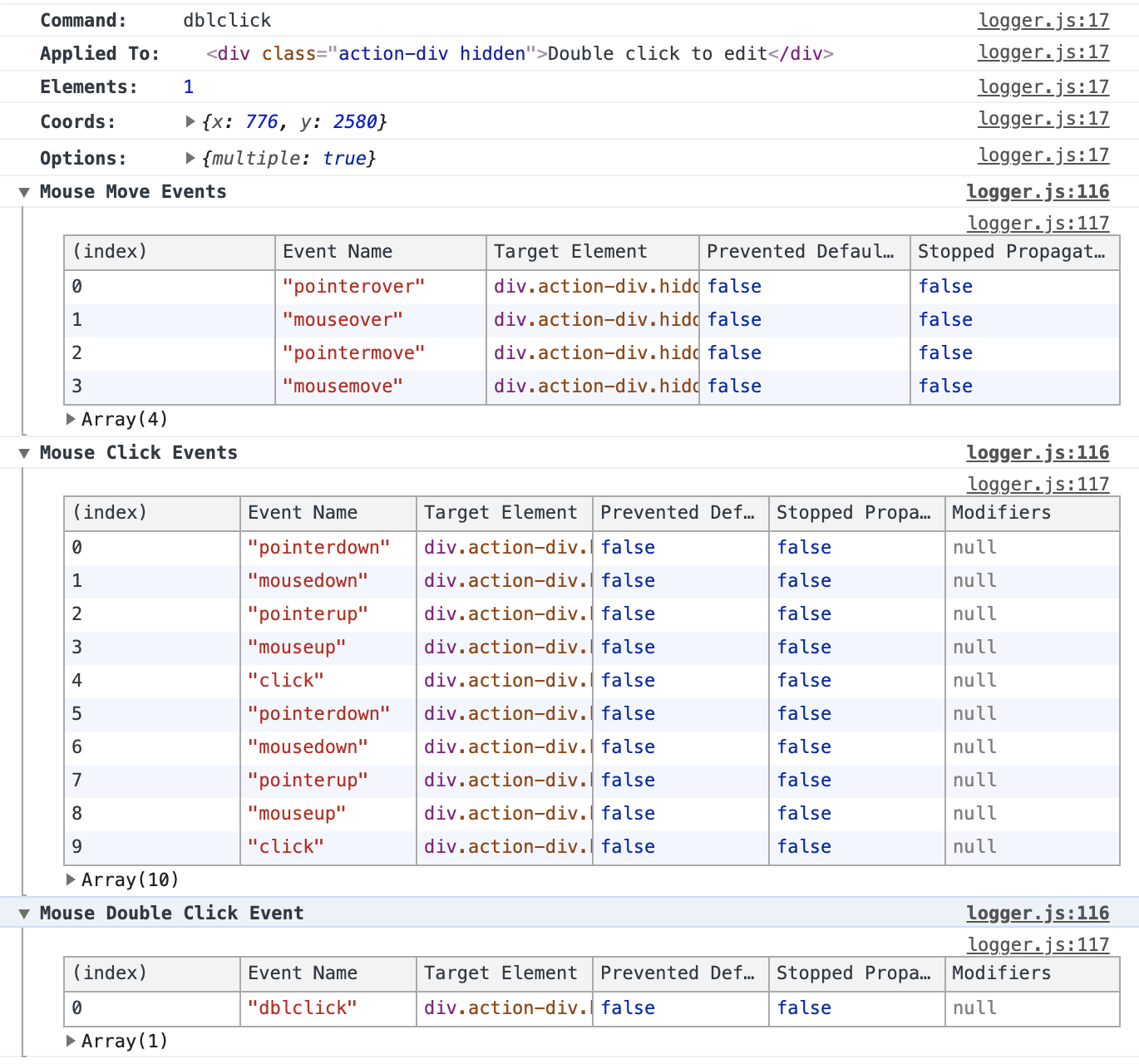
When you click dblclick in the Command Log, the console outputs the
following:
History
| Version | Changes |
|---|---|
| 15.20.0 | Option scrollBehavior now accepts a per-axis { block, inline } object and the 'start' and 'end' alignments |
| 6.1.0 | Added option scrollBehavior |
| 5.0.0 | Added options altKey, ctrlKey, metaKey, and shiftKey |
| 3.5.0 | .dblclick() now follows the same actionability checks as .click() |
| 3.5.0 | Added support for options force and multiple |
| 3.5.0 | Added support for position, x, and y arguments |
| 3.5.0 | Added sending mouseover, mousemove, mouseout, pointerdown, pointerup, and pointermove during .dblclick() |