filter
Get the DOM elements that match a specific selector or pass a test function.
Opposite of .not()
The querying behavior of this command matches exactly how
.filter() works in jQuery.
Syntax
.filter(selector)
.filter(selector, options)
.filter(fn)
.filter(fn, options)
Usage
Correct Usage
cy.get('td').filter('.users') // Yield all el's with class '.users'
Incorrect Usage
cy.filter('.animated') // Errors, cannot be chained off 'cy'
cy.clock().filter() // Errors, 'clock' does not yield DOM elements
Arguments
selector (String selector)
A selector used to filter matching DOM elements.
fn (Function)
A function called once for each element in the subject, with the element's
index and the element itself as arguments: (index, element). .filter()
yields the elements for which the function returns a truthy value.
options (Object)
Pass in an options object to change the default behavior of .filter().
| Option | Default | Description |
|---|---|---|
log | true | Displays the command in the Command log |
timeout | defaultCommandTimeout | Time to wait for .filter() to resolve before timing out |
Yields
.filter()yields the new DOM element(s) it found..filter()is a query, and it is safe to chain further commands.
Examples
Selector
Filter list items by class name with .filter()
<ul>
  <li>Home</li>
  <li class="active">About</li>
  <li>Services</li>
  <li>Pricing</li>
  <li>Contact</li>
</ul>
// yields <li>About</li>
cy.get('ul').find('>li').filter('.active')
Filter elements by attribute value with .filter()
<table>
  <tr data-cy="order-row" data-status="shipped">
    <td>#1001</td>
  </tr>
  <tr data-cy="order-row" data-status="pending">
    <td>#1002</td>
  </tr>
  <tr data-cy="order-row" data-status="shipped">
    <td>#1003</td>
  </tr>
</table>
// yields the rows for orders #1001 and #1003
cy.get('[data-cy="order-row"]')
  .filter('[data-status="shipped"]')
  .should('have.length', 2)
Filter form controls by checked or disabled state
Standard CSS pseudo-classes such as :checked, :disabled, and :enabled
narrow form controls by their current state.
<input type="checkbox" name="email" checked />
<input type="checkbox" name="sms" />
<input type="checkbox" name="push" checked />
cy.get('input[type="checkbox"]').filter(':checked').should('have.length', 2)
Filter to visible elements with the :visible selector
Cypress replaces jQuery's :visible and :hidden selectors with its own
visibility rules, so
.filter(':visible') keeps exactly the elements that .should('be.visible')
treats as visible. Cypress also adds a :focused selector that matches the
focused element.
<ul class="menu">
  <li>Dashboard</li>
  <li>Reports</li>
  <li style="display: none">Admin</li>
  <li>Settings</li>
</ul>
cy.get('.menu li').filter(':visible').should('have.length', 3)
Function
Filter elements with a test function in .filter()
<ul>
  <li>Home</li>
  <li class="active">About</li>
  <li>Services</li>
</ul>
// yields <li>Home</li> and <li>Services</li>
cy.get('li').filter((index, el) => !el.classList.contains('active'))
// yields the even-indexed <li> elements: Home and Services
cy.get('li').filter((index) => index % 2 === 0)
Because .filter() is a query, Cypress calls the function again on every
retry. Keep it synchronous and free of side
effects, and don't call other Cypress commands inside it.
Read the element from the function's second argument rather than from this.
Arrow functions don't bind this, so el works in every function style.
Filter elements by a numeric value with a function
A selector can't compare numbers, but a function can.
<ul>
  <li class="price">$45.00</li>
  <li class="price">$120.00</li>
  <li class="price">$310.50</li>
</ul>
// yields the $120.00 and $310.50 prices
cy.get('.price')
  .filter((index, el) => parseFloat(el.textContent.replace('$', '')) > 100)
  .should('have.length', 2)
Filter elements by text without matching case
The :contains selector is case-sensitive. Compare lowercased text in a
function to match regardless of case.
<ul>
  <li>Services</li>
  <li>Advanced services</li>
  <li>Pricing</li>
</ul>
cy.get('li')
  .filter((index, el) => el.textContent.toLowerCase().includes('services'))
  .should('have.length', 2)
To get a single element by text regardless of case, use
.contains() with the matchCase: false option.
Contains
Filter elements by text with the :contains selector
You can use the jQuery :contains selector to perform a case-sensitive text substring match.
<ul>
  <li>Home</li>
  <li>Services</li>
  <li>Advanced Services</li>
  <li>Pricing</li>
  <li>Contact</li>
</ul>
Find both list items that contain the word "Services":
cy.get('li').filter(':contains("Services")').should('have.length', 2)
Filter table rows by a cell's text with :has()
Combine the jQuery :has selector with
:contains to keep only the rows with a matching cell, then act on something
inside that row.
<table>
  <tbody>
    <tr>
      <td>Ana</td>
      <td>Admin</td>
      <td><button class="edit">Edit</button></td>
    </tr>
    <tr>
      <td>Ben</td>
      <td>Viewer</td>
      <td><button class="edit">Edit</button></td>
    </tr>
  </tbody>
</table>
cy.get('tbody tr')
  .filter(':has(td:contains("Admin"))')
  .find('button.edit')
  .click()
Match a non-breaking space with :contains in .filter()
If the HTML contains a
non-breaking space entity
and the test uses the
jQuery :contains selector, then the
test needs to use the Unicode value \u00a0 instead of .
<div data-testid="testattr">
<span>Hello world</span>
</div>
cy.get('[data-testid="testattr"]').filter(':contains("Hello\u00a0world")')
Actions and assertions
Click one element from a .filter() result
.filter() can yield several elements, and action commands such as
.click() fail on more than one element unless you pass
{ multiple: true }. Narrow the result to a single element first with
.first(), .last(), or
.eq().
<ul>
  <li><button class="delete">Delete</button> Draft 1</li>
  <li><button class="delete" disabled>Delete</button> Published post</li>
  <li><button class="delete">Delete</button> Draft 2</li>
</ul>
// clicks the Delete button for Draft 1
cy.get('button.delete').filter(':enabled').first().click()
Assert that no elements match a .filter() selector
<ul>
  <li class="notification info">Saved</li>
  <li class="notification info">Synced</li>
</ul>
// passes once no notification has the 'error' class
cy.get('.notification').filter('.error').should('not.exist')
Notes
Choosing between .filter(), .find(), and .contains()
These three commands narrow a selection in different ways:
.filter()keeps the elements in the current subject that match. It never looks inside them..find()searches the descendants of the current subject..contains()matches by text and yields the deepest element that contains it.
<ul>
  <li class="active">About <span class="badge">New</span></li>
  <li>Services</li>
</ul>
cy.get('li').filter('.active') // yields <li class="active">
cy.get('li').find('.badge') // yields <span class="badge">
cy.get('ul').contains('Services') // yields <li>Services</li>
Rules
Requirements
.filter()requires being chained off a command that yields DOM element(s) or a document.
Assertions
.filter()will automatically retry until the element(s) exist in the DOM..filter()will automatically retry until all chained assertions have passed.
Timeouts
.filter()can time out waiting for the element(s) to exist in the DOM..filter()can time out waiting for assertions you've added to pass.
Command Log
Filter the li's to the li with the class 'active'.
cy.get('.left-nav>.nav').find('>li').filter('.active')
The commands above display in the Command Log as:

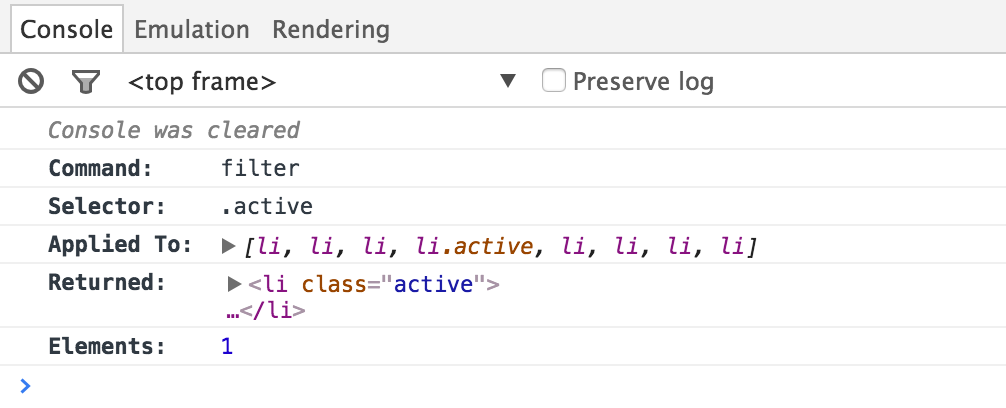
Clicking the filter command in the Command Log outputs the following to the
console:
History
| Version | Changes |
|---|---|
| 12.6.0 | Overwrite .filter() with Cypress.Commands.overwriteQuery() rather than Cypress.Commands.overwrite(). |
| 12.0.0 | .filter() is now a query. |
| 3.2.0 | .filter() reads options when its first argument is a function. |
| 3.0.0 | The type definition accepts a function argument. |