Cypress.ensure
Cypress.ensure is a set of helper functions that validate a
subject inside
your own custom queries and
custom commands. These functions run the same checks
Cypress's built-in commands run: .contains() uses
Cypress.ensure.isType() to accept only an element, document, or window, and
.select() uses Cypress.ensure.isNotDisabled() to
refuse a disabled <select>.
Each function checks one condition and throws a Cypress error when the subject fails it. Because the errors come from Cypress itself, a failure in your command reads like a failure in a built-in one:
- The message names your command, so the reader knows which step failed.
- The message describes the subject Cypress received and the command that ran before it.
- The message links to the relevant Cypress docs page, such as Interacting with Elements.
- Inside a custom query, Cypress retries a failed check until it passes or the query times out, the same as its own queries.
This page has a reference entry for each function under Functions, and complete custom queries and commands that combine them under Examples.
Syntax
Cypress.ensure.isAttached(subject, commandName, cy)
Cypress.ensure.isDocument(subject, commandName, cy)
Cypress.ensure.isElement(subject, commandName, cy)
Cypress.ensure.isNotDisabled(subject, commandName)
Cypress.ensure.isNotHiddenByAncestors(subject, commandName)
Cypress.ensure.isNotReadonly(subject, commandName)
Cypress.ensure.isScrollable(subject, commandName)
Cypress.ensure.isType(subject, types, commandName, cy)
Cypress.ensure.isVisible(subject, commandName)
Cypress.ensure.isWindow(subject, commandName, cy)
Usage
Correct Usage
Cypress.Commands.addQuery('editable', function () {
  return (subject) => {
    Cypress.ensure.isElement(subject, 'editable', cy)
    Cypress.ensure.isNotDisabled(subject, 'editable')

    return subject
  }
})
Incorrect Usage
// The state checks take no `cy` argument
Cypress.ensure.isNotDisabled(subject, 'editable', cy)

// The state checks need the jQuery-wrapped subject, not a raw DOM element
Cypress.ensure.isNotDisabled(subject[0], 'editable')
Arguments
Every function takes these arguments. isType() also takes a
types array.
subject (any)
The value to check, usually the subject your query or command received from the
previous command. The element state checks (isNotDisabled(),
isNotHiddenByAncestors(), isNotReadonly(), isScrollable(), and
isVisible()) expect a jQuery-wrapped element, which is what
cy.get() and other element queries yield.
commandName (String)
The name of your query or command, as the reader calls it. Cypress puts it in
the error message, so 'editable' produces an error that starts with
`cy.editable()` failed because….
cy (Object)
The global cy object. Pass it to the type checks and
isAttached(). Cypress reads the current command chain from it to describe the
previous command and the subject in the error.
Return value
Each function returns nothing when the check passes and throws an error when it
fails. isScrollable() returns true when the check passes.
Functions
| Function | Throws when the subject… |
|---|---|
isAttached() | is a DOM element no longer attached to the page |
isDocument() | is not a document |
isElement() | is not a DOM element |
isNotDisabled() | is disabled |
isNotHiddenByAncestors() | is clipped out of view by an ancestor's overflow |
isNotReadonly() | is a read-only text field |
isScrollable() | cannot be scrolled |
isType() | matches none of the listed types |
isVisible() | is not visible |
isWindow() | is not a window |
isAttached()
Cypress.ensure.isAttached(subject, commandName, cy)
Throws when the subject is a DOM element that is no longer attached to the page,
for example because the app re-rendered it. Use it before you call a native DOM
method on an element you've held onto. On a detached element, a native call such
as .click() acts on the stale element instead of the one on the page, and
raises no error.
When the check fails, it throws:
`cy.<commandName>()` failed because the page updated as a result of this command, but you tried to continue the command chain.
Used in: Guard a native DOM call against a detached element
isDocument()
Cypress.ensure.isDocument(subject, commandName, cy)
Throws when the subject is not a global document object, such as the one
cy.document() yields.
When the check fails, it throws:
`cy.<commandName>()` failed because it requires the subject be a global `document` object.
Used in: Read a document's meta tags in a custom query
isElement()
Cypress.ensure.isElement(subject, commandName, cy)
Throws when the subject is not a DOM element or a jQuery collection of them.
Unlike isType(subject, ['element'], …), it doesn't check that the element is
still attached; pair it with isAttached() when that matters.
When the check fails, it throws this error, followed by the subject received and the previous command:
`cy.<commandName>()` failed because it requires a DOM element.
Used in: Compare a hand-written error with an ensure error, Wait for an element to be editable in a custom query, Wait for a carousel slide to scroll into view
isNotDisabled()
Cypress.ensure.isNotDisabled(subject, commandName)
Throws when the subject has the disabled property, the same check
.select() and
.selectFile() run.
- When the subject is a collection, it checks only the first element.
When the check fails, it throws:
`cy.<commandName>()` failed because this element is `disabled`:
Used in: Wait for an element to be editable in a custom query
isNotHiddenByAncestors()
Cypress.ensure.isNotHiddenByAncestors(subject, commandName)
Throws when an ancestor clips the subject out of view, such as an
overflow: hidden container the element has scrolled outside of, or a
zero-height container with overflow: hidden. isNotHiddenByAncestors() also fails a fixed or
sticky element that another element covers.
isNotHiddenByAncestors() doesn't check the ancestors' display or visibility, so an element inside
a display: none parent passes. Call isVisible() for that.
Cypress runs this check after isVisible() when the
visibilityStrategy
is 'legacy'.
isNotHiddenByAncestors()treatsopacity: 0as visible.- When the subject is a collection,
isNotHiddenByAncestors()fails when any element is clipped.
When the check fails, it throws this error, followed by the reason:
`cy.<commandName>()` failed because this element is not visible:
Used in: Wait for a carousel slide to scroll into view
isNotReadonly()
Cypress.ensure.isNotReadonly(subject, commandName)
Throws when the subject is a text-like element, such as <input type="text">,
<input type="email">, or <textarea>, with the readonly attribute. A
checkbox, radio button, or other element with readonly passes, because
browsers ignore readonly on those elements.
- When the subject is a collection, it checks only the first element.
When the check fails, it throws:
`cy.<commandName>()` failed because this element is readonly:
Used in: Wait for an element to be editable in a custom query
isScrollable()
Cypress.ensure.isScrollable(subject, commandName)
Throws when the subject cannot be scrolled, the same check
.scrollTo() runs. Returns true when it passes.
When the check fails, it throws:
`cy.<commandName>()` failed because this element is not scrollable:
Used in: Check an element before acting on it in a custom command
isType()
Cypress.ensure.isType(subject, types, commandName, cy)
Throws when the subject matches none of the types. isType() is the check behind a
custom command's prevSubject
option.
types (Array)
Any of 'element', 'document', 'window', and 'optional'. The check passes
when the subject matches at least one of them.
'optional'lets anundefinedsubject through, for a query that can start a chain or continue one.'element'also runsisAttached(), so a subject the app has removed from the page fails with the detached-element error.- When you list more than one type, the error names all of them.
With ['element', 'document'], a failed check throws:
`cy.<commandName>()` failed because it requires a DOM element or document.
Used in: Accept only certain subject types in a custom query
isVisible()
Cypress.ensure.isVisible(subject, commandName)
Throws when the subject is not visible, following the
visibility rules of
your visibilityStrategy.
isVisible()treatsopacity: 0as visible, matching the checks Cypress runs before it interacts with an element. Assert with.should('be.visible')when opacity matters.- When the subject is a collection,
isVisible()fails when any element is hidden.
When the check fails, it throws this error, followed by the reason:
`cy.<commandName>()` failed because this element is not visible:
Used in: Wait for an element to be editable in a custom query
isWindow()
Cypress.ensure.isWindow(subject, commandName, cy)
Throws when the subject is not a global window object, such as the one
cy.window() yields.
When the check fails, it throws:
`cy.<commandName>()` failed because it requires the subject be a global `window` object.
Used in: Read the app's localStorage keys in a custom query
Examples
Compare a hand-written error with an ensure error
Both versions of the .inputValue() query below reject a subject that isn't an
element. The first throws its own error:
- JavaScript
- TypeScript
Cypress.Commands.addQuery('inputValue', function () {
  return (subject) => {
    if (!Cypress.dom.isElement(subject)) {
      throw new Error('inputValue() requires an element')
    }

    return subject.val()
  }
})
export {}
declare global {
  namespace Cypress {
    interface Chainable {
      inputValue(): Chainable<string | number | string[] | undefined>
    }
  }
}

Cypress.Commands.addQuery('inputValue', function () {
  return (subject) => {
    if (!Cypress.dom.isElement(subject)) {
      throw new Error('inputValue() requires an element')
    }

    return subject.val()
  }
})

export {}
The second calls Cypress.ensure.isElement() instead:
- JavaScript
- TypeScript
Cypress.Commands.addQuery('inputValue', function () {
  return (subject) => {
    Cypress.ensure.isElement(subject, 'inputValue', cy)

    return subject.val()
  }
})
export {}
declare global {
  namespace Cypress {
    interface Chainable {
      inputValue(): Chainable<string | number | string[] | undefined>
    }
  }
}

Cypress.Commands.addQuery('inputValue', function () {
  return (subject) => {
    Cypress.ensure.isElement(subject, 'inputValue', cy)

    return subject.val()
  }
})

export {}
Chain either one off a subject that isn't an element:
cy.title().inputValue()
The hand-written check fails with only its own message:
Error: Timed out retrying after 4000ms: inputValue() requires an element
The ensure check fails with a Cypress error that names the command, shows the
subject it received, and names the command that produced it:
CypressError: Timed out retrying after 4000ms: `cy.inputValue()` failed because it requires a DOM element.

The subject received was:

  > `Example page`

The previous command that ran was:

  > `cy.title()`
Choose between an ensure check and an assertion
Cypress.ensure and assertions can check the same state, but they belong in
different places. In a test, assert the state you expect with
.should(). Inside a custom query or command, call
Cypress.ensure, so every test that uses the query gets the check, and the
error names the query:
// In a test: assert the state you expect
cy.get('#email').should('be.enabled')

// In a custom query: the check is part of the query
cy.get('#email').editable()
.editable() is defined in
Wait for an element to be editable in a custom query.
Accept only certain subject types in a custom query
The .dataCy() query below finds elements by their data-cy attribute. The query can
start a chain, where it searches the whole page, or continue one, where it
searches inside the previous element or document. isType() rejects every other
subject, such as a string yielded by .invoke().
- JavaScript
- TypeScript
Cypress.Commands.addQuery('dataCy', function (value) {
  return (subject) => {
    Cypress.ensure.isType(
      subject,
      ['optional', 'element', 'document'],
      'dataCy',
      cy
    )

    const $root = subject === undefined ? cy.$$('body') : Cypress.$(subject)

    return $root.find(`[data-cy="${value}"]`)
  }
})
export {}
declare global {
  namespace Cypress {
    interface Chainable {
      dataCy(value: string): Chainable<JQuery<HTMLElement>>
    }
  }
}

Cypress.Commands.addQuery('dataCy', function (value: string) {
  return (subject) => {
    Cypress.ensure.isType(
      subject,
      ['optional', 'element', 'document'],
      'dataCy',
      cy
    )

    const $root = subject === undefined ? cy.$$('body') : Cypress.$(subject)

    return $root.find(`[data-cy="${value}"]`)
  }
})

export {}
Then use it at the start of a chain or after another query:
cy.dataCy('submit').should('have.text', 'Submit')
cy.get('form').dataCy('email').should('have.attr', 'type', 'email')
Chaining .dataCy() off a subject it doesn't accept fails with a Cypress error
that lists every accepted type:
cy.title().dataCy('submit')
CypressError: Timed out retrying after 4000ms: `cy.dataCy()` failed because it requires a DOM element or document.

The subject received was:

  > `Example page`

The previous command that ran was:

  > `cy.title()`
Wait for an element to be editable in a custom query
Cypress retries the checks inside a custom query, so a query built from
Cypress.ensure functions waits for the element to reach the state you need.
The .editable() query yields its subject once it is visible, enabled, and not
read-only, and fails with Cypress's own actionability error if it never gets
there.
- JavaScript
- TypeScript
Cypress.Commands.addQuery('editable', function () {
  return (subject) => {
    Cypress.ensure.isElement(subject, 'editable', cy)
    Cypress.ensure.isVisible(subject, 'editable')
    Cypress.ensure.isNotDisabled(subject, 'editable')
    Cypress.ensure.isNotReadonly(subject, 'editable')

    return subject
  }
})
export {}
declare global {
  namespace Cypress {
    interface Chainable {
      editable(): Chainable<JQuery<HTMLElement>>
    }
  }
}

Cypress.Commands.addQuery('editable', function () {
  return (subject) => {
    Cypress.ensure.isElement(subject, 'editable', cy)
    Cypress.ensure.isVisible(subject, 'editable')
    Cypress.ensure.isNotDisabled(subject, 'editable')
    Cypress.ensure.isNotReadonly(subject, 'editable')

    return subject
  }
})

export {}
Here, the #email input starts out disabled and the app enables it after it
loads the user's profile. .editable() retries until the input is enabled, then
.invoke() sets its value:
cy.get('#email').editable().invoke('val', 'jane@example.com')
cy.get('#email').should('have.value', 'jane@example.com')
If the input stays disabled, the query times out with the same error a
.type() into a disabled input produces:
CypressError: Timed out retrying after 4000ms: `cy.editable()` failed because this element is `disabled`:

`<input id="email" type="email" disabled="">`

Fix this problem, or use `{force: true}` to disable error checking.

https://on.cypress.io/element-cannot-be-interacted-with
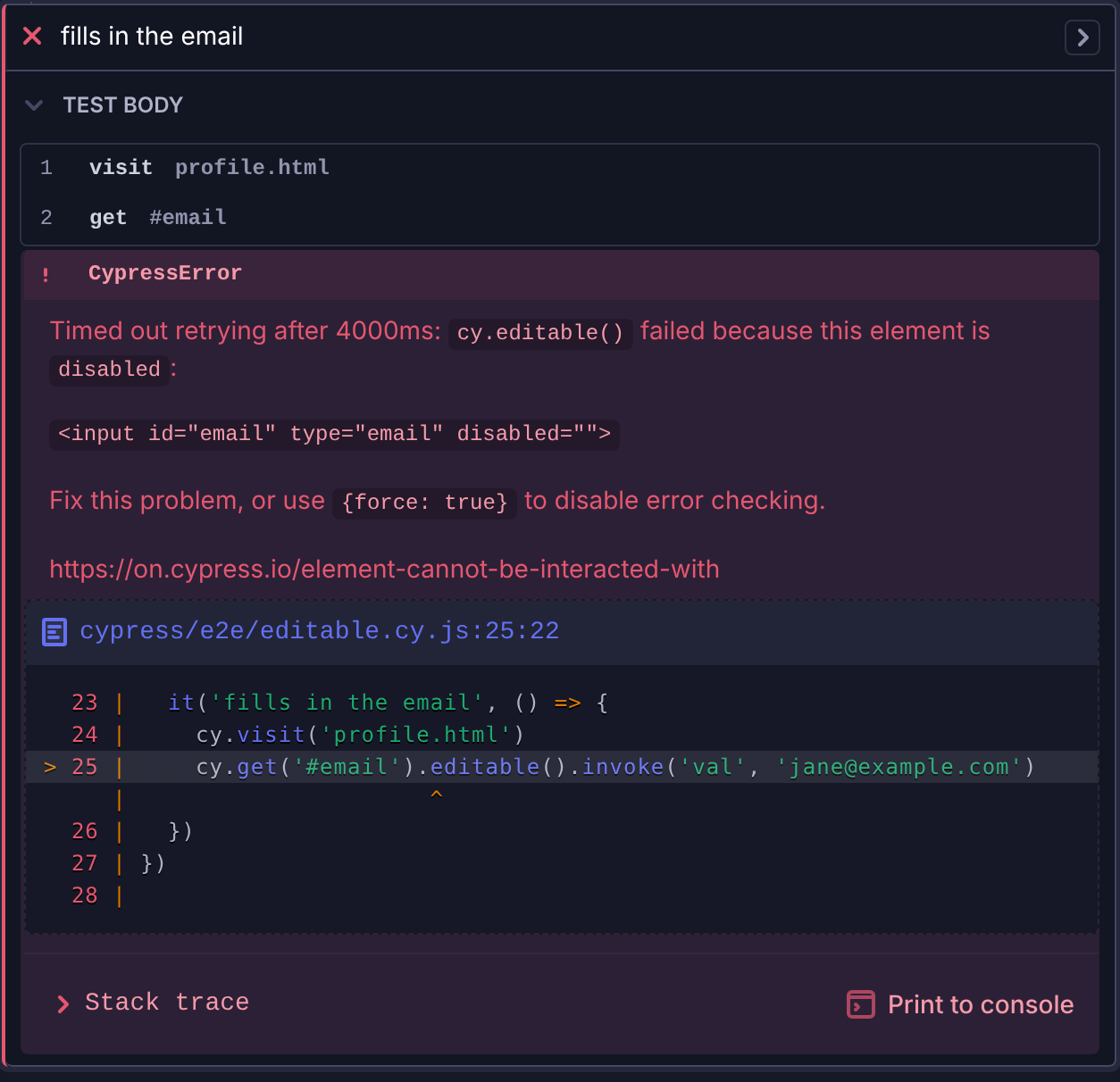
In the Cypress App, the error appears under the failed test and names
cy.editable(), the same way it names a built-in command:
Support a force option in a custom query
Some ensure errors end with use {force: true} to disable error checking, a
hint written for built-in commands such as .type(). To
make that hint true for your own query, accept a force option and skip the
state checks when it's set. This version of .editable() keeps the type check
either way:
- JavaScript
- TypeScript
Cypress.Commands.addQuery('editable', function (options = {}) {
  return (subject) => {
    Cypress.ensure.isElement(subject, 'editable', cy)

    if (!options.force) {
      Cypress.ensure.isVisible(subject, 'editable')
      Cypress.ensure.isNotDisabled(subject, 'editable')
      Cypress.ensure.isNotReadonly(subject, 'editable')
    }

    return subject
  }
})
export {}
declare global {
  namespace Cypress {
    interface Chainable {
      editable(options?: { force?: boolean }): Chainable<JQuery<HTMLElement>>
    }
  }
}

Cypress.Commands.addQuery(
  'editable',
  function (options: { force?: boolean } = {}) {
    return (subject) => {
      Cypress.ensure.isElement(subject, 'editable', cy)

      if (!options.force) {
        Cypress.ensure.isVisible(subject, 'editable')
        Cypress.ensure.isNotDisabled(subject, 'editable')
        Cypress.ensure.isNotReadonly(subject, 'editable')
      }

      return subject
    }
  }
)

export {}
With { force: true }, the query yields the disabled #locked input right
away, and .invoke() sets its value:
cy.get('#locked').editable({ force: true }).invoke('val', 'jane@example.com')
Wait for a carousel slide to scroll into view
An element scrolled outside an overflow: hidden container is still in the
page, but the reader can't see it. The .unclipped() query retries until no
ancestor clips its subject:
- JavaScript
- TypeScript
Cypress.Commands.addQuery('unclipped', function () {
  return (subject) => {
    Cypress.ensure.isElement(subject, 'unclipped', cy)
    Cypress.ensure.isNotHiddenByAncestors(subject, 'unclipped')

    return subject
  }
})
export {}
declare global {
  namespace Cypress {
    interface Chainable {
      unclipped(): Chainable<JQuery<HTMLElement>>
    }
  }
}

Cypress.Commands.addQuery('unclipped', function () {
  return (subject) => {
    Cypress.ensure.isElement(subject, 'unclipped', cy)
    Cypress.ensure.isNotHiddenByAncestors(subject, 'unclipped')

    return subject
  }
})

export {}
Here, clicking "Next" scrolls the carousel to the second slide.
.unclipped() waits for the scroll to finish before the assertion runs:
cy.get('#next').click()
cy.contains('.slide', 'Slide 2').unclipped().should('have.text', 'Slide 2')
Read a document's meta tags in a custom query
The .metaContent() query reads a <meta> tag from the
cy.document() subject, and isDocument() rejects
any other subject. Because it's a query, an assertion on its value retries until
the app updates the tag:
- JavaScript
- TypeScript
Cypress.Commands.addQuery('metaContent', function (name) {
  return (subject) => {
    Cypress.ensure.isDocument(subject, 'metaContent', cy)

    return subject
      .querySelector(`meta[name="${name}"]`)
      ?.getAttribute('content')
  }
})
export {}
declare global {
  namespace Cypress {
    interface Chainable {
      metaContent(name: string): Chainable<string | null | undefined>
    }
  }
}

Cypress.Commands.addQuery('metaContent', function (name: string) {
  return (subject) => {
    Cypress.ensure.isDocument(subject, 'metaContent', cy)

    return subject
      .querySelector(`meta[name="${name}"]`)
      ?.getAttribute('content')
  }
})

export {}
cy.document().metaContent('description').should('eq', 'Cypress example app')
Read the app's localStorage keys in a custom query
The .storageKeys() query reads the keys in the app's localStorage from the
cy.window() subject, and retries until an assertion on
them passes:
- JavaScript
- TypeScript
Cypress.Commands.addQuery('storageKeys', function () {
  return (subject) => {
    Cypress.ensure.isWindow(subject, 'storageKeys', cy)

    return Object.keys(subject.localStorage)
  }
})
export {}
declare global {
  namespace Cypress {
    interface Chainable {
      storageKeys(): Chainable<string[]>
    }
  }
}

Cypress.Commands.addQuery('storageKeys', function () {
  return (subject) => {
    Cypress.ensure.isWindow(subject, 'storageKeys', cy)

    return Object.keys(subject.localStorage)
  }
})

export {}
cy.window().storageKeys().should('include', 'authToken')
Check an element before acting on it in a custom command
A custom command added with
Cypress.Commands.add() runs once without
retrying, so a failed check fails the test right away. The .scrollToBottom()
command below checks that its subject can be scrolled before it changes the
element's scrollTop, then yields the element so the chain can continue.
- JavaScript
- TypeScript
Cypress.Commands.add(
  'scrollToBottom',
  { prevSubject: 'element' },
  (subject) => {
    Cypress.ensure.isScrollable(subject, 'scrollToBottom')

    subject[0].scrollTop = subject[0].scrollHeight

    return cy.wrap(subject, { log: false })
  }
)
export {}
declare global {
  namespace Cypress {
    interface Chainable {
      scrollToBottom(): Chainable<JQuery<HTMLElement>>
    }
  }
}

Cypress.Commands.add(
  'scrollToBottom',
  { prevSubject: 'element' },
  (subject) => {
    Cypress.ensure.isScrollable(subject, 'scrollToBottom')

    subject[0].scrollTop = subject[0].scrollHeight

    return cy.wrap(subject, { log: false })
  }
)

export {}
cy.get('#messages')
  .scrollToBottom()
  .contains('Latest message')
  .should('be.visible')
Calling it on an element that can't scroll fails with:
CypressError: `cy.scrollToBottom()` failed because this element is not scrollable:

`<div id="footer">Footer</div>`

Make sure you're targeting the correct element or use `{ensureScrollable: false}` to disable the scrollable check.

https://on.cypress.io/scrollto
The message ends with the hint and docs link Cypress shows for its own
.scrollTo() command. See
Error messages come from the built-in commands.
Guard a native DOM call against a detached element
The .saveAndCollapse() command clicks a panel's "Save" button, then clicks
its "Collapse" button with a native DOM click(). Saving can re-render the
panel, which leaves subject pointing at a detached element, and a native
click on it never reaches the panel on the page. isAttached() turns that
silent miss into a clear failure:
- JavaScript
- TypeScript
Cypress.Commands.add(
  'saveAndCollapse',
  { prevSubject: 'element' },
  (subject) => {
    cy.wrap(subject).contains('button', 'Save').click()

    cy.then(() => {
      // Saving can re-render the panel and detach `subject`
      Cypress.ensure.isAttached(subject, 'saveAndCollapse', cy)

      subject.find('[data-cy="collapse"]')[0].click()
    })
  }
)
export {}
declare global {
  namespace Cypress {
    interface Chainable {
      saveAndCollapse(): Chainable<void>
    }
  }
}

Cypress.Commands.add(
  'saveAndCollapse',
  { prevSubject: 'element' },
  (subject) => {
    cy.wrap(subject).contains('button', 'Save').click()

    cy.then(() => {
      // Saving can re-render the panel and detach `subject`
      Cypress.ensure.isAttached(subject, 'saveAndCollapse', cy)

      subject.find('[data-cy="collapse"]')[0].click()
    })
  }
)

export {}
cy.get('#panel').saveAndCollapse()
Write your own subject check in a custom query
Cypress.ensure covers the subject checks Cypress itself needs. For any other
condition, throw an error from your query's inner function. Cypress retries it
the same way it retries an ensure check:
- JavaScript
- TypeScript
Cypress.Commands.addQuery('priceValue', function () {
  return (subject) => {
    Cypress.ensure.isElement(subject, 'priceValue', cy)

    const value = parseFloat(subject.text().replace(/[^0-9.]/g, ''))

    if (Number.isNaN(value)) {
      throw new Error(
        `priceValue() could not read a price from "${subject.text()}"`
      )
    }

    return value
  }
})
export {}
declare global {
  namespace Cypress {
    interface Chainable {
      priceValue(): Chainable<number>
    }
  }
}

Cypress.Commands.addQuery('priceValue', function () {
  return (subject) => {
    Cypress.ensure.isElement(subject, 'priceValue', cy)

    const value = parseFloat(subject.text().replace(/[^0-9.]/g, ''))

    if (Number.isNaN(value)) {
      throw new Error(
        `priceValue() could not read a price from "${subject.text()}"`
      )
    }

    return value
  }
})

export {}
Notes
Retry behavior of ensure checks in queries and commands
Cypress.ensure functions throw an error and nothing more. What happens next
depends on where you call them:
- In the inner function of a custom query,
Cypress retries the function until it stops throwing or the query times out,
then fails the test with the last error, prefixed with
Timed out retrying after…. - In a custom command or a
.then()callback, the error fails the test right away.
Call them while a command is running, from a query, a command, or a callback.
The type checks read the running command from cy to build their error
message.
Error messages come from the built-in commands
Each check throws the error message Cypress uses for its own commands, with your
commandName in place of the built-in name. Some messages end with a hint
written for those commands, such as use {force: true} to disable error checking. Your query or command only supports that option if you add it, as
in Support a force option in a custom query.
Otherwise, when the hint would mislead your readers, write your own check
instead.
History
| Version | Changes |
|---|---|
| 12.0.0 | Added Cypress.ensure |
See also
- Custom Queries - the main place to use
Cypress.ensure - Custom Commands
Cypress.dom- DOM helpers that return a boolean instead of throwing- Interacting with Elements - the actionability checks Cypress runs before it acts on an element