clear
Clear the value of an input, textarea, or contenteditable element.
It is unsafe to
chain further commands that rely on the subject after .clear().
An alias for .type('{selectall}{del}'), except that
.clear() clears every element in its subject, while .type() requires a
single element.
Syntax
.clear()
.clear(options)
Usage
Correct Usage
cy.get('[type="text"]').clear() // Clear text input
cy.get('textarea').type('Hi!')
cy.get('textarea').clear() // Clear textarea
cy.focused().clear() // Clear focused input/textarea
cy.get('[contenteditable]').clear() // Clear contenteditable element
cy.get('form input[type="text"]').clear() // Clear every text input in a form
Incorrect Usage
cy.clear() // Errors, cannot be chained off 'cy'
cy.get('nav').clear() // Errors, 'get' doesn't yield a clearable element
cy.get('[type="checkbox"]').clear() // Errors, checkboxes aren't clearable
cy.clock().clear() // Errors, 'clock' does not yield DOM elements
Arguments
options (Object)
Pass in an options object to change the default behavior of .clear().
| Option | Default | Description |
|---|---|---|
animationDistanceThreshold | animationDistanceThreshold | The distance in pixels an element must exceed over time to be considered animating. |
force | false | Forces the action, disables waiting for actionability |
log | true | Displays the command in the Command log |
scrollBehavior | scrollBehavior | Viewport position to where an element should be scrolled before executing the command. Accepts a single alignment, a per-axis { block, inline } object, or false. |
timeout | defaultCommandTimeout | Time to wait for .clear() to resolve before timing out |
waitForAnimations | waitForAnimations | Whether to wait for elements to finish animating before executing the command. |
Yields
.clear()yields the same subject it was given.- It is unsafe
to chain further commands that rely on the subject after
.clear().
Examples
No Args
Clear the input and type a new value
cy.get('textarea').clear()
cy.get('textarea').type('Hello, World')
Clear an input and confirm it's empty
End the chain at .clear(), then start a new chain for the assertion. The new
cy.get() re-queries the input, so the assertion still
passes if your app re-renders it after the clear.
cy.get('input[name="email"]').clear()
cy.get('input[name="email"]').should('have.value', '')
Chaining the assertion directly off .clear() retries only against the element
.clear() acted on. If that element is replaced in the DOM, the assertion keeps
checking the detached copy. See
Actions should be at the end of chains.
Multiple elements
Clear every text input in a form
.clear() clears each element in the subject in order, then yields them all.
cy.get('#signup-form input[type="text"]').clear()
cy.get('#signup-form input[type="text"]').should(($inputs) => {
  $inputs.each((i, input) => {
    expect(input).to.have.value('')
  })
})
A have.value assertion on several elements checks only the first one's value,
so check each element inside a .should() callback. Cypress retries the
callback and re-runs the cy.get() query, so it always checks the inputs
currently on the page.
Contenteditable elements
Clear a rich text editor
Target the element that carries the contenteditable attribute, then type new
content into it.
cy.get('[contenteditable]').clear()
cy.get('[contenteditable]').type('A fresh start')
Rich text editors often manage their own selection and DOM. The
.type() notes on contenteditable elements
cover how to work with them.
Notes
Actionability
The element must first reach actionability
.clear() is an "action command" that follows all the rules of
Actionability.
Events
.clear() doesn't fire change until the element loses focus
.clear() fires the same keyboard and input events a user's keystrokes do.
An input or textarea fires change when it loses focus after its value
changes, so .clear() alone doesn't trigger it. If your app validates or saves
on change, follow .clear() with .blur(), or with any
command that moves focus elsewhere, such as clicking another element:
cy.get('input[name="email"]').clear()
cy.get('input[name="email"]').blur()
cy.contains('Email is required').should('be.visible')
Documentation
.clear() is an alias for
.type('{selectall}{del}') that also works on a subject
with more than one element.
Read the .type() documentation for more details.
Rules
Requirements
.clear()requires being chained off a command that yields DOM element(s)..clear()requires every element in the subject to be one of the following:- a
textarea - an
inputof typetext,password,email,number,search,tel,url,date,datetime,datetime-local,month,week, ortime(aninputwith notypeattribute counts astext) - an element whose content is editable, such as one with a
contenteditableattribute
- a
Assertions
.clear()automatically waits for the element to reach an actionable state.clear()automatically retries until all chained assertions have passed
Timeouts
.clear()can time out waiting for the element to reach an actionable state..clear()can time out waiting for assertions you've added to pass.
Command Log
Clear the input and type a new value
cy.get('input[name="name"]').clear()
cy.get('input[name="name"]').type('Jane Lane')
The commands above will display in the Command Log as:

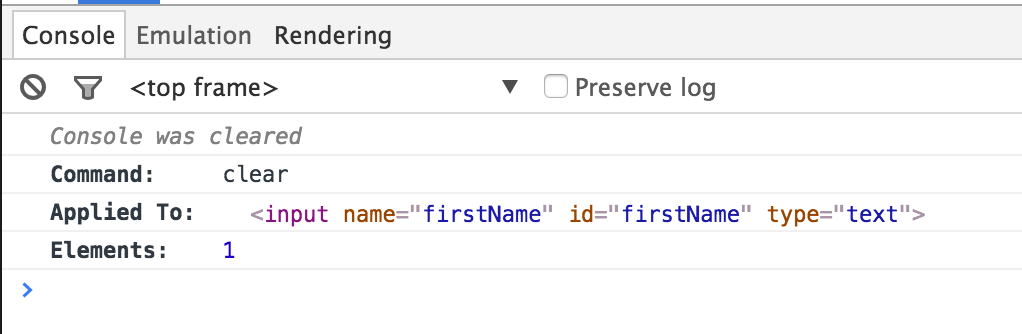
When clicking on clear within the command log, the console outputs the
following: