its
Get a property's value on the previously yielded subject.
If you want to call a function on the previously yielded subject, use
.invoke().
Syntax
.its(propertyName)
.its(propertyName, options)
Usage
Correct Usage
cy.wrap({ width: '50' }).its('width') // Get the 'width' property
cy.window().its('sessionStorage') // Get the 'sessionStorage' property
Incorrect Usage
cy.its('window') // Errors, cannot be chained off 'cy'
cy.clearCookies().its('length') // Errors, 'clearCookies' does not yield Object
Arguments
propertyName (String, Number)
Index, name of property, or path to a nested property to get. A path uses dot
notation ('body.user') and can reach into arrays with a numeric segment or
bracket notation ('items.1' or 'items[1]').
options (Object)
Pass in an options object to change the default behavior of .its().
| Option | Default | Description |
|---|---|---|
log | true | Displays the command in the Command log |
timeout | defaultCommandTimeout | Time to wait for .its() to resolve before timing out |
Yields
.its()yields the value of the property..its()is a query, and it is safe to chain further commands.
Examples
Objects
Get property
cy.wrap({ age: 52 }).its('age').should('eq', 52) // true
Arrays
Get index
cy.wrap(['Wai Yan', 'Yu']).its(1).should('eq', 'Yu') // true
DOM elements
Get the length property of a DOM element
cy.get('ul li') // this yields us a jquery object
  .its('length') // gets the 'length' property of that jQuery object
  .should('be.gt', 2) // ensure the length is greater than 2
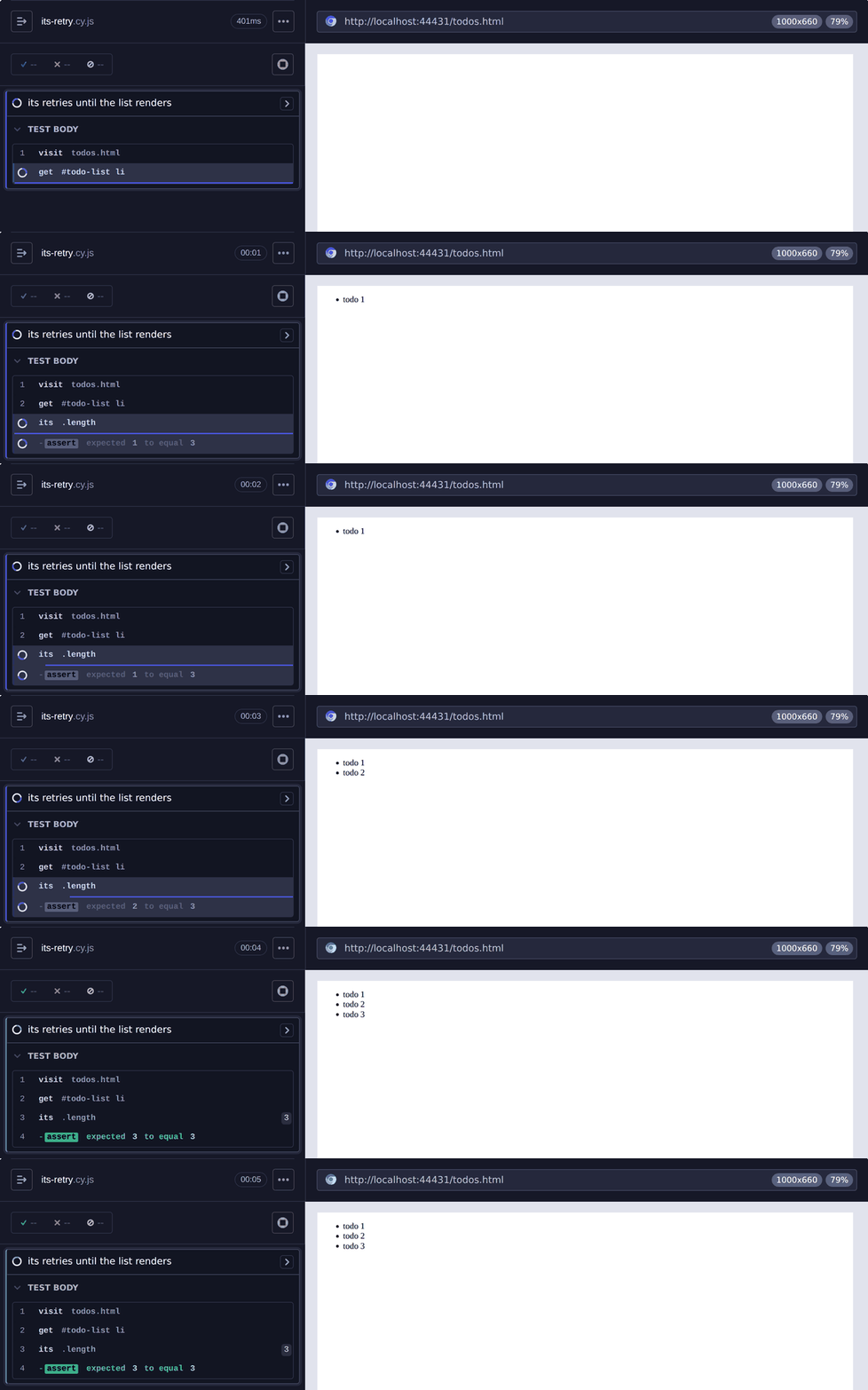
Wait for a list to finish rendering with .its('length')
.its() is a query, so Cypress re-runs cy.get() and
.its() together until the assertion passes. If the app renders its list items
over time, this waits until all three are on the page.
cy.get('#todo-list li').its('length').should('eq', 3)
In the Command Log, .its() and its assertion stay pending while the list
renders, then pass once the third item appears.
Get a property of the DOM element inside the jQuery object
Commands like cy.get() yield a jQuery object. Start the
path with an index to reach the DOM element inside it, then read the element's
own properties, such as the browser's
validity state.
cy.get('#email').type('not-an-email')
cy.get('#email').its('0.validity.valid').should('be.false')
Requests
Get the user object of the response's body
cy.request('/users/1')
  .its('body.user')
  .then((user) => {
    // do something with the user
  })
Alternatively, get the body and destructure it:
cy.request('/users/1')
  .its('body')
  .then(({ user }) => {
    // do something with the user
  })
Intercepted requests
cy.wait() on a cy.intercept()
alias yields the interception, so .its() can reach into its request and
response.
Assert on the status code of an intercepted response
cy.intercept('GET', '/comments').as('getComments')
cy.get('#fetch-comments').click()
cy.wait('@getComments').its('response.statusCode').should('eq', 200)
Assert on the body of an intercepted request
cy.intercept('POST', '/comments').as('postComment')
cy.get('#post-comment').click()
cy.wait('@postComment')
  .its('request.body')
  .should('deep.include', { comment: 'hi' })
Strings
Get length of title
cy.title().its('length').should('eq', 24)
Functions
Get function as property
const fn = () => {
  return 42
}

cy.wrap({ getNum: fn }).its('getNum').should('be.a', 'function')
Access function properties
You can access functions to then drill into their own properties instead of invoking them.
// a basic Factory constructor
function Factory(arg) {
  this.arg = arg
}

Factory.create = (arg) => {
  return new Factory(arg)
}

// assign it to the window
window.Factory = Factory
cy.window() // yields window object
  .its('Factory') // yields Factory function
  .invoke('create', 'arg') // now invoke properties on it
Use .its() to test window.fetch
Application state
Read app state from a store exposed on window
When your app exposes its store on window, .its() and
.invoke() can read that state directly. The whole
chain retries, so the assertion waits for the app to update its state.
// expose the store only when the app runs inside Cypress
if (window.Cypress) {
  window.store = store
}
cy.window()
  .its('store')
  .invoke('getState')
  .its('cart.items')
  .should('have.length', 2)
Nested properties
You can drill into nested properties by using dot notation.
const user = {
  contacts: {
    work: {
      name: 'Kamil',
    },
  },
}

cy.wrap(user).its('contacts.work.name').should('eq', 'Kamil') // true
Include an array index in the path with a numeric segment or bracket notation.
const order = {
  items: [{ name: 'Apple' }, { name: 'Banana' }],
}

cy.wrap(order).its('items[1].name').should('eq', 'Banana') // true
cy.wrap(order).its('items.1.name').should('eq', 'Banana') // true
Existence
Wait for some property to exist on window
cy.window()
  .its('globalProp')
  .then((globalProp) => {
    // do something now that window.globalProp exists
  })
Assert that a property does not exist on window
cy.window().its('evilProp').should('not.exist')
Assert that a property is null or undefined
.its() normally retries until a property has a value. Chain an assertion that
expects null or undefined, and .its() leaves the decision to that
assertion instead.
cy.wrap({ deletedAt: null }).its('deletedAt').should('be.null')
cy.wrap({ name: 'Jane' }).its('nickname').should('be.undefined')
Wait longer for a property with the timeout option
Pass timeout when a property takes longer to appear than
defaultCommandTimeout allows, such
as a flag an app sets after a slow startup.
cy.window().its('appReady', { timeout: 10000 }).should('be.true')
Notes
Choosing between .its(), .invoke(), and .then()
All three work with the subject, but they do different jobs:
.its()reads a property. When the property holds a function,.its()yields the function itself without calling it..invoke()calls a function on the subject and yields what it returns..then()runs a callback with the subject, for logic that doesn't fit a single property read or function call.
.its() and .invoke() are queries, so Cypress retries them together with the
queries before them until chained assertions pass. .then() runs its callback
once and is not retried,
so prefer .its() or .invoke() whenever you assert on the value they yield.
Rules
Requirements
.its()requires being chained off a previous command.
Assertions
.its()automatically retries until the property is notnullorundefined, unless the next assertion is one that can pass on those values:not.exist,be.undefined,be.null,not.be.ok,eq, ornot.eq. In that case, the assertion alone decides when.its()passes..its()automatically retries until all chained assertions have passed.
Timeouts
.its()can time out waiting for the property to exist..its()can time out waiting for assertions you've added to pass.
Command Log
Get response.body of an aliased intercept
cy.intercept('/comments', { fixture: 'comments.json' }).as('getComments')
cy.get('#fetch-comments').click()
cy.wait('@getComments')
  .its('response.body')
  .should('deep.eq', [
    { id: 1, comment: 'hi' },
    { id: 2, comment: 'there' },
  ])
The commands above display in the Command Log as:
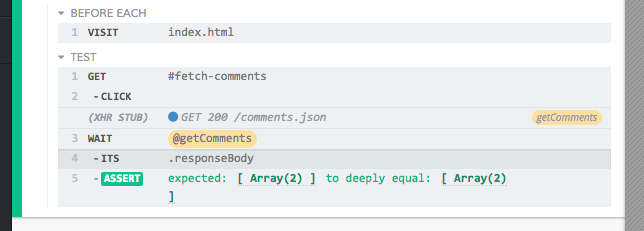
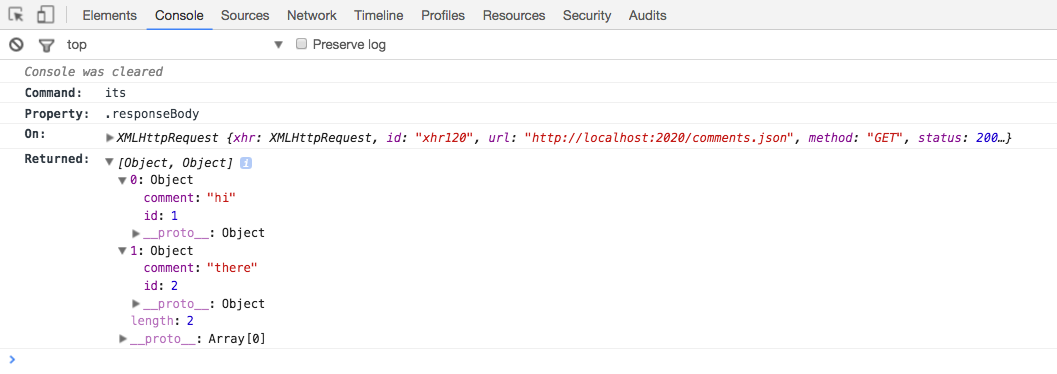
Clicking its in the Command Log prints the following to the console:
History
| Version | Changes |
|---|---|
| 12.0.0 | .its() is now a query. Overwrite it with Cypress.Commands.overwriteQuery() rather than Cypress.Commands.overwrite(). |
| 3.8.0 | Added support for options argument |
| 3.7.0 | Added support for arguments of type Number for propertyName |