Cypress.dom
Cypress.dom is a set of helper functions that answer questions about the DOM
the same way Cypress does. Is this element visible? Is it still attached to the
page? Can it receive focus? Cypress's own commands and assertions rely on these
checks, so when you call them yourself, your answer matches the one Cypress
uses. .should('be.visible'), for
example, explains a failure with the message getReasonIsHidden() returns.
Each function takes a value, checks it, and returns the result right away.
Returning right away makes Cypress.dom useful anywhere you already hold an element and need a
true or false to act on:
- Inspect an element's state while you debug a test.
- Assert on a condition no built-in assertion covers, such as whether focus stays inside a dialog.
- Make a custom query or custom command handle different kinds of subjects.
Syntax
Cypress.dom.getReasonIsHidden(element)
Cypress.dom.isAttached(element)
Cypress.dom.isDescendent(element, descendent)
Cypress.dom.isDetached(element)
Cypress.dom.isDocument(obj)
Cypress.dom.isDom(obj)
Cypress.dom.isElement(obj)
Cypress.dom.isFocusable(element)
Cypress.dom.isFocused(element)
Cypress.dom.isHidden(element)
Cypress.dom.isInputType(element, type)
Cypress.dom.isJquery(obj)
Cypress.dom.isScrollable(element)
Cypress.dom.isVisible(element)
Cypress.dom.isWindow(obj)
Cypress.dom.stringify(element)
Cypress.dom.stringify(element, form)
Cypress.dom.unwrap(obj)
Cypress.dom.wrap(obj)
Usage
Correct Usage
cy.get('#email').then(($input) => {
  Cypress.dom.isVisible($input) // true
  Cypress.dom.isFocused($input) // false
})
Incorrect Usage
// Cypress.dom functions are not commands, so they don't chain off cy
cy.get('#email').isVisible()

// They check an element, not a selector, and this call throws
Cypress.dom.isVisible('#email')
Arguments
The functions take the value to check as their first argument. Every function
that checks an element accepts either a DOM element or a jQuery object; the
Accepts column of the Functions table lists what each one takes.
Three functions take a second argument: isDescendent() takes
a descendent,
isInputType() takes a type, and
stringify() takes a form.
element (Element, jQuery)
A DOM element, or a jQuery object that wraps one or more elements. Element
queries such as cy.get() yield a jQuery object, so in a
.then() callback, pass the subject as it is.
obj (any)
Any value. The type checks, such as isElement() and isWindow(), accept
anything and return false for a value that isn't the type they check for.
Return value
Every function except getReasonIsHidden(), stringify(), unwrap(), and
wrap() returns a boolean. None of them yield a subject, so to use a result in
a Cypress chain, call the function inside a callback such as
.then() or .should().
Functions
| Function | Returns… | Accepts |
|---|---|---|
getReasonIsHidden() | why Cypress considers an element hidden | element, jQuery |
isAttached() | whether an element is attached to the page | element, jQuery |
isDescendent() | whether one element is inside another | element, jQuery |
isDetached() | whether an element is no longer attached to the page | element, jQuery |
isDocument() | whether a value is a document | any value |
isDom() | whether a value is an element, document, or window | any value |
isElement() | whether a value is a DOM element | any value |
isFocusable() | whether an element can receive focus | element, jQuery |
isFocused() | whether an element has focus | element, jQuery |
isHidden() | whether Cypress considers an element hidden | element, jQuery |
isInputType() | whether an <input> or <button> has a given type | element, jQuery |
isJquery() | whether a value is a jQuery object | any value |
isScrollable() | whether an element or the window can scroll | element, jQuery, window |
isVisible() | whether Cypress considers an element visible | element, jQuery |
isWindow() | whether a value is a window | any value |
stringify() | a short HTML string that describes an element | element, jQuery, window, document |
unwrap() | the DOM elements inside a jQuery object, as an array | any value |
wrap() | a jQuery object that wraps the value | element, HTML |
getReasonIsHidden()
Cypress.dom.getReasonIsHidden(element)
Returns a sentence that explains why Cypress considers an element hidden. The sentence is
the reason that follows a failed .should('be.visible') assertion, so you can
read it without failing the test.
- The reason follows your
visibilityStrategy. Under the default'modern'strategy, it names the computeddisplay,visibility,opacity, andcontent-visibilityvalues, or the element's size when it has no width or height. - For a visible element, it returns a sentence that doesn't name a cause, such
as
This element `<button#place-order>` is not visible.CheckisHidden()first.
For a <button id="place-order"> with display: none, it returns:
This element `<button#place-order>` is not visible per `Element.checkVisibility()`. Computed: `display: none`, `visibility: visible`, `opacity: 1`, `content-visibility: visible`.
Used in: Inspect an element's state while debugging a test
isAttached()
Cypress.dom.isAttached(element)
Returns true when the element is attached to a page with an active window.
isAttached() is the check behind Cypress's
detached element
errors.
- For a jQuery object,
isAttached()returnstrueonly when every element in it is attached, andfalsefor an empty jQuery object. - A
windowordocumentcounts as attached.
Used in: Inspect an element's state while debugging a test
isDescendent()
Cypress.dom.isDescendent(element, descendent)
Returns true when descendent is inside element, at any depth.
descendent (Element, jQuery)
The element to look for inside element.
- Each argument can be a DOM element or a jQuery object. For a jQuery object,
isDescendent()compares the first element in it. isDescendent()returnsfalsewhendescendentis missing.- An element counts as its own descendent, so passing the same element twice
returns
true.
Used in: Check that keyboard focus stays inside a dialog
isDetached()
Cypress.dom.isDetached(element)
Returns true when the element is no longer attached to the page, for example
because the app re-rendered it. isDetached() is the opposite of
isAttached(), so an empty jQuery object counts as detached.
Used in: Check whether the app re-rendered an element
isDocument()
Cypress.dom.isDocument(obj)
Returns true when the value is a document, such as the one
cy.document() yields, or a jQuery object that wraps
one.
- A document fragment, such as an element's
shadowRoot, also returnstrue.
Used in: Log any subject in a custom command
isDom()
Cypress.dom.isDom(obj)
Returns true when the value is a DOM element, a document, or a window, or
a jQuery object whose first item is one of them. A text node or an HTML string
returns false.
Used in: Log any subject in a custom command
isElement()
Cypress.dom.isElement(obj)
Returns true when the value is a DOM element, or a jQuery object whose first
item is a DOM element. A window, a document, a text node, and an empty
jQuery object return false.
Used in: Log any subject in a custom command
isFocusable()
Cypress.dom.isFocusable(element)
Returns true when the element is a kind that can receive focus: a link or
<area> with an href, an enabled <input>, <select>, <textarea>, or
<button>, an <iframe>, or any element with a tabindex or
contenteditable attribute.
isFocusable()checks the element's type and attributes, not whether it is visible, so an<input>inside adisplay: nonecontainer still returnstrue.isFocusable()countstabindex="-1", which can receive focus from a script but not from the Tab key.
Used in: Inspect an element's state while debugging a test, Check that keyboard focus stays inside a dialog
isFocused()
Cypress.dom.isFocused(element)
Returns true when the element is the document's active element, including
inside a shadow root.
- For a jQuery object,
isFocused()checks the first element. isFocused()returnsfalsefor<body>when nothing else has focus.- In a test,
.should('have.focus')orcy.focused()asserts focus and retries. UseisFocused()when you need the answer in your own logic.
Used in: Inspect an element's state while debugging a test
isHidden()
Cypress.dom.isHidden(element)
Returns true when Cypress considers the element hidden, following the
visibility rules of
your
visibilityStrategy.
isHidden() is the opposite of isVisible(); see that entry for the
behavior both share.
When the value isn't a DOM element or a jQuery object, isHidden() throws:
`Cypress.dom.isHidden()` failed because it requires a DOM element. The subject received was: `#email`
Used in: Inspect an element's state while debugging a test
isInputType()
Cypress.dom.isInputType(element, type)
Returns true when the element is an <input> or <button> whose type
matches. Any other element returns false.
type (String, Array)
The type to match, such as 'email', or an array of types, any of which can
match.
isInputType()reads the element'stypeproperty, not its attribute. A browser treats an<input>with an unknowntype, such astype="nickname", astype="text", and so doesisInputType().- For a jQuery object,
isInputType()checks the first element.
Used in: Fill in each field of a form by its input type
isJquery()
Cypress.dom.isJquery(obj)
Returns true when the value is a jQuery object, such as the subject an element
query yields. isJquery() checks the object itself, so it also recognizes jQuery objects
created by a different copy of jQuery, such as your app's.
Used in: Log any subject in a custom command
isScrollable()
Cypress.dom.isScrollable(element)
Returns true when the element's content overflows it and its overflow is
scroll or auto, so the element can scroll. isScrollable() is the check
.scrollTo() runs before it scrolls an element.
- For a jQuery object,
isScrollable()checks the first element. - For a
window, or for the<html>element,isScrollable()returnstruewhen the page is taller or wider than the window.
Used in: Inspect an element's state while debugging a test, Scroll a container only when its content overflows
isVisible()
Cypress.dom.isVisible(element)
Returns true when Cypress considers the element visible, following the
visibility rules of
your
visibilityStrategy.
isVisible() is the opposite of isHidden().
isVisible()treats an element withopacity: 0as hidden. The actionability checks that run before Cypress clicks or types ignore opacity, so an element can be hidden by this check and still be actionable.- Under the default
'modern'strategy, a jQuery object with several elements counts as visible only when every element in it is visible. isVisible()checks the element's state at the moment you call it and doesn't retry.
When the value isn't a DOM element or a jQuery object, isVisible() throws:
`Cypress.dom.isVisible()` failed because it requires a DOM element. The subject received was: `#email`
Used in: Inspect an element's state while debugging a test, Dismiss an optional banner only when it is visible
isWindow()
Cypress.dom.isWindow(obj)
Returns true when the value is a window, such as the one
cy.window() yields, or a jQuery object that wraps
one.
Used in: Log any subject in a custom command
stringify()
Cypress.dom.stringify(element, form)
Returns a string that describes the element, the format Cypress uses in its Command Log and error messages.
form (String)
'long' (the default) or 'short'. Any other value throws.
form | Returns | Example |
|---|---|---|
'long' | the element's opening and closing tags, with its text cut to 10 characters | <p id="intro">Hello w...</p> |
'short' | the tag name with its id and classes | <p#intro.lead> |
- For a jQuery object with several elements,
'short'describes the first and counts the rest, as in[ <li.item>, 2 more... ]. - A
windowreturns<window>and adocumentreturns<document>.
Used in: Inspect an element's state while debugging a test, Log any subject in a custom command
unwrap()
Cypress.dom.unwrap(obj)
Returns the DOM elements inside a jQuery object as an array, even when it holds a single element. Any other value comes back unchanged.
Used in: Log any subject in a custom command
wrap()
Cypress.dom.wrap(obj)
Returns a jQuery object that wraps the value, the same as calling
Cypress.$ with it. Use it when you hold a DOM element and
need jQuery methods on it, such as .find() or .attr().
- A selector string searches the spec's document, not your app's, so it finds
nothing on the page you visited. To find elements in your app, use
cy.$$or a query such ascy.get().
Examples
Inspect an element's state while debugging a test
When a command fails on an element and the error doesn't explain why, log the checks Cypress runs. This example prints a table of them to the browser's DevTools console, followed by the reason when the element is hidden:
cy.get('#place-order').then(($button) => {
  console.table({
    element: Cypress.dom.stringify($button, 'short'),
    attached: Cypress.dom.isAttached($button),
    visible: Cypress.dom.isVisible($button),
    focusable: Cypress.dom.isFocusable($button),
    focused: Cypress.dom.isFocused($button),
    scrollable: Cypress.dom.isScrollable($button),
  })

  if (Cypress.dom.isHidden($button)) {
    console.log(Cypress.dom.getReasonIsHidden($button))
  }
})
For a button with display: none, the console shows visible as false and
names the computed style that hides it:
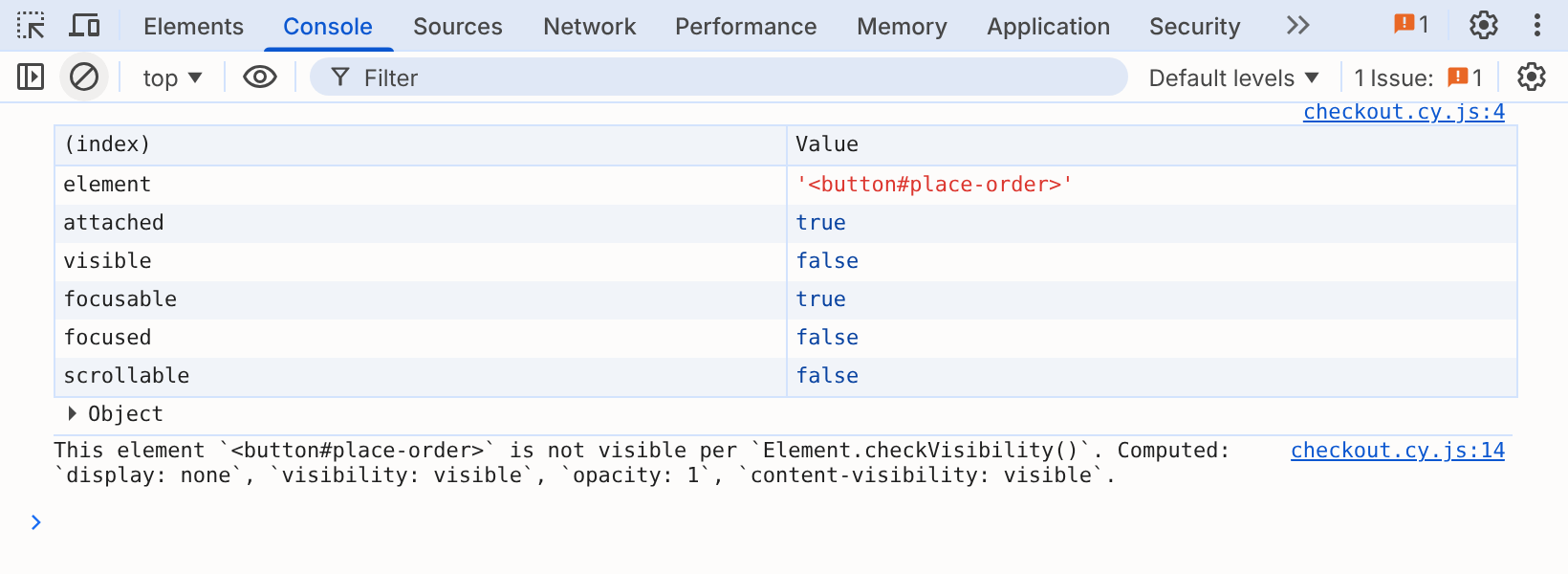
cy.get() waits only for the element to exist, so the
callback runs as soon as the button is in the DOM, whether or not it is
visible.
Dismiss an optional banner only when it is visible
Some apps show a banner on some visits and not others, such as a promotion that appears on a schedule. When the test can't control whether it shows, check for it and dismiss it only when it's there:
cy.get('body').then(($body) => {
  const $banner = $body.find('#promo-banner')

  if ($banner.length && Cypress.dom.isVisible($banner)) {
    cy.wrap($banner).find('button.dismiss').click()
  }
})

cy.contains('h1', 'Welcome').should('be.visible')
The check runs once, when the callback runs, and doesn't retry. The check misses a banner that appears a moment later, and the test carries on without dismissing it. When you can, control the banner from the test instead, for example with a cookie or a stubbed response. The conditional testing guide covers the alternatives.
Check whether the app re-rendered an element
Some apps update an element in place, and others replace it with a new one. To test that an action replaces the element, hold on to the original and check that it detaches:
cy.get('#cart-total').then(($oldTotal) => {
  cy.get('#add-to-cart').click()

  cy.get('#cart-total').should(($newTotal) => {
    expect(Cypress.dom.isDetached($oldTotal)).to.be.true
    expect($newTotal).to.have.text('$20.00')
  })
})
.should() retries the callback, and
cy.get() queries the page again on each retry, so the
assertion passes once the old element has detached and the new one shows the
updated total.
Scroll a container only when its content overflows
.scrollTo() fails on an element that can't scroll.
When the amount of content varies, such as an activity feed, scroll only when
there is somewhere to scroll to:
cy.get('#activity-feed').then(($feed) => {
  if (Cypress.dom.isScrollable($feed)) {
    cy.wrap($feed).scrollTo('bottom')
  }
})
Fill in each field of a form by its input type
To fill in a form whose fields change, such as a sign-up form behind a feature flag, iterate over its inputs and choose a value by type:
cy.get('#signup input').each(($input) => {
  if (Cypress.dom.isInputType($input, 'email')) {
    cy.wrap($input).type('jane@example.com')
  } else if (Cypress.dom.isInputType($input, ['text', 'search'])) {
    cy.wrap($input).type('Jane')
  }
})
The test leaves inputs of other types, such as checkboxes, as they are. An input with
an unknown type counts as text, the same way the browser treats it, so it
gets 'Jane'.
Check that keyboard focus stays inside a dialog
An accessible modal dialog traps focus: pressing Tab on its last control moves focus back to its first, rather than to the page behind it. This test counts the dialog's focusable elements, presses Tab once more than that, and checks that focus never leaves the dialog:
cy.get('#open-settings').click()

cy.get('[role="dialog"]').then(($dialog) => {
  const $focusable = $dialog
    .find('*')
    .filter((_, el) => Cypress.dom.isFocusable(el))

  // Press Tab once more than there are focusable elements,
  // so focus has to wrap around to the start
  for (let i = 0; i <= $focusable.length; i++) {
    cy.press(Cypress.Keyboard.Keys.TAB)
    cy.focused().should(($focused) => {
      expect(Cypress.dom.isDescendent($dialog, $focused)).to.be.true
    })
  }
})
If focus moves outside the dialog, the assertion fails. isFocusable() doesn't
check visibility, so if the dialog holds hidden controls, filter them out with
isVisible() before you count.
Log any subject in a custom command
A custom command that accepts any subject can use the type checks to describe
what it received. The .logSubject() command below writes the subject to the
Command Log in the same short format Cypress uses, and lists its type and its
elements when you click the log entry:
- JavaScript
- TypeScript
const describeType = (subject) => {
  if (Cypress.dom.isWindow(subject)) return 'window'
  if (Cypress.dom.isDocument(subject)) return 'document'
  if (Cypress.dom.isElement(subject)) return 'element'

  return typeof subject
}

Cypress.Commands.add('logSubject', { prevSubject: true }, (subject) => {
  Cypress.log({
    name: 'logSubject',
    message: Cypress.dom.isDom(subject)
      ? Cypress.dom.stringify(subject, 'short')
      : String(subject),
    consoleProps: () => ({
      Type: describeType(subject),
      Elements: Cypress.dom.isJquery(subject)
        ? Cypress.dom.unwrap(subject)
        : subject,
    }),
  })

  return subject
})
export {}
declare global {
  namespace Cypress {
    interface Chainable<Subject> {
      logSubject(): Chainable<Subject>
    }
  }
}

const describeType = (subject: unknown) => {
  if (Cypress.dom.isWindow(subject)) return 'window'
  if (Cypress.dom.isDocument(subject)) return 'document'
  if (Cypress.dom.isElement(subject)) return 'element'

  return typeof subject
}

Cypress.Commands.add('logSubject', { prevSubject: true }, (subject) => {
  Cypress.log({
    name: 'logSubject',
    message: Cypress.dom.isDom(subject)
      ? Cypress.dom.stringify(subject, 'short')
      : String(subject),
    consoleProps: () => ({
      Type: describeType(subject),
      Elements: Cypress.dom.isJquery(subject)
        ? Cypress.dom.unwrap(subject)
        : subject,
    }),
  })

  return subject
})

export {}
Chain it off any command that yields a subject:
cy.get('#signup input').logSubject()
cy.document().logSubject()
cy.title().logSubject()
The Command Log shows [ <input#name>, 4 more... ] for the five inputs,
<document> for the document, and the page title as plain text:
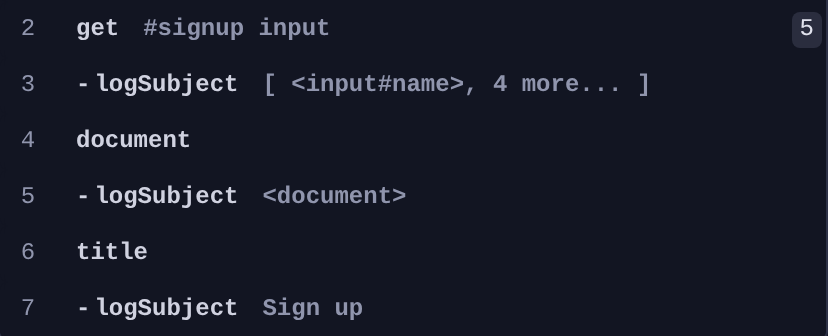
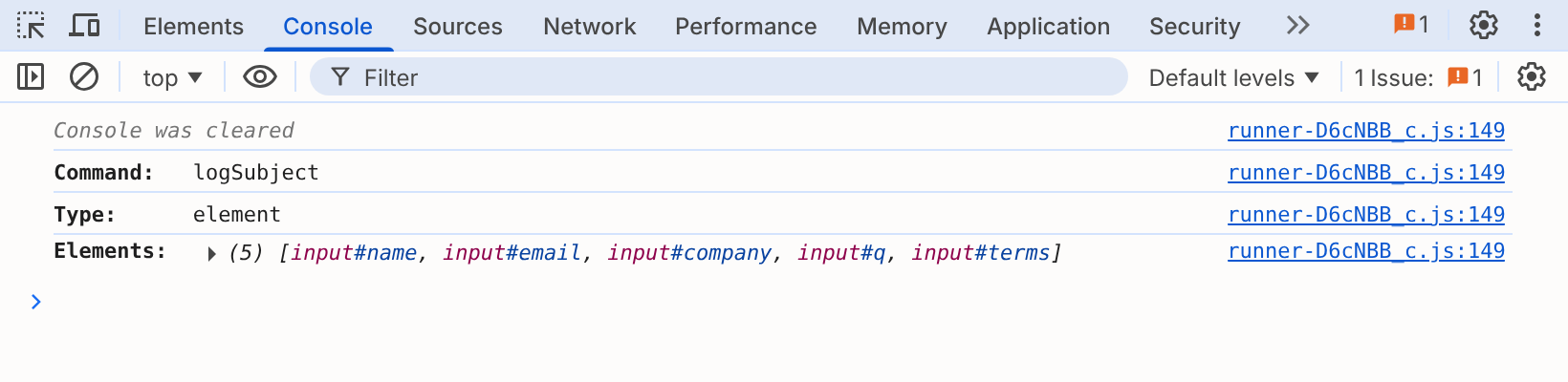
Clicking the first logSubject row prints its type and all five inputs to the
DevTools console:
Notes
Cypress.dom checks don't retry on their own
Each function checks the DOM once, at the moment you call it. In a
.then() callback, the result can be out of date by the
time the next command runs. To wait for a condition, call the function inside a
.should() callback or a
custom query, which Cypress retries until it
passes or times out.
Cypress.dom compared with Cypress.ensure and assertions
- An assertion such as
.should('be.visible')checks state in a test, and retries. Cypress.ensurethrows a Cypress error when a subject fails a check, for validating the subject of a custom query or command.Cypress.domreturns the answer and leaves what to do with it to you.
History
| Version | Changes |
|---|---|
| 16.2.1 | getReasonIsHidden(), isDescendent(), isFocusable(), isFocused(), and isScrollable() accept either a DOM element or a jQuery object |
| 16.0.0 | isVisible(), isHidden(), and getReasonIsHidden() follow the visibilityStrategy, which defaults to 'modern' |
| 6.2.1 | isJquery() always returns a boolean |
| 0.20.0 | Renamed Cypress.Dom to Cypress.dom |
See also
Cypress.ensure- checks that throw a Cypress error instead of returning a boolean- Custom Queries - retry a
Cypress.domcheck until it passes - Interacting with Elements - the visibility and actionability rules behind these checks
Cypress.$