focused
Get the DOM element that is currently focused.
Syntax
cy.focused()
cy.focused(options)
Usage
Correct Usage
cy.focused() // Yields the element currently in focus
Arguments
options (Object)
Pass in an options object to change the default behavior of cy.focused().
| Option | Default | Description |
|---|---|---|
log | true | Displays the command in the Command log |
timeout | defaultCommandTimeout | Time to wait for cy.focused() to resolve before timing out |
Yields
cy.focused()yields the DOM element that currently has focus.- When no element has focus,
cy.focused()yields an empty jQuery object. Its implicit assertion then fails unless you assert that the element does not exist. cy.focused()is a query, and it is safe to chain further commands.
Examples
No Args
Get the element that is focused
cy.focused().then(($el) => {
  // do something with $el
})
Blur the element with focus
cy.focused().blur()
Make an assertion on the focused element
cy.focused().should('have.attr', 'name', 'username')
Assert that no element has focus
cy.focused().should('not.exist')
Check which element has focus on page load
cy.visit('/login')
cy.focused().should('have.attr', 'name', 'username')
Act on the element that has focus
When your app moves focus for you, such as a one-time code input that advances
to the next box, chain the next command off cy.focused() instead of querying
the element yourself.
cy.get('[data-cy="otp-1"]').type('4')
cy.focused().should('have.attr', 'data-cy', 'otp-2').type('2')
Keyboard and focus management
Move focus with the Tab key
cy.press() dispatches real keyboard events, so the
browser moves focus the same way it does for a keyboard user.
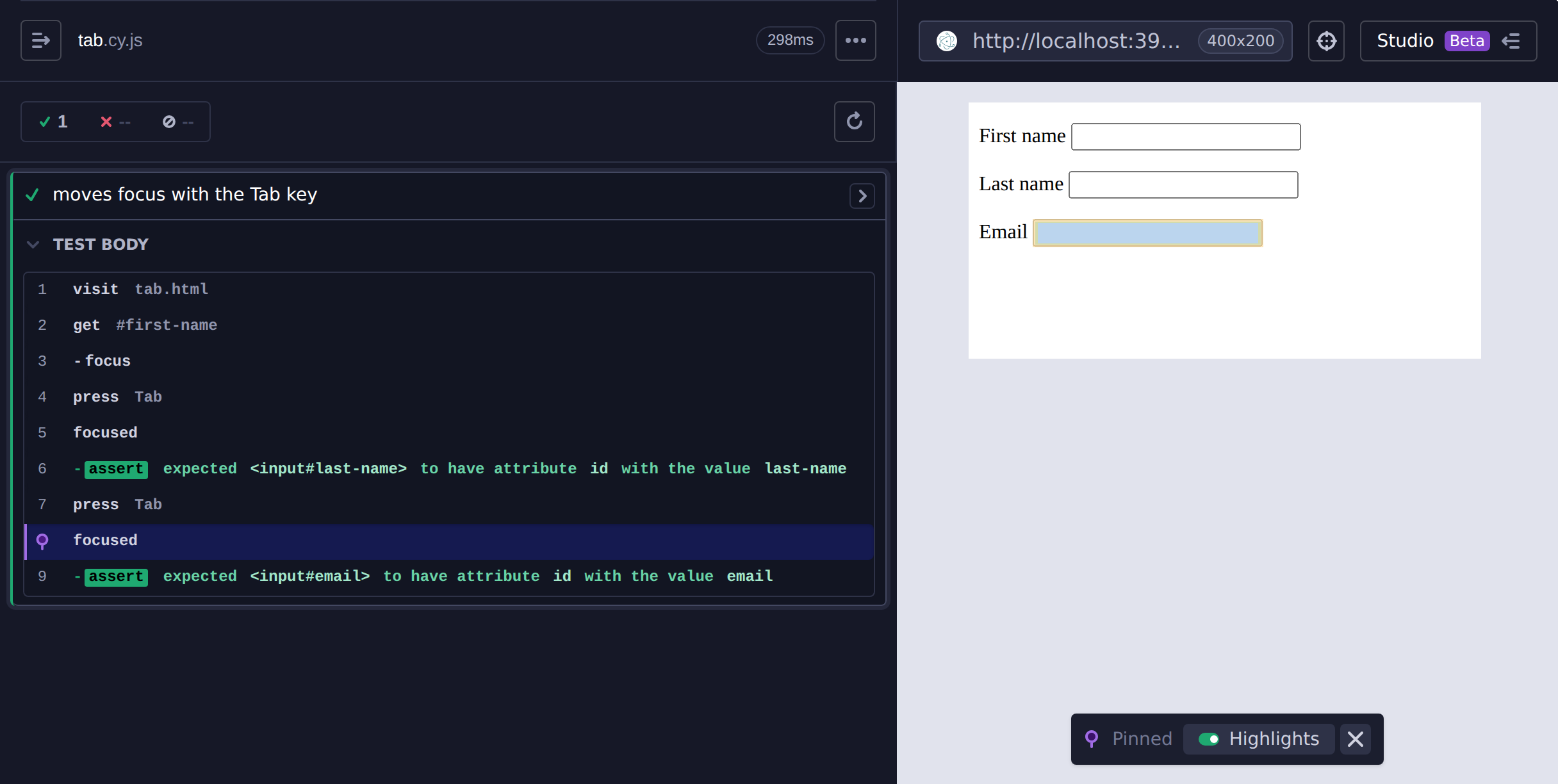
cy.get('#first-name').focus()
cy.press(Cypress.Keyboard.Keys.TAB)
cy.focused().should('have.attr', 'id', 'last-name')
cy.press(Cypress.Keyboard.Keys.TAB)
cy.focused().should('have.attr', 'id', 'email')
Click a focused row in the Command Log to pin its snapshot. Cypress
highlights the element that had focus at that step, which shows where each Tab
press moved focus:
Move focus with the arrow keys
Tabs, menus, and toolbars often move focus with the arrow keys instead of Tab. Assert where focus lands after each key press.
cy.get('[role="tab"]').first().focus()
cy.press(Cypress.Keyboard.Keys.RIGHT)
cy.focused().should('have.attr', 'aria-controls', 'panel-2')
Check that a skip link receives focus first
cy.visit('/')
cy.press(Cypress.Keyboard.Keys.TAB)
cy.focused().should('contain', 'Skip to main content')
Return focus to the trigger when a dialog closes
cy.get('[data-cy="open-settings"]').click()
cy.press(Cypress.Keyboard.Keys.ESC)
cy.focused().should('have.attr', 'data-cy', 'open-settings')
Keep focus inside a dialog
A modal dialog traps focus, so pressing Tab on its last control wraps back to its first control instead of reaching the page behind it.
cy.get('[role="dialog"]').find('button').last().focus()
cy.press(Cypress.Keyboard.Keys.TAB)
cy.focused().should('have.attr', 'data-cy', 'dialog-first-field')
Move focus to the first invalid field
If your app moves focus to the first invalid field when a form fails validation, assert where focus lands after submitting.
cy.get('form').submit()
cy.focused().should('have.attr', 'name', 'email')
Options
Wait for focus that moves after a delay
When focus moves after an animation or a network request, pass a longer
timeout. It applies to cy.focused() and the assertions chained to it.
cy.get('[data-cy="load-more"]').click()
cy.focused({ timeout: 10000 }).should('have.attr', 'data-cy', 'first-new-item')
Shadow DOM and iframes
Get a focused element inside a shadow DOM
cy.get('my-search').shadow().find('input').focus()
cy.focused().should('have.attr', 'type', 'search')
Get the iframe that holds focus
When focus is inside an iframe, cy.focused() yields the <iframe> element.
cy.get('iframe#card-form').its('0.contentDocument.body').find('input').focus()
cy.focused().should('match', 'iframe#card-form')
Notes
Nothing focused
When no element has focus, the browser reports the document's <body> as the
active element. cy.focused() doesn't treat <body> as focused, so it yields
nothing and retries until an element receives focus or the command times out.
To assert that nothing has focus, chain .should('not.exist'). The exception
is a <body> with contenteditable, which cy.focused() yields.
Shadow DOM
When the focused element is inside an open shadow root, cy.focused() yields
that element rather than its shadow host. This does not require the
includeShadowDom option.
Iframes
cy.focused() reads the activeElement of the application's top-level
document. It follows shadow roots, but it doesn't look inside iframes, so when
focus is inside an iframe it yields the <iframe> element. See
Get the iframe that holds focus.
Scope of cy.focused()
cy.focused() always searches the whole document. It ignores the subject it is
chained from and the scope set by .within().
Assert focus on a known element
cy.focused() answers "which element has focus?" When you already know which
element should have focus, assert on that element directly with the focus
assertion:
cy.get('#email').should('have.focus')
Rules
Requirements
cy.focused()requires being chained off ofcy.
Assertions
cy.focused()automatically retries until the element exists in the DOM.cy.focused()automatically retries until all chained assertions have passed.
Timeouts
cy.focused()can time out waiting for the element to exist in the DOM.cy.focused()can time out waiting for assertions you've added to pass.
Command Log
Make an assertion on the focused element
cy.focused().should('have.attr', 'name').and('eq', 'num')
The commands above will display in the Command Log as:

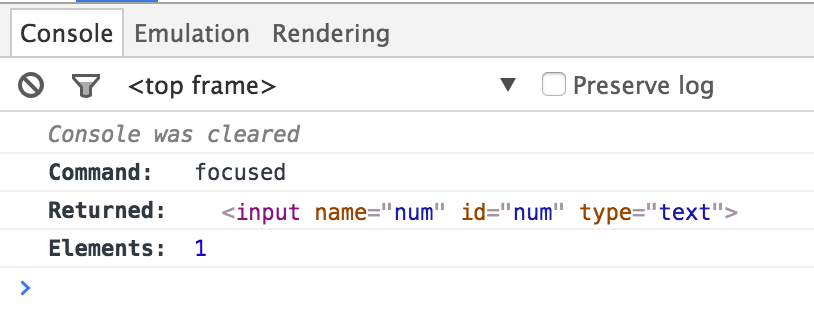
When clicking on the focused command within the command log, the console
outputs the element it yielded (Yielded) and how many elements it found
(Elements):
History
| Version | Changes |
|---|---|
| 13.7.1 | Yields the focused element inside a shadow root |
| 12.0.0 | cy.focused() became a query |
| 0.20.0 | Retries until the element exists in the DOM |