session
Cache and restore cookies,
localStorage,
and
sessionStorage
(together, session data) to recreate a consistent browser context between
tests. Your tests sign in once, and every later call to cy.session() with the
same id restores that sign-in instead of repeating it.
cy.session() follows the
testIsolation setting to decide whether
it clears the page when it creates or restores a session.
Syntax
cy.session(id, setup)
cy.session(id, setup, options)
Usage
Correct Usage
// Caching session when logging in via page visit
cy.session(name, () => {
  cy.visit('/login')
  cy.get('[data-test=name]').type(name)
  cy.get('[data-test=password]').type('s3cr3t')
  cy.get('form').contains('Log In').click()
  cy.url().should('contain', '/login-successful')
})

// Caching session when logging in via API
cy.session(username, () => {
  cy.request({
    method: 'POST',
    url: '/login',
    body: { username, password },
  }).then(({ body }) => {
    window.localStorage.setItem('authToken', body.token)
  })
})
Incorrect Usage
// visiting before calling cy.session() is redundant, it needs to
// be done inside the setup function
cy.visit('/login')
cy.session(name, () => {
  // need to call cy.visit() here because the page is blank when
  // the setup function runs
  cy.get('[data-test=name]').type(name)
  cy.get('[data-test=password]').type('s3cr3t')
  cy.get('form').contains('Log In').click()
  // should assert that login was successful here to guarantee the
  // login process completes before it is cached
})
// should have asserted this inside the cy.session() setup
// function because the page is blank here
cy.url().should('contain', '/login-successful')
Arguments
id (String, Array, Object)
A unique identifier that Cypress uses to cache and restore a given session. A
String is enough in most cases. When you pass an Array or Object, Cypress
generates the id by stringifying the value deterministically. For example,
['Jane', '123', 'admin'] becomes the id ["Jane","123","admin"]. See
Choosing the correct id to cache a session
for examples.
Large data structures are slow to serialize into an identifier, and cyclical ones can fail to serialize at all. Pass only the values that identify the session.
setup (Function)
Cypress calls this function whenever a session for the given id isn't cached
yet, or when the cached session is no longer valid (see the validate option).
After setup and validate run for the first time, Cypress saves all cookies,
localStorage, and sessionStorage. Later calls to cy.session() with the
same id skip setup and only restore and validate the cached session data.
setup starts with cookies, localStorage, and sessionStorage cleared in all
domains, and with a blank page when test isolation is enabled, so visit the page
it needs inside setup. See
When the page and session data are cleared.
options (Object)
| Option | Default | Description |
|---|---|---|
cacheAcrossSpecs | false | When enabled, Cypress treats the newly created session as global, and any spec in the same Cypress run on the same machine can restore it. Use this option for a session that many specs share. |
validate | undefined | Validates the newly created or restored session. Cypress runs it immediately after setup creates the session, or after it clears the page and restores a saved session. See Validating a restored session with validate for what makes a session invalid.- If validation fails immediately after setup, the test fails.- If validation fails after Cypress restores a session, setup runs again. |
Yields
cy.session()yields the session's status as a string:'created'whensetupran for a new session.'restored'when a saved session was restored.'recreated'when a restored session failed validation andsetupran again.
Examples
Caching a session in a login custom command
Wrap the body of your login
custom command in cy.session(). The first
call signs in and caches the session. Later calls with the same username restore
it and check it with validate.
- JavaScript
- TypeScript
Cypress.Commands.add('login', (username, password) => {
  cy.session(
    username,
    () => {
      cy.visit('/login')
      cy.get('[data-test=name]').type(username)
      cy.get('[data-test=password]').type(password)
      cy.get('form').contains('Log In').click()
      cy.url().should('contain', '/login-successful')
    },
    {
      validate() {
        cy.request('/whoami').its('status').should('eq', 200)
      },
    }
  )
})
declare global {
  namespace Cypress {
    interface Chainable {
      login(username: string, password: string): Chainable<void>
    }
  }
}

Cypress.Commands.add('login', (username, password) => {
  cy.session(
    username,
    () => {
      cy.visit('/login')
      cy.get('[data-test=name]').type(username)
      cy.get('[data-test=password]').type(password)
      cy.get('form').contains('Log In').click()
      cy.url().should('contain', '/login-successful')
    },
    {
      validate() {
        cy.request('/whoami').its('status').should('eq', 200)
      },
    }
  )
})
The id is the username alone. Cypress shows the id in the Command Log, so
keep passwords out of it.
Caching a session in a login helper function
The same pattern works in a login helper function:
const login = (name, password) => {
  cy.session(
    name,
    () => {
      cy.visit('/login')
      cy.get('[data-test=name]').type(name)
      cy.get('[data-test=password]').type(password)
      cy.get('#submit').click()
      cy.url().should('contain', '/home')
    },
    {
      validate() {
        // A protected page returns a 4xx status code when the user isn't
        // signed in, which makes cy.visit() fail by default
        cy.visit('/account-details')
      },
    }
  )
}
Asserting on the sign-in response inside setup
cy.session() yields the session's status, not the value your login code
returns, so a test can't assert on the sign-in response after cy.session().
Assert on it inside setup instead:
- JavaScript
- TypeScript
Cypress.Commands.add('loginByApi', (username, password) => {
  cy.session(username, () => {
    cy.request('POST', `/api/login`, {
      username,
      password,
    }).then((response) => {
      expect(response.status).to.eq(200)
    })
  })
})
declare global {
  namespace Cypress {
    interface Chainable {
      loginByApi(username: string, password: string): Chainable<void>
    }
  }
}

Cypress.Commands.add('loginByApi', (username, password) => {
  cy.session(username, () => {
    cy.request('POST', `/api/login`, {
      username,
      password,
    }).then((response) => {
      expect(response.status).to.eq(200)
    })
  })
})
The assertion runs every time setup signs in, so a failed sign-in still fails
the test. On a restore, setup doesn't run, and cy.session() checks the
session with validate instead, if you pass one.
Modifying session data before caching
To change which session data Cypress caches, modify cookies, localStorage, or
sessionStorage in setup.
cy.session('user', () => {
  cy.visit('/login')
  cy.get('[data-test=name]').type('user')
  cy.get('[data-test=password]').type('p4ssw0rd123')
  cy.get('#submit').click()
  cy.url().should('contain', '/home')
  // Remove session data you don't want to cache
  cy.clearCookie('authId')
  cy.window().then((win) => {
    win.localStorage.removeItem('authToken')
  })
  // Add session data you want to cache
  cy.setCookie('session_id', '189jd09sufh33aaiidhf99d09')
})
Using the session status cy.session() yields
cy.session() yields 'created', 'restored', or 'recreated'.
Use it to run work that belongs with setup, such as seeding data for a new
user, only when setup actually ran.
cy.session('admin', loginAsAdmin).then((status) => {
  if (status !== 'restored') {
    cy.task('db:seed:admin')
  }
})
Validating a restored session with validate
The validate function checks that the session is established correctly.
Validation matters most when Cypress restores a cached session: if the session is no longer
valid, cy.session() recreates it by running setup again.
These scenarios mark the session as invalid:
- the
validatefunction throws an exception - the
validatefunction returns a Promise that resolves tofalseor rejects - the
validatefunction contains a failing Cypress command - the
validatefunction returns nothing, or returns a Cypress chain, and its last Cypress command yieldsfalse
Returning false directly from validate, without a Promise, does not mark the
session as invalid.
Here are a few validate examples:
// Attempt to visit a page that only a logged-in user can see
function validateByVisit() {
  cy.visit('/private')
}

// Make an API request that returns a 200 only when logged in
function validateByRequest() {
  cy.request('/api/user').its('status').should('eq', 200)
}

// Run any Cypress command that fails if the user is not logged in
function validateByUrl() {
  cy.visit('/account', { failOnStatusCode: false })
  cy.url().should('match', /\/account$/)
}
Validating a cached session without a network request
A validate function that visits a page or makes a request confirms the server
still accepts the session, at the cost of a round trip on every restore. When
your app keeps its session in a cookie or in storage, checking for that data
directly is quicker.
const login = (name) => {
  cy.session(
    name,
    () => {
      cy.visit('/login')
      cy.get('[data-test=name]').type(name)
      cy.get('[data-test=password]').type('s3cr3t')
      cy.get('form').contains('Log In').click()
      cy.url().should('contain', '/login-successful')
    },
    {
      validate() {
        cy.getCookie('session_id').should('exist')
      },
    }
  )
}
When test isolation is enabled, the application's page is blank while validate
runs after a restore, so cy.window() can't reach its storage. Read storage with
cy.getAllLocalStorage(), which returns it
for every origin. This validate recreates the session once the cached token
expires:
function validate() {
  cy.getAllLocalStorage().then((storage) => {
    const { tokenExpiresAt } = storage['https://app.cypress.io'] ?? {}

    expect(Number(tokenExpiresAt)).to.be.greaterThan(Date.now())
  })
}
These checks confirm that the session data is present. If your server can end a
session on its own, such as when a user logs out in another test, validate with
a request instead so cy.session() catches it.
Switching between cached sessions in one test
cy.session() clears all session data before it creates or restores a session,
so it switches from one user to another without logging the first one out. One
test can then act as two users without a logout step between them.
const login = (name) => {
  cy.session(name, () => {
    cy.request({
      method: 'POST',
      url: '/login',
      body: { name, password: 's3cr3t' },
    }).then(({ body }) => {
      window.localStorage.setItem('authToken', body.token)
    })
  })
}

it('should transfer money between users', () => {
  login('user')
  cy.visit('/transfer')
  cy.get('#amount').type('100.00')
  cy.get('#send-money').click()

  login('other-user')
  cy.visit('/account_balance')
  cy.get('#balance').should('have.text', '100.00')
})
Where to call cy.visit() after cy.session()
Call cy.visit() after logging in, inside each suite's
beforeEach hook.
Organize your tests into suites
by the page they test, so each test loads only the page it needs.
const login = (name) => {
  cy.session(name, () => {
    cy.visit('/login')
    cy.get('[data-test=name]').type(name)
    cy.get('[data-test=password]').type('s3cr3t')
    cy.get('#submit').click()
    cy.url().should('contain', '/home')
  })
}

describe('home page tests', () => {
  beforeEach(() => {
    login('user')
    cy.visit('/home')
  })

  it('should test something on the /home page', () => {
    // assertions
  })

  it('should test something else on the /home page', () => {
    // assertions
  })
})

describe('other page tests', () => {
  beforeEach(() => {
    login('user')
    cy.visit('/other')
  })

  it('should test something on the /other page', () => {
    // assertions
  })
})
Caching a session with test isolation disabled
With testIsolation disabled, Cypress
keeps the page and its session data between tests. Log in once in a before
hook, then visit the page your tests share. The tests that follow pick up where
the previous one left off, so they don't call cy.visit() again.
describe('dashboard', { testIsolation: false }, () => {
  before(() => {
    login('user')
    cy.visit('/dashboard')
  })

  it('shows the signed-in user', () => {
    cy.contains('h1', 'user')
  })

  it('lists recent orders', () => {
    cy.get('[data-test=orders]').should('be.visible')
  })
})
With test isolation disabled, cy.session() doesn't clear the page. After it
creates a session, the browser stays on whatever page setup ends on. Call
login() before cy.visit(), not after, so your tests start on the page you
visited.
Caching a session across specs with cacheAcrossSpecs
To reuse a session across specs in the same Cypress run on the same machine, set
cacheAcrossSpecs: true in the session options. Define the session once, in a
file every spec imports:
export const login = (name = 'user1') => {
  cy.session(
    name,
    () => {
      cy.request({
        method: 'POST',
        url: '/login',
        body: { name, password: 's3cr3t' },
      }).then(({ body }) => {
        window.localStorage.setItem('authToken', body.token)
      })
    },
    {
      validate() {
        cy.visit('/user_profile')
        cy.contains(`Hello ${name}`)
      },
      cacheAcrossSpecs: true,
    }
  )
}
import { login } from '../support/login'

it('can view profile', () => {
  login()
})
import { login } from '../support/login'

it('can create a blog post', () => {
  login()
})
Because every spec imports the same login(), each call with the id user1
passes the same setup and validate. Reusing an id with a different setup
function fails the test, as the second call here does:
cy.session('user1', () => {
  cy.visit('/login')
})

// The same id with a different setup function
cy.session('user1', () => {
  cy.visit('/sso-login')
})
The error names the id to change:
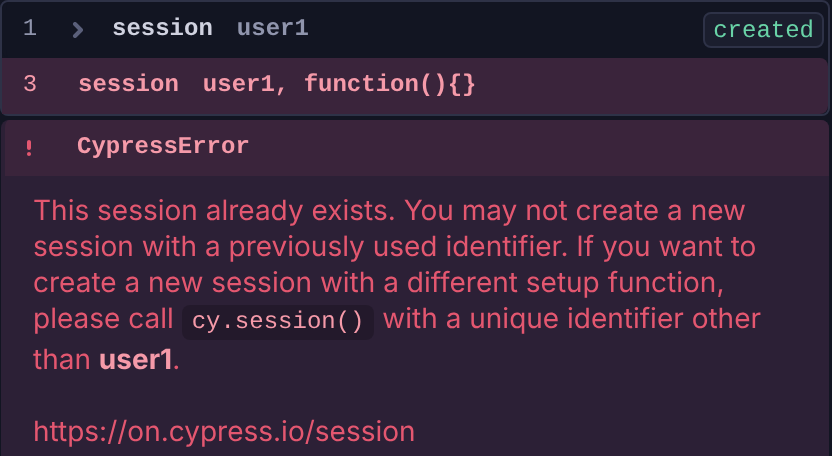
The cross-spec cache lives in memory for a single cypress run on a single
machine. Cypress doesn't write it to disk or share it between machines, so:
- A new
cypress runstarts with an empty cache and runssetupagain. - When specs are split across machines in parallel CI,
setupruns at least once per machine.
In the Instrument Panel, a globe icon marks each session cached across specs.

Caching sessions from multiple login commands
A more complex app can need several login commands, each with its own
cy.session() call. Cypress saves and restores sessions by id, so each
session needs an id of its own.
In this example, loginByForm and loginByApi can create different session
data for the same user. If both used name as the id, cy.session() couldn't
tell the session loginByForm creates for 'user' apart from the one
loginByApi creates. Adding the login method to the id caches each one
separately.
const loginByForm = (name, password) => {
  cy.session(['loginByForm', name], () => {
    cy.visit('/login')
    cy.get('[data-test=name]').type(name)
    cy.get('[data-test=password]').type(password)
    cy.get('#submit').click()
    cy.url().should('contain', '/home')
  })
}

const loginByApi = (name, password) => {
  cy.session(['loginByApi', name], () => {
    cy.request({
      method: 'POST',
      url: '/api/login',
      body: { name, password },
    }).then(({ body }) => {
      window.localStorage.setItem('authToken', body.token)
    })
  })
}
Testing logout without ending a cached session
A test that logs out ends the session on the server, but the copy that
cy.session() cached still holds the old cookies. The next test that restores
it fails validate and runs setup again. Give the logout test a session id
of its own, so the session your other tests share stays valid.
const login = (name, id = name) => {
  cy.session(
    id,
    () => {
      cy.visit('/login')
      cy.get('[data-test=name]').type(name)
      cy.get('[data-test=password]').type('s3cr3t')
      cy.get('form').contains('Log In').click()
      cy.url().should('contain', '/login-successful')
    },
    {
      validate() {
        cy.request('/whoami').its('status').should('eq', 200)
      },
    }
  )
}

it('views the dashboard', () => {
  login('user')
  cy.visit('/dashboard')
  cy.contains('h1', 'Dashboard')
})

it('logs out', () => {
  // a separate session, so logging out doesn't end the shared one
  login('user', 'user-logout')
  cy.visit('/dashboard')
  cy.contains('button', 'Log out').click()
  cy.request({ url: '/whoami', failOnStatusCode: false })
    .its('status')
    .should('eq', 401)
})
To test what a signed-out user sees without logging out on the server, clear the browser's session data instead. Clearing that data leaves the cached session as it is.
it('redirects a signed-out user to the login page', () => {
  login('user')
  cy.then(Cypress.session.clearCurrentSessionData)
  cy.visit('/dashboard')
  cy.url().should('contain', '/login')
})
Restoring a session across domains
cy.session() caches cookies, localStorage, and sessionStorage for every
domain, so your tests can move between domains and still restore the same
session. Visit the login page by its full URL inside setup, rather than
visiting the domain before you call cy.session(). cy.session() clears the
page before setup runs, and a relative URL in cy.visit() resolves against
your baseUrl, not the page you visited
earlier.
const login = (name) => {
  cy.session(
    name,
    () => {
      cy.visit('https://app.cypress.io/login')
      cy.get('[data-test=name]').type(name)
      cy.get('[data-test=password]').type('s3cr3t')
      cy.get('form').contains('Log In').click()
      cy.url().should('contain', '/login-successful')
    },
    {
      validate() {
        cy.request('https://app.cypress.io/whoami')
          .its('status')
          .should('eq', 200)
      },
    }
  )
}

it('signs in on app.cypress.io', () => {
  login('bob')
  cy.visit('https://app.cypress.io/dashboard')
  // do things on app.cypress.io
})

it('visits www.cypress.io without the session', () => {
  cy.visit('https://www.cypress.io')
  // do things on www.cypress.io
})

it('restores the session on app.cypress.io', () => {
  // restores bob's app.cypress.io cookies without logging in again
  login('bob')
  cy.visit('https://app.cypress.io/dashboard')
  // do things on app.cypress.io
})
Logging in through an identity provider with cy.origin()
When your app signs users in through an identity provider on another domain,
call cy.origin() inside setup. cy.session() caches
the cookies and storage for both domains, so a restored session skips the
identity provider entirely.
const login = (name) => {
  cy.session(
    name,
    () => {
      cy.visit('https://app.cypress.io/login')
      cy.contains('button', 'Sign in with SSO').click()

      cy.origin('https://auth.cypress.io', { args: { name } }, ({ name }) => {
        cy.get('[data-test=name]').type(name)
        cy.get('[data-test=password]').type('s3cr3t')
        cy.get('form').contains('Log In').click()
      })

      cy.url().should('eq', 'https://app.cypress.io/dashboard')
    },
    {
      validate() {
        cy.request('https://app.cypress.io/whoami')
          .its('status')
          .should('eq', 200)
      },
    }
  )
}
You can't call cy.session() inside the cy.origin() callback, so keep the
cy.origin() call inside setup. For provider-specific walkthroughs, see the
guides for Auth0,
Okta, and
Azure Active Directory.
Notes
When the page and session data are cleared
Every call to cy.session() creates, restores, or recreates the session, and
yields the status that names the path it took:
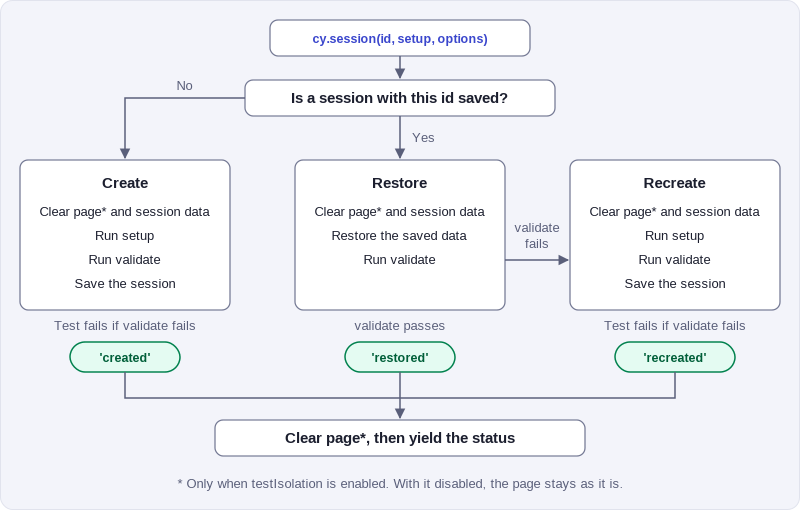
The testIsolation setting decides whether Cypress also clears the page:
| What Cypress clears | Test isolation enabled | Test isolation disabled |
|---|---|---|
The page, before setup or a restore and again when cy.session() ends | ||
Session data, before setup or a restore |
Clearing with test isolation enabled in cy.session()
Clearing the page as well as the session data makes cy.session() behave the
same whether it creates or restores a session, and it switches sessions without
logging out first. Call cy.visit() after
cy.session() to load the page you want to test.
Clearing with test isolation disabled in cy.session()
Cypress clears the session data but doesn't clear the page. After cy.session(),
the browser shows the page setup ended on, or, after a restore, the page that
was open before the call. Call cy.visit() afterward when a test needs a
specific page. Disabling test isolation can make end-to-end
tests faster, but each test inherits the browser state the previous one left
behind, and a test can behave differently when you run it alone with .only().
Write each test so it doesn't depend on the one before it, and set up your
session in a before hook or in the first test.
How long Cypress keeps a cached session
Cypress keeps a session for a given id for the rest of the spec file. You
can't change a session once it's cached, but you can create a new session with a
different id.
In cypress open, Cypress also keeps sessions when you rerun the spec file, so
you don't wait for setup on every rerun.
To keep a session across specs, set cacheAcrossSpecs to true.
Clearing saved sessions while you develop
In cypress open, click Clear All Sessions in the
Instrument Panel to clear all spec and global sessions
and rerun the spec file.
To clear all spec and global sessions from code while you debug, call
Cypress.session.clearAllSavedSessions().
Where to call cy.session()
You can call cy.session() directly in a test or beforeEach, but we recommend
calling it inside a login custom command or
reusable helper function. See the
Caching a session in a login custom command
and
Caching a session in a login helper function
examples for more details.
Choosing the correct id to cache a session
For Cypress to cache sessions separately, each session needs its own
id. Cypress shows the id in the Command Log, so we recommend
keeping sensitive data such as passwords and tokens out of it.
// If your session setup code uses a string variable, pass in the
// string as the id
const loginByName = (name) => {
  cy.session(name, () => {
    loginWith(name)
  })
}

// If your session setup code uses a single object, pass in the
// object as the id, and Cypress serializes it into an identifier
const loginWithParams = (params = {}) => {
  cy.session(params, () => {
    loginWith(params)
  })
}

// If your session setup code uses multiple variables, pass in an
// array of those variables, and Cypress serializes it into an
// identifier
const loginWithVariables = (name, email, params = {}) => {
  cy.session([name, email, params], () => {
    loginWith(name, email, params)
  })
}
Build the id from every value in setup that can change between sessions.
Setting the id to [name, role] caches a separate session for each name and
role, and leaves the password out.
const login = (name, role, password) => {
  cy.session([name, role], () => {
    cy.visit('/login')
    cy.get('[data-test=name]').type(name)
    cy.get('[data-test=role]').select(role)
    cy.get('[data-test=password]').type(password)
    cy.get('#submit').click()
  })
}
Keep the id the same for every call that should get the same session. A value
that changes on every call, such as a random id from a package like uuid,
never matches a saved session, so setup runs every time.
Common questions about cy.session()
Why are all my Cypress commands failing after calling cy.session()?
When testIsolation is enabled, call
cy.visit() after cy.session(). Otherwise your tests
run on a blank page.
Why am I seeing 401 errors after calling cy.session()?
Your session might not be valid, or it might not have been fully established
before Cypress saved it. Add a validate function so cy.session() can check
the session and recreate it when needed.
Rules
Requirements
cy.session()requires being chained off ofcy.cy.session()runs only in end-to-end tests. In a component test, the Cypress mount adapters make it throwcy.session from a component spec is not allowed.cy.session()can't be called inside acy.origin()callback. Call it outside of the callback instead.
Timeouts
cy.session()has notimeoutoption.cy.session()runs for as long as the commands insetupandvalidaterun, and each of those commands uses its own timeout.- If
setuporvalidatereturns a Promise,cy.session()waits up to 20 seconds for it to settle, then fails the test.
Command Log
The Instrument Panel
When a test creates or restores a session, Cypress shows a Sessions panel at the top of the test, alongside the other instrument panels.
Clicking Clear All Sessions clears all saved spec and global
sessions and reruns the spec file (see
How long Cypress keeps a cached session). A globe icon marks a
session cached across specs with cacheAcrossSpecs.
Session status in the Command Log
The images in this section come from running this login() function, with
baseUrl set to https://app.cypress.io, in three tests. The first test
creates the session and the second restores it. The third logs out, which ends
the session on the server, so the next restore fails validate and Cypress
recreates the session. validate passes failOnStatusCode: false so a failed
check reports the status code, 401, rather than the full request.
const login = (name) => {
  cy.session(
    name,
    () => {
      cy.visit('/login')
      cy.get('[data-test=name]').type(name)
      cy.get('[data-test=password]').type('s3cr3t')
      cy.get('form').contains('Log In').click()
      cy.url().should('contain', '/login-successful')
    },
    {
      validate() {
        cy.request({ url: '/whoami', failOnStatusCode: false })
          .its('status')
          .should('eq', 200)
      },
    }
  )
}

it('creates a session', () => {
  login('user')
})

it('restores the session', () => {
  login('user')
})

it('recreates the session after logging out', () => {
  login('user')
  cy.visit('/dashboard')
  cy.contains('button', 'Log out').click()
  cy.url().should('contain', '/login')
  login('user')
})
Whenever you call cy.session(), the Command Log shows one of the following
lines, with the session id and the status of the call:
-
No saved session exists, so Cypress creates and saves a new session:

-
Cypress finds a saved session and restores it:

-
Cypress finds a saved session, but
validatefails, so Cypress recreates and saves the session:
If validate fails immediately after setup creates the session, the test fails
with an error.
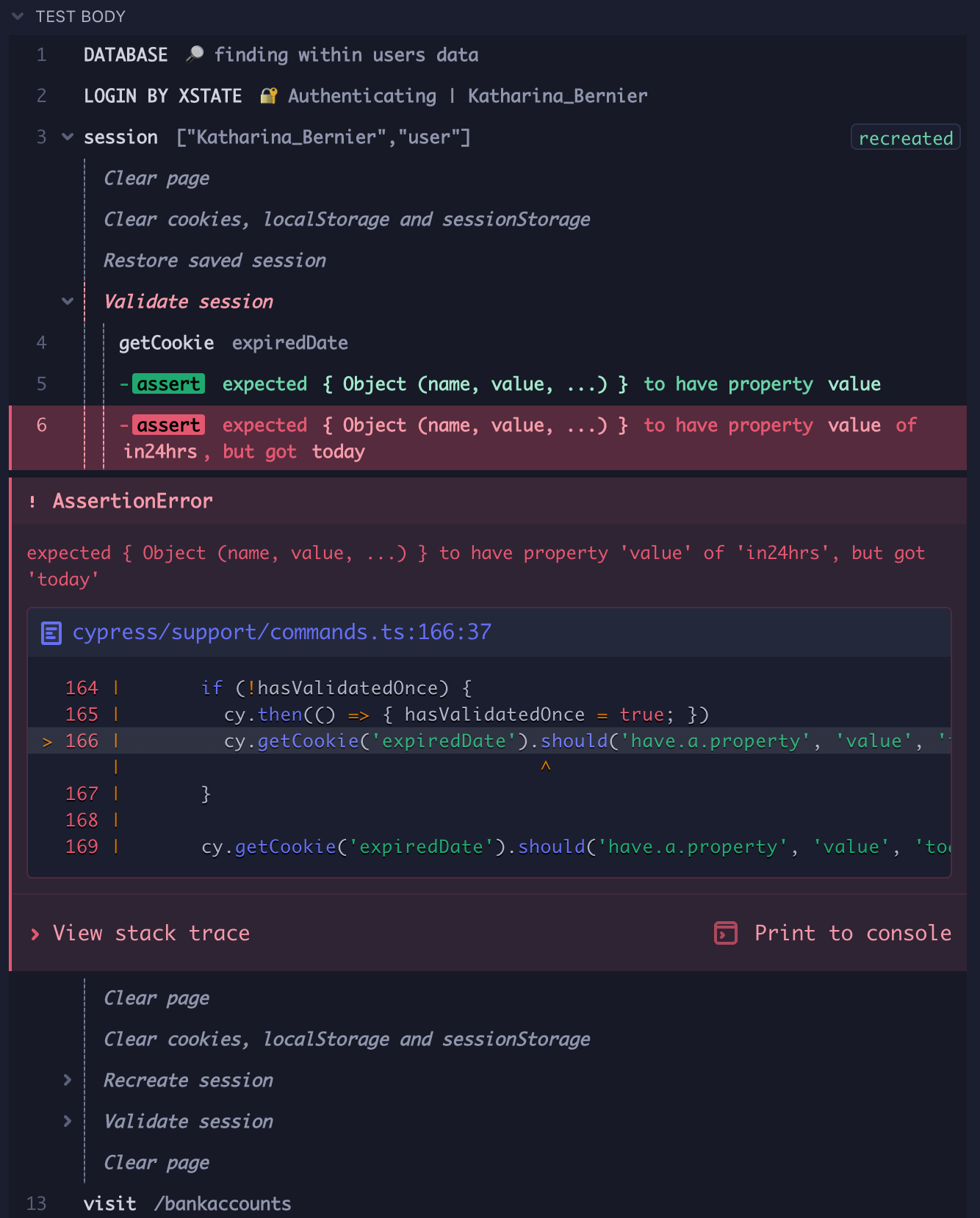
Expanding the session group in the Command Log shows each step Cypress ran. In
the third test, Cypress clears the page and session data and restores the saved
session. In Validate session, /whoami returns 401, so the assertion
fails and Cypress reports that it is recreating the session. Cypress then clears the
page and session data again, runs Recreate session and Validate session, and
clears the page.
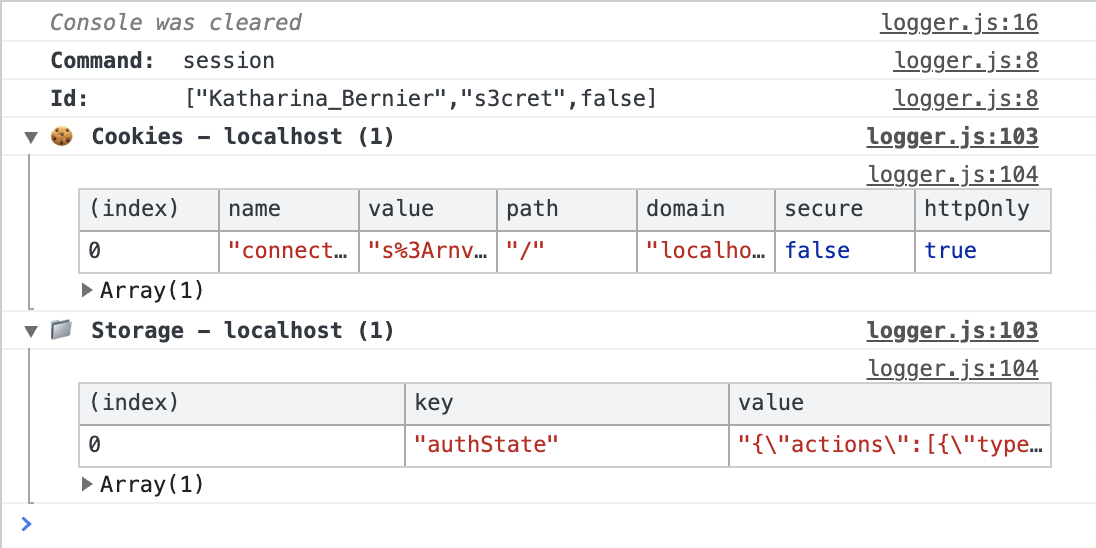
Clicking a session id in the Instrument Panel, or the first line under an
expanded session group in the Command Log, prints that session's details to the
console. This information contains the id and the domains the session
captured data from, along with the cached session data for each domain,
including cookies, localStorage, and sessionStorage.
History
| Version | Changes |
|---|---|
| 16.2.1 | Typed the yielded value as the session's status instead of null. |
| 12.0.0 | Removed experimentalSessionAndOrigin and made the command available by default. |
| 11.0.0 | The setup argument is now required. |
| 10.9.0 | Added cacheAcrossSpecs property. |
| 9.6.0 | Added support for experimentalSessionAndOrigin and removed experimentalSessionSupport. |
| 8.2.0 | cy.session() command added and can be used when experimentalSessionSupport is enabled. |