fixture
Load a fixed set of data located in a file.
Tests are easiest to trust when every run starts from the same data.
cy.fixture() loads known test data, such as JSON records, images, and CSV
files, from your fixturesFolder.
That keeps the data out of your spec code, lets many tests share it, and means a
test fails because your app changed, not because the data did.
Reach for cy.fixture() when you need to:
- Stub network responses with
cy.intercept(), so your tests don't depend on a live backend or on data that changes between runs - Fill in forms or check the page against the same known records every time
- Upload a sample file through a file input with
.selectFile()
To read a file that changes while your tests run, or a file your app produces,
use cy.readFile() instead. See
How cy.fixture() differs from cy.readFile().
Syntax
cy.fixture(filePath)
cy.fixture(filePath, encoding)
cy.fixture(filePath, options)
cy.fixture(filePath, encoding, options)
Usage
Correct Usage
cy.fixture('users').as('usersJson') // load data from users.json
cy.fixture('logo.png').then((logo) => {
  // load data from logo.png
})
Arguments
filePath (String)
A path to a file within the
fixturesFolder , which
defaults to cypress/fixtures.
You can nest fixtures within folders and reference them by defining the path from the fixturesFolder:
cy.fixture('users/admin.json') // Get data from {fixturesFolder}/users/admin.json
encoding (String)
The encoding to be used when reading the file. The following encodings are supported:
'ascii''base64''binary''hex''latin1''utf8''utf-8''ucs2''ucs-2''utf16le''utf-16le'null
Passing an encoding yields the raw file contents without parsing them, whatever
the file extension. For example, cy.fixture('users.json', 'utf8') yields the
JSON as a string rather than an object. Passing null yields the contents as a
Cypress.Buffer instance.
options (Object)
Pass in an options object to change the default behavior of cy.fixture().
| Option | Default | Description |
|---|---|---|
timeout | responseTimeout | Time to wait for cy.fixture() to resolve before timing out |
Yields
cy.fixture()yields the contents of the file. Formatting is determined by its file extension, unless you pass anencoding.cy.fixture()yields a copy of the cached contents, so changing the yielded object does not affect latercy.fixture()calls for the same file.- The yielded subject is not updated if the contents change on disk. See How Cypress caches fixture data for when Cypress reads the file again.
Examples
JSON
Load a users.json fixture
cy.fixture('users.json').as('usersData')
Omit the fixture file's extension
When no extension is passed to cy.fixture(), Cypress first looks for a file
with exactly that name. If there isn't one, Cypress searches for files with the
specified name and a supported extension within the
fixturesFolder (which
defaults to cypress/fixtures) and resolves the first one.
cy.fixture('admin').as('adminJSON')
The example above would resolve in the following order:
cypress/fixtures/admin.jsoncypress/fixtures/admin.jscypress/fixtures/admin.htmlcypress/fixtures/admin.txtcypress/fixtures/admin.csvcypress/fixtures/admin.pngcypress/fixtures/admin.jpgcypress/fixtures/admin.jpegcypress/fixtures/admin.gifcypress/fixtures/admin.tifcypress/fixtures/admin.tiffcypress/fixtures/admin.zip
Import a JSON fixture into your spec
If you are loading a JSON fixture, you can use the import statement and
let the bundler load it:
import user from '../fixtures/user.json'
it('loads the same object', () => {
  cy.fixture('user').then((userFixture) => {
    expect(user, 'the same data').to.deep.equal(userFixture)
  })
})
Generate a test for each record in a fixture
To create one test per fixture record, import the fixture. cy.fixture()
supplies data inside a test, but a loop inside its callback can't add new it()
blocks.
import users from '../fixtures/users.json'

describe('User profiles', () => {
  users.forEach((user) => {
    it(`shows the profile for ${user.name}`, () => {
      cy.visit(`/users/${user.id}`)
      cy.contains('h1', user.name)
    })
  })
})
Type fixture data in TypeScript
cy.fixture() accepts a type argument that describes the yielded contents.
Cypress doesn't check the file against the type, so keep the two in sync.
type User = {
  id: number
  name: string
  email: string
}

cy.fixture<User[]>('users').then((users) => {
  // users is typed as User[]
  cy.get('[data-cy="user-email"]').first().should('have.text', users[0].email)
})
Read a JSON fixture as raw text
Pass an encoding to yield the file's contents as a string instead of the parsed object. This helps when you want the exact text of the file, such as to compare it with a raw request body.
cy.fixture('users.json', 'utf8').then((raw) => {
  expect(raw).to.be.a('string')
  expect(raw).to.include('"email"')
})
Images
Image fixtures yield base64 strings by default
cy.fixture('images/logo.png').then((logo) => {
  // logo will be encoded as base64
  // and should look something like this:
  // aIJKnwxydrB10NVWqhlmmC+ZiWs7otHotSAAAOw==...
})
Read an image fixture as a Cypress.Buffer
cy.fixture('images/logo.png', null).then((logo) => {
  // logo will be read as a buffer
  // and should look something like this:
  // Buffer([0, 0, ...])
  expect(Cypress.Buffer.isBuffer(logo)).to.be.true
})
File uploads
Upload a fixture with .selectFile()
Load the fixture with a null encoding so it yields a Cypress.Buffer, alias
it, and pass the alias to .selectFile(). Cypress
keeps the fixture's file name, so the upload arrives as avatar.png.
cy.fixture('images/avatar.png', null).as('avatar')
cy.get('input[type="file"]').selectFile('@avatar')
Audio
Play an MP3 fixture in the browser
cy.fixture('audio/sound.mp3', 'base64').then((mp3) => {
  const uri = 'data:audio/mp3;base64,' + mp3
  const audio = new Audio(uri)

  audio.play()
})
Accessing fixture data
Stub a network response with fixture data
cy.fixture('users').then((json) => {
  cy.intercept('GET', '/users/**', json)
})
Load a fixture in beforeEach() and read it with cy.get()
Aliases are cleared between tests, so load the fixture in a beforeEach() hook
and read the alias back with cy.get(). This works
with arrow functions, unlike the this context.
describe('User list', () => {
  beforeEach(() => {
    cy.fixture('users').as('users')
  })

  it('shows a row for every user', () => {
    cy.visit('/users')
    cy.get('@users').then((users) => {
      cy.get('[data-cy="user-row"]').should('have.length', users.length)
    })
  })
})
Bootstrap your app's data with fixtures
Change fixture data before stubbing a response
You can modify fixture data directly before visiting a URL or mounting a component that makes a network request to that URL.
- End-to-End Test
- Component Test
cy.fixture('user').then((user) => {
  user.firstName = 'Jane'
  cy.intercept('GET', '/users/1', user).as('getUser')
})

cy.visit('/users')
cy.wait('@getUser').then(({ response }) => {
  expect(response.body.firstName).to.eq('Jane')
})
cy.fixture('user').then((user) => {
  user.firstName = 'Jane'
  cy.intercept('GET', '/users/1', user).as('getUser')
})

cy.mount(<Users />)
cy.wait('@getUser').then(({ response }) => {
  expect(response.body.firstName).to.eq('Jane')
})
Notes
How cy.fixture() differs from cy.readFile()
Both commands read a file from disk, but they answer different questions.
cy.fixture() answers "what data should this test start with?" while
cy.readFile() answers "what's in this file right
now?" Use cy.fixture() for known data that stays the same during the run, and
cy.readFile() for files that change or that your app creates. For when to
reach for a static import or cy.task() instead, see
Choosing how to load test data in Cypress.
cy.fixture() | cy.readFile() | |
|---|---|---|
| Path is relative to | fixturesFolder | The project root |
| File extension | Optional | Required |
| Reads from disk | Once per path and encoding, then yields the cached copy | On every call |
| Retries until assertions pass | No | Yes, reading the file again on each retry |
| Images by default | A base64 string | A utf8 string |
| Default timeout | responseTimeout | defaultCommandTimeout |
| Command Log | Not logged | Logged |
| Missing file | Always fails | Can be asserted with .should('not.exist') |
Serve a fixture directly from cy.intercept()
Fixtures can also be referenced directly without using the cy.fixture() command
by using the special property fixture on the
cy.intercept() StaticResponse object.
cy.intercept('GET', '/users/**', { fixture: 'users' })
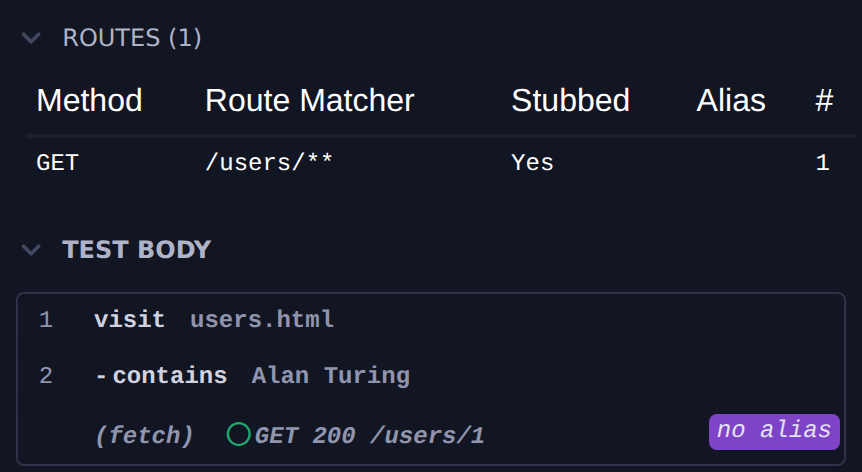
The Command Log's Routes panel lists the route as stubbed, and each request it answers appears in the test body without a live server behind it:
cy.intercept() serves image and .zip fixtures as raw bytes. Other binary
files, such as .mp4 or .pdf, are read as utf8 text by default, which
corrupts them. To serve one of those byte for byte, add null as the encoding
after a comma:
cy.intercept('GET', '/media/intro.mp4', { fixture: 'media/intro.mp4,null' })
You can pass any other supported encoding the same way.
How Cypress validates JSON and JavaScript fixtures
Cypress automatically validates your fixtures. If your .json or .js files
contain syntax errors, the test fails with an error that names the fixture and
describes the problem.
A .js fixture is evaluated as a single JavaScript expression, such as an
object literal ({ name: 'Jane' }), rather than loaded as a module.
How Cypress chooses a fixture's encoding
When you don't pass an encoding, Cypress reads the file based on its extension:
| Extension | Yields |
|---|---|
.json | The parsed JSON |
.js | The evaluated JavaScript expression |
.png, .jpg, .jpeg, .gif, .tif, .tiff, .zip | A base64 string |
.html, .txt, .csv, and every other extension | A utf8 string |
To read a file differently, pass an encoding as the second argument of
cy.fixture(). You can specify null as the encoding to read the file as a
Cypress.Buffer instance instead.
These defaults describe what cy.fixture() yields. When you serve a fixture
from cy.intercept(), image and
.zip fixtures are sent as raw bytes instead of base64.
Sharing fixture data through the this context
If you store and access the fixture data using this test context object, make
sure to use function () { ... } callbacks. Otherwise the test engine will NOT
have this pointing at the test context.
describe('User page', () => {
  beforeEach(function () {
    // "this" points at the test context object
    cy.fixture('user').then((user) => {
      // "this" is still the test context object
      this.user = user
    })
  })

  // the test callback is in "function () { ... }" form
  it('has user', function () {
    // this.user exists
    expect(this.user.firstName).to.equal('Jane')
  })
})
Loading large files with cy.fixture()
Why large fixtures can crash or stall Cypress
cy.fixture() reads the entire file into memory and transfers its contents
from the Cypress Node.js server process to the browser test runner over an
internal WebSocket connection. There is no explicit file size limit in Cypress
itself, but large files — especially binary files like .zip archives — can
cause Cypress to crash or become unresponsive due to:
- Memory pressure: The complete file must fit in available RAM. Cypress
keeps the contents in the fixture cache and yields a separate copy, so each
loaded fixture takes up memory more than once. By default, binary files such
as images and
.ziparchives are also converted to abase64string in the browser, which is about a third larger than the file itself. - Single-message transfer: File contents are sent as a single message over the internal socket, so the whole payload is buffered at once.
As a practical guideline, avoid using cy.fixture() with files larger than a
few megabytes. Smaller test fixtures (representative subsets of production data)
are preferable wherever possible.
Upload a large file with .selectFile() and a path
If your goal is to simulate a file upload through an <input type="file">
element, use .selectFile() with a path string
rather than loading the fixture first and then setting the input manually:
// ✅ Preferred for file upload simulation
cy.get('input[type="file"]').selectFile('cypress/fixtures/large.zip')
Check a large file in Node.js with cy.task()
For scenarios where you must work with large files but do not need to transfer
their full contents to the browser (for example, verifying file metadata or
invoking a server-side operation), use cy.task() to
keep the operation in the Node.js context:
- cypress.config.js
- cypress.config.ts
const { defineConfig } = require('cypress')
const { statSync } = require('fs')

module.exports = defineConfig({
  e2e: {
    setupNodeEvents(on, config) {
      on('task', {
        getFileSize(filePath) {
          const { size } = statSync(filePath)
          return size
        },
      })
    },
  },
})
import { defineConfig } from 'cypress'
import { statSync } from 'fs'

export default defineConfig({
  e2e: {
    setupNodeEvents(on, config) {
      on('task', {
        getFileSize(filePath: string) {
          const { size } = statSync(filePath)
          return size
        },
      })
    },
  },
})
// in your test
cy.task('getFileSize', 'cypress/fixtures/large.zip').then((size) => {
  expect(size).to.be.greaterThan(0)
})
How Cypress caches fixture data
The first time you load a fixture, Cypress caches its contents, keyed on the
path exactly as you wrote it and the encoding. Later cy.fixture() calls with
the same path and encoding yield the cached contents, even if the file has
changed on disk. Because the key is the path as written, cy.fixture('users')
and cy.fixture('users.json') are cached separately, so use one form
consistently to read the file only once.
When you write to a file inside the
fixturesFolder with
cy.writeFile(), Cypress clears that file from the
cache, so the next cy.fixture() call reads the new contents:
cy.writeFile('cypress/fixtures/todo.json', { title: 'New data' })
cy.fixture('todo').its('title').should('eq', 'New data')
Cypress doesn't detect changes made any other way, such as from
cy.task() or another process. To read a file that
changes during your tests, use cy.readFile()
instead.
Fixtures in cy.intercept() are read when the route is added
The fixture property of a cy.intercept()
StaticResponse reads the file when Cypress registers the route. Overwriting
the file afterwards doesn't change what that route replies with, so the
following will not work:
// 🚨 DOES NOT WORK
cy.intercept('GET', '/todos/1', { fixture: 'todo' }).as('todo')
// application requests the /todos/1 resource
// the intercept replies with the object from todo.json file

cy.wait('@todo').then(() => {
  cy.writeFile('cypress/fixtures/todo.json', { title: 'New data' })
})
// application requests the /todos/1 resource again
// the intercept replies with the object read from todo.json
// when the route was added and NOT { "title": "New data" }
In this situation, respond to the network request with the object and add a new intercept when the data changes:
// ✅ RESPOND WITH OBJECT
cy.fixture('todo.json').then((todo) => {
  cy.intercept('GET', '/todos/1', { body: todo }).as('todo')
  // application requests the /todos/1 resource
  // the intercept replies with the initial object

  cy.wait('@todo').then(() => {
    // modify the response object
    todo.title = 'New data'
    // and override the intercept
    cy.intercept('GET', '/todos/1', { body: todo })
  })
})
Rules
Requirements
cy.fixture()requires being chained off ofcy.cy.fixture()requiresfixturesFolderto be set. It fails iffixturesFolderisfalse.
Assertions
cy.fixture()will only run assertions you have chained once, and will not retry.
Timeouts
cy.fixture()can time out waiting for the Cypress server to send the fixture. It waits for thetimeoutoption, which defaults toresponseTimeout.cy.fixture()yields cached contents without waiting on the server, so a cached fixture never times out.
Command Log
cy.fixture()does not log in the Command Log
History
| Version | Changes |
|---|---|
| 15.18.0 | An aliased fixture keeps its file name for .selectFile() when a later test loads the same fixture. |
| 15.0.0 | cy.writeFile() clears the cache for a fixture it writes. An explicit encoding always yields raw file contents. |
See also
- Guide: Variables and Aliases
cy.intercept()cy.readFile()for a similar command without caching and with built-in retryability.selectFile()for simulating file uploads, including with large filescy.task()for keeping large file operations in the Node.js context