invoke
Invoke a function on the previously yielded subject.
If you want to get a property that is not a function on the previously yielded
subject, use .its().
Syntax
.invoke(functionName)
.invoke(options, functionName)
.invoke(functionName, args...)
.invoke(options, functionName, args...)
Usage
Correct Usage
cy.get('.input').invoke('val').should('eq', 'foo') // Invoke the 'val' function
cy.get('.modal').invoke('show') // Invoke the jQuery 'show' function
cy.wrap({ animate: fn }).invoke('animate') // Invoke the 'animate' function
Incorrect Usage
cy.invoke('convert') // Errors, cannot be chained off 'cy'
cy.wrap({ name: 'Jane' }).invoke('name') // Errors, 'name' is not a function
cy.wrap({ animate: fn })
  .invoke('animate')
  .then(() => {}) // 'animate' will be called multiple times
Arguments
functionName (String, Number)
Name of function to be invoked. Use dot notation to invoke a function nested
inside the subject, such as 'math.sum', or a number to invoke a function in an
array by its index.
In TypeScript, a function name yields the function's return type. A dot-notation
path can't be strongly typed, so it yields any.
options (Object)
Pass in an options object to change the default behavior of .invoke(). Unlike
most commands, .invoke() takes options as its first argument, before
functionName.
| Option | Default | Description |
|---|---|---|
log | true | Displays the command in the Command log |
timeout | defaultCommandTimeout | Time to wait for .invoke() to resolve before timing out |
args...
Additional arguments to be given to the function call. There is no limit to the number of arguments.
Yields
.invoke()yields the return value of the method..invoke()is a query. Chaining further commands is safe when the function has no side effects, because the function can be called more than once. When it does have side effects, end the chain at.invoke(). See Functions with side effects.
Examples
Function
Assert on a function's return value
const fn = () => {
  return 'bar'
}

cy.wrap({ foo: fn }).invoke('foo').should('eq', 'bar') // true
Show a hidden element with .invoke('show')
In the example below, .invoke() forces a hidden div to be 'display: block'
so you can interact with its children elements.
cy.get('div.container')
  .should('be.hidden') // element is hidden
  .invoke('show') // call jquery method 'show' on the '.container'
  .should('be.visible') // element is visible now
  .find('input') // drill down into a child "input" element
  .type('Cypress is great') // and type text
Function with Arguments
Pass arguments to the function
Arguments after the function name are passed to the function in order.
const fn = (a, b, c) => {
  return a + b + c
}

cy.wrap({ sum: fn })
  .invoke('sum', 2, 4, 6)
  .should('be.gt', 10) // true
  .and('be.lt', 20) // true
The same works for jQuery methods, such as attr:
cy.get('img').invoke('attr', 'src').should('include', 'myLogo')
Arrays
In the above examples, the subject was an object, but .invoke() also works on
arrays and accepts a numerical index to pick a function to run.
const reverse = (s) => Cypress._.reverse(s)
const square = (n) => n * n

// picks function with index 1 and calls it with argument 4
cy.wrap([reverse, square]).invoke(1, 4).should('eq', 16)
Nested functions
Pass a property path in dot notation to invoke a function nested inside the
subject. The function runs with its parent object as this.
const api = {
  math: {
    sum: (a, b) => a + b,
  },
}

cy.wrap(api).invoke('math.sum', 2, 3).should('eq', 5)
jQuery method
If the parent command yields a jQuery element, you can invoke a jQuery method,
like attr, text, or val. To confirm the element's id attribute for
example:
<div id="code-snippet">The code example</div>
cy.contains('The code example')
  .invoke('attr', 'id')
  .should('equal', 'code-snippet')
Tip: Cypress has a built-in Chai-jQuery assertion to confirm the attribute. The above example can be written as:
cy.contains('The code example').should('have.attr', 'id', 'code-snippet')
Any jQuery method that returns a value works the same way, such as css,
outerWidth, or prop:
cy.get('.sidebar').invoke('css', 'position').should('eq', 'sticky')
cy.get('.sidebar').invoke('outerWidth').should('be.gt', 200)
cy.get('#terms').invoke('prop', 'checked').should('eq', true)
Application code on window
Use cy.window() and .its() to
reach functions your app exposes on window, such as a Redux store, then call
them with .invoke(). Because dispatch changes app state, end the chain at
.invoke() so it runs once, and read the result in a new chain.
cy.window().its('store').invoke('dispatch', { type: 'cart/clear' })

cy.window()
  .its('store')
  .invoke('getState')
  .its('cart.items')
  .should('have.length', 0)
Browser APIs work the same way, such as localStorage.getItem:
cy.window().its('localStorage').invoke('getItem', 'token').should('exist')
Options
Pass an options object as the first argument, before the function name. Set
log: false to leave the .invoke() call out of the Command Log.
cy.window()
  .its('localStorage')
  .invoke({ log: false }, 'getItem', 'theme')
  .should('eq', 'dark')
Set timeout when the assertion needs longer than
defaultCommandTimeout to pass, such
as a status that a slow widget sets after it loads:
cy.get('#chart')
  .invoke({ timeout: 10000 }, 'data', 'status')
  .should('eq', 'ready')
Functions that return a promise
.invoke() does not wait for a returned promise to resolve. To call a function
that returns a promise and work with its resolved value, call it inside
.then(), which waits for the promise:
const userApi = {
  fetchUser: () => Promise.resolve({ name: 'Jane' }),
}

cy.wrap(userApi)
  .then((api) => api.fetchUser())
  .its('name')
  .should('eq', 'Jane')
Save the yielded value for later
An alias created with .as() re-runs the query chain,
including .invoke(), each time you use it, so it yields the current value. To
keep the value from the moment you saved it, such as an input's value before the
test changes it, create a static alias:
cy.get('#username').invoke('val').as('username', { type: 'static' })

cy.get('#username').clear().type('new-name')

cy.get('@username').should('eq', 'jane')
Recipes that use .invoke()
- Bootstrapping your App -
.invoke('text')to test HTML content - Hover and Hidden Elements -
.invoke('show')and.trigger()to click an element that is only visible on hover - Tab Handling and Links -
.invoke('removeAttr', 'target')to click a link without opening a new tab
Notes
Functions with side effects
Cypress runs .invoke() again each time a chained command or assertion needs
its value, so a function with side effects can run more than once. Here, the
jQuery setter val runs every time .type() asks for its subject:
cy.get('input').invoke('val', 'text').type('newText')
End the chain at .invoke() so the setter runs once, then continue in a new
chain:
cy.get('input').invoke('val', 'text')
cy.get('input').type('newText')
Retries
.invoke() automatically retries invoking the specified method until the
returned value satisfies the attached assertions. The example below passes after
1 second.
let message = 'hello'
const english = {
  greeting() {
    return message
  },
}

setTimeout(() => {
  message = 'bye'
}, 1000)

// initially the english.greeting() returns "hello" failing the assertion.
// .invoke('greeting') tries again and again until after 1 second
// the returned message becomes "bye" and the assertion passes
cy.wrap(english).invoke('greeting').should('equal', 'bye')
Rules
Requirements
.invoke()requires being chained off a previous command.
Assertions
.invoke()will wait for thefunctionto exist on the subject before running..invoke()will automatically retry until all chained assertions have passed.
Timeouts
.invoke()can time out waiting for thefunctionto exist on the subject..invoke()can time out waiting for assertions you've added to pass.
Command Log
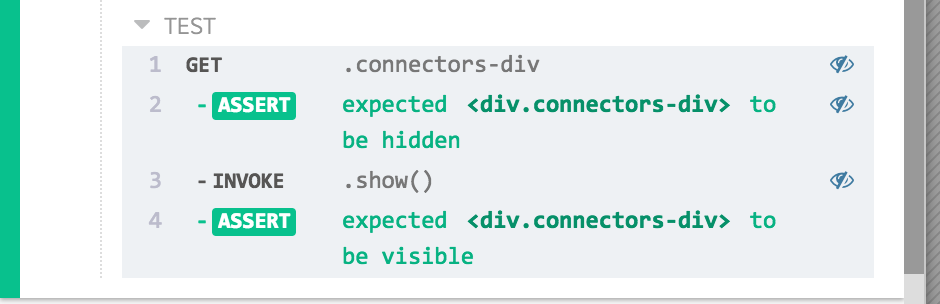
Invoke jQuery show method on element
cy.get('.connectors-div')
  .should('be.hidden')
  .invoke('show')
  .should('be.visible')
The commands above will display in the Command Log as:
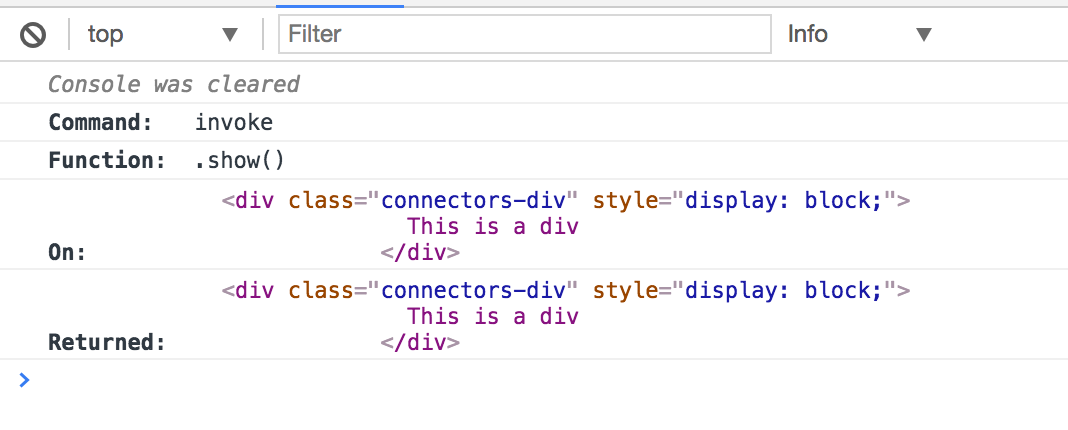
When clicking on invoke within the command log, the console outputs the
following:
History
| Version | Changes |
|---|---|
| 12.0.0 | .invoke() no longer supports promises or async functions |
| 3.8.0 | Added support for options argument |
| 3.7.0 | Added support for arguments of type Number for functionName |