scrollIntoView
Scroll the nearest scrollable container, or the window, until an element is in view.
It is unsafe to
chain further commands that rely on the subject after .scrollIntoView().
Syntax
.scrollIntoView()
.scrollIntoView(options)
Usage
Correct Usage
cy.get('footer').scrollIntoView() // Scrolls 'footer' into view
Incorrect Usage
cy.scrollIntoView('footer') // Errors, cannot be chained off 'cy'
cy.window().scrollIntoView() // Errors, 'window' doesn't yield a DOM element
cy.get('li').scrollIntoView() // Errors, 'li' yields more than one element
Arguments
options (Object)
Pass in an options object to change the default behavior of .scrollIntoView().
| Option | Default | Description |
|---|---|---|
duration | 0 | Time in ms to animate the scroll over, as a number or a numeric string such as '500' |
easing | swing | Easing animation for the scroll: swing or linear (any other value throws an error) |
log | true | Displays the command in the Command Log |
offset | {top: 0, left: 0} | Pixels to scroll past the element, or short of it when negative, to leave room above or to the left; a key left out defaults to 0 |
timeout | defaultCommandTimeout | Time to wait for assertions chained after .scrollIntoView() to pass before timing out |
Yields
.scrollIntoView()yields the same subject it was given.- It is unsafe
to chain further commands that rely on the subject after
.scrollIntoView().
Examples
Scrolling
cy.get('button#checkout').scrollIntoView()
Check that an element is in the viewport
Visibility doesn't
account for the viewport, so .should('be.visible') passes for an element that
is scrolled out of view. To confirm the scroll worked, check the element's
position instead. This checks that its top edge is inside the viewport.
cy.get('button#checkout').scrollIntoView()
cy.get('button#checkout')
  .invoke('get', 0)
  .invoke('getBoundingClientRect')
  .its('top')
  .should('be.within', 0, Cypress.config('viewportHeight'))
Scroll an item inside a scrollable container
When the element sits inside a scrollable container, such as a results list,
.scrollIntoView() scrolls that container to reach it, as described in
Where the element lands after scrolling.
cy.get('[data-cy="results"] li').eq(40).scrollIntoView()
cy.get('[data-cy="results"]').its('0.scrollTop').should('be.greaterThan', 0)
Options
Use linear easing animation to scroll
cy.get('.next-page').scrollIntoView({ easing: 'linear' })
Animate the scroll to an element over 2000ms
cy.get('footer').scrollIntoView({ duration: 2000 })
Scroll 150px past the top of an element
cy.get('#nav').scrollIntoView({ offset: { top: 150, left: 0 } })
Leave room for a fixed header
A negative offset stops short of the element, so it lands below a fixed
header instead of underneath it.
cy.get('#pricing').scrollIntoView({ offset: { top: -80, left: 0 } })
Workflows
Show a back-to-top button after scrolling
Sticky headers, "back to top" buttons, and lazy-loaded images change as the page scrolls. Scroll to a point on the page, then assert on the change.
cy.get('footer').scrollIntoView()
cy.get('[data-cy="back-to-top"]').should('have.class', 'is-shown')
Notes
Where the element lands after scrolling
.scrollIntoView() scrolls the element's nearest scrollable ancestor, or the
window when there isn't one, until the element's top-left corner lines up with
the top-left of that container, as far as the container can scroll. Use the
offset option to adjust where it lands. When the scrollable ancestor is a
container inside the page, Cypress first scrolls that container into view, then
scrolls the element within it.
Actionability
.scrollIntoView() doesn't run the
actionability checks that
commands like .click() do. It scrolls an element even
when the element is hidden, disabled, or covered by another element.
Skip .scrollIntoView() before action commands
Action commands such as .click() and
.type() scroll the element into view before acting on
it, so a .scrollIntoView() in front of them adds nothing. The
scrollBehavior option controls
where the element lands, and setting it to false turns this scrolling off.
cy.get('#submit').scrollIntoView().click() // ❌ the scroll is redundant
cy.get('#submit').click() // ✅ .click() scrolls the element into view itself
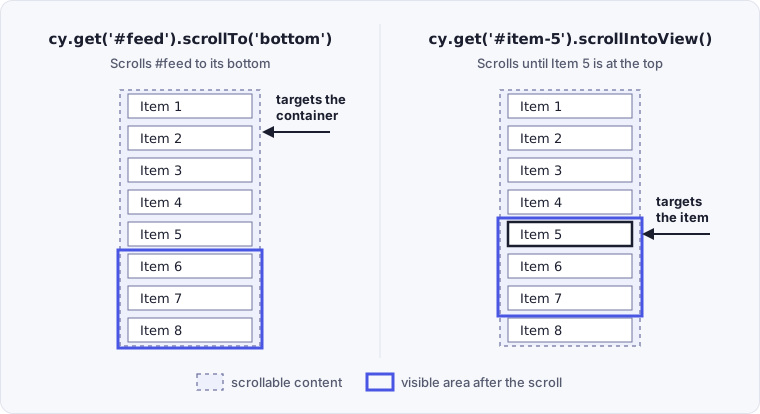
Choosing between .scrollTo() and .scrollIntoView()
.scrollTo() scrolls a container, either the window or a scrollable element, to
a position. .scrollIntoView() scrolls whatever contains an element until that
element is in view. To reach a specific item, use .scrollIntoView() on the
item rather than .scrollTo() on its container.
cy.get('#feed').scrollTo('bottom') // scrolls the container itself
cy.get('#item-5').scrollIntoView() // scrolls until this item is in view
Compare where each call leaves the list:
Snapshots don't show scroll positions
Snapshots don't capture scroll positions. To watch the scrolling, step through
the commands with .pause() or
watch the video of the test run.
Rules
Requirements
.scrollIntoView()requires being chained off a command that yields a single DOM element. It throws an error when the subject contains more than one element.
Assertions
.scrollIntoView()runs once and is not retried. Assertions chained after.scrollIntoView()retry until they pass or time out. See Only queries are retried.
Timeouts
.scrollIntoView()can time out waiting for assertions you've added to pass.
Command Log
Scroll a button into view inside a horizontal container
cy.get('#scroll-horizontal button').scrollIntoView()
cy.get('#scroll-horizontal').its('0.scrollLeft').should('be.greaterThan', 0)
The commands above display in the Command Log as:

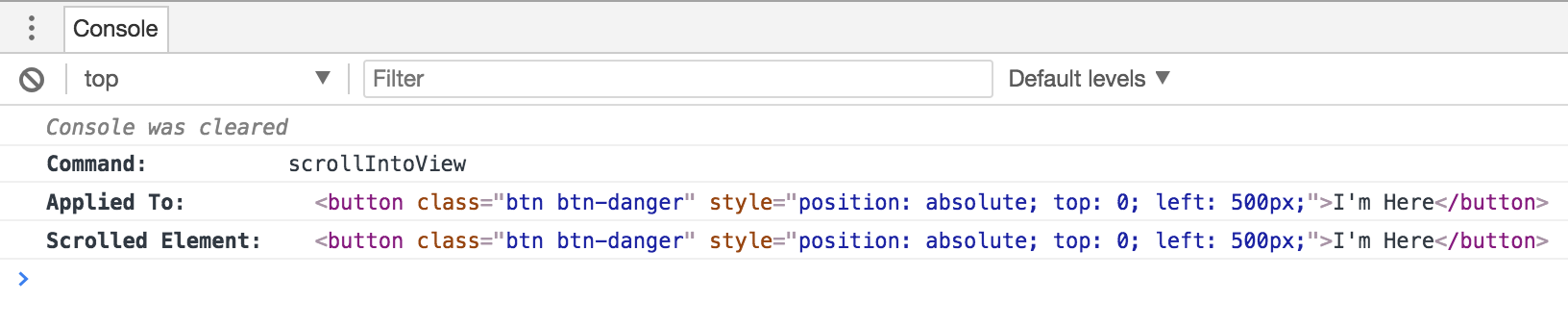
Clicking the scrollIntoView command in the Command Log prints the following
to the console:
History
| Version | Changes |
|---|---|
| 0.20.0 | .scrollIntoView() command added |
See also
.click()- Scrolls the element into view before clicking itcy.scrollTo()cy.viewport()- Set the window size, which decides what counts as in view- Scrolling in Interacting with Elements - How action commands scroll elements into view on their own