not
Filter DOM element(s) from a set of DOM elements.
Opposite of .filter()
The querying behavior of this command matches exactly how
.not() works in jQuery.
Syntax
.not(selector)
.not(selector, options)
Usage
Correct Usage
cy.get('input').not('.required') // Yield all inputs without class '.required'
Incorrect Usage
cy.not('.icon') // Errors, cannot be chained off 'cy'
cy.clock().not() // Errors, 'clock' does not yield DOM elements
Arguments
selector (String selector)
A selector used to remove matching DOM elements.
options (Object)
Pass in an options object to change the default behavior of .not().
| Option | Default | Description |
|---|---|---|
log | true | Displays the command in the Command log |
timeout | defaultCommandTimeout | Time to wait for .not() to resolve before timing out |
Yields
.not()yields the new DOM element(s) it found..not()is a query, and it is safe to chain further commands.
Examples
Selector
Yield the elements that do not have class active
<ul>
  <li>Home</li>
  <li class="active">About</li>
  <li>Services</li>
  <li>Pricing</li>
  <li>Contact</li>
</ul>
cy.get('ul>li').not('.active').should('have.length', 4) // true
Contains
Yield the elements that do not contain some text
There is no built-in negation for cy.contains(), so
there is no way to ask it directly for the elements that do not contain a
piece of text. Instead, select the full set of elements and remove the matching
ones with .not() and the
jQuery :contains selector. The
match is a case-sensitive substring match.
<ul>
  <li>Test: Name</li>
  <li>Test: Name (1)</li>
  <li>Test: Name (2)</li>
  <li>Test: Name (3)</li>
</ul>
// yields only <li>Test: Name</li>, the item without a numeric suffix
cy.get('li').not(':contains("(")')
The same approach works with .filter() and the
:not() selector when you would rather
keep a positive filter:
// yields the rows that are not disabled
cy.get('tr').filter(':not(.disabled)')
Rules
Requirements
.not()requires being chained off a command that yields DOM element(s) or a document.
Assertions
.not()will automatically retry until the element(s) exist in the DOM..not()will automatically retry until all chained assertions have passed.
Timeouts
.not()can time out waiting for the element(s) to exist in the DOM..not()can time out waiting for assertions you've added to pass.
Command Log
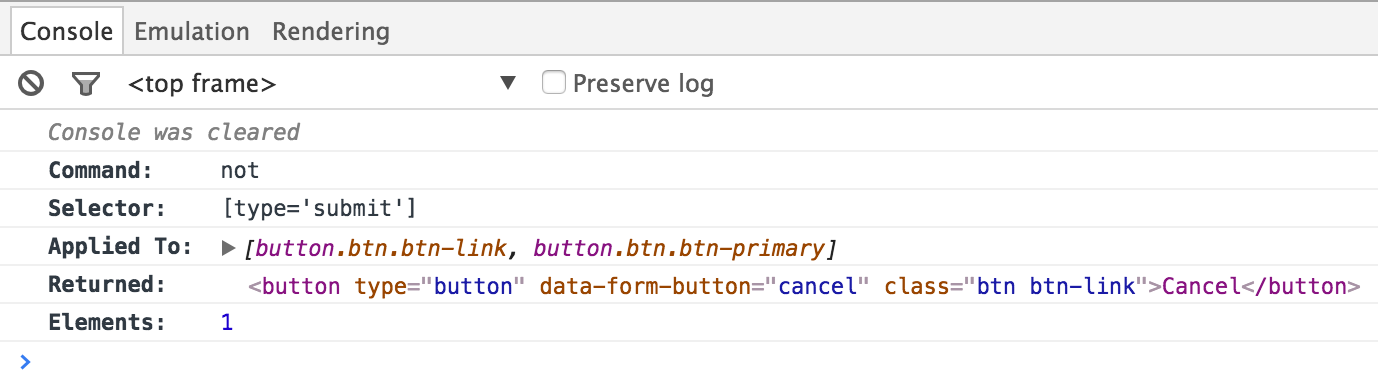
Find all buttons that are not of type submit
cy.get('form').find('button').not('[type="submit"]')
The commands above will display in the Command Log as:

When clicking on not within the command log, the console outputs the
following: