scrollIntoView
Scroll an element into view.
It is unsafe to
chain further commands that rely on the subject after .scrollIntoView().
Syntax
.scrollIntoView()
.scrollIntoView(options)
Usage
Correct Usage
cy.get('footer').scrollIntoView() // Scrolls 'footer' into view
Incorrect Usage
cy.scrollIntoView('footer') // Errors, cannot be chained off 'cy'
cy.window().scrollIntoView() // Errors, 'window' does not yield DOM element
Arguments
options (Object)
Pass in an options object to change the default behavior of .scrollIntoView().
| Option | Default | Description |
|---|---|---|
duration | 0 | Scrolls over the duration (in ms) |
easing | swing | Will scroll with the easing animation |
log | true | Displays the command in the Command log |
offset | {top: 0, left: 0} | Amount to scroll after the element has been scrolled into view |
timeout | defaultCommandTimeout | Time to wait for .scrollIntoView() to resolve before timing out |
Yields
.scrollIntoView()yields the same subject it was given.- It is unsafe
to chain further commands that rely on the subject after
.scrollIntoView().
Examples
Scrolling
cy.get('button#checkout').scrollIntoView()
cy.get('button#checkout').should('be.visible')
Options
Use linear easing animation to scroll
cy.get('.next-page').scrollIntoView({ easing: 'linear' })
Scroll to element over 2000ms
cy.get('footer').scrollIntoView({ duration: 2000 })
Scroll 150px below an element
cy.get('#nav').scrollIntoView({ offset: { top: 150, left: 0 } })
Notes
Choosing between .scrollTo() and .scrollIntoView()
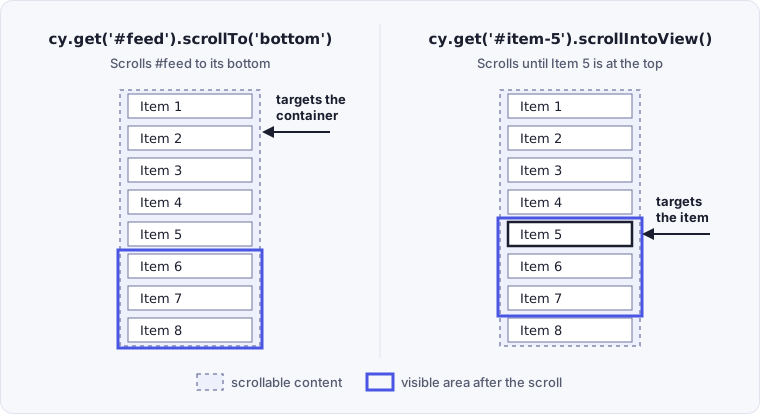
.scrollTo() scrolls a container, either the window or a scrollable element, to
a position. .scrollIntoView() scrolls whatever contains an element until that
element is in view. To reach a specific item, use .scrollIntoView() on the
item rather than .scrollTo() on its container.
cy.get('#feed').scrollTo('bottom') // scrolls the container itself
cy.get('#item-5').scrollIntoView() // scrolls until this item is in view
Compare where each call leaves the list:
Snapshots
Snapshots do not reflect scroll behavior
Cypress does not reflect the accurate scroll positions of any elements within
snapshots. If you want to see the actual scrolling behavior in action, we
recommend using .pause() to walk through each command
or
watching the video of the test run.
Rules
Requirements
.scrollIntoView()requires being chained off a command that yields DOM element(s).
Assertions
.scrollIntoView()itself will not be retried — it fires once. Assertions chained after.scrollIntoView()will be retried until they pass or time out. See Only queries are retried.
Timeouts
.scrollIntoView()can time out waiting for assertions you've added to pass.
Command Log
Assert element is visible after scrolling it into view
cy.get('#scroll-horizontal button').scrollIntoView()
cy.get('#scroll-horizontal button').should('be.visible')
The commands above will display in the Command Log as:

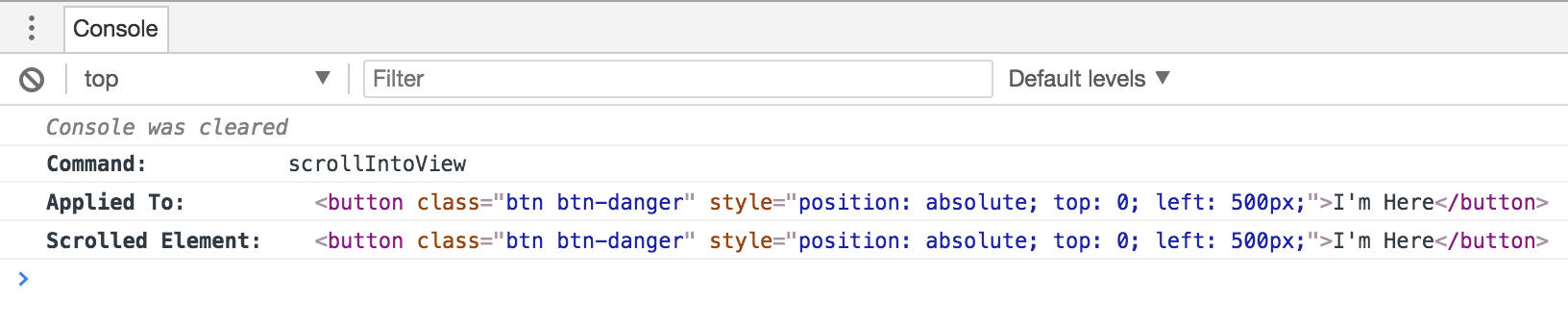
When clicking on the scrollintoview command within the command log, the
console outputs the following:
See also
cy.scrollTo()- Scrolling in Interacting with Elements - How action commands scroll elements into view on their own