request
Send an HTTP request from your test. You can use cy.request() to seed data
before a test, log in without going through the login page, or test API
endpoints directly. The Cypress server sends the request from Node.js rather
than the browser, so CORS doesn't apply, and it shares cookies with the browser.
See How cy.request() sends a request.
Syntax
cy.request(url)
cy.request(url, body)
cy.request(method, url)
cy.request(method, url, body)
cy.request(options)
Usage
Correct Usage
cy.request('http://dev.local/seed')
Arguments
url (String)
The URL to make the request to.
A relative URL resolves against the cy.origin() origin, your baseUrl, or the
page you visited, in that order. See
How cy.request() resolves a relative URL.
body (String, Object, FormData, Blob)
A request body to be sent in the request. When body is a JavaScript object
or boolean, Cypress automatically JSON-serializes it and sets the
Content-Type: application/json request header, unless you set a Content-Type
in headers. When body is a string, it is sent as-is with no automatic
content-type. When body is a FormData instance, Cypress sends it as
multipart/form-data, which is how you
upload a file.
method (String)
Make a request using a specific method. If no method is defined, Cypress uses
the GET method by default.
Cypress accepts these methods:
| Group | Methods |
|---|---|
| Standard HTTP | GET, POST, PUT, PATCH, DELETE, HEAD, OPTIONS, TRACE, CONNECT |
| WebDAV | CHECKOUT, COPY, LOCK, MERGE, MKACTIVITY, MKCOL, MOVE, PROPFIND, PROPPATCH, REPORT, SEARCH, UNLOCK |
| Other extensions | QUERY, PURGE, M-SEARCH, NOTIFY, SUBSCRIBE, UNSUBSCRIBE |
options (Object)
Pass in an options object to change the default behavior of cy.request().
| Option | Default | Description |
|---|---|---|
log | true | Displays the command in the Command log |
url | null | The URL to make the request to |
method | GET | The HTTP method to use in the request |
auth | null | Adds an Authorization header for HTTP Basic Authentication, or a bearer token with bearer |
body | null | Body to send along with the request |
failOnStatusCode | true | Whether to fail on response codes other than 2xx and 3xx |
followRedirect | true | Whether to automatically follow redirects |
form | false | Whether to convert the body values to URL encoded content and set the x-www-form-urlencoded header |
encoding | utf8 | The encoding to be used when serializing the response body. The following encodings are supported: ascii, base64, binary, hex, latin1, utf8, utf-8, ucs2, ucs-2, utf16le, utf-16le. A value that isn't a Node.js Buffer encoding, such as false or an empty string, fails. |
gzip | true | Whether to accept the gzip encoding |
headers | null | Additional headers to send; accepts an object literal. Cypress also sends them on each redirect it follows, with the exceptions in How cy.request() follows redirects. |
qs | null | Query parameters to append to the url of the request |
retryOnStatusCodeFailure | false | Whether to retry a request that fails with a status code error. Cypress retries up to 4 times when this is true. Requires failOnStatusCode: true; setting it with failOnStatusCode: false throws an error. |
retryOnNetworkFailure | true | Whether to retry a request that fails with a transient network error, such as ECONNREFUSED, ECONNRESET, or ENOTFOUND. Cypress retries up to 4 times when this is true. |
timeout | responseTimeout | Time to wait for cy.request() to resolve before timing out. See Give a slow endpoint more time. |
Set baseUrl, which relative URLs resolve against, and responseTimeout, the
default for timeout, globally in the
Cypress configuration.
Yields
cy.request() yields the response as an object literal containing these
properties:
status: the response status codestatusText: the status message, such asOKorFoundisOkStatusCode:truewhenstatusis2xxor3xxbody: the response body, parsed as described in Response body parsingheaders: the response headersduration: how long the request took, in millisecondsrequestHeaders: the headers Cypress sent with the requestallRequestResponses: each request and response in the chain, including redirectsredirects: each redirect Cypress followed, asstatus: urlstrings (only present when a redirect was followed)redirectedToUrl: the URL the response redirects to (only present withfollowRedirect: false)
Examples
URL
Make a GET request
Call an endpoint before each test, such as one that seeds a database.
beforeEach(() => {
  cy.request('http://localhost:8080/db/seed')
})
Check a page's HTML without visiting it
Unlike cy.visit(), which loads the page and all of its
resources, requesting a page returns only its HTML. That makes it a quick way to
check what the server renders.
cy.request('/admin').its('body').should('include', '<h1>Admin</h1>')
Method and URL
Send a DELETE request
cy.request('DELETE', 'http://localhost:8080/users/827')
Alias the request using .as()
cy.request('https://jsonplaceholder.cypress.io/comments').as('comments')

cy.get('@comments').should((response) => {
  expect(response.body).to.have.length(500)
  expect(response).to.have.property('headers')
  expect(response).to.have.property('duration')
})
Method, URL, and Body
Send a POST request with a JSON body
cy.request('POST', 'http://localhost:8080/users/admin', { name: 'Jane' }).then(
  (response) => {
    // response.body is automatically parsed from JSON when the server responds
    // with a Content-Type ending in "json" (e.g. application/json)
    expect(response.body).to.have.property('name', 'Jane') // true
  }
)
Authentication
Authenticate with HTTP Basic or a bearer token
To send a request to an endpoint protected by
HTTP Basic Authentication,
provide the credentials with the auth option. Cypress base64-encodes them and
attaches an Authorization header to the request.
Read credentials with cy.env() rather than writing them
into the test, so they stay out of your spec files. The examples on this page
read username, password, and apiToken, which you set as described in
Environment Variables & Secrets.
cy.env(['username', 'password']).then(({ username, password }) => {
  cy.request({
    method: 'POST',
    url: '/api/query',
    auth: {
      username,
      password,
    },
    body: {
      cpId: 709916,
    },
  })
})
The auth option also accepts user/pass as aliases for
username/password. To send a bearer token instead, pass it as bearer, and
Cypress sends Authorization: Bearer <token>.
cy.env(['apiToken']).then(({ apiToken }) => {
  cy.request({
    url: '/api/profile',
    auth: {
      bearer: apiToken,
    },
  })
})
Log in with an HTML form using form: true
Once a test covers your login page, other tests don't need to go through it.
Submitting the login form with cy.request() skips loading the page and its
resources, and the session cookie your server sets lands in the browser, the
same as a real form submission. For more approaches, see the
logging in recipes.
cy.env(['username', 'password']).then(({ username, password }) => {
  cy.request({
    method: 'POST',
    url: '/login_with_form', // baseUrl is prepended to the URL
    form: true, // sends the body URL-encoded with Content-Type: application/x-www-form-urlencoded
    body: {
      username,
      password,
    },
    log: false, // keeps the credentials out of the Command Log
  })
})

// to prove we have a session
cy.getCookie('cypress-session-cookie').should('exist')
Log in through the API and cache it with cy.session()
Logging in with cy.request() skips the login page, and wrapping it in
cy.session() runs the login once and restores the
session cookie in later tests. The validate function checks that the cached
session still works before each test reuses it.
beforeEach(() => {
  cy.session(
    'api-login',
    () => {
      cy.env(['username', 'password']).then(({ username, password }) => {
        cy.request({
          method: 'POST',
          url: '/api/login',
          body: { username, password },
          log: false,
        }).then((response) => {
          expect(response.status, 'login status').to.eq(200)
        })
      })
    },
    {
      validate() {
        cy.request('/api/me').its('status').should('eq', 200)
      },
    }
  )
})

it('shows the dashboard to a logged-in user', () => {
  cy.visit('/dashboard')
  cy.contains('h1', 'Dashboard')
})
Redirects, errors, and retries
Request a page without following redirects
To test where a page redirects, such as a dashboard that sends a logged-out
user away, set followRedirect: false. The response then has the redirect's
status, and redirectedToUrl holds the absolute URL the browser would go to
next.
cy.request({
  url: '/dashboard',
  followRedirect: false, // turn off following redirects
}).then((response) => {
  // redirect status code is 302
  expect(response.status).to.eq(302)
  expect(response.redirectedToUrl).to.eq('http://localhost:8080/unauthorized')
})
Check every redirect cy.request() followed
When Cypress follows redirects, response.redirects lists each hop as the status
code and the absolute URL it redirected to. Use it to confirm that an old route
lands on the right page, and with the right status code.
cy.request('/old-dashboard').then((response) => {
  expect(response.redirects).to.deep.eq([
    '301: http://localhost:8080/dashboard',
  ])
  expect(response.status).to.eq(200)
})
Test an error response with failOnStatusCode: false
By default, a status code other than 2xx or 3xx fails the test. Set
failOnStatusCode: false to get the response back instead, so you can assert on
the status code and the error your API returns.
cy.request({
  url: '/api/users/999',
  failOnStatusCode: false,
}).then((response) => {
  expect(response.status).to.eq(404)
  expect(response.body).to.have.property('error', 'User not found')
})
The Command Log marks the 404 with a red indicator, and the test still passes
because the assertions match:

Retry a request that fails with a server error
A service that's still starting up can answer with a 503 for a moment. With
retryOnStatusCodeFailure: true, Cypress retries a request that comes back with
a status code other than 2xx or 3xx, up to 4 times, before it fails the
test.
cy.request({
  url: '/api/status',
  retryOnStatusCodeFailure: true,
})
  .its('status')
  .should('eq', 200)
Give a slow endpoint more time with timeout
timeout overrides responseTimeout
for one request, so a slow endpoint doesn't need a longer timeout for every
request in your suite.
cy.request({
  url: '/api/reports/monthly',
  timeout: 60000, // wait up to 60 seconds for this request only
})
Files
Download a PDF file
With encoding: 'binary', response.body holds the file's binary content, which
you can save with cy.writeFile(). This works for
other file types too, such as .zip or .doc files.
cy.request({
  url: 'http://localhost:8080/some-document.pdf',
  encoding: 'binary',
}).then((response) => {
  cy.writeFile('path/to/save/document.pdf', response.body, 'binary')
})
Get the data URL of an image
With encoding: 'base64', response.body holds the image's base64-encoded
content, which you can use to build a
Data URI.
cy.request({
  url: 'https://docs.cypress.io/img/logo/cypress-logo-circle-dark.png',
  encoding: 'base64',
}).then((response) => {
  const base64Content = response.body
  const mime = response.headers['content-type'] // or 'image/png'
  // see https://developer.mozilla.org/en-US/docs/Web/HTTP/Basics_of_HTTP/Data_URIs
  const imageDataUrl = `data:${mime};base64,${base64Content}`
})
Upload a file with multipart/form-data
To upload a file, build a
FormData object
and pass it as the body. Cypress encodes each field, sends the file's bytes
unchanged, and sets the Content-Type: multipart/form-data header with the
boundary the server needs to parse the parts. Leave form unset, since it
applies to URL-encoded forms only.
This is the cy.request() equivalent of curl -F [email protected]:
cy.env(['apiToken']).then(({ apiToken }) => {
  // image fixtures are read as base64 by default
  cy.fixture('image.png').then((image) => {
    const formData = new FormData()

    formData.append(
      'file',
      Cypress.Blob.base64StringToBlob(image, 'image/png'),
      'image.png'
    )

    cy.request({
      method: 'POST',
      url: '/api/action/upload_file',
      headers: {
        Authorization: `Bearer ${apiToken}`,
      },
      body: formData,
    })
      .its('status')
      .should('eq', 200)
  })
})
The third argument to formData.append() sets the filename the server
receives. Without it, the part is sent with the filename blob. Plain string
fields go in the same object, such as formData.append('description', 'Avatar').
The response to a FormData request arrives as raw bytes, even when it is JSON.
See Response body parsing to read it.
API testing workflows with cy.request()
Send query parameters with qs
The qs option builds the query string for you. Cypress merges it with any
query string already in the url, rather than replacing it.
cy.request({
  url: '/api/users?active=true',
  qs: { page: 2, limit: 10 },
})
// requests /api/users?active=true&page=2&limit=10
Create a record, then use its ID in later requests
Seed the data a test needs, then use what the API returns. Here the id from
the POST response drives the GET and the DELETE that cleans up.
cy.request('POST', '/api/users', { name: 'Jane' })
  .its('body.id')
  .then((id) => {
    cy.request(`/api/users/${id}`).its('body.name').should('eq', 'Jane')
    cy.request('DELETE', `/api/users/${id}`).its('status').should('eq', 204)
  })
Assert on the status, headers, and response time
Every response carries its status, its headers, and the duration of the
request in milliseconds, so one request can check all three.
cy.request('/api/users').then((response) => {
  expect(response.status).to.eq(200)
  expect(response.headers['content-type']).to.include('application/json')
  expect(response.duration).to.be.lessThan(500)
})
Type the response body in TypeScript
cy.request() takes a type argument for the response body, so response.body
is typed in your editor instead of any.
cy.request('/api/users/1').then((response) => {
  expect(response.body.name).to.eq('Jane')
})
interface User {
  id: number
  name: string
}

cy.request<User>('/api/users/1').then((response) => {
  expect(response.body.name).to.eq('Jane')
})
Poll an endpoint until a job finishes
To wait for work the server does in the background, call cy.request() from a
function that calls itself until the response shows the job is done. The
attempts count stops the loop, so a job that never finishes fails the test
rather than polling forever.
function waitForJob(id, attempts = 10) {
  if (attempts === 0) {
    throw new Error(`Job ${id} did not finish`)
  }

  cy.request(`/api/jobs/${id}`).then(({ body }) => {
    if (body.status !== 'done') {
      cy.wait(500)
      waitForJob(id, attempts - 1)
    }
  })
}

cy.request('POST', '/api/jobs', { type: 'export' })
  .its('body.id')
  .then((id) => {
    waitForJob(id)
  })
For a version that yields the finished job so you can assert on it, see Poll an asynchronous job.
Notes
How cy.request() sends a request
cy.request() doesn't send the request from the browser. Your test hands it to
the Cypress server, which runs in Node.js and sends it to your server directly.
Along the way, the Cypress server reads the browser's cookies for the URL and
saves any Set-Cookie headers it gets back into the browser.
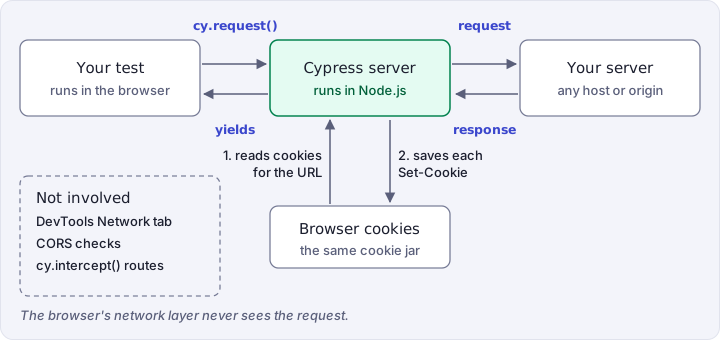
Because the request doesn't go through the browser:
- It doesn't appear in the browser's DevTools Network tab.
- CORS doesn't apply, so you can request any server, whatever its CORS headers.
cy.intercept()routes don't match it. It always reaches your real server, which is what you want when you test an endpoint without starting your front end.- Cypress doesn't verify the server's TLS certificate, so a self-signed or
expired certificate doesn't fail the request. It also means
cy.request()doesn't catch a certificate problem. - It sends the browser's
User-Agentunless you set one inheaders. To change the browser's own user agent, see how to override the browser's default user agent.
For example:
// docs.cypress.io sends no CORS headers, and cy.request() still succeeds
cy.request('https://docs.cypress.io').its('status').should('eq', 200)
How cy.request() resolves a relative URL
When you pass a URL without a protocol and host, such as /api/users, Cypress
resolves the host for cy.request() in this order:
- Inside a
cy.origin()callback, Cypress uses the origin you passed tocy.origin(). - If the
baseUrlproperty is set in your configuration file, Cypress prefixes the URL with it. This applies whether or not you have visited a page, sobaseUrlwins over the origin of a page you visited.
- cypress.config.js
- cypress.config.ts
const { defineConfig } = require('cypress')

module.exports = defineConfig({
  e2e: {
    baseUrl: 'http://localhost:1234',
  },
})
import { defineConfig } from 'cypress'

export default defineConfig({
  e2e: {
    baseUrl: 'http://localhost:1234',
  },
})
cy.request('seed/admin') // URL is http://localhost:1234/seed/admin
- If no
baseUrlis set and you have visited a page, Cypress uses the origin of the URL used for thecy.visit().
cy.visit('http://localhost:8080/app')
cy.request('users/1.json') //  URL is  http://localhost:8080/users/1.json
- If Cypress cannot determine the host, it throws an error.
How cy.request() sends and stores cookies
Before it sends a request, Cypress attaches the cookies the browser would have
sent to that URL. When the response has Set-Cookie headers, Cypress sets those
cookies in the browser, so later requests and page visits use them.
Cookies are pulled from the cookie jar by domain match. A cookie set without
hostOnly: true is a domain cookie, so it can be attached to a cy.request()
aimed at a different host that domain-matches it (for example a sibling
subdomain on the same registrable domain). If a cookie shows up on a request
unexpectedly, see
Cookie scope (host-only vs. domain cookies)
for how to scope it to a single exact host with hostOnly: true.
How cy.request() follows redirects
With followRedirect: true, the default, Cypress follows each redirect and sends
your headers again. Keep these behaviors in mind:
- Cookies carry across. Cypress saves any
Set-Cookieheaders into the browser, then attaches the cookies that match the next URL. Authorizationis dropped when the redirect changes the hostname.- A redirected
POST,PUT, orDELETEis followed as aGET, without its body orContent-Type. Only a307keeps the method and body.
How cy.request() handles request and response bodies
Request body serialization
What Cypress sends, and what you get back in response.body, depends on the
type of body:
body | Content-Type Cypress sets | response.body |
|---|---|---|
| Object or boolean | application/json, unless you set one | Parsed whenever it is valid JSON, whatever the response's Content-Type |
Object with form: true | application/x-www-form-urlencoded | Parsed when the response's Content-Type ends in json, otherwise a string |
| String | None | Parsed when the response's Content-Type ends in json, otherwise a string |
FormData | multipart/form-data with a boundary, replacing one you set | An ArrayBuffer of the raw bytes, whatever the response's Content-Type |
Blob | None | An ArrayBuffer of the raw bytes, whatever the response's Content-Type |
| None | None | Parsed when the response's Content-Type ends in json, otherwise a string |
For a string or Blob body, set a Content-Type in headers if your server
expects one.
A FormData body needs no Content-Type of its own. Cypress encodes each field
as a part of a multipart/form-data body, and a File or Blob field keeps
its filename and type, defaulting to application/octet-stream when it has no
type. The boundary that separates the parts goes in the Content-Type header
Cypress sets, replacing any you pass in headers.
Don't combine a FormData body with form: true or an
application/x-www-form-urlencoded header. Either one sends the body down the
URL-encoded form path, and the request fails with a network-level error.
Response body parsing
response.body is parsed into an object when either:
- The response's
Content-Typeends injson, such asapplication/json. - The request
bodyis an object or boolean (withoutform: true), and the response is valid JSON.
After a FormData or Blob request, response.body is an ArrayBuffer of raw
bytes, even for JSON, so decode it before you assert on it. In every other case,
it is a string.
const formData = new FormData()
formData.append('name', 'Jane')

cy.request({ method: 'POST', url: '/api/users', body: formData }).then(
  (response) => {
    const user = JSON.parse(new TextDecoder().decode(response.body))
    expect(user).to.have.property('name', 'Jane')
  }
)
Rules
Requirements
cy.request()requires being chained off ofcy.cy.request()requires that the server sends a response.cy.request()requires that the response status code be2xxor3xxwhenfailOnStatusCodeistrue.
Assertions
cy.request()will only run assertions you have chained once, and will not retry.
Timeouts
cy.request()can time out waiting for the server to respond.
Command Log
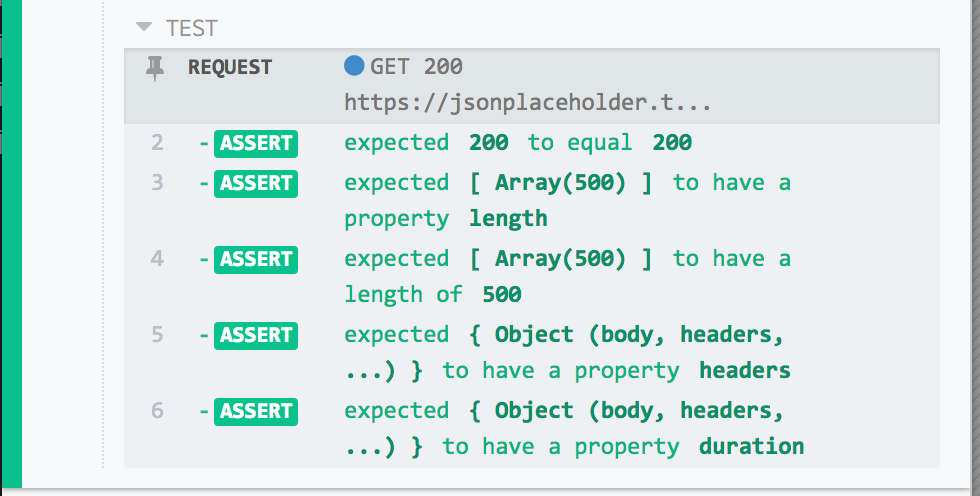
This example requests the comments endpoint and tests the response:
cy.request('https://jsonplaceholder.cypress.io/comments').then((response) => {
  expect(response.status).to.eq(200)
  expect(response.body).to.have.length(500)
  expect(response).to.have.property('headers')
  expect(response).to.have.property('duration')
})
The commands above display in the Command Log as a request row with the
method, status, and URL, followed by one row per assertion:
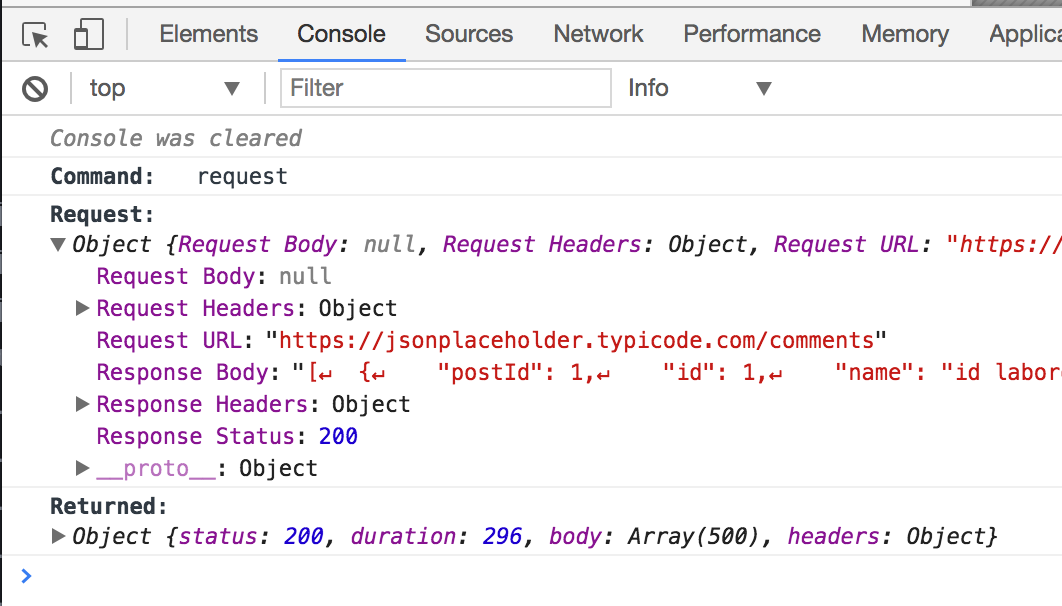
When you click request in the Command Log, the console shows the request
Cypress sent and the response it got under Request:, and the yielded response
under Yielded::
History
| Version | Changes |
|---|---|
| 16.2.1 | Fails with an invalid encoding error when encoding is false, 0, or an empty string. |
| 15.20.0 | Added support for QUERY method. |
| 7.4.0 | Added support for FormData and Blob request bodies. |
| 4.7.0 | Added support for encoding option. |
| 3.3.0 | Added support for options retryOnStatusCodeFailure and retryOnNetworkFailure. |
| 3.2.0 | Added support for any valid HTTP method argument including TRACE, COPY, LOCK, MKCOL, MOVE, PURGE, PROPFIND, PROPPATCH, UNLOCK, REPORT, MKACTIVITY, CHECKOUT, MERGE, M-SEARCH, NOTIFY, SUBSCRIBE, UNSUBSCRIBE, SEARCH, and CONNECT. |