first
Get the first DOM element within a set of DOM elements.
The querying behavior of this command matches exactly how
.first() works in jQuery.
Syntax
.first()
.first(options)
Usage
Correct Usage
cy.get('nav a').first() // Yield first link in nav
Incorrect Usage
cy.first() // Errors, cannot be chained off 'cy'
cy.getCookies().first() // Errors, 'getCookies' does not yield DOM element
Arguments
options (Object)
Pass in an options object to change the default behavior of .first().
| Option | Default | Description |
|---|---|---|
log | true | Displays the command in the Command log |
timeout | defaultCommandTimeout | Time to wait for .first() to resolve before timing out |
Yields
.first()yields the first DOM element within the set it was given..first()is a query, and it is safe to chain further commands.
Examples
No Args
Get the first list item in a list
<ul>
  <li class="one">Knick knack on my thumb</li>
  <li class="two">Knick knack on my shoe</li>
  <li class="three">Knick knack on my knee</li>
  <li class="four">Knick knack on my door</li>
</ul>
// yields <li class="one">Knick knack on my thumb</li>
cy.get('li').first()
Get the first element across several lists
.first() yields one element for the whole set, even when the elements sit in
different parents. The :first-child selector yields the first child of every
parent instead.
<ul class="fruits">
  <li>Apple</li>
  <li>Banana</li>
</ul>
<ul class="vegetables">
  <li>Carrot</li>
  <li>Daikon</li>
</ul>
// yields <li>Apple</li>
cy.get('ul li').first()

// yields [<li>Apple</li>, <li>Carrot</li>]
cy.get('ul li:first-child')
Common workflows with .first()
Scope .within() to the first matching element
.within() throws an error when its subject contains
more than one element. Narrow the set with .first() before calling it.
cy.get('tr')
  .first()
  .within(() => {
    cy.contains('Edit').click()
  })
Click the first result after the list finishes loading
An action such as .click() is not an assertion, so
cy.get('[data-cy=result]').first().click() acts on the first element that
exists at that moment. If the list renders placeholder rows before the real
results, the element it clicks can be a placeholder. Assert on the finished list
before calling .first(), and Cypress retries the query until the assertion
passes.
cy.get('[data-cy=result]').should('have.length', 10).first().click()
Assert on the first element while the list re-renders
cy.get() and .first() are both queries, so Cypress re-runs them together
until the chained assertion passes. If the list re-renders and a new element
takes the first position, the assertion checks the new element rather than the
one that was first when the query started.
cy.get('[data-cy=todo]').first().should('have.text', 'Buy milk')
Notes
How .first() compares to .eq(0)
.first() yields the same element as .eq(0). Use .eq()
to get an element at any other index, including negative indexes counted back
from the end of the set.
Selecting the first element that matches a selector
.first() takes no selector. cy.get('li').first('.active') yields the first
<li> whether or not it has the class active. The Command Log still shows
.active as the command's message, which can make it look as though the
selector was applied. TypeScript flags the call as an error. To get the first
element that matches a selector, narrow the set with
.filter() before calling .first().
cy.get('li').filter('.active').first()
Rules
Requirements
.first()requires being chained off a command that yields DOM element(s) or a document.
Assertions
.first()will automatically retry until the element(s) exist in the DOM..first()will automatically retry until all chained assertions have passed.
Timeouts
.first()can time out waiting for the element(s) to exist in the DOM..first()can time out waiting for assertions you've added to pass.
Command Log
Find the first input in the form
cy.get('form').find('input').first()
The commands above display in the Command Log as:

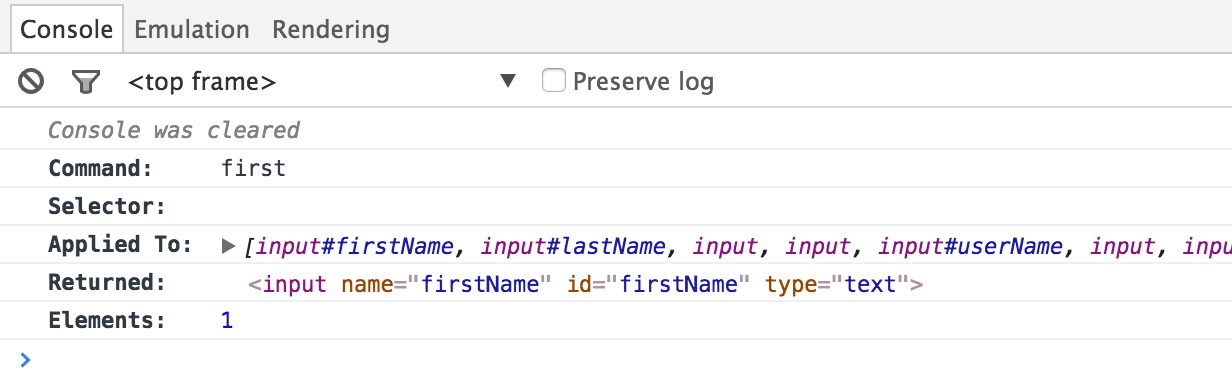
Click the first command in the Command Log to print the following to the
console:
History
| Version | Changes |
|---|---|
| 12.6.0 | Overwrite .first() with Cypress.Commands.overwriteQuery() rather than Cypress.Commands.overwrite(). |
| 12.0.0 | .first() is now a query. |