eq
Get a DOM element at a specific index within a set of DOM elements.
The querying behavior of this command matches exactly how
.eq() works in jQuery.
Syntax
.eq(index)
.eq(indexFromEnd)
.eq(index, options)
.eq(indexFromEnd, options)
Usage
Correct Usage
cy.get('tbody>tr').eq(0) // Yield first 'tr' in 'tbody'
cy.get('ul>li').eq(4) // Yield fifth 'li' in 'ul'
Incorrect Usage
cy.eq(0) // Errors, cannot be chained off 'cy'
cy.getCookies().eq(4) // Errors, 'getCookies' does not yield DOM element
Arguments
index (Number)
The position of the element to get within the set of elements, counting from
0.
indexFromEnd (Number)
A negative number that counts back from the end of the set of elements. -1 is
the last element.
options (Object)
Pass in an options object to change the default behavior of .eq().
| Option | Default | Description |
|---|---|---|
log | true | Displays the command in the Command log |
timeout | defaultCommandTimeout | Time to wait for .eq() to resolve before timing out |
Yields
.eq()yields the DOM element at the given index within the set it was given..eq()is a query, and it is safe to chain further commands.
Examples
Index
Get the 2nd item in a list with .eq()
<ul>
  <li>tabby</li>
  <li>siamese</li>
  <li>persian</li>
  <li>sphynx</li>
  <li>burmese</li>
</ul>
cy.get('li').eq(1).should('contain', 'siamese')
Assert on the 3rd row of a table with .eq()
The header row is a <tr> too, so it sits at index 0.
<table>
  <tr>
    <th>Breed</th>
    <th>Origin</th>
  </tr>
  <tr>
    <td>Siamese</td>
    <td>Thailand</td>
  </tr>
  <tr>
    <td>Sphynx</td>
    <td>Canada</td>
  </tr>
  <tr>
    <td>Persian</td>
    <td>Iran</td>
  </tr>
</table>
cy.get('tr').eq(2).should('contain', 'Canada')
Index from end
Get the 2nd-to-last item in a list with .eq()
<ul>
  <li>tabby</li>
  <li>siamese</li>
  <li>persian</li>
  <li>sphynx</li>
  <li>burmese</li>
</ul>
cy.get('li').eq(-2).should('contain', 'sphynx')
Common workflows with .eq()
Wait for the element at an index to render with .eq()
cy.get() and .eq() are both queries, so Cypress re-runs them together until
an element exists at the index. Here, the results render one at a time, and
.eq(2) waits for the third one.
<ul class="results"></ul>
<!-- results render one at a time, 500 ms apart: Ada, Grace, Katherine, Margaret -->
cy.get('.results li').eq(2).should('have.text', 'Katherine')
Move a table row up and check its position with .eq()
.eq() yields a single DOM element, so you can keep chaining queries and actions
off it. It also narrows the set to one element before
.within(), which throws an error when its subject
contains more than one element. Here, the test checks where each row ends up, so
the index is what's under test.
<table>
  <tbody>
    <tr>
      <td>Ada</td>
      <td><button>Move up</button></td>
    </tr>
    <tr>
      <td>Grace</td>
      <td><button>Move up</button></td>
    </tr>
  </tbody>
</table>
<!-- clicking Move up swaps its row with the row above it -->
cy.get('tbody tr')
  .eq(1)
  .within(() => {
    cy.contains('Move up').click()
  })
cy.get('tbody tr').eq(0).should('contain', 'Grace')
cy.get('tbody tr').eq(1).should('contain', 'Ada')
Click an item after the list finishes loading with .eq()
An action such as .click() is not an assertion, so
cy.get('[data-cy=result]').eq(3).click() acts on the element at index 3 at
that moment. If the list renders placeholder rows before the real results, the
element it clicks can be a placeholder. Assert on the finished list before
calling .eq(), and Cypress retries the query until the assertion passes.
Here, the results are ranked, so the test clicks the fourth-ranked result.
<ul class="results"></ul>
<!--
  4 placeholder <li data-cy="result" class="placeholder"> elements render
  first, then 10 <li data-cy="result"> results replace them. Clicking a
  result adds the class "selected".
-->
cy.get('[data-cy=result]').should('have.length', 10).eq(3).click()
cy.get('[data-cy=result]').eq(3).should('have.class', 'selected')
Check table row order after sorting with .eq()
cy.get() and .eq() are both queries, so Cypress re-runs them together until
the chained assertion passes. After the table re-sorts, the assertion checks
whichever row is at the index now, which is what you want when testing sort
order.
<table>
  <thead>
    <tr>
      <th>Name</th>
    </tr>
  </thead>
  <tbody>
    <tr>
      <td>Grace</td>
    </tr>
    <tr>
      <td>Ada</td>
    </tr>
  </tbody>
</table>
<!-- clicking the Name header sorts the rows alphabetically -->
cy.contains('th', 'Name').click()
cy.get('tbody tr').eq(0).should('contain', 'Ada')
cy.get('tbody tr').eq(1).should('contain', 'Grace')
Options
Wait longer for .eq() with the timeout option
The timeout you pass to .eq() sets how long Cypress retries the whole query
chain, including the cy.get() before it. Here, the third notification appears
after 6 seconds, which is past the default 4-second
defaultCommandTimeout.
<ul class="notifications">
  <li>Saved</li>
  <li>Uploaded</li>
</ul>
<!-- a third <li> with the text "Synced" is added after 6 seconds -->
cy.get('.notifications li')
  .eq(2, { timeout: 10000 })
  .should('have.text', 'Synced')
Notes
How .eq() compares to .first() and .last()
.eq(0) yields the same element as .first(), and
.eq(-1) yields the same element as .last().
What happens when the .eq() index is out of range
When no element exists at the index, .eq() yields an empty set. Cypress
retries until an element appears at the index. If none appears before the
timeout, it fails with an error such as
Expected to find element: `5`, but never found it. To assert that the set has
no element at an index, chain .should('not.exist').
<ul>
  <li>tabby</li>
  <li>siamese</li>
  <li>persian</li>
  <li>sphynx</li>
  <li>burmese</li>
</ul>
cy.get('li').eq(5).should('not.exist')
How .eq() compares to the :nth-child() selector
.eq() counts across the whole set and yields a single element. The CSS
:nth-child() selector counts from 1 within each parent, so it can match
several elements when the set spans more than one parent.
<ul class="fruits">
  <li>Apple</li>
  <li>Banana</li>
</ul>
<ul class="veggies">
  <li>Carrot</li>
  <li>Daikon</li>
</ul>
cy.get('li').eq(1) // yields <li>Banana</li>
cy.get('li:nth-child(2)') // yields <li>Banana</li> and <li>Daikon</li>
How .eq() compares to the jQuery :eq() selector
cy.get() accepts jQuery selectors, so cy.get('li:eq(1)') yields the same
element as cy.get('li').eq(1). jQuery deprecated the
:eq() selector in jQuery 3.4 and removed
it in jQuery 4, so use the .eq() command instead.
cy.get('li:eq(1)') // deprecated jQuery selector
cy.get('li').eq(1) // use the .eq() command instead
When to use .select() instead of .eq() on options
.eq() yields an <option> element without selecting it, so the <select>
keeps its value. Calling .click() on the option doesn't select it either:
Cypress fails because the option isn't visible. To choose an option by its
position, pass the index to .select().
<select>
  <option value="small">Small</option>
  <option value="medium">Medium</option>
  <option value="large">Large</option>
</select>
cy.get('select').select(1).should('have.value', 'medium')
How an aliased .eq() re-queries the current DOM
An alias stores the query chain, not the element it found. Each time you use the
alias, Cypress re-runs the chain against the current DOM, so an aliased .eq()
yields whichever element is at that index now. Learn more in
aliasing DOM elements.
<input class="new-todo" />
<ul class="todo-list">
  <li>Buy milk</li>
  <li>Walk dog</li>
</ul>
<!-- pressing Enter in .new-todo adds the text as a new <li> at the top of the list -->
cy.get('.todo-list li').eq(1).as('second')
cy.get('@second').should('have.text', 'Walk dog')

cy.get('.new-todo').type('Write docs{enter}')
cy.get('@second').should('have.text', 'Buy milk')
When to use .eq() instead of a data-cy selector
An index is tied to the order of the elements on the page. When that order
changes, such as a new item added at the top of a list, .eq() selects a
different element and the test breaks for a reason unrelated to what it checks.
Use .eq() when the position itself is what you're testing, such as sort order
or the newest item in a feed. Otherwise, select the element by a data-cy
attribute. Learn more in
selecting elements.
// position matters: the first row after sorting
cy.get('tbody tr').eq(0).should('contain', 'Ada')

// position doesn't matter: the row for a specific user
cy.get('[data-cy=user-ada]').should('be.visible')
Rules
Requirements
.eq()requires being chained off a command that yields DOM element(s) or a document.
Assertions
.eq()will automatically retry until the element(s) exist in the DOM..eq()will automatically retry until all chained assertions have passed.
Timeouts
.eq()can time out waiting for the element(s) to exist in the DOM..eq()can time out waiting for assertions you've added to pass.
Command Log
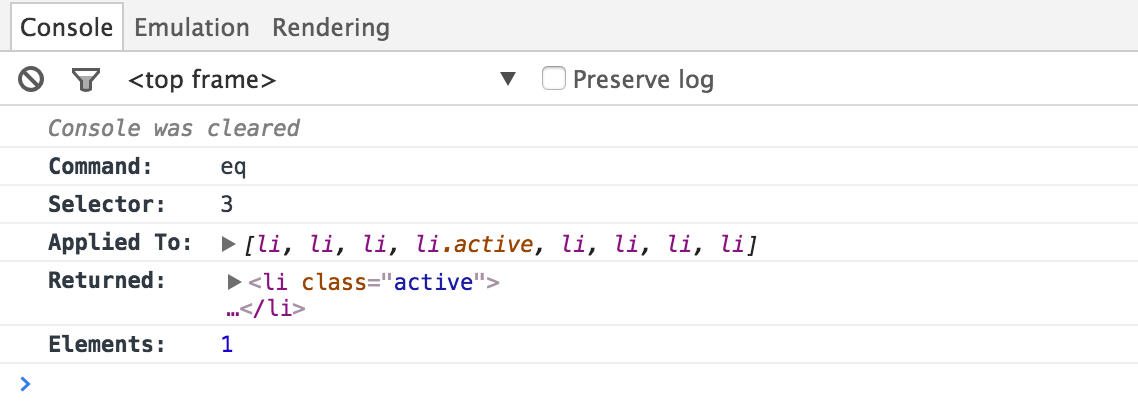
Find the 4th <li> in the list
cy.get('ul').find('li').eq(3)
The commands above display in the Command Log as:

Click the eq command in the Command Log to print the following to the
console:
History
| Version | Changes |
|---|---|
| 12.6.0 | Overwrite .eq() with Cypress.Commands.overwriteQuery() rather than Cypress.Commands.overwrite(). |
| 12.0.0 | .eq() is now a query. |