debug
Set a debugger and log what the previous command yields.
You need to have your Developer Tools open for .debug() to hit the breakpoint.
Syntax
.debug()
.debug(options)

// ---or---

cy.debug()
cy.debug(options)
Usage
Correct Usage
cy.debug().getCookie('app') // Pause to debug at beginning of commands
cy.get('nav').debug() // Debug the `get` command's yield
Arguments
options (Object)
Pass in an options object to change the default behavior of .debug().
| Option | Default | Description |
|---|---|---|
log | true | Displays the command in the Command log |
Yields
.debug()yields the same subject it was given from the previous command..debug()is a query, and it is safe to chain further commands.
Examples
Debug
Pause with debugger after .get()
cy.get('a').debug().should('have.attr', 'href')
Confirm the element before acting on it
Place .debug() before an action to check which element the action
receives.
Inspect a subject that isn't a DOM element
.debug() works on any subject, such as a response object or your application's
state.
cy.request('/api/users').debug() // inspect the full response object
cy.window().its('store').invoke('getState').debug() // inspect app state
Network requests
Inspect an intercepted request
After cy.wait() on an alias, the subject is the
interception, so you can expand subject.request.body and subject.response at
the breakpoint.
cy.intercept('POST', '/api/login').as('login')
cy.get('form').submit()
cy.wait('@login').debug()
Assertions
See the first-run subject while an assertion retries
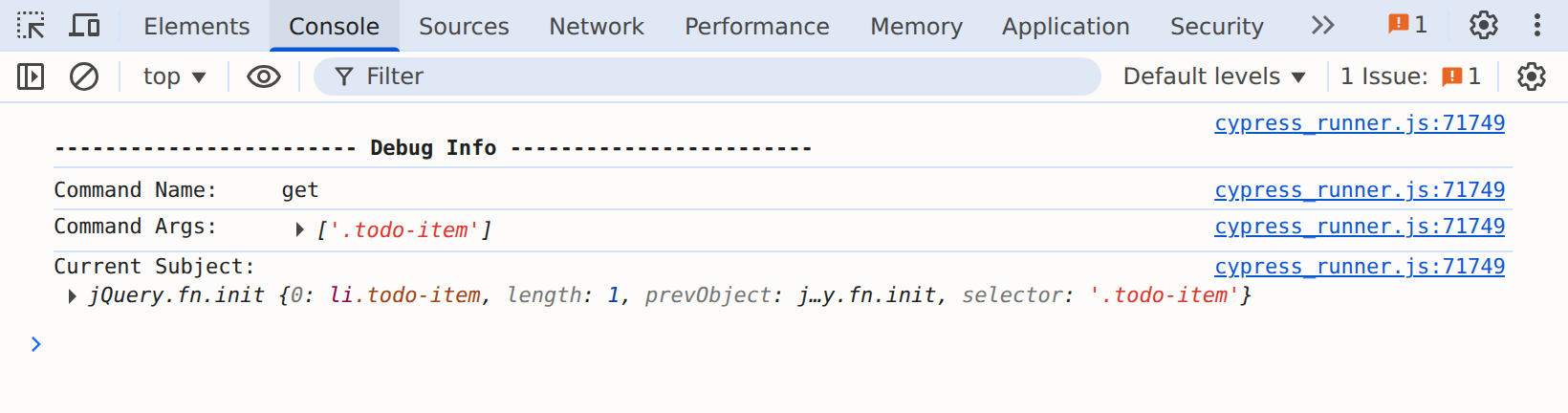
The "Debug Info" block shows the subject from the first time .debug() runs.
Here, it may log fewer than three items even though .should() passes once the
list finishes rendering. See
.debug() pauses once per call.
cy.get('.todo-item').debug().should('have.length', 3)
The Command Log shows the assertion passing with three items:

The "Debug Info" block, logged on the first run, shows the subject before the list finished rendering:
Debugger statement
Pause with your test's variables in scope
.debug() gives you subject at the breakpoint. To also reach variables from
your test, put a debugger statement inside .then(). A
debugger written directly in the test body pauses before any Cypress commands
run. The Debugging guide explains why.
The breakpoint only sees a test variable that the .then() callback uses. The
browser leaves out outer variables the callback never references, so reference
each one you want to inspect.
const expected = 'Welcome back'

cy.get('h1').then(($h1) => {
  const matches = $h1.text() === expected

  debugger // $h1, expected, and matches are in scope here
})
Notes
What .debug() logs to the console
When .debug() runs, it prints a "Debug Info" block to the browser console
with the previous command's name, its arguments, and the current subject. When
you call cy.debug() off of cy as the first command in a test, there is no
previous command or subject, so each value logs as undefined.
Inspect the subject at the breakpoint
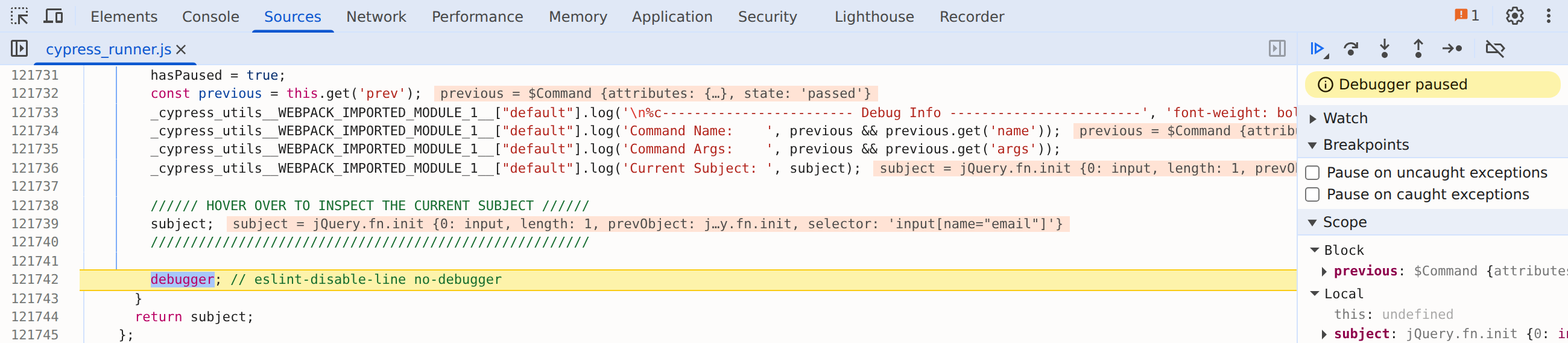
When the debugger statement pauses execution, the current subject is in scope
as the variable subject. Type subject in the Developer Tools console to
interact with it.
The breakpoint is in Cypress's own cypress_runner.js, not in your test file.
Look for the "HOVER OVER TO INSPECT THE CURRENT SUBJECT" comment above the
paused line, and for subject under "Local" in the "Scope" pane:
.debug() pauses once per call
.debug() is a query, so Cypress retries it along with the queries before it
while any chained assertions are failing. It only logs and hits the breakpoint
the first time it runs. The "Debug Info" block shows the subject from that
first run, which may differ from the subject Cypress yields once the assertions
pass.
Rules
Requirements
.debug()can be chained off ofcyor off another command.
Assertions
.debug()does not run assertions. Assertions pass through as if this command did not exist.
Timeouts
.debug()cannot time out.
Command Log
Log out the current subject for debugging
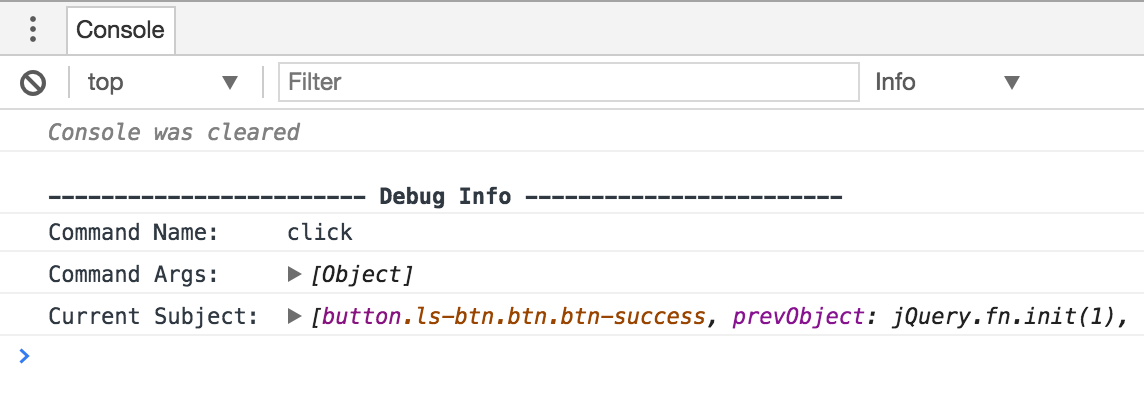
cy.get('.ls-btn').click({ force: true }).debug()
The commands above display in the Command Log as:

When .debug() runs, the console outputs the following:
History
| Version | Changes |
|---|---|
| 12.0.0 | .debug() became a query and can no longer be overwritten with Cypress.Commands.overwrite(). See the migration guide. |