intercept
Spy and stub network requests and responses.
Tip: We recommend you read the Network Requests guide first.
All intercepts are automatically cleared before every test.
Syntax
// spying only
cy.intercept(url)
cy.intercept(method, url)
cy.intercept(routeMatcher)
See arguments url, method and routeMatcher
// spying and response stubbing
cy.intercept(url, staticResponse)
cy.intercept(method, url, staticResponse)
cy.intercept(routeMatcher, staticResponse)
cy.intercept(url, routeMatcher, staticResponse)
See staticResponse argument
// spying, dynamic stubbing, request modification, etc.
cy.intercept(url, routeHandler)
cy.intercept(method, url, routeHandler)
cy.intercept(routeMatcher, routeHandler)
cy.intercept(url, routeMatcher, routeHandler)
See routeHandler argument
// Specifying request and response types
type CustomRequest = {
  kind: 'custom_request'
}
type CustomResponse = {
  kind: 'custom_response'
}
cy.intercept<CustomRequest, CustomResponse>(url, (req) => {
  req.body // .body of request will be of type CustomRequest
  req.continue((res) => {
    res.body // .body of response will be of type CustomResponse
  })
})
Usage
Correct Usage
// spying
cy.intercept('/users/**')
cy.intercept('GET', '/users*')
cy.intercept({
  method: 'GET',
  url: '/users*',
  hostname: 'localhost',
})

// spying and response stubbing
cy.intercept('POST', '/users*', {
  statusCode: 201,
  body: {
    name: 'Peter Pan',
  },
})

// spying, dynamic stubbing, request modification, etc.
cy.intercept('/users*', { hostname: 'localhost' }, (req) => {
  /* do something with request and/or response */
})
Arguments
method (String)
Match the route to a specific
HTTP method (GET,
POST, PUT, PATCH, DELETE, QUERY, etc).
If no method is defined Cypress will match all requests by default.
url (String, Glob, RegExp)
Specify the URL to match. See Matching url for examples.
Alternatively, specify the URL via the routeMatcher
argument (below).
routeMatcher (RouteMatcher)
routeMatcher is an object used to match the incoming HTTP requests with this
intercepted route.
All properties are optional but all those that are set must match for the
request to be intercepted. If a string is passed to any property, it will be
glob-matched against the request using
Cypress.minimatch with the { matchBase: true }
minimatch option applied.
| Option | Description |
|---|---|
| auth | HTTP Basic Authentication (object with keys username and password) |
| headers | HTTP request headers (object) |
| hostname | HTTP request hostname |
| https | true: only secure (https://) requests, false: only insecure (http://) requests |
| method | HTTP request method (matches any method by default) |
| middleware | true: match route first and in defined order, false: match route in reverse order (default) |
| path | HTTP request path after the hostname, including query parameters |
| pathname | Like path, but without query parameters |
| port | HTTP request port(s) (number or Array) |
| query | Parsed query string (object) |
| resourceType deprecated | The resource type of the request. See "Request object properties" for a list of possible values for resourceType. |
| times | Maximum number of times to match (number) |
| url | Full HTTP request URL |
See examples below.
staticResponse (StaticResponse)
By passing in a StaticResponse as the last argument, you can
statically define (stub) a response for matched
requests. See StaticResponse object for the list of
properties.
Additionally, you can pass { log: false } with your StaticResponse to
disable command logs for this intercept. See
"Disabling logs for a request".
See
Stubbing a response with a StaticResponse object
for an example.
routeHandler (Function)
The routeHandler function is called whenever a request is matched, with the
first argument being the request object. From inside the callback, you have
access to the entire request-response where you can modify the outgoing request,
send a response, access the real response, and more.
See "Intercepted requests" and
Request/Response Modification with routeHandler.
Yields
cy.intercept()yieldsnull, but can be aliased.- Waiting on an aliased
cy.intercept()route using cy.wait() will yield an object that contains information about the matching request/response cycle. See Using the yielded object for examples of how to use this object.
Examples
Matching url
You can provide the exact URL to match or use pattern-matching to match many URLs at once, either with globs or with regex. See Glob Pattern Matching URLs.
// match any request that exactly matches the URL
cy.intercept('https://prod.cypress.io/users')

// match any request that satisfies a glob pattern
cy.intercept('/users\\?_limit=*')

// match any request that satisfies a regex pattern
cy.intercept(/\/users\?_limit=(3|5)$/)
Matching method
If you don't pass in a method argument, then all HTTP methods
(GET, POST, PUT, PATCH, DELETE, etc.) will match.
cy.intercept('/users')
// matches this: GET http://localhost/users
// ...and this, too: POST http://localhost/users

cy.intercept('GET', '/users')
// matches this: GET http://localhost/users
// ...but not this: POST http://localhost/users
Matching with RouteMatcher
Specifying a method and url to match can also be acheived by passing the
routeMatcher object into cy.intercept instead:
// These both yield the same result:
cy.intercept({ method: 'GET', url: '**/users' })
cy.intercept('GET', '**/users')
// Match any type of request with the pathname `/search`
// and the query parameter 'q=some+terms'
cy.intercept({
  pathname: '/search',
  query: {
    q: 'some terms',
  },
}).as('searchForTerms')
cy.intercept(
  {
    // this RegExp matches any URL beginning with
    // 'http://api.example.com/' and ending with '/edit' or '/save'
    url: /^http:\/\/api\.example\.com\/.*\/(edit|save)/,
    // matching requests must also contain this header
    headers: {
      'x-requested-with': 'exampleClient',
    },
  }
})
// this example will cause 1 request to `/temporary-error`
// to receive a network error and subsequent requests will
// not match this `RouteMatcher`
cy.intercept({ url: '/temporary-error', times: 1 }, { forceNetworkError: true })
Matching array query parameters
The query matcher compares each query parameter against a single string value,
so it cannot match repeated, array-style parameters such as
?ids[]=1&ids[]=2. The following will not match that request:
// 🚫 does not work - the array parameter is ignored
cy.intercept({
  pathname: '/items',
  query: {
    ids: '1',
  },
})
Instead, match the request with a RegExp url, or use a
routeHandler function and read the repeated values
with URLSearchParams.getAll():
// match any request to `/items` that includes an `ids` parameter
cy.intercept({ method: 'GET', url: /\/items\?.*ids/ }).as('items')
// inspect every `ids` value and only stub when `1` is present
cy.intercept('/items*', (req) => {
  const ids = new URL(req.url).searchParams.getAll('ids[]')

  if (ids.includes('1')) {
    req.reply({ fixture: 'items.json' })
  }
}).as('items')
Pattern Matching
// match updates to the `/users` endpoint using glob matching
cy.intercept({
  method: '+(PUT|PATCH)',
  url: '**/users/*',
})
// matches:
//   PUT /users/1
//   PATCH /users/1
//
// doesn't match:
//   GET /users
//   GET /users/1

// same as above, but using regex
cy.intercept({
  method: '/PUT|PATCH/',
  url: '**/users/*',
})
Aliasing an intercepted route
While cy.intercept doesn't yield anything, you can chain
.as to it to create an
alias which can be used
to wait on a request.
cy.intercept('GET', '/users').as('getAllUsers')
cy.intercept('POST', '/users').as('createUser')
Accessing all intercepted requests
When an intercepted route is aliased, you can retrieve all matching
intercepted requests using the .all suffix with
cy.get(). This is useful when your application makes
multiple requests to the same route and you need to assert on all of them.
cy.intercept('GET', '/users').as('getUsers')

// trigger multiple requests
cy.visit('/users')
cy.visit('/users')

// yields an array of all interceptions for this alias
cy.get('@getUsers.all').then((interceptions) => {
  expect(interceptions).to.have.length(2)
})
You can also retrieve a specific intercept by its 1-based numeric index. Without
any suffix, cy.get('@alias') returns the most recent intercepted request.
cy.intercept('GET', '/users').as('getUsers')

cy.visit('/users')
cy.visit('/users')

// yields the first intercepted request
cy.get('@getUsers.1').its('response.statusCode').should('eq', 200)

// yields the second intercepted request
cy.get('@getUsers.2').its('response.statusCode').should('eq', 200)
Index 0 is not valid — indices start at 1. These suffixes are not
supported by cy.wait(). Use cy.get('@alias.all')
instead of cy.wait('@alias.all').
Aliasing individual requests
Aliases can be set on a per-request basis by setting the alias property of the
intercepted request. This is especially useful when intercepting GraphQL
requests:
cy.intercept('POST', '/graphql', (req) => {
  if (req.body.hasOwnProperty('query') && req.body.query.includes('mutation')) {
    req.alias = 'gqlMutation'
  }
})

// assert that a matching request has been made
cy.wait('@gqlMutation')
For more guidance around aliasing requests with GraphQL, see Working with GraphQL.
Waiting on a request
Use cy.wait() with aliasing an intercepted route to wait for the request/response cycle to complete.
With URL
cy.intercept('http://example.com/settings').as('getSettings')

// once a request to get settings responds, 'cy.wait' will resolve
cy.wait('@getSettings')
With RouteMatcher
cy.intercept({
  url: 'http://example.com/search*',
  query: { q: 'expected terms' },
}).as('search')

// once any type of request to search with a querystring
// containing 'q=expected+terms' responds, 'cy.wait' will resolve
cy.wait('@search')
Using the yielded object
Using cy.wait() on a cy.intercept() route alias yields
an interception object which represents the request/response cycle:
cy.wait('@someRoute').then((interception) => {
  // 'interception' is an object with properties
  // 'id', 'request' and 'response'
})
You can chain .its() and
.should() to assert against request/response cycles:
// assert that a request to this route
// was made with a body that included 'user'
cy.wait('@someRoute').its('request.body').should('include', 'user')

// assert that a request to this route
// received a response with HTTP status 500
cy.wait('@someRoute').its('response.statusCode').should('eq', 500)

// assert that a request to this route
// received a response body that includes 'id'
cy.wait('@someRoute').its('response.body').should('include', 'id')
Waiting on errors
You can use cy.wait() to wait on requests that end with network errors:
cy.intercept('GET', '/should-err', { forceNetworkError: true }).as('err')

// assert that this request happened
// and that it ended in an error
cy.wait('@err').should('have.property', 'error')
Stubbing a response
With a string
// requests to '/update' will be fulfilled
// with a body of "success"
cy.intercept('/update', 'success')
With a fixture
// requests to '/users.json' will be fulfilled
// with the contents of the "users.json" fixture
cy.intercept('/users.json', { fixture: 'users.json' })
With a StaticResponse object
A StaticResponse object represents a response to an HTTP
request, and can be used to stub routes:
const staticResponse = {
  // some StaticResponse properties here...
}

cy.intercept('/projects', staticResponse)
Stub a response with a JSON body:
cy.intercept('/projects', {
  body: [{ projectId: '1' }, { projectId: '2' }],
})
Stub headers, status code, and body all at once:
cy.intercept('/not-found', {
  statusCode: 404,
  body: '404 Not Found!',
  headers: {
    'x-not-found': 'true',
  },
})
Stub response with a fixture that is read as a Buffer:
cy.intercept('/not-found', {
  fixture: 'media/gif.mp4,null',
})
See also StaticResponse object.
Using the routeHandler function
By specifying a routeHandler function as the last argument
to cy.intercept, you'll have access to the entire request-response session,
enabling you to modify the outgoing request, manipulate the real response, make
assertions, etc.
The routeHandler takes the incoming HTTP request (IncomingHTTPRequest) as
the first argument.
cy.intercept('/users*', (req) => {
  /* do something with request and/or response */
})
Throughout these examples we will refer to the incoming HTTP request as req.
Those of you with Express.js
middleware experience
should be familiar with this syntax.
Asserting on a request
cy.intercept('POST', '/organization', (req) => {
  expect(req.body).to.include('Acme Company')
})
Modifying an outgoing request
You can use the request handler callback to modify the intercepted request object before it is sent.
// set the request body to something different
// before it's sent to the destination
cy.intercept('POST', '/login', (req) => {
  req.body = 'username=janelane&password=secret123'
})

// dynamically set the alias
cy.intercept('POST', '/login', (req) => {
  req.alias = 'login'
})
Adding a header to an outgoing request
You can add a header to an outgoing request, or modify an existing header
cy.intercept('/req-headers', (req) => {
  req.headers['x-custom-headers'] = 'added by cy.intercept'
})
Note: the new header will NOT be shown in the browser's Network tab, as the request has already left the browser. You can still confirm the header was added by waiting on the intercept as shown below:
Waiting on the intercept
cy.intercept('/req-headers', (req) => {
  req.headers['x-custom-headers'] = 'added by cy.intercept'
}).as('headers')

// the application makes the call ...
// confirm the custom header was added
cy.wait('@headers')
  .its('request.headers')
  .should('have.property', 'x-custom-headers', 'added by cy.intercept')
Add, modify or delete a header to all outgoing requests
You can add, modify or delete a header to all outgoing requests using a
beforeEach() in the
supportFile.
beforeEach(() => {
  cy.intercept(
    { url: 'http://localhost:3001/**', middleware: true },
    // Delete 'if-none-match' header from all outgoing requests
    (req) => delete req.headers['if-none-match']
  )
})
Dynamically stubbing a response
You can use the req.reply() function to dynamically control the
response to a request.
cy.intercept('/billing', (req) => {
  // functions on 'req' can be used to
  // dynamically respond to a request here

  // send the request to the destination server
  req.reply()

  // respond to the request with a JSON object
  req.reply({ plan: 'starter' })

  // send the request to the destination server
  // and intercept the response
  req.continue((res) => {
    // 'res' represents the real destination's response
    // See "Intercepting a response" for more details and examples
  })
})
See "Intercepted requests" for more information on the req object and
its properties and methods.
Returning a Promise
If a Promise is returned from the route callback, it will be awaited before continuing with the request.
cy.intercept('POST', '/login', (req) => {
  // you could asynchronously fetch test data...
  return getLoginCredentials().then((credentials) => {
    // ...and then, use it to supplement the outgoing request
    req.headers['authorization'] = credentials
  })
})
Passing a request to the next request handler
If req.reply() or req.continue() is not
explicitly called inside of a request handler, requests will pass to the next
request handler until none are left.
// you could have a top-level middleware handler that
// sets an auth token on all requests
// but remember setting `middleware: true` will
// cause this to always be called first
cy.intercept('http://api.company.com/', { middleware: true }, (req) => {
  req.headers['authorization'] = `token ${token}`
})

// and then have another handler that
// more narrowly asserts on certain requests
cy.intercept('POST', 'http://api.company.com/widgets', (req) => {
  expect(req.body).to.include('analytics')
})

// a POST request to http://api.company.com/widgets would hit both
// of those callbacks, middleware first, then the request would be
// sent out with the modified request headers to the
// real destination
Disabling logs for a request
By default, Cypress logs all requests that match any cy.intercept(), as well
as all XMLHttpRequests and fetch requests. You can use cy.intercept() to
disable these logs by passing { log: false } in the second parameter:
// disable Cypress's default behavior of logging all XMLHttpRequests and fetches
cy.intercept({ resourceType: /xhr|fetch/ }, { log: false })
Note: Currently, you can only enable/disable a request's logs when defining the
cy.intercept(), not inside of an intercept callback. See
#26069.
Intercepting a response
Inside of a callback passed to req.continue(), you can access the destination
server's real response.
cy.intercept('/integrations', (req) => {
  // req.continue() with a callback will send the request to
  // the destination server
  req.continue((res) => {
    // 'res' represents the real destination response
    // you can manipulate 'res' before it's sent to the browser
  })
})
See "Intercepted responses" for more information on the res object. See
"Controlling the outbound request with req.continue()" for
more information about req.continue().
Asserting on a response
cy.intercept('/projects/2', (req) => {
  req.continue((res) => {
    expect(res.body).to.include('My Project')
  })
})
Returning a Promise
If a Promise is returned from the route callback, it will be awaited before sending the response to the browser.
cy.intercept('/users', (req) => {
  req.continue((res) => {
    // the response will not be sent to the browser until
    // 'waitForSomething()' resolves
    return waitForSomething()
  })
})
Throttle or delay response all incoming responses
You can throttle or delay all incoming responses using a beforeEach() in the
supportFile.
// Throttle API responses to simulate real-world conditions
beforeEach(() => {
  cy.intercept(
    {
      url: 'http://localhost:3001/**',
      middleware: true,
    },
    (req) => {
      req.on('response', (res) => {
        // Throttle the response to 1 Mbps to simulate a
        // mobile 3G connection
        res.setThrottle(1000)
      })
    }
  )
})
Request/Response Modification with routeHandler
Specify routeHandler as the last argument to modify the
outgoing request, stub a response, make assertions, etc.
If a function is passed as the routeHandler, it will be called with the
intercepted HTTP request:
cy.intercept('/api', (req) => {
  // do something with the intercepted request
})
From here, you can do several things with the intercepted request:
- modify and make assertions on the request like its body, headers, URL, method, etc. (example)
- stub out the response without interacting with a real back-end (example
- pass the request through to its destination and modify or make assertions on the real response on its way back (example)
- attach listeners to various events on the request (example)
Asserting on a request
You can use the request handler callback to make an assertion on the intercepted request object before it is sent.
// match requests to create a user
cy.intercept('POST', '/users', (req) => {
  // make an assertion on the payload contents
  expect(req.body).to.include('Peter Pan')
})
Controlling the outgoing request
The outgoing request, including its body, headers, etc., can be modified before it's sent.
// modify the request body before it's sent to its destination
cy.intercept('POST', '/users', (req) => {
  req.body = {
    name: 'Peter Pan',
  }
})

// add a header to an outgoing request
cy.intercept('POST', '/users', (req) => {
  req.headers['x-custom-header'] = 'added by cy.intercept'
})

// modify an existing header
cy.intercept('POST', '/users', (req) => {
  req.headers['authorization'] = 'Basic YWxhZGRpbjpvcGVuc2VzYW1l'
})
Verifying the request modification
cy.intercept('POST', '/users', (req) => {
  req.headers['x-custom-header'] = 'added by cy.intercept'
}).as('createUser')

cy.get('button.save').click()
// you can see the headers in the console output by selecting
// this line in the command log:
cy.wait('@createUser')
  // ...or make an assertion:
  .its('request.headers')
  .should('have.property', 'x-custom-header', 'added by cy.intercept')
In Chrome, Chromium, and Edge the browser sends the modified request, so the
modification is reflected in the browser's network traffic (for example, in Chrome
DevTools). On the
legacy network path
the browser logs the request before Cypress modifies it, so the modification does
not appear there — verify it from the Cypress command log, or with an assertion on
request.headers after cy.wait().
cy.intercept() cannot be debugged using
cy.request()! Cypress only intercepts requests made
by your front-end application.
Controlling the response
The intercepted request passed to the route handler (hereafter referred to as
req, though you can use any name) contains methods to dynamically control the
response to a request:
req.reply()- stub out a response requiring no dependency on a real back-endreq.continue()- modify or make assertions on the real responsereq.destroy()- destroy the request and respond with a network errorreq.redirect()- respond to the request with a redirect to a specified locationreq.on()- modify the response by attaching to events
Stubbing out a response (req.reply()):
req.reply() takes a StaticResponse object as the first
argument:
// stub out the response without interacting with a real back-end
cy.intercept('POST', '/users', (req) => {
  req.reply({
    headers: {
      Set-Cookie: 'newUserName=Peter Pan;'
    },
    statusCode: 201,
    body: {
      name: 'Peter Pan'
    },
    delay: 10, // milliseconds
    throttleKbps: 1000, // to simulate a 3G connection
    forceNetworkError: false // default
  })
})

// stub out a response body using a fixture
cy.intercept('GET', '/users', (req) => {
  req.reply({
    statusCode: 200, // default
    fixture: 'users.json'
  })
})
See StaticResponse objects below for more information.
The reply method also supports shorthand to avoid having to specify a
StaticResponse object:
// equivalent to `req.reply({ body })`
req.reply(body)

// equivalent to `req.reply({ body, headers })`
req.reply(body, headers)

// equivalent to `req.reply({ statusCode, body, headers})`
req.reply(statusCode, body, headers)
Note: Calling reply() will end the request phase and stop the request from
propagating to the next matching request handler in line. See Interception
Lifecycle.
See also
Providing a stub response with req.reply()
Modifying the real response (continue):
The continue method accepts a function which is passed an object representing
the real response being intercepted on its way back to the client (your
front-end application).
// pass the request through and make an assertion on
// the real response
cy.intercept('POST', '/users', (req) => {
  req.continue((res) => {
    expect(res.body).to.include('Peter Pan')
  })
})
See also Controlling the outbound request with req.continue()
Responding with a network error (destroy):
// dynamically destroy the request and
// respond with a network error
cy.intercept('POST', '/users', (req) => {
  if (mustDestroy(req)) {
    req.destroy()
  }

  function mustDestroy(req) {
    // code that determines whether to force a network error
    // based on the contents of `req`
  }
})
Responding with a new location (redirect):
// respond to this request with a redirect to a new 'location'
cy.intercept('GET', '/users', (req) => {
  // statusCode defaults to `302`
  req.redirect('/customers', 301)
})
Responding by listening to events (on):
cy.intercept('GET', '/users', (req) => {
  req.on('before:response', (res) => {
    // do something when the `before:response` event is triggered
  })
})
cy.intercept('POST', '/users', (req) => {
  req.on('response', (res) => {
    // do something when the `response` event is triggered
  })
})
See example for throttling a response See more examples of events
Returning a Promise
If a Promise is returned from the route callback, it will be awaited before continuing with the request.
cy.intercept('POST', '/users', (req) => {
  // asynchronously fetch test data
  return getAuthToken().then((token) => {
    // ...and apply it to the outgoing request
    req.headers['Authorization'] = `Basic ${token}`
  })
})

cy.intercept('POST', '/users', (req) => {
  req.continue((res) => {
    // the response will not be sent to the browser until
    // `waitForSomething()` resolves:
    return waitForSomething()
  })
})
Stubbing a response with a string
// requests to create a user will be fulfilled
// with a body of 'success'
cy.intercept('POST', '/users', 'success')
// { body: 'success' }
Intercepted requests
If a function is passed as the handler for a cy.intercept(), it will be called
with the first argument being an object that represents the intercepted HTTP
request:
cy.intercept('/api', (req) => {
  // `req` represents the intercepted HTTP request
})
From here, you can do several things with the intercepted request:
- you can modify and assert on the request's properties (body, headers, URL, method...)
- the request can be sent to the real upstream server
- optionally, you can intercept the response from this
- a response can be provided to stub out the request
- listeners can be attached to various events on the request
Request object properties
The request object (req) has several properties from the HTTP request itself:
{
  /**
   * The body of the request.
   * If a JSON Content-Type was used and the body was valid JSON,
   * this will be an object.
   * If the body was binary content, this will be a buffer.
   */
  body: string | object | any
  /**
   * The headers of the request.
   */
  headers: { [key: string]: string }
  /**
   * Request HTTP method (GET, POST, ...).
   */
  method: string
  /**
   * Request URL.
   */
  url: string
  /**
   * URL query string as object.
   */
  query: Record<string, string|number>
  /**
   * The HTTP version used in the request. Read only.
   * Not reported in Chrome, Chromium, or Edge, where the browser negotiates the
   * protocol with the origin directly and it is not known when the request is
   * intercepted. Firefox, WebKit, and Electron still report it.
   */
  httpVersion?: string
  /**
   * The resource type of the request. Read only.
   */
  resourceType: 'document' | 'fetch' | 'xhr' | 'websocket' | 'stylesheet'
              | 'script' | 'image' | 'font' | 'cspviolationreport' | 'ping'
              | 'manifest' | 'other'
}
req.httpVersion is not reported in Chrome, Chromium, or Edge, where Cypress intercepts
traffic inside the browser and the protocol your application negotiates with your server
is not known at the point the request is intercepted. Firefox, WebKit, and Electron route
traffic through the Cypress HTTP/1.1 proxy and still report it. See
Native network interception for the other
properties this affects and how to write assertions that pass in every browser.
req also has some optional properties which can be set to control
Cypress-specific behavior:
{
  /**
   * If provided, the number of milliseconds before an upstream
   * response to this request will time out and cause an error.
   * By default, `responseTimeout` from config is used.
   */
  responseTimeout?: number
  /**
   * Set if redirects should be followed when this request is made.
   * By default, requests will not follow redirects before
   * yielding the response (the 3xx redirect is yielded).
   */
  followRedirect?: boolean
  /**
   * If set, `cy.wait` can be used to await the request/response
   * cycle to complete for this request via `cy.wait('@alias')`.
   */
  alias?: string
}
Any modifications to the properties of req will be persisted to other request
handlers, and finally merged into the actual outbound HTTP request.
Controlling the outbound request with req.continue()
Calling req.continue() without any argument will cause the request to be sent
outgoing, and the response will be returned to the browser after any other
listeners have been called. For example, the following code modifies a POST
request and then sends it to the upstream server:
cy.intercept('POST', '/submitStory', (req) => {
  req.body.storyName = 'some name'
  // send the modified request and skip any other
  // matching request handlers
  req.continue()
})
If a function is passed to req.continue(), the request will be sent to the
real upstream server, and the callback will be called with the response once the
response is fully received from the server. See "Intercepted responses"
Note: calling req.continue() will stop the request from propagating to the
next matching request handler in line. See "Interception lifecycle"
for more information.
Providing a stub response with req.reply()
The req.reply() function can be used to send a stub response for an
intercepted request. By passing a string, object, or
StaticResponse to req.reply(), the request can be
preventing from reaching the destination server.
For example, the following code stubs out a JSON response from a request interceptor:
cy.intercept('/billing', (req) => {
  // dynamically get billing plan name at request-time
  const planName = getPlanName()
  // this object will automatically be JSON.stringified and
  // sent as the response
  req.reply({ plan: planName })
})
Instead of passing a plain object or string to req.reply(), you can also pass
a StaticResponse object. With a
StaticResponse, you can force a network error,
delay/throttle the response, send a fixture, and more.
For example, the following code serves a dynamically chosen fixture with a delay of 500ms:
cy.intercept('/api/users/*', async (req) => {
  // asynchronously retrieve fixture filename at request-time
  const fixtureFilename = await getFixtureFilenameForUrl(req.url)
  req.reply({
    fixture: fixtureFilename,
    delay: 500,
  })
})
See the StaticResponse documentation for more information on
stubbing responses in this manner.
req.reply() shorthand
req.reply() also supports shorthand, similar to res.send(), to
avoid having to specify a StaticResponse object:
// equivalent to `req.reply({ body })`
req.reply(body)

// equivalent to `req.reply({ body, headers })`
req.reply(body, headers)

// equivalent to `req.reply({ statusCode, body, headers})`
req.reply(statusCode, body, headers)
Convenience functions
There are also two convenience functions available on req:
{
  /**
   * Destroy the request and respond with a network error.
   */
  destroy(): void
  /**
   * Respond to this request with a redirect to a new 'location'.
   * @param statusCode HTTP status code to redirect with. Default: 302
   */
  redirect(location: string, statusCode?: number): void
}
See examples in the Controlling the response section
Note: calling req.reply() will end the request phase and stop the request from
propagating to the next matching request handler in line. See "Interception
lifecycle" for more information.
Request events
For advanced use, several events are available on req, that represent
different stages of the Interception lifecycle.
By calling req.on, you can subscribe to different events:
cy.intercept('/shop', (req) => {
  req.on('before:response', (res) => {
    /**
     * Emitted before `response` and before any `req.continue`
     * handlers. Modifications to `res` will be applied to the
     * incoming response. If a promise is returned, it will be
     * awaited before processing other event handlers.
     */
  })

  req.on('response', (res) => {
    /**
     * Emitted after `before:response` and after any
     * `req.continue` handlers - before the response is sent
     * to the browser. Modifications to `res` will be applied
     * to the incoming response. If a promise is returned, it
     * will be awaited before processing other event handlers.
     */
  })

  req.on('after:response', (res) => {
    /**
     * Emitted once the response to a request has finished
     * sending to the browser. Modifications to `res` have no
     * impact. If a promise is returned, it will be awaited
     * before processing other event handlers.
     */
  })
})
See "Intercepted responses" for more details on the res object yielded
by before:response and response. See "Interception lifecycle"
for more details on request ordering.
Intercepted responses
The response can be intercepted in two ways:
- by passing a callback to
req.continue()within a request handler - by listening for the
before:responseorresponserequest events (see "Request events")
The response object, res, will be passed as the first argument to the handler
function:
cy.intercept('/url', (req) => {
  req.on('before:response', (res) => {
    // this will be called before any `req.continue` or
    // `response` handlers
  })

  req.continue((res) => {
    // this will be called after all `before:response`
    // handlers and before any `response` handlers
    // by calling `req.continue`, we signal that this
    // request handler will be the last one, and that
    // the request should be sent outgoing at this point.
    // for that reason, there can only be one
    // `req.continue` handler per request.
  })

  req.on('response', (res) => {
    // this will be called after all `before:response`
    // handlers and after the `req.continue` handler
    // but before the response is sent to the browser
  })
})
Response object properties
The response object (res) yielded to response handlers has several properties
from the HTTP response itself. All of the following properties on res can be
modified:
| Property | Description |
|---|---|
| body | response body (object, string, ArrayBuffer) |
| headers | response headers (object) |
| statusCode | response status code (number) |
| statusMessage | response status message (string) |
res.statusMessage is an empty string when the response reached the browser over a
protocol that carries no reason phrase. HTTP/2 and HTTP/3 do not carry one, so a response
your server delivered over either reports ''. An HTTP/1.1 response reports the phrase
your server sent, which may itself be empty. Prefer res.statusCode, which is always
reported, and treat the phrase for a standard code as redundant with it.
Note about body: If the response header contains
Content-Type: application/json and the body contains valid JSON, this will be
an object. And if the body contains binary content, this will be a buffer.
Cypress relies on the Content-Type: application/json header to decide whether
to parse the body as JSON. If that header is absent, the body is yielded as a
string even when it contains JSON. This commonly happens with responses that
omit a Content-Type header. For example, a 304 Not Modified response, which
per RFC 7232 is not
expected to include representation metadata such as Content-Type, or a 301
redirect. When asserting on response.body for these responses, either assert
against the string value or parse it yourself with JSON.parse():
cy.wait('@getResource').then(({ response }) => {
  // when no `Content-Type: application/json` header is present,
  // `response.body` is a string and must be parsed before
  // asserting on its properties
  const body =
    typeof response.body === 'string'
      ? JSON.parse(response.body)
      : response.body

  expect(body).to.have.property('id')
})
res also has some optional properties which can be set to control
Cypress-specific behavior:
| Property | Description |
|---|---|
| throttleKbps | Maximum data transfer rate of the response (kilobits/second) |
| delay | Minimum network latency or delay to add to the response time (milliseconds) |
Any modifications to the properties of res will be persisted to other response
handlers, and finally merged into the actual incoming HTTP response.
Ending the response with res.send()
To end the response phase of the request, call res.send(). Optionally, you can
pass a StaticResponse to res.send(), to be merged with the
actual response.
When res.send() is called, the response phase will end immediately and no
other response handlers will be called for the current request. Here is an
example of how res.send() could be used:
cy.intercept('/notification', (req) => {
  req.continue((res) => {
    if (res.body.status === 'failed') {
      // sends a fixture body instead of the existing 'res.body'
      res.send({ fixture: 'success.json' })
    }
  })
})
See the StaticResponse documentation for more information on
the format.
res.send() shorthand
res.send() also supports shorthand, similar to req.reply(), to
avoid having to specify a StaticResponse object:
// equivalent to `res.send({ body })`
res.send(body)

// equivalent to `res.send({ body, headers })`
res.send(body, headers)

// equivalent to `res.send({ statusCode, body, headers})`
res.send(statusCode, body, headers)
Convenience functions
There are also two convenience functions available on res:
{
  /**
   * Wait for 'delay' milliseconds before sending the
   * response to the client.
   */
  setDelay: (delay: number) => IncomingHttpResponse
  /**
   * Serve the response at 'throttleKbps' kilobytes per second.
   */
  setThrottle: (throttleKbps: number) => IncomingHttpResponse
}
Note: calling res.send() will end the response phase and stop the response
from propagating to the next matching response handler in line. See
"Interception lifecycle" for more information.
StaticResponse objects
A StaticResponse represents a
statically defined response (stub).
The following properties are available on StaticResponse.
| Option | Description |
|---|---|
| statusCode | HTTP response status code |
| headers | HTTP response headers |
| body | Serve a static response body (object, string, ArrayBuffer) (when fixture is omitted). |
| fixture | Serve a fixture as the HTTP response body (allowed when body is omitted). Read the contents with an encoding other than the default for the file type, pass the fixture like path,encoding. |
| forceNetworkError | Force an error by destroying the browser connection |
| delay | Minimum network latency or delay to add to the response time (milliseconds) |
| throttleKbps | Maximum data transfer rate of the response (kilobits/second) |
Note: All properties are optional.
You can supply a StaticResponse to Cypress in 3 ways:
- To
cy.intercept()asan argument, to stub a response to a route:cy.intercept('/url', staticResponse) - To
req.reply(), to stub a response from a request handler:req.reply(staticResponse) - To
res.send(), to stub a response from a response handler:res.send(staticResponse)
See
"Stubbing a response with a StaticResponse object"
for examples of stubbing with cy.intercept().
Interception lifecycle
The lifecycle of a cy.intercept() interception begins when an HTTP request is
sent from your app that matches one or more registered cy.intercept() routes.
From there, each interception has two phases: request and response.
cy.intercept() routes are matched in reverse order of definition, except for
routes which are defined with { middleware: true }, which always run first.
This allows you to override existing cy.intercept() declarations by defining
an overlapping cy.intercept():

Request phase
The following steps are used to handle the request phase.
- Start with the first matching route according to the above algorithm (middleware first, followed by handlers in reverse order).
- Was a handler (body,
StaticResponse, or function) supplied tocy.intercept()? If not, continue to step 7. - If the handler was a body or
StaticResponse, immediately end the request with that response. - If the handler was a function, call the function with
req, the incoming request, as the first argument. See "Intercepted requests" for more information on thereqobject.- If
req.reply()is called, immediately end the request phase with the provided response. See "Providing a stub response withreq.reply()". - If
req.continue()is called, immediately end the request phase, and send the request to the destination server. If a callback is provided toreq.continue(), it will be called during the response phase
- If
- If the handler returned a Promise, wait for the Promise to resolve.
- Merge any modifications to the request object with the real request.
- If there is another matching
cy.intercept(), return to step 2 and continue following steps with that route. - Send the request outgoing to the destination server and end the request phase. The response phase will begin once a response is received.
Response phase
Once the HTTP response is received from the upstream server, the following steps are applied:
- Get a list of registered
before:responseevent listeners. - For each
before:responselistener (if any), call it with theresobject.- If
res.send()is called, end the response phase and merge any passed arguments with the response. - If a Promise is returned, await it. Merge any modified response properties with the real response.
- If
- If a
req.continue()with callback is declared for this route, call the callback with theresobject.- If
res.send()is called, end the response phase and merge any passed arguments with the response. - If a Promise is returned, await it. Merge any modified response properties with the real response.
- If
- Get a list of registered
responseevent listeners. - For each
responselistener (if any), call it with theresobject.- If
res.send()is called, end the response phase and merge any passed arguments with the response. - If a Promise is returned, await it. Merge any modified response properties with the real response.
- If
- Send the response to the browser.
- Once the response is complete, get a list of registered
after:responseevent listeners. - For each
after:responselistener (if any), call it with theresobject (minusres.send)- If a Promise is returned, await it.
- End the response phase.
Glob Pattern Matching URLs
When matching a URL, providing an exact URL to match can be too restrictive. For example, what if you wanted to run your tests on a different host?
// match any request that exactly matches the URL
cy.intercept('https://prod.cypress.io/users')
// matches this: https://prod.cypress.io/users
// ...but not this: https://staging.cypress.io/users
// ...or this: http://localhost/users
Glob pattern matching provides the necessary flexibility:
cy.intercept('/users')
// matches all of these:
//   https://prod.cypress.io/users
//   https://staging.cypress.io/users
//   http://localhost/users

cy.intercept('/users\\?_limit=+(3|5)')
// matches all of these:
//   https://prod.cypress.io/users?_limit=3
//   http://localhost/users?_limit=5
In minimatch glob syntax, ? is a wildcard that matches any single character — it does not represent a literal ?. To match a literal question mark (such as the ? that begins a URL query string), escape it with a backslash: use \\? in your JavaScript string so that minimatch receives the pattern character \?.
// INCORRECT – the unescaped ? is a wildcard matching any single character
cy.intercept('/users?_limit=*')

// CORRECT – \\? in the JS string sends \? to minimatch, matching a literal ?
cy.intercept('/users\\?_limit=*')
Cypress.minimatch
Under the hood, cy.intercept uses the minimatch
library with the { matchBase: true } option applied for glob matching and
provides access to it via the Cypress global. This enables you to test your
pattern in your spec or in the Cypress browser console.
You can invoke the Cypress.minimatch with just two arguments - the URL
(string) and the pattern (string), respectively - and if it yields true,
then you have a match!
cy.intercept() matches patterns against the full request URL (including
protocol and hostname). If the full URL does not match, it also tries matching
against the URL path — everything after the hostname, including any query
string — as a fallback.
Because of this fallback, path-only patterns like /api/users* work with
cy.intercept() even though they omit the hostname. However, when verifying
such a pattern with Cypress.minimatch(), pass just the path — not the
full URL — to replicate the fallback behavior accurately:
// path-only pattern: test with the path
Cypress.minimatch('/api/users/1', '/api/users*', { matchBase: true }) // true

// full-URL pattern (** absorbs the hostname): test with the full URL
Cypress.minimatch('http://localhost/api/users/1', '**/api/users*') // true
Passing the full URL to Cypress.minimatch() with a path-only pattern may
return false even though cy.intercept() would match via its path fallback.
expect(
  Cypress.minimatch(
    'http://localhost/users?_limit=3',
    '**/users\\?_limit=+(3|5)'
  )
).to.be.true
expect(
  Cypress.minimatch(
    'http://localhost/users?_limit=5',
    '/users\\?_limit=+(3|5)',
    {
      matchBase: true,
    }
  )
).to.be.true
expect(
  Cypress.minimatch(
    'http://localhost/users?_limit=7',
    '**/users\\?_limit=+(3|5)'
  )
).to.be.false
When intercepting URLs that have complex or encoded query strings, using a
URL glob for the entire URL (path + query string) can be error-prone. The
pathname and query
routeMatcher properties provide a more
reliable alternative:
// Instead of matching the full path + query string with a glob:
cy.intercept('/api/v3/upload_status/**/process**')

// Match just the path, and optionally assert the query separately:
cy.intercept({
  pathname: '/api/v3/upload_status/**/process',
})

// Or pin specific query parameter values:
cy.intercept({
  pathname: '/api/v3/upload_status/**/process',
  query: { json: '{"count":12,"offset":0}' },
})
pathname never includes the query string, so encoded or complex query
parameters cannot interfere with path-segment glob matching.
minimatch options
You can also pass in options (object) as the third argument, one of which is
debug which if set to true, will yield verbose output that could help you
understand why your pattern isn't working as you expect:
Cypress.minimatch(
  'http://localhost/users?_limit=3',
  '**/users\\?_limit=+(3|5)',
  {
    debug: true,
  }
)
// true (plus debug messages)
cy.intercept() and request caching
cy.intercept() intercepts requests at the network layer. This can cause
confusion when trying to intercept a request that has already been cached by the
browser. If a request is served from the browser cache, it will never hit the
network layer, and cy.intercept() will never fire.
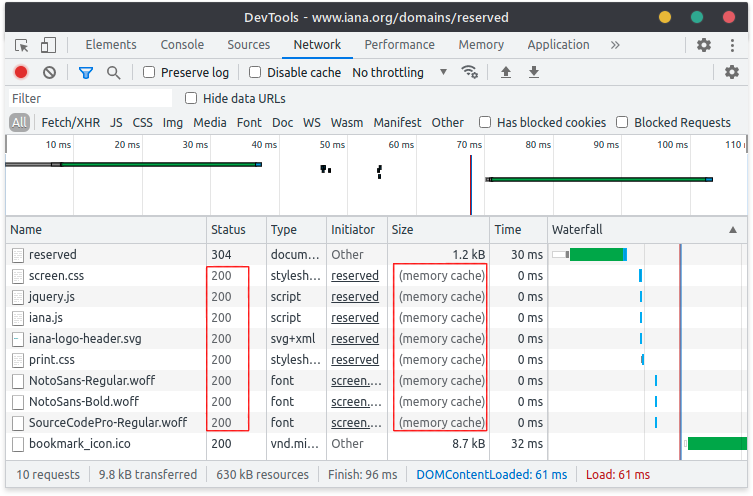
To see if this is affecting your app, check the Developer Tools. In the
following example, all of the requests circled in red have been served from
cache, and will not send an HTTP request. Thus, they cannot be intercepted by
cy.intercept():
If you would like to intercept resources that normally send cache headers, here are some workarounds:
- Turn off cache headers on your development server when in testing mode.
- Disable caching on responses by adding a top-level
cy.intercept()that removes cache headers from desired requests. For example:beforeEach(() => {cy.intercept('https://api.example.com/**/*',{ middleware: true },(req) => {req.on('before:response', (res) => {// force all API responses to not be cachedres.headers['cache-control'] = 'no-store'})})}) - Chromium-family browsers only: Use
remote:debugger:protocolto disable cache entirely. For more information, see this comment on issue #14459
Command Log
Routes Instrument Panel
When you create cy.intercept() rules, Cypress will display a new Instrument called Routes.
cy.intercept('/accounts*').as('accountsGet')
cy.intercept('/company', { companyId: 1 }).as('companyGet')
cy.intercept('/teams*', [{ teamId: 2 }]).as('teamsGet')
It will list the routing table in the
Instrument Panel, including the method, RouteMatcher, if the route is
stubbed, any alias, and number of matched requests:

When HTTP requests are made, Cypress will log them in the Command Log and
indicate whether they matched a cy.intercept() by the presence of a yellow
badge on the right hand side:

The circular indicator is filled if the request went to the destination server, but unfilled if the request was stubbed with a response.
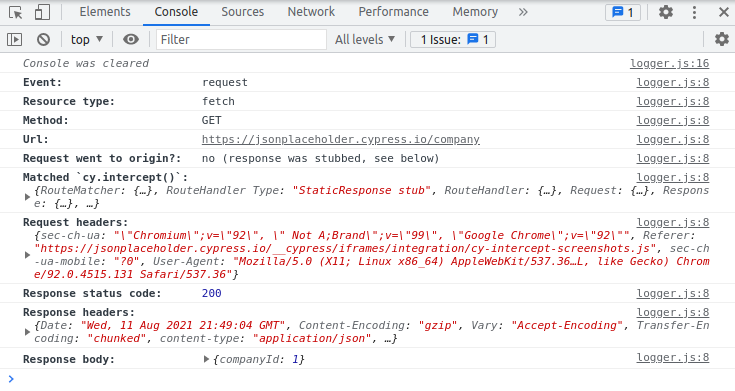
Clicking on a request that matched a cy.intercept() will print additional
information about the request and response to the console:
Read more about request logging in Cypress.
History
| Version | Changes |
|---|---|
| 15.20.0 | Added support for QUERY method. |
| 14.0.0 | Deprecated resourceType property |
| 12.2.0 | Added resourceType property to req and RouteMatcher. |
| 7.6.0 | Added query option to req (The incoming request object yielded to request handler functions). |
| 7.0.0 | Removed matchUrlAgainstPath option from RouteMatcher, reversed handler ordering, added request events, removed substring URL matching, removed cy.route2 alias, added middleware RouteMatcher option, renamed res.delay() to res.setDelay() and res.throttle() to res.setThrottle(). |
| 6.4.0 | Renamed delayMs property to delay (backwards-compatible). |
| 6.2.0 | Added matchUrlAgainstPath option to RouteMatcher. |
| 6.0.0 | Renamed cy.route2() to cy.intercept(). |
| 6.0.0 | Removed experimentalNetworkStubbing option and made it the default behavior. |
| 5.1.0 | Added experimental cy.route2() command under experimentalNetworkStubbing option. |