Cypress.log
This is the internal API for controlling what gets printed to the Command Log.
Useful when writing your own custom commands.
Overview
Custom commands are a powerful way to encapsulate repeated logic in your test
suite, but without Cypress.log they appear as a black box in the Command Log.
When a test fails inside a custom command, all you see is the command name —
there is no indication of which internal step failed, what data was used, or
what the application looked like at that moment. Cypress.log solves this by
giving your custom commands the same first-class visibility as built-in Cypress
commands.
Catch bugs earlier, before they reach production
Transparent command logs surface failures at the exact step where something went
wrong rather than several steps downstream. When a custom login command fails,
a well-structured log entry tells you immediately whether the failure was in the
network request, the DOM interaction, or the redirect — without any guesswork.
Finding the root cause earlier in the development cycle means fixing it while
the context is fresh, before the bug is compounded by subsequent changes or
discovered by users in production.
Reduce debugging time and CI costs
Time spent investigating a failing test is time not spent building features. The
snapshot() method captures the state of your application's DOM at named points
in time — 'before' and 'after' an action, for example — and makes those
snapshots available for time-travel inspection directly in the Cypress UI, just
like built-in commands. Instead of re-running a test locally with added
console.log statements and artificial pauses, a developer can pinpoint the
exact DOM state that caused the failure in the initial run. Fewer re-runs
translates directly into reduced CI infrastructure costs and faster feedback
loops.
The consoleProps option extends this further by placing structured,
context-rich data — API response bodies, user IDs, session tokens, form values
— a single click away in the browser's DevTools console. This eliminates the
need to manually reproduce the exact conditions of a failure, which is
especially valuable for intermittent issues that are hard to reproduce on demand.
Build confidence in your test suite
When custom commands log clearly and consistently, the entire team can read a failing test run and understand what happened — not just the author of the command. This shared legibility reduces the risk of misdiagnosed failures, where a test bug is mistaken for an application bug (or vice versa), and lowers the cost of onboarding new team members to an existing test suite. A command log that looks and behaves like Cypress's own built-in commands signals that the tests are maintained to the same standard as the application code they protect.
Syntax
Cypress.log(options)
Arguments
options (Object)
Pass in an options object to Cypress.log().
| Option | Default | Description |
|---|---|---|
$el | undefined | The jQuery element the command is acting on. Highlights the element in the app preview when the log is clicked. |
name | name of the command | The name of the command shown in the Command Log. |
displayName | name of the command | Overrides name only for display purposes in the Command Log. |
message | command args | The message shown next to the command name in the Command Log. |
consoleProps | function() {} | A function that returns an object. The object's properties are printed in the DevTools console when the log is clicked. |
autoEnd | true | Set to false to manually control when the log ends. Required for commands that finish asynchronously. |
type | 'parent' | The nesting type of the log entry: 'parent' or 'child'. Child logs appear indented beneath parent logs. |
end | false | Set to true to immediately mark the log as finished when it is created. |
Return Value
Cypress.log() returns a Log object with the following methods. These are
particularly useful when autoEnd: false is set and you need to manually
control the log lifecycle.
| Method | Description |
|---|---|
log.end() | Marks the log as passed and complete. Use this when autoEnd: false to signal that the command succeeded. Returns the Log object. |
log.error(error) | Marks the log as failed and associates the given Error object with it. Returns the Log object. |
log.finish() | Finalizes the log automatically: takes a final snapshot (unless disabled) then calls end(). This is called internally by Cypress on command completion; prefer end() in custom commands. |
log.get() | Returns all of the log's current attributes as an object. |
log.get(attr) | Returns the value of a single attribute by name (e.g. log.get('consoleProps')). |
log.set(key, value) | Updates a single log attribute by name. Returns the Log object. |
log.set(options) | Updates multiple log attributes at once by passing an object. Useful for updating consoleProps with data available only after an async operation. Returns the Log object. |
log.snapshot() | Captures the current state of the DOM and associates it with this log entry for time-travel debugging. |
log.snapshot(name) | Captures a named snapshot (e.g. 'before' or 'after'). Named snapshots appear as labeled tabs in the Command Log when the entry is pinned, showing DOM state before and after an action. |
log.snapshot(name, options) | Captures a named snapshot with additional options. options.at specifies the index at which to insert the snapshot; options.next sets the name for the next snapshot to be taken. |
Examples
Basic Custom Command Log
Log specific properties of a custom command to the Command Log and the DevTools console.
- cypress/support/commands.js
- cypress/support/commands.ts
Cypress.Commands.add('setSessionStorage', (key, value) => {
  // Turn off logging of the cy.window() to command log
  cy.window({ log: false }).then((window) => {
    window.sessionStorage.setItem(key, value)
  })

  const log = Cypress.log({
    name: 'setSessionStorage',
    // shorter name for the Command Log
    displayName: 'setSS',
    message: `${key}, ${value}`,
    consoleProps: () => {
      // return an object which will
      // print to dev tools console on click
      return {
        Key: key,
        Value: value,
        'Session Storage': window.sessionStorage,
      }
    },
  })
})
declare global {
  namespace Cypress {
    interface Chainable {
      setSessionStorage(key: string, value: string): Chainable<void>
    }
  }
}

Cypress.Commands.add('setSessionStorage', (key, value) => {
  // Turn off logging of the cy.window() to command log
  cy.window({ log: false }).then((window) => {
    window.sessionStorage.setItem(key, value)
  })

  const log = Cypress.log({
    name: 'setSessionStorage',
    // shorter name for the Command Log
    displayName: 'setSS',
    message: `${key}, ${value}`,
    consoleProps: () => {
      // return an object which will
      // print to dev tools console on click
      return {
        Key: key,
        Value: value,
        'Session Storage': window.sessionStorage,
      }
    },
  })
})
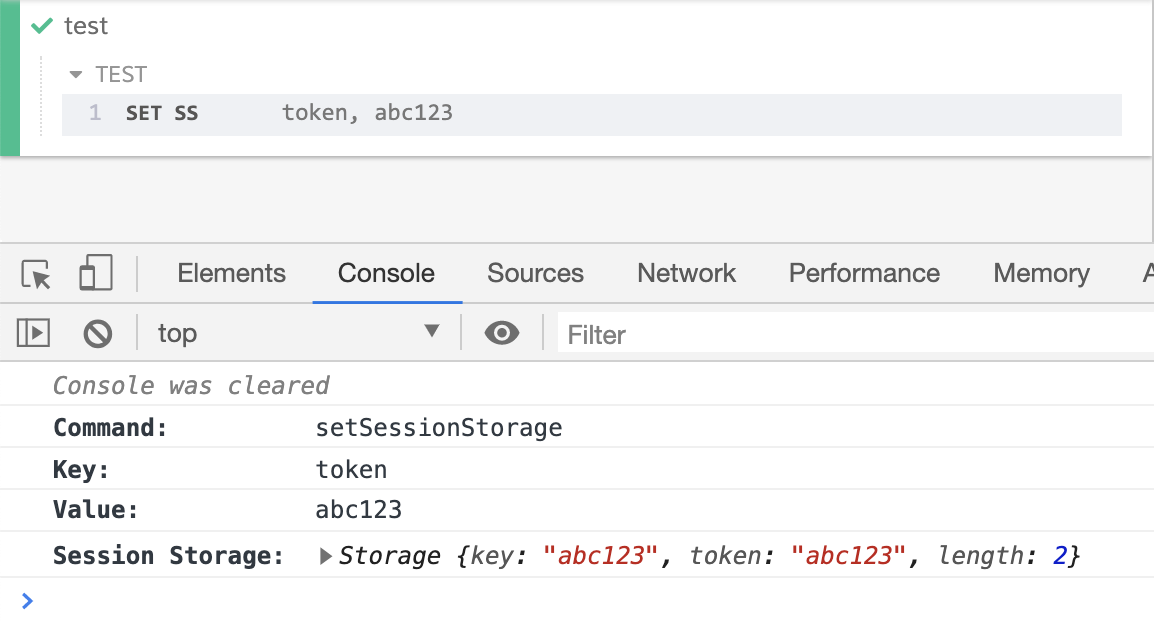
The code above displays in the Command Log as shown below, with the console properties shown on click of the command.
Manually Controlling Log Lifecycle with autoEnd: false
When your custom command performs asynchronous work (such as network requests),
set autoEnd: false so the log stays open until you explicitly close it. Use
snapshot() to capture the DOM state before and after the action, set() to
update consoleProps with data available only after the async work completes,
and end() to mark the log as passed.
Cypress.Commands.add('login', (username, password) => {
  const log = Cypress.log({
    name: 'login',
    displayName: 'LOGIN',
    message: `Authenticating | ${username}`,
    // keep the log open until we manually call log.end()
    autoEnd: false,
    consoleProps: () => ({ username, password }),
  })

  // snapshot the DOM before any changes
  log.snapshot('before')

  cy.request('POST', '/api/login', { username, password }).then((response) => {
    // update consoleProps with data available only after the request
    log.set({
      consoleProps: () => ({
        username,
        password,
        userId: response.body.userId,
        token: response.body.token,
      }),
    })

    // snapshot the DOM after the login completes
    log.snapshot('after')

    // mark the log as passed and finished
    log.end()
  })
})
When you click on the LOGIN log entry and pin it, you can switch between the
before and after named snapshots to compare the DOM state at each point in
time, identical to how built-in Cypress commands work.
Marking a Log as Failed with error()
Use log.error() to turn the log entry red when an async operation fails.
log.error() only updates the visual state of the log — it does not fail
the test. To fail the test, you must also rethrow the error (or reject the
Promise).
Cypress.Commands.add('myAsyncCommand', (url) => {
  const log = Cypress.log({
    name: 'myAsyncCommand',
    message: url,
    autoEnd: false,
  })

  cy.request(url).then(
    (response) => {
      log.set({ message: `${url} → ${response.status}` })
      log.end()
    },
    (err) => {
      // Mark the log entry red in the Command Log…
      log.error(err)
      // …but also rethrow so Cypress knows the command failed.
      throw err
    }
  )
})
Reading Log Attributes with get()
Use log.get() to inspect the current state of a log entry. This is useful
when writing plugins or custom reporter integrations.
const log = Cypress.log({ name: 'myCommand', message: 'hello' })

// get all attributes
const attrs = log.get()

// get a single attribute
const name = log.get('name') // 'myCommand'
const state = log.get('state') // 'pending'