within
Scopes all subsequent Cypress commands to within the element. Useful when working
within a particular group of elements such as a <form>.
It is unsafe to
chain further commands that rely on the subject after .within().
Syntax
.within(callbackFn)
.within(options, callbackFn)
Usage
Correct Usage
cy.get('.list')
  .first()
  .within(($list) => {}) // Yield the first `.list` and scope all commands within it
Incorrect Usage
cy.within(() => {}) // Errors, cannot be chained off 'cy'
cy.getCookies().within(() => {}) // Errors, 'getCookies' does not yield DOM element
cy.get('div').within(($divs) => {}) // Probably errors, because get('div') yields multiple elements
Arguments
callbackFn (Function)
Pass a function that takes the current yielded subject as its first argument.
options (Object)
Pass in an options object to change the default behavior of .within().
| Option | Default | Description |
|---|---|---|
log | true | Displays the command in the Command log |
Yields
.within()yields the same subject it was given.- It is unsafe
to chain further commands that rely on the subject after
.within().
Trying to return a different element the .within callback have no effect:
<div id="within-yields">
  The parent div
  <div class="some-child">Child element</div>
</div>
cy.get('#within-yields')
  .within(() => {
    // we are trying to return something
    // from the .within callback,
    // but it won't have any effect
    return cy.contains('Child element').should('have.class', 'some-child')
  })
  .should('have.id', 'within-yields')
Similarly, trying to change the subject by using the
cy.wrap command inside the .within callback have no
effect:
<div id="wrap-inside-within">
  The parent div
  <div class="some-child">Child element</div>
</div>
cy.get('#wrap-inside-within')
  .within(() => {
    // returning cy.wrap(...) has no effect on the yielded value
    // it will still be the original parent DOM element
    return cy.wrap('a new value')
  })
  .should('have.id', 'wrap-inside-within')
Examples
Forms
Get inputs within a form and submit the form
<form>
  <input name="email" type="email" />
  <input name="password" type="password" />
  <button type="submit">Login</button>
</form>
cy.get('form').within(($form) => {
// you have access to the found form via
// the jQuery object $form if you need it
// cy.get() will only search for elements within form,
// not within the entire document
cy.get('input[name="password"]').type('password')
cy.root().submit()
})
Tables
Find row with specific cell and confirm other cells in the row
<table>
  <tr>
    <td>My first client</td>
    <td>My first project</td>
    <td>0</td>
    <td>Active</td>
    <td><button>Edit</button></td>
  </tr>
</table>
cy.contains('My first client')
  .parent('tr')
  .within(() => {
    // all searches are automatically rooted to the found tr element
    cy.get('td').eq(1).contains('My first project')
    cy.get('td').eq(2).contains('0')
    cy.get('td').eq(3).contains('Active')
    cy.get('td').eq(4).contains('button', 'Edit').click()
  })
Temporarily escape
You can temporarily escape the .within context by starting a new command chain
with cy.root followed by .closest.
Inside a .within() block, cy.root() yields the scoped element (here, the
<form>) rather than <html>. Chaining .closest then
traverses up from that element to a shared ancestor outside the scope, from
which you can query elements that live outside the .within() context.
<section class="example">
  {/* note the input field outside the form */}
  <input id="name" type="text" />
  <form>
    <input name="email" type="email" />
    <input name="password" type="password" />
    <button type="submit">Login</button>
  </form>
</section>
cy.get('form').within(($form) => {
// temporarily escape the .within context: cy.root() is the <form>, and
// .closest('.example') walks up to the ancestor outside it
cy.root().closest('.example').find('#name').type('Joe')
// continue using the .within context
cy.get('input[name="password"]').type('password')
cy.root().submit()
})
Notes
Yielded Subject
.within() cannot be used to return an inner element
The subject yielded by .within() is always the original parent element. Any
command you run, value you return, or cy.wrap() you call
inside the callback has no effect on what .within() yields. This is true
even when .within() is used inside a
custom command or when .within() blocks are
nested.
If you need to yield an element found inside the scope, query it after the
.within() block instead. For example, scope to the parent with
.find() (or chain queries off the parent directly)
rather than relying on .within() to hand back the inner element:
// ✗ The inner `cy.get()` is NOT yielded — `.within()` yields the parent,
// so chaining `.type()` operates on the wrong (parent) subject.
cy.get('.ag-header-cell')
  .first()
  .within(() => {
    cy.get('.ag-text-field-input')
  })
  .type('hello') // operates on `.ag-header-cell`, not the input

// ✓ Query the inner element directly so it becomes the yielded subject.
cy.get('.ag-header-cell')
  .first()
  // the input is now the yielded subject, so `.type()` operates on it
  .find('.ag-text-field-input')
  .type('hello')
Rules
Requirements
.within()requires being chained off a previous command that yields exactly one DOM element or the document.
Assertions
.within()will only run assertions you have chained once, and will not retry.
Timeouts
.within()cannot time out.
Command Log
Get the input within the form
cy.get('.query-form').within((el) => {
  cy.get('input:first')
})
The commands above will display in the Command Log as:

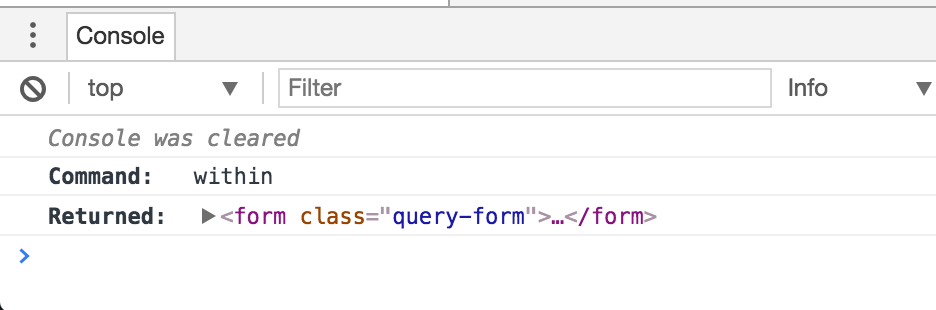
When clicking on the within command within the command log, the console
outputs the following:
History
| Version | Changes |
|---|---|
| 12.0.0 | .within() now throws an error when given more than one element as the subject. |
| 5.4.0 | fixed the yielded value to always be the parent element |
| < 0.3.3 | .within() command added |