Run Checks
Run Checks evaluate recorded runs in Cypress Cloud against thresholds you define: failed tests, flaky tests, accessibility scores, UI Coverage, and more.
Run Checks represent your team's opinion about what counts as "acceptable" or "needs attention" in your project. With customization to target specific specs, tags, branches, or pages for your checks, a huge amount of flexibility is possible to ensure each check produces useful signals that match the specific purpose of that run. This creates easy visibility for potential issues in Cypress Cloud itself, and allows for automatically flagging runs that miss the mark.
- Declarative thresholds: Encode limits on failed tests, flaky tests, accessibility scores, failing accessibility elements, UI Coverage scores, and untested elements, without maintaining parallel threshold logic in each CI pipeline.
- Cross-product gates: One check can combine assertions about a run's test results, its Cypress Accessibility report, and its UI Coverage report.
- Customized for your tags and branches: Apply a check only to runs on certain branches or with certain run tags, so a release gate on
maindoesn't fail every feature-branch run. Include and exclude specs or pages to fine tune the results for your specific needs.
Run Checks don't change how your tests run or how reports are generated. They only define how Cypress Cloud evaluates a run's results once they're available. Here's an example of how they are presented:
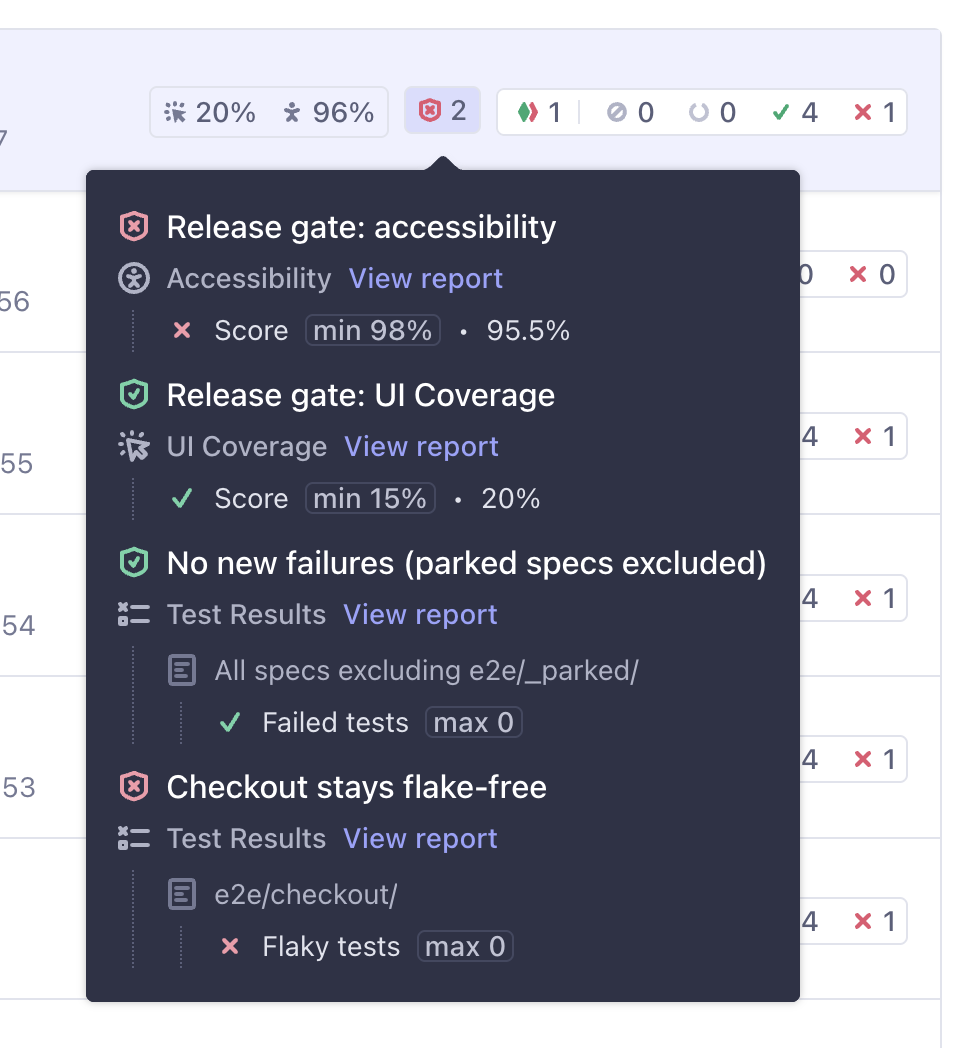
Early Access notes
Run Checks have launched as Early Access with a gradual rollout starting November 5, 2026. There are no limitations on usage and no breaking changes are expected, but Checks do not yet flow into all the usual places your Cypress test results are populated, as outlined below. If a feature is not active yet that you are interested in, please reach out to your usual Cypress point of contact. Feedback and requests are appreciated.
Check results appear on the run's page, in its Properties tab, in the
project's runs list, and through the Results API
(getCheckResults()). Support in Cypress Cloud webhooks
is planned soon.
Run Checks are not yet included in automated Slack notifications or GitHub pull request comments, and they don't push to GitHub status checks automatically. To report them as commit statuses today, follow Report Run Checks as GitHub pull request statuses.
Defining Run Checks
Run Checks are part of your project's App Quality configuration. The name,
threshold, and scoping you set shape how results appear in Cypress Cloud and in
the Results API.
Run Checks don't block CI automatically
A check is a
pass/fail evaluation of data about the run, and does not change the run's outcome.
To fail a job or block a merge,
fetch results with getCheckResults() or
report them as GitHub commit statuses.
Labels like "release gate" and workflows such as quarantining problematic specs are patterns you build with configuration and CI. Run Checks don't enforce those workflows on their own.
Here is one example of how config values appear in the UI. Most projects use a simpler set of checks than this:
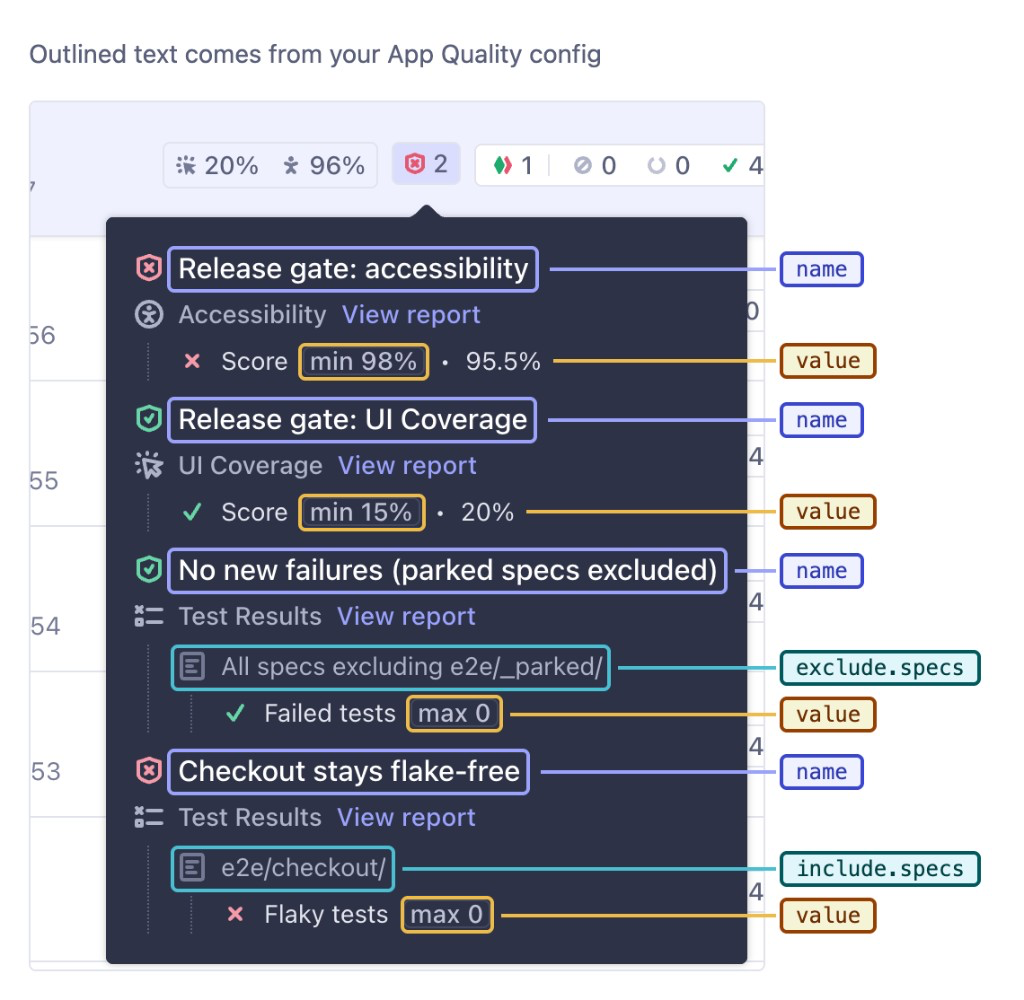
Configuration lives in Cypress Cloud, not in your repository. To view or change it for a project:
- Open your project in Cypress Cloud and go to Project Settings.
- Select the App Quality tab, which holds the configuration editor.
- Edit the configuration as JSON, then Save. Discard reverts unsaved edits back to the last saved version.
The editor validates your JSON against the schema when you save, so an invalid configuration can't be saved, and it shows how long ago the configuration was last saved.
Add a checks array to the root of the configuration:
{
  "checks": [
    {
      "name": "release-gate",
      "comment": "Merge requirements for main",
      "include": { "branches": ["main"] },
      "assertions": [
        { "type": "run.failedTests.max", "value": 0 },
        { "type": "accessibility.score.min", "value": 90 },
        {
          "type": "uiCoverage.score.min",
          "value": 80,
          "viewMatch": "^(Login|Checkout)",
          "comment": "Critical flows must stay well covered"
        }
      ]
    }
  ]
}
Syntax
{
  "checks": [
    {
      "name": string,
      "assertions": [
        {
          "type": string,
          "value": number,
          // View metrics only
          "viewMatch": string,
          // Test result metrics only
          "include": { "specs": [string] } | [{ "specs": [string] }],
          "exclude": { "specs": [string] } | [{ "specs": [string] }],
          "comment": string
        }
      ],
      "include": { "branches": [string], "tags": [string] } | [ /* rules */ ],
      "exclude": { "branches": [string], "tags": [string] } | [ /* rules */ ],
      "comment": string
    }
  ]
}
Check options
| Option | Required | Description |
|---|---|---|
name | Required | Identifies the check in Cypress Cloud and in check results. Must be non-empty and unique across the checks array. |
assertions | Required | A non-empty array of assertions. The check passes only when every assertion passes. |
include | Optional | One run rule, or an array of rules. When set, the check applies only to runs that match at least one rule. |
exclude | Optional | One run rule, or an array of rules. The check doesn't apply to runs that match any rule, even when include matches. |
comment | Optional | A note about why the check exists. Comments have no effect on behavior. |
Assertion options
| Option | Required | Description |
|---|---|---|
type | Required | The metric and the direction of its threshold. See Assertion types. |
value | Required | The threshold. Scores accept a number from 0 to 100. Counts accept a non-negative integer. |
viewMatch | Optional | For accessibility.* and uiCoverage.* assertions. A regular expression matched against view names; each matching view is held to the threshold on its own. See Narrowing to views. |
include | Optional | For run.* assertions. One spec rule, or an array of spec rules, selecting which specs' results are counted. See Narrowing to specs. |
exclude | Optional | For run.* assertions. One spec rule, or an array of spec rules, removing specs from the count. |
comment | Optional | A note about the assertion. Comments have no effect on behavior. |
Assertion types
Each assertion type names the data it reads and whether its threshold is a minimum (.min) or a maximum (.max). A .min assertion passes when the measured value is greater than or equal to value; a .max assertion passes when it's less than or equal to value.
| Type | value | Narrow with | Passes when |
|---|---|---|---|
run.failedTests.max | Integer, 0+ | include / exclude | The number of failed tests in the run is at most value. |
run.flakyTests.max | Integer, 0+ | include / exclude | The number of flaky tests in the run is at most value. Requires flaky test detection. |
accessibility.score.min | 0 to 100 | viewMatch | The run's accessibility score is at least value. |
accessibility.failedElements.max | Integer, 0+ | viewMatch | The number of elements failing accessibility rules is at most value. |
uiCoverage.score.min | 0 to 100 | viewMatch | The run's UI Coverage score is at least value. |
uiCoverage.untestedElements.max | Integer, 0+ | viewMatch | The number of untested elements is at most value. |
run.* assertions read the run's own test results and are available on every project. run.flakyTests.max reads the flaky tests that Flaky Test Management detects, so it's unavailable on projects without flake detection.
accessibility.* and uiCoverage.* assertions read the run's Cypress Accessibility and UI Coverage reports, and are unavailable on runs where that product isn't enabled or processed.
Narrowing to views
Without viewMatch, a view assertion measures the run as a whole: the run-level score, or the total count across all views.
With viewMatch, the assertion selects the views whose name matches the pattern and holds each of them to the threshold on its own. The assertion fails if any matched view misses the threshold. A viewMatch that matches no views passes, because there's nothing to measure.
viewMatch is a regular expression matched against the view name, not the URL, and it matches anywhere in the name. Use ^ and $ to match the start or end of the name.
{
  "type": "accessibility.failedElements.max",
  "value": 0,
  "viewMatch": "Checkout",
  "comment": "No failing elements on any checkout view"
}
Narrowing to specs
run.* assertions count tests across every spec in the run by default. Use include and exclude on the assertion to count only some specs. Each rule is an object with a non-empty specs array of regular expressions, matched anywhere in the spec's file path.
The counts from every matched spec are added together, and the total is held to the threshold once. A spec that ran on more than one machine, such as in multiple run groups, contributes the results from each.
{
  "type": "run.failedTests.max",
  "value": 0,
  "include": { "specs": ["cypress/e2e/checkout/"] },
  "exclude": { "specs": ["/quarantine/"] },
  "comment": "Checkout specs must pass, apart from quarantined ones"
}
To keep known-bad specs in the suite while gating CI on everything else, see
Quarantine problematic specs with Run Checks.
That pattern is a use of include / exclude, not a built-in Cypress Cloud
quarantine mode.
Scoping checks to runs
By default, a check applies to every run in the project. Use include and exclude on the check to apply it only to some runs.
Each rule is an object with one or both of these properties:
| Property | Description |
|---|---|
branches | A non-empty array of regular expressions matched against the run's Git branch. |
tags | A non-empty array of regular expressions matched against the run's tags. |
A rule must set at least one of branches or tags. include and exclude each accept a single rule or an array of rules.
Rules match as follows:
- Within a property, any pattern can match.
{ "branches": ["main", "release/.*"] }matches a run onmainor on anyrelease/branch. - Within a rule, every property must match.
{ "branches": ["main"], "tags": ["nightly"] }matches only runs onmainthat also carry thenightlytag. - Across an array of rules, any rule can match.
excludewins overinclude. A run that matches both is excluded.- A run with no branch never matches a
branchespattern. A check that includes only certain branches doesn't apply to it, and anexcluderule on branches doesn't remove it.
Branch and tag patterns match the whole value, so main matches the branch main but not feature/main. To match part of a value, start the pattern with ^ or end it with $ to anchor it yourself, or use .*. Patterns are regular expressions, not globs: write release/.* rather than release/*. Matching is case-sensitive.
{
  "checks": [
    {
      "name": "nightly-regression",
      "include": [
        { "branches": ["main"], "tags": ["nightly"] },
        { "tags": ["release-candidate"] }
      ],
      "exclude": { "branches": ["^dependabot/"] },
      "assertions": [
        { "type": "run.failedTests.max", "value": 0 },
        { "type": "run.flakyTests.max", "value": 5 }
      ]
    }
  ]
}
A check whose tag rule hasn't matched yet stays pending until the run completes. Any run group can add tags while the run is in progress, so Cypress Cloud can only rule out a tag rule once every group has reported.
How checks are evaluated
Cypress Cloud starts evaluating checks after the run completes. run.* assertions can settle immediately from the run's final test counts. accessibility.* and uiCoverage.* assertions settle independently as each report finishes processing. Results update in Cypress Cloud while evaluation is in progress.
The check title, threshold pill, and any spec scope line come from your config.
Product labels such as Accessibility or Test Results, metric labels such as
Score or Failed tests, status icons, and measured values such as 95.5% are
produced by Cypress Cloud from the assertion type and the run.
A run's checks use the App Quality configuration saved at the time the run is recorded. When you regenerate a run, its checks are evaluated again against the configuration saved at that time, so you can adjust a check and see its effect on an existing run without recording again.
Check statuses
| Status | Meaning |
|---|---|
passed | Every assertion passed. |
failed | At least one assertion failed. |
errored | No assertion failed, but at least one is errored or unavailable, so the check couldn't confirm a pass. |
not-applicable | The check's include and exclude rules don't select this run, so it wasn't evaluated. |
While a run is still processing, a check can also be pending (waiting on data) or failing (at least one assertion has already failed while others are still pending). A failed assertion never recovers, so a failing check always ends as failed.
Assertion statuses
| Status | Meaning |
|---|---|
passed | The measured value met the threshold. |
failed | The measured value missed the threshold. |
errored | The data the assertion needs couldn't be read, for example because a report failed to load or a run-level score wasn't produced for the run. |
unavailable | The run has no data for the assertion by design: the product it reads isn't enabled or processed for the run, or the project doesn't have access to the assertion type (such as run.flakyTests.max without flaky test detection). |
pending | The assertion is still waiting for its run results or report to finish processing. Appears while evaluation is in progress; getCheckResults() waits until assertions leave this status. |
Keep these behaviors in mind when designing checks:
- A failure outranks an error. A check with one
failedand oneerroredassertion isfailed. - An
unavailableassertion makes its checkerrored, notpassed. If a check mixes products and some runs don't produce one of them, scope the check withincludeandexclude, or split it into one check per product.
Using check results in CI
To act on check results outside Cypress Cloud, such as blocking a merge or a deploy, fetch them in CI with getCheckResults() from the @cypress/extract-cloud-results module. Install it as described in the Results API guide, which also lists the supported CI providers. During Early Access, getCheckResults() is the supported way to access these results in CI, and matches how many teams already access UI Coverage or Cypress Accessibility results. Cypress Cloud CLI and MCP support are planned.
Run it in the same CI job that recorded the run, after cypress run --record:
- It identifies the run from the CI provider's environment variables, so you don't pass a run number.
- It waits until Cypress Cloud has finished evaluating the run's checks, including any Cypress Accessibility and UI Coverage reports they read. It checks every 30 seconds for up to 15 minutes.
- It returns each check with its status and the status of each assertion, in the order your configuration lists them.
Results include each assertion's configured threshold and its status, but not the measured value. To show the score or count, link to the run's Properties tab in Cypress Cloud.
const { getCheckResults } = require('@cypress/extract-cloud-results')

const results = await getCheckResults({
  projectId: 'abc123', // optional if the CYPRESS_PROJECT_ID env is set
  recordKey: '...', // optional if the CYPRESS_RECORD_KEY env is set
  runTags: ['release'], // optional; narrows the match when a CI job records more than one run
})
// {
//   runNumber: 57,
//   runUrl: 'https://cloud.cypress.io/projects/abc123/runs/57',
//   runStatus: 'failed',
//   checksStatus: 'evaluated', // or 'not-configured' when the project has no checks
//   checks: [
//     {
//       name: 'release-gate',
//       status: 'failed', // passed, failed, errored, or not-applicable
//       assertionResults: [
//         { type: 'accessibility.score.min', value: 98, status: 'failed' },
//         { type: 'run.failedTests.max', value: 0, status: 'passed' },
//       ],
//     },
//   ],
// }
getCheckResults() throws if it can't find the run, if evaluation errors, or if evaluation doesn't finish in time. More status values may be added, so handle values you don't recognize.
To post each applicable check as a GitHub commit status and make it a required status check on the pull request, see Report Run Checks as GitHub pull request statuses.
See also
- Report Run Checks as GitHub pull request statuses
- Quarantine problematic specs with Run Checks
- Cypress Cloud FAQ: Run Checks
- Cypress Accessibility configuration - every App Quality configuration option, including
viewsthatviewMatchmatches against - UI Coverage configuration
- Flaky Test Management - the flake detection
run.flakyTests.maxreads cypress run --tag- the run tags that check rules match