Cypress AI
Cypress offers AI capabilities across the platform to help teams write tests faster, understand failures more clearly, and keep tests running as apps change. These capabilities are built into and for the tools you already use - the Cypress App and Cypress Cloud - and are designed to reduce the manual effort that can slow down testing.
Cypress AI includes two categories of functionality, and they have different default behaviors by design.
- AI Capabilities: features built into Cypress that operate within the platform and are enabled by default.
- AI Tooling: interfaces, integrations, and packaged behaviors that enable AI agents and assistants to work with Cypress. You must opt-in to use these tools.
This page explains what's available, how each capability fits into your workflow, and how Cypress handles your data.
The Problem Developers Face
Writing tests, maintaining them, and debugging failures is time-consuming and repetitive:
- Writing tests requires boilerplate and memorizing commands.
- Understanding large test suites is hard for new team members.
- Debugging failures often means staring at logs and replaying tests.
- Identifying missing coverage is manual and error-prone.
Cypress AI is designed to solve these problems without changing how you already work.
Getting Started
AI Capabilities are enabled by default for all users in your organization on every Cypress Cloud plan, including the free Starter plan. Login to your Cypress Cloud account to get started.
Each AI Tool must be enabled and installed individually. See each tool's documentation for instructions. AI Skills and the cypress tap CLI run entirely on your machine, so you can start with those without a Cypress Cloud account at all.
How Cypress AI Fits Into the Workflow
Cypress AI are easy-to-use capabilities and tools across your testing lifecycle. They are woven into the core workflow.
AI Capabilities
| When To Use | AI Capability | Outcome |
|---|---|---|
| Author Tests | cy.prompt(), Studio AI | Generate commands, assertions, and full tests from natural language or UI exploration |
| Understand Tests | Test Intent Summaries | Quickly see what tests verify, reducing cognitive load and onboarding friction |
| Debug Failures | Error Summaries | AI-powered explanations for what happened when a test failed |
| Test maintenance | cy.prompt() | Automatically adapt to UI changes that would otherwise break selectors |
| Fill Coverage Gaps | UI Coverage Test Generation | Identify untested flows and automatically generate new tests |
AI Tools
| When To Use | AI Tool | Outcome |
|---|---|---|
| Author Tests | cypress-author and cypress-docs Skills | Improves how AI agents create, update, and fix Cypress tests. |
| Understand Tests | cypress-explain Skill | Helps AI describe, and critique existing tests. |
| Analyze & Triage | Cloud MCP | Gives AI coding assistants and AI agents a direct window into your application's health and stability |
| Triage & Automate | Cloud CLI and cypress-cloud-cli Skill | Brings Cloud data and Test Replay access to the terminal for triage, scripting, CI, and terminal-based AI agents |
| Run & Debug Tests | cypress tap CLI and cypress-tap Skill | Live Cypress app access for your agent. Drives Cypress and pulls the command log and DOM directly into context. |
Capabilities in detail
cy.prompt()
Best for: teams who want to generate Cypress test code from plain English, or reduce selector maintenance as their UI evolves.
cy.prompt() is a Cypress command that converts natural language test steps into executable Cypress commands. It uses AI to interpret each step, evaluate the DOM, generate selectors, and produce Cypress code. cy.prompt() supports two workflows.
cy.prompt(
[
'visit https://cloud.cypress.io/login',
'type {{password}} in the password field',
'click the login button',
'verify we are redirected to the dashboard',
],
{
placeholders: { password: 'secret123' },
}
)
Workflow 1: Generate once, commit to source control
Use cy.prompt() to generate a test quickly, then export and commit the generated code.
This workflow is a good fit when:
- Your app has stable, predictable elements.
- You want predictable, reviewable test code in version control.
- You want to use AI to accelerate authoring but prefer to own the output.

Workflow 2: Continuous self-healing
Keep cy.prompt() running in your tests. When a selector fails between runs, Cypress regenerates code for that step automatically. This is "self-healing" — the test adapts without manual intervention.
This workflow is a good fit when:
- Your app is in active development and UI changes frequently.
- You are willing to accept AI calls at runtime in exchange for less maintenance.
- You understand that self-healing works best when it catches occasional, unexpected changes — not when selectors change on every run.
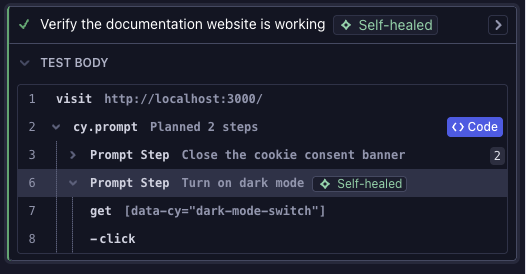
Read the full cy.prompt() documentation →
Studio AI
Best for: teams who want to write assertions faster without guessing what to assert after every interaction.
Cypress Studio lets you build and extend E2E tests by recording real interactions in your app. Studio AI adds assertion recommendations on top: as you record, it watches what changes in the UI and suggests assertions automatically. You review them, keep what fits, and save.
Studio AI observes DOM changes between interactions and generates assertions based on what actually changed — visibility, text content, form values, element attributes, URL changes, and more. It does not have access to your application's source code or business logic.
Read the full Studio AI documentation →
Test Intent Summaries
Best for: teams who need to understand what a test is checking without reading every command or watching a full Test Replay.
Test Intent Summaries are AI-generated descriptions of a test's purpose, available in the Cypress Cloud test details sidebar. They help you orient quickly — whether you are reviewing a new test or debugging a failure — without needing to trace through the command log manually.
Test Intent Summaries are available on all Cypress Cloud plans at no additional cost.
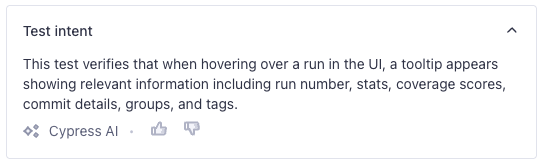
Error Summaries
Best for: teams who want to understand why a test failed without parsing raw stack traces.
"At a glance" Error Summaries are plain-language explanations of what went wrong in a failed test attempt, available alongside stack traces and error messages in the Cypress Cloud test details sidebar. They describe what led to the failure so you can jump directly to investigating the root cause.
Error Summaries are available on all Cypress Cloud plans at no additional cost.
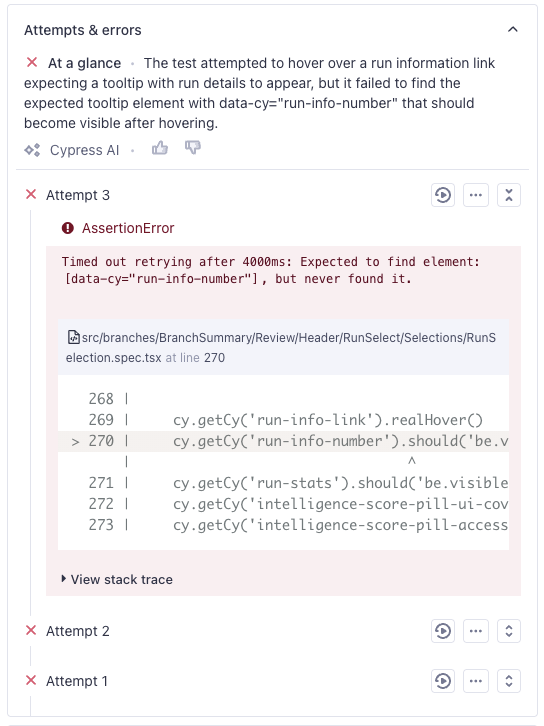
UI Coverage Test Generation
Best for: teams using UI Coverage who want to close coverage gaps without writing tests from scratch.
UI Coverage Test Generation lets you generate targeted Cypress tests directly from coverage gaps identified during code reviews. Instead of manually identifying what to test, you can generate a test scaffold from the gap and refine from there.
This capability is included with UI Coverage and is not available on standard Cloud plans.
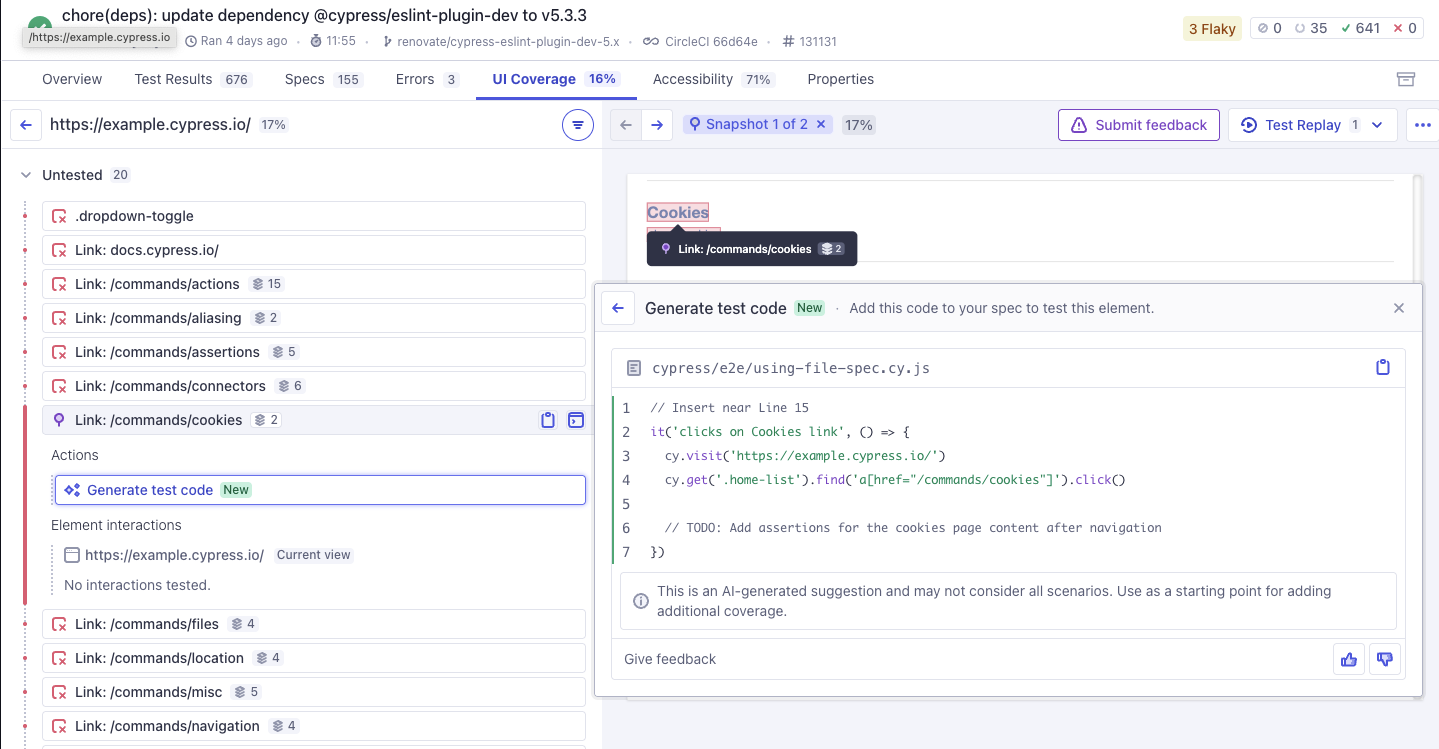
Read the UI Coverage Test Generation documentation →
AI Tools in detail
AI Tools close the gap between an AI agent that writes test code it has never run and one that authors, verifies, triages, and repairs tests against your real application and run data. The walkthrough below shows all four tools working together in an agentic testing loop: AI Skills for writing tests, cypress tap for verifying them against a live session, the Cloud CLI for triaging failed CI runs, and Cloud MCP for full run context in your editor.
AI Skills
Best for: teams wanting to providing instructions to improve the output of AI when working with Cypress.
Use skills when you want your AI agent to:
- Apply Cypress best practices to generated and reviewed tests
- Steer away from brittle patterns and weak selectors
- Produce more Cypress-focused explanations and critiques
- Run and debug local tests against a live Cypress session with the
cypress-tapCLI - Triage recorded Cloud runs, failures, and flakes with the
cy-cloudCLI - Establish consistent AI behavior across your team and workflows
Read the AI Skills documentation →
Cloud MCP
Best for: teams moving toward agentic workflows who want to eliminate the context gap between their CI environment and their development tools.
Cloud MCP is a remote server that gives AI assistants a direct window into your application's health and stability. By connecting your AI coding assistant or AI agent directly to your CI results, it transforms Cypress from a testing tool into a real-time engineering data source—removing the manual overhead that makes testing a bottleneck.
Since May 20, 2026, Cloud MCP has been generally available on all Cypress Cloud plans at no additional cost.
Instead of spending time investigating runs, your assistant uses the Model Context Protocol (MCP) to independently monitor and analyze recorded run data, including errors, stack traces, Test Replay links, accessibility violations, and UI Coverage gaps. This makes it easier to reach for Cypress as your tool of choice.
Read the Cloud MCP documentation →
Cloud CLI
Best for: developers and terminal-based agents that query Cloud data from scripts, CI, and the command line.
The Cloud CLI (cy-cloud) brings your Cypress Cloud data to the command line. Check run status, read failing tests, and pull the Test Replay timeline of commands, network requests, and console logs, all as JSON that scripts and AI agents can parse.
Where Cloud MCP connects an AI client directly to your Cloud data, the Cloud CLI is the scriptable counterpart: give it to agents that work through a terminal, or wire it into your own automation and tooling. It is available on all Cypress Cloud plans at no additional cost.
Read the Cloud CLI documentation →
cypress tap
Best for: AI coding agents that need live app context, DOM, command logs, to check their work against a running Cypress session.
cypress tap is an extension of the cypress CLI that enables you or an agent to interact with an open-mode Cypress
session and read its context from the terminal. An agent can run a spec and poll its status, then
read the failing test's Command Log and error as the reporter shows them.
It can also inspect the DOM of the application-under-test at the moment a command ran.
Where the Cloud CLI and Cloud MCP give agents your recorded run data in
Cypress Cloud, cypress tap gives your AI agent context to your Cypress session and your application-under-test on your
machine, while developing and verifying tests before it ever runs in CI.
It is completely free and needs no Cypress Cloud account: it ships with the Cypress App and drives the session already running on your machine.
Read the cypress tap documentation →
FAQs
Do AI features require a paid subscription?
No. Every AI capability and AI tool listed on this page is available without a paid subscription, and several of them run entirely on your machine without a Cypress Cloud account at all.
| Capability / Tool | What it needs |
|---|---|
| AI Skills | Nothing. Install them into your agent. |
cypress tap CLI | Nothing beyond Cypress v15.21.0+ and an open mode session. |
| Cypress Studio recording | Nothing. Studio AI recommendations use your Cloud account. |
| cy.prompt() | A Cypress Cloud account on any plan, including the free Starter plan. |
| Studio AI recommendations | A Cypress Cloud account on any plan, including the free Starter plan. |
| Test Intent Summaries and Error Summaries | A Cypress Cloud account on any plan, including the free Starter plan. |
| Cloud MCP and the Cloud CLI | A Cypress Cloud account on any plan, including the free Starter plan. |
| UI Coverage Test Generation | A UI Coverage subscription. |
| Agent-ready accessibility reports | A Cypress Accessibility subscription. |
What a paid plan changes is headroom, not access: a larger cy.prompt
execution allowance and higher hourly limits for cy.prompt and Studio AI. See
Usage limits below and
Cypress Cloud plans
for full plan details.
The two premium solutions in the table, UI Coverage and Cypress Accessibility, are products in their own right rather than AI capabilities gated behind a paywall. Their AI features come with the solution.
Why do I need a Cloud Account?
This applies to the AI capabilities that call a large language model on your behalf, such as cy.prompt, Studio AI recommendations, and the Cloud summaries, along with the tools that read your recorded Cloud data. AI Skills and the cypress tap CLI call no LLM of their own and read no Cloud data, so they need no account. See Do AI features require a paid subscription? above.
The capabilities that do use large language models rely on them to interpret prompts, analyze DOM state, and generate test code. Cypress Cloud manages those LLM requests securely on your behalf.
Without a Cloud account, there is no secure channel through which to route those requests, no organizational controls to apply, and no way to enforce the data handling commitments Cypress makes to its customers.
A free Cypress Cloud account is enough to get started.
Create a free account ➜Free accounts include a 30-day trial of all paid features, including higher AI usage limits. When the trial ends, your account moves to the free Starter plan and AI features keep working at free plan limits.
Usage limits
Usage limits vary by feature and plan. For organization-level cy.prompt
execution limits and billing, see the cy.prompt FAQ.
Some hourly limits apply to all plans. Those are as follows:
| Capability / Tool | Free plan | Paid plan |
|---|---|---|
| cy.prompt() prompts | 100 per hour, per user | 600 per hour, per user |
| cy.prompt() steps | 500 per hour, per user | 3,000 per hour, per user |
| Studio AI recommendations | 60 per hour, per user | 300 per hour, per user |
| Test Intent Summaries | Included | Included |
| Error Summaries | Included | Included |
| AI Skills | unlimited | unlimited |
cypress tap CLI | unlimited | unlimited |
| Cloud MCP requests | 100 per hour, per user | 100 per hour, per user |
| Cloud CLI requests | 100 per hour, per user | 100 per hour, per user |
| UI Coverage Test Generation | Not available | Included with UI Coverage |
Studio AI can also be tried without logging in, capped at 6 accepted recommendations per browser session. See Studio AI usage limits for details.
If you need to increase your limits, contact support at [email protected].
Pricing
AI Skills and the cypress tap CLI are available to all Cypress users, with or without a Cypress Cloud account.
Cloud MCP, the Cloud CLI, Test Intent Summaries and Error Summaries are available for free to all Cypress Cloud plans, including the Starter plan.
cy.prompt is available on all Cypress Cloud plans, including the Starter plan. Each plan comes with an execution allowance. See cy.prompt in the Cloud FAQ for what counts as an execution and what happens when you reach your allowance.
UI Coverage Test Generation is included with UI Coverage premium solutions subscriptions.
Studio AI recommendations are provided at no additional charge during the beta period.
For cy.prompt execution limits and billing,
see the cy.prompt FAQ.
Pricing is subject to change. We will communicate any changes before they take effect.
See Cypress Cloud plans for full plan details.
Release Status
| Capability / Tool | Release Status |
|---|---|
| cy.prompt | Generally Available |
| Studio AI recommendations | Beta |
| Test Intent Summaries | Generally Available |
| Error Summaries | Generally Available |
| AI Skills | Generally Available |
| Cloud MCP | Generally Available |
| Cloud CLI | Beta |
cypress tap CLI | Beta |
| UI Coverage Test Generation | Generally Available |
Security and data handling
Read the Cypress AI Security page →
Disabling AI features
AI Capabilities are enabled by default for all users in your organization on an applicable plan. Organization admins and owners can disable them from Cypress Cloud organization settings.

AI tools must be installed individually and are not enabled by default. To stop using an AI Tool, remove it from your AI client's configuration.
Cloud MCP and the Cloud CLI can each be disabled for an organization from the organization's Integrations page. Disabling an integration immediately revokes access for all users in that organization, regardless of whether they authenticated via OAuth or a personal access token.