Re-run optimization
When a CI run fails, it's common to re-run the job before investigating the failure deeply, especially if the failure is unexplained or seems like the result of typical flake or some known instability in the CI environment.
That CI rerun usually executes your entire test suite again, including the specs that already passed. When re-run optimization is in enabled and you are recording to Cypress Cloud, Cypress will automatically detect when a CI re-run is happening, and avoid re-running what already passed.
This speeds up your CI process and removes redundant testing, and makes your runs more resilient to inherently unstable environments or services.
You choose the granularity in project or organization settings:
- Run only failed tests re-executes only the tests that did not pass. Specs
that were fully green are still skipped, and passing tests inside a failing
spec are skipped too. This option requires Cypress 15.21.0 or later. Use this if you are confident that each
itblock is fully independent. If it would work using.only, it should work here. - Run only failed specs re-executes every spec that contained a failure, including tests in those specs that already passed. This reduces redundant re-runs but allows for cases where tests may rely on existing state from other tests. This is the default for new Cypress Cloud organizations.
Example
With no re-run optimization applied to a run, in a 40-spec suite where only 2 specs fail, a CI re-run triggers all 40 specs on a retry.
With Run only failed specs, the re-run executes just those 2 specs, avoiding 38 specs entirely.
With Run only failed tests, the re-run executes only the specific failing tests within those failed specs.
Enabling Re-run optimization gives you:
- A faster path to green: reruns finish in a fraction of the time because passing work is skipped entirely.
- Lower CI compute cost: skipped specs and tests never spin up machines or consume CI minutes.
- Fewer billed test results: you aren't charged for re-validating work that already passed, since skipped specs and tests are never executed.
Review the behavior and limitations section before enabling Re-run Optimization on critical pipelines for existing projects. It may change CI behavior your team is already used to.
How it works
-
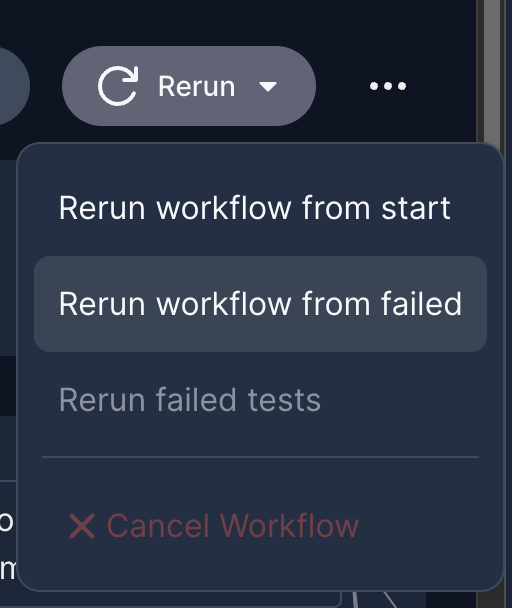
You trigger a rerun from your CI provider after a run fails, using the "Re-run jobs" or "Re-run failed jobs" function in your CI provider. Here's how that looks in Circle CI, as one example:
-
Cypress Cloud links the original run to every rerun. A stable rerun group ID tells Cloud they belong to the same CI build. On supported CI providers, Cypress sets this ID automatically from your CI environment. On other providers, you can set it manually with
CYPRESS_RERUN_GROUP_ID. -
Cypress Cloud picks the latest completed run in that group as the anchor run. The anchor run is the reference point that determines what still needs to execute in the new re-run.
-
Only the work that failed in the anchor run is re-executed.
- Run only failed specs: Cypress skips every spec that already passed, and re-runs each spec that contained a failure (including tests in that spec that passed).
- Run only failed tests: Cypress skips every spec that already passed, then inside remaining specs it re-runs tests that failed or were skipped in the anchor run, plus tests that are new or modified since that run. Tests that passed, including tests that failed an attempt and then passed, are omitted.
When this happens, the Cypress App prints a notice near the start of the run's CLI output. For Run only failed specs:
Warning from Cypress Cloud: This run is only retrying failed specs from run 1234.
It will not include specs that passed in that run.
For Run only failed tests:
Re-running only the tests that did not pass in the run 1234. It will not include tests that passed in that run.
The anchor is always the latest completed run for the rerun group, regardless of which specific run you clicked "rerun" on in your CI provider's UI.
In Cypress Cloud, a run that was rerun is labeled with a Re-run tag, so you can identify reruns at a glance and confirm that Re-run optimization was applied.

Availability
Re-run optimization is a Smart Orchestration feature available to users on a Business or Enterprise tier Cypress Cloud plan, as well as during a free trial.
Run only failed tests requires Cypress 15.21.0 or later. If the project's setting is Run only failed tests but the runner is an earlier version, Cloud falls back to Run only failed specs for that run.
Wondering if upgrading your Team tier subscription is worth it? Check out the recommendations on the run overview page to see how much time we predict Smart Orchestration features would save you.
Enable Re-run optimization
Re-run optimization is configured in the Smart Orchestration section of your organization and project settings. Only Owners and Admins can change the setting. Members and Viewers have read-only access. For new Cloud organizations, spec-based re-runs are on by default. For organizations and projects created before Re-run Optimization existed, you must manually update the setting.
Project setting
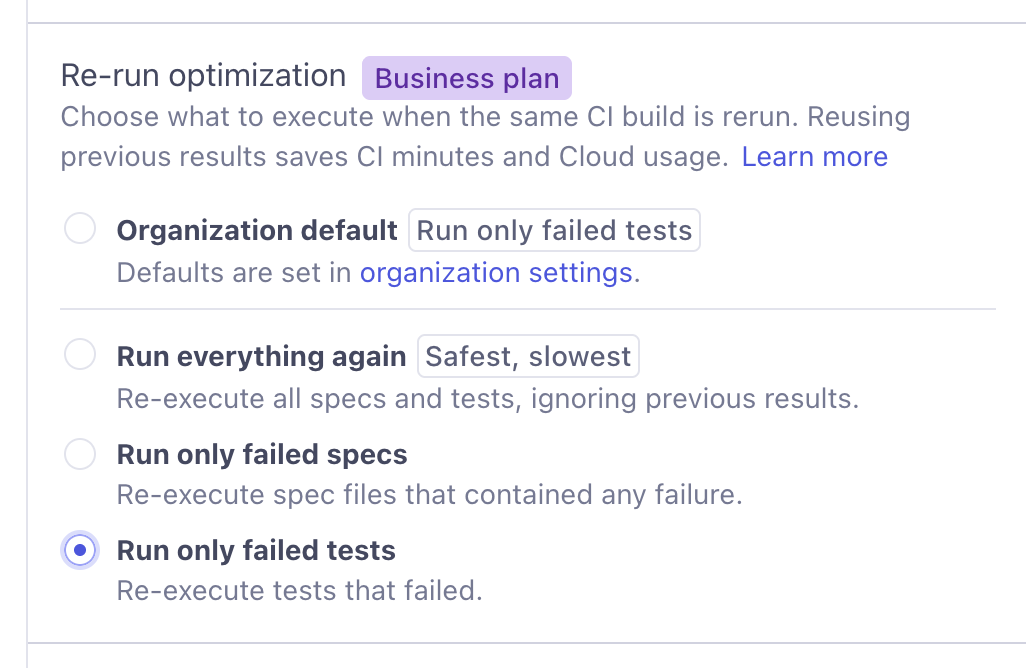
Each project can inherit the organization default or override it.
- Organization default (selected by default) follows the org-level setting.
- Run everything again disables Re-run optimization for the project.
- Run only failed specs re-executes spec files that contained any failure.
- Run only failed tests re-executes tests that failed. Requires Cypress 15.21.0 or later.
Organization setting
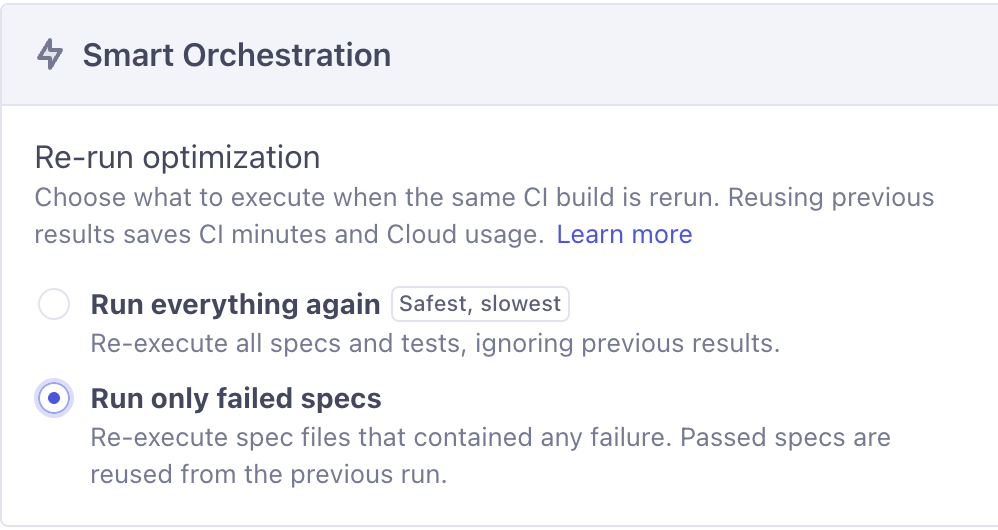
Sets the default behavior for every project in the organization.
- Run everything again rebuilds the full suite on a rerun. This is the default for existing organizations.
- Run only failed specs re-executes spec files that contained any failure. This will be the default for newly created organizations.
- Run only failed tests re-executes tests that failed. Requires Cypress 15.21.0 or later.
CI provider support
On supported providers, Cypress detects reruns automatically and builds the rerun
group ID for you. For any other provider, use the
CYPRESS_RERUN_GROUP_ID environment
variable to enable Re-run optimization manually.
CI providers that don't require manual setup:
CircleCI and Bitbucket Pipelines require Cypress v15.15.0 or later. Run only failed tests requires Cypress v15.21.0 or later.
Setting the rerun group ID manually
All other CI providers that require manual setup
For these providers, CYPRESS_RERUN_GROUP_ID is the rerun group ID that links an
original CI run to all of its reruns. Set it when your CI provider isn't
automatically supported, or when you want explicit control over grouping.
Requires Cypress v15.15.0 or later.
The value must be:
- Shared across an original run and all of its reruns.
- Unique between builds that are not related to one another.
A CI build identifier that persists across retries is usually a good fit. When
Cloud receives a run with CYPRESS_RERUN_GROUP_ID set, it uses that value to find
the anchor run and, if Re-run optimization is enabled, skips the work that passed
there.
CYPRESS_RERUN_GROUP_ID takes precedence over automatic detection. On supported
providers, setting it overrides the rerun group ID that Cypress would otherwise
construct for you.
Opting out in CI
To force a full run and skip the optimization, set the CYPRESS_RERUN_ALL_TESTS
environment variable to true (requires Cypress v15.15.0 or later).
Cloud then treats the run as a full run and runs every spec, even if a matching anchor run exists. This is useful for specific branches or pipelines where you always want the complete suite to run.
env:
  CYPRESS_RERUN_ALL_TESTS: true
Note that this represents a full opt-out from the re-run optimization process.
Do not use CYPRESS_RERUN_ALL_TESTS to "reset" a re-run chain. Instead,
modify the CYPRESS_RERUN_GROUP_ID.
What a rerun will execute
Every rerun is compared against your most recent completed run in the rerun group. Run only failed specs re-executes the specs that were still failing there. Run only failed tests re-executes the tests that did not pass there. That means you can trust a rerun to always work from your latest results: within the depth limit it does not re-run work that already passed, and it does not revert to an older, larger set of failures. That most-recent completed run is called the anchor run.
Knowing this lets you predict exactly what a rerun will do:
- You rerun a completed run → it retries that run's failing specs or tests. The common case, and where you see the biggest time and cost savings.
- You rerun after several attempts → each rerun anchors on the latest completed run, so chained reruns keep narrowing toward what's still broken instead of replaying earlier failures you've already fixed.
- You rerun while another run is still in progress → Cloud anchors on the last completed run, since the in-progress one has no final results yet. If CI already stopped that run's Cypress processes, the Cloud run stays in progress until the run timeout. Cancel a run so the next rerun can anchor on the run you stopped.
- You rerun within the run-completion delay window → Cloud hasn't marked the previous run complete yet, so the rerun safely runs the full suite. Complete a run so the next rerun can anchor on the run that just finished, without waiting out the delay. Shortening the run-completion delay has the same effect when you don't call the API.
Cloud never blocks parallel reruns: if several start at once, each one anchors on whichever run is complete at the time it begins.
Behavior and limitations
These tradeoffs are why the feature is experimental and opt-in. For most reruns the speed and cost savings far outweigh them, but it's worth understanding them before enabling Re-run optimization on critical pipelines:
- Passing results are not carried forward. A rerun-optimized run shows only the specs and tests that were re-executed. Work that passed in the anchor run does not appear in the rerun's results.
- Passing work is skipped for up to 5 chained reruns. Re-run optimization filters out specs and tests that passed in earlier runs in the group, looking back up to 5 runs. A 6th rerun re-executes the passing work from the original run.
- Reporter output reflects only the re-executed work. CI guardrails based on test counts (JUnit/XML reporters, custom reporters, threshold checks) will see fewer specs and tests than a full run. You may need to adjust these on your end.
- CLI messaging is limited. The CLI prints a notice for the specs or tests being re-run, but the skipped work is not listed in the output.
- Analytics may be incomplete. Analytics features such as App Quality won't be fully accurate for rerun-optimized runs, because those runs contain only a subset of specs and tests.
- Cypress Accessibility and UI Coverage reports may be incomplete. Rerun-optimized runs reflect only the specs and tests that were re-executed, not the full suite from the anchor run.
Tip:Pair Re-run optimization with other Smart Orchestration features for compounding savings. With Spec Prioritization failures surface first, with Auto Cancellation the run stops early once they do, and with Re-run optimization the retry replays only the failed specs or tests, so each layer gets you to a passing build faster and cheaper.
See also
- Smart Orchestration Overview - all of the Smart Orchestration features for speeding up CI runs and reducing costs
- Spec Prioritization - run failed specs first to surface failures earlier
- Auto Cancellation - stop a run early once failures cross a threshold
- Run Cancellation API - end a stopped run immediately so a rerun anchors to it
- Run Completion API - end a finished run before the completion delay so a rerun anchors to it
- Parallelization - split your suite across multiple machines to run specs in parallel
- Test Replay - debug the failing specs surfaced by a rerun
- Test retries - retry failed tests within a single run, which is a different mechanism from Re-run optimization
- Cypress Command Line - reference for the environment variables and flags used above