Multi-tab testing
Many user flows don't stay in one tab. A receipt opens in a new tab, a
sign-in or payment provider opens a popup, and a settings change in one tab has
to show up in another. Cypress runs your test in a single tab, and the
@cypress/puppeteer
plugin reaches the tabs and popups outside it. The plugin runs
Puppeteer code against the same browser Cypress launched,
then hands the result back to your command chain, where you assert on it and see
it in the Command Log like any other Cypress command.
This guide first helps you decide whether a test needs a second tab. It then covers how to set up the plugin and test the most common multi-tab flows.
Test new-tab links when the tabs don't interact
Ask what the test is really checking. Often it's only that your app opens the
right page, and nothing passes between the tabs while both are open: no popup
reports back to your app, and no change in one tab has to show up in the other.
You can check that from the Cypress tab without opening a second one, and the
test runs in every browser Cypress supports. When the test depends on what
happens inside the new tab, or on the tabs communicating, use
@cypress/puppeteer
instead.
The first two examples run against this page:
<h1>Order #1234</h1>
<a href="/receipt.html" target="_blank">View receipt</a>
Assert a new-tab link instead of following it
When the link is the behavior you care about, assert its attributes:
cy.contains('a', 'View receipt')
  .should('have.attr', 'target', '_blank')
  .and('have.attr', 'href', '/receipt.html')
Open a new-tab link in the Cypress tab
To check the destination page as well, remove the target attribute before
clicking. The browser then opens the link in the Cypress tab:
cy.contains('a', 'View receipt').invoke('removeAttr', 'target').click()
cy.contains('h1', 'Receipt for order #1234')
Stub window.open to check which page your app opens
When your app opens a tab from JavaScript, stub
window.open
before the page loads and assert how your app called it. This page opens an
authorization popup from a button:
<button id="connect">Connect calendar</button>
<script>
  document.querySelector('#connect').addEventListener('click', () => {
    window.open('/authorize.html', 'authorize', 'width=500,height=600')
  })
</script>
The spec stubs window.open, clicks the button, and checks the URL:
cy.visit('/connect.html', {
  onBeforeLoad(win) {
    cy.stub(win, 'open').as('open')
  },
})
cy.contains('button', 'Connect calendar').click()
cy.get('@open').should('have.been.calledWith', '/authorize.html')
Stubs, spies, and clocks covers cy.stub()
in more depth. To follow a link to another origin in the same tab, use
cy.origin().
When a test needs @cypress/puppeteer and a second tab
Use @cypress/puppeteer when the test has to work inside the other tab, not only
confirm that it opened. Each of these scenarios has a worked example later in
this guide:
- Read content from a tab that a link opens, such as a receipt, an invoice, or an export preview
- Complete a popup flow, such as a sign-in, payment, or account-linking popup that reports back to your app
- Test cross-tab updates, such as a setting or a sign-out in one tab that has to show up in the others
- Test two users at once, such as chat, comments, or a shared document
How @cypress/puppeteer connects your spec to other tabs
The plugin has two halves:
- In your Cypress config, you register named message handlers with
setup(). Each handler runs in Node.js and receives a PuppeteerBrowserconnected to the browser Cypress launched. - In your spec,
cy.puppeteer('handlerName', ...args)runs that handler and yields whatever it returns.
Here's one call from the first example below, readNewTab, which reads a tab
that a link opened. The Cypress tab and the new tab both run in the browser
Cypress launched, and the message handler between them runs in Node.js, in your
Cypress config:
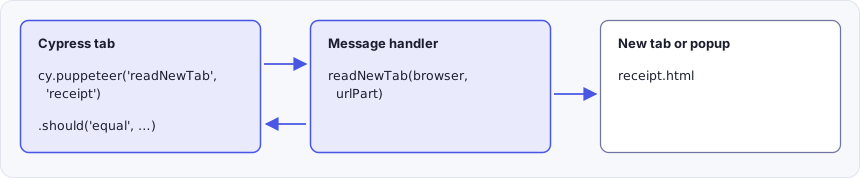
When your spec calls cy.puppeteer('readNewTab', 'receipt'), the call travels
to Node.js through cy.task(), so its arguments must be serializable. The
handler uses Puppeteer to find the new tab, read its heading, and close it. Its
return value then travels back to the Cypress tab, where .should() asserts on
it.
Each time cy.puppeteer() runs, the plugin connects Puppeteer to the browser,
calls your handler, and disconnects again. The browser stays open throughout. In
headed Chromium-based browsers other than Electron, the plugin also brings the
Cypress tab back to the front before it disconnects, so your test carries on
where it left off.
Keep these behaviors in mind as you write handlers:
- Puppeteer calls both tabs and windows
pages.
browser.pages()lists every one of them, including the tab Cypress runs in. That tab's URL contains/__/and your spec's file name, so skip it when you look for a tab by URL, or a handler can match the Cypress tab and close it. - Each call gets a fresh connection, so look up pages inside the handler every
time. Don't keep a
Pageor element around for the next call. cy.puppeteer()runs your handler once and doesn't retry. If an assertion chained after it fails, the test fails without running the handler again. Wait for anything that takes time, like a tab that's still opening, inside the handler withretry()or a Puppeteer method such aspage.waitForSelector().cy.puppeteer()runs on top ofcy.task(), so the same rules apply. Arguments and return values must be serializable, a handler that returnsundefinedyieldsnull, and a handler that runs longer thantaskTimeout(60 seconds by default) fails the command.- If a handler throws,
cy.puppeteer()fails the test with the handler's error message.
Browser support for @cypress/puppeteer
The plugin requires a Chromium-based browser, such as Chrome, Chrome for Testing, Chromium, Edge, or Electron. Two of those browsers have limits:
- Google Chrome 137 and later can't run headed once you register the plugin.
In a headed browser, the plugin needs the Cypress extension to bring the
Cypress tab back to the front, and Chrome 137 removed the
--load-extensionflag that loads it. Withsetup()in your Cypress config, headed Chrome 137 or later fails to launch, even for specs that never callcy.puppeteer(). Headless runs work in any version of Chrome. For headed runs, use Chrome for Testing or Chromium. The Cypress Docker images repository has examples for Chrome for Testing and Chromium. - Electron reads and controls tabs that your app opens, but it can't open a
new tab with
browser.newPage(), create a separate browser context, or take a screenshot of another tab. A popup your app opens in Electron also has nowindow.opener. The examples below point out where this matters.
Set up @cypress/puppeteer in your project
Install the plugin. It bundles its own copy of Puppeteer, so you don't need to install Puppeteer separately.
- npm
- Yarn
- pnpm
- Bun
npm install @cypress/puppeteer --save-dev
yarn add @cypress/puppeteer --dev
pnpm add --save-dev @cypress/puppeteer
bun add --dev @cypress/puppeteer
Import its support file to add the cy.puppeteer() command:
import '@cypress/puppeteer/support'
Then register your message handlers in your Cypress config with setup(). Each
example below shows the handler it uses.
Register all of your handlers in a single setup() call. A second call
replaces the handlers from the first, so when you combine examples from this
guide, merge their onMessage objects into one.
If you write your tests in TypeScript, add the plugin's types to your
tsconfig.json so your editor recognizes cy.puppeteer():
{
  "compilerOptions": {
    "types": ["cypress", "@cypress/puppeteer/support"]
  }
}
Read content from a tab that a link opens
Here, a link on an order page opens the receipt in a new tab:
<h1>Order #1234</h1>
<a href="/receipt.html" target="_blank">View receipt</a>
<h1>Receipt for order #1234</h1>
The readNewTab handler finds the new tab by its URL, reads its heading, and
closes the tab so it doesn't carry over into the next test. A tab takes a moment
to open, so retry() keeps calling the lookup until it returns a page instead of
throwing:
- cypress.config.js
- cypress.config.ts
const { defineConfig } = require('cypress')
const { setup, retry } = require('@cypress/puppeteer')

module.exports = defineConfig({
  // setupNodeEvents can be defined in either
  // the e2e or component configuration
  e2e: {
    setupNodeEvents(on, config) {
      setup({
        on,
        onMessage: {
          async readNewTab(browser, urlPart) {
            // The tab can take a moment to open, so keep looking until it does
            const page = await retry(async () => {
              const pages = await browser.pages()
              const tab = pages.find((p) => p.url().includes(urlPart))

              if (!tab)
                throw new Error(`No tab with a URL containing "${urlPart}"`)

              return tab
            })

            const heading = await page.waitForSelector('h1')
            const text = await heading?.evaluate((el) => el.textContent)

            await page.close()

            return text
          },
        },
      })
    },
  },
})
import { defineConfig } from 'cypress'
import { setup, retry } from '@cypress/puppeteer'

export default defineConfig({
  // setupNodeEvents can be defined in either
  // the e2e or component configuration
  e2e: {
    setupNodeEvents(on, config) {
      setup({
        on,
        onMessage: {
          async readNewTab(browser, urlPart: string) {
            // The tab can take a moment to open, so keep looking until it does
            const page = await retry(async () => {
              const pages = await browser.pages()
              const tab = pages.find((p) => p.url().includes(urlPart))

              if (!tab)
                throw new Error(`No tab with a URL containing "${urlPart}"`)

              return tab
            })

            const heading = await page.waitForSelector('h1')
            const text = await heading?.evaluate((el) => el.textContent)

            await page.close()

            return text
          },
        },
      })
    },
  },
})
The spec clicks the link, then asserts on the text the handler yields:
cy.visit('/order.html')
cy.contains('a', 'View receipt').click()

cy.puppeteer('readNewTab', 'receipt').should('equal', 'Receipt for order #1234')
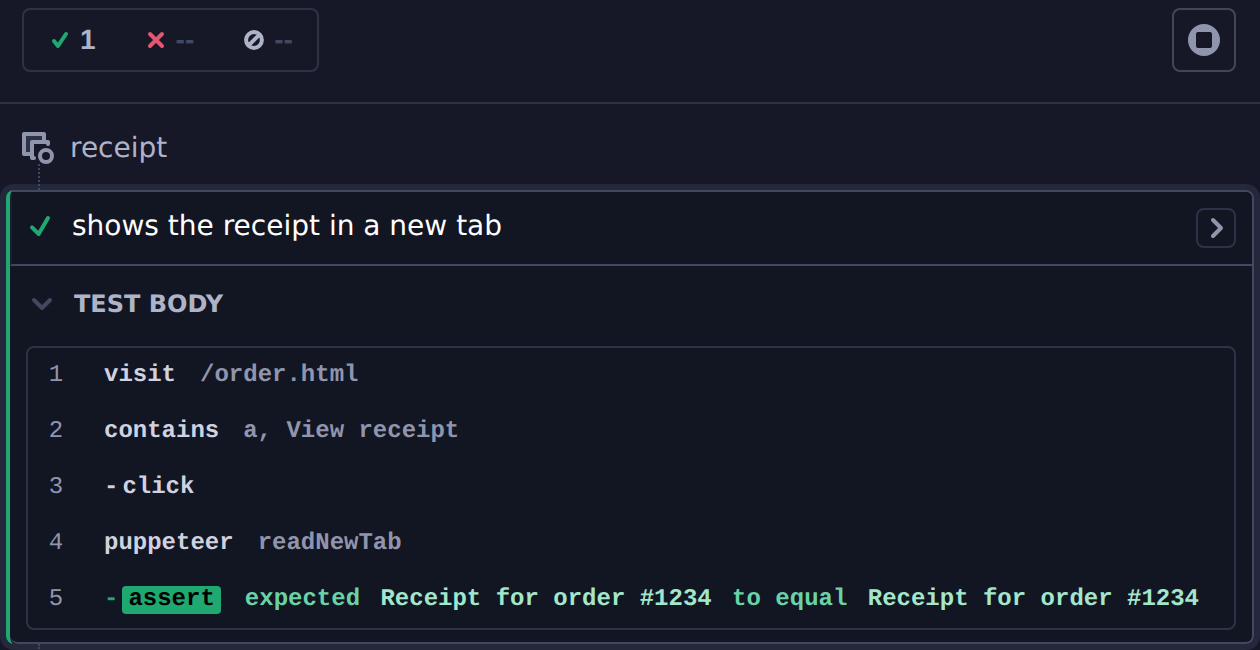
The Command Log shows the handler as a puppeteer step, followed by the
assertion on the text it yielded:
retry() gives up after 4 seconds by default. For a page that takes longer to
open, pass an options object as the second argument with a longer timeout in
milliseconds, such as { timeout: 10000 }.
Complete a popup flow and assert in the main tab
Sign-in, payment, and account-linking flows often open a popup, wait for the user
to approve something there, then update the original page. In this example, the
popup reports back to your app with window.opener.postMessage():
<button id="connect">Connect calendar</button>
<p id="status">Not connected</p>
<script>
  document.querySelector('#connect').addEventListener('click', () => {
    window.open('/authorize.html', 'authorize', 'width=500,height=600')
  })

  window.addEventListener('message', (event) => {
    if (event.data === 'authorized') {
      document.querySelector('#status').textContent = 'Connected'
    }
  })
</script>
<button id="allow">Allow access</button>
<script>
  document.querySelector('#allow').addEventListener('click', () => {
    window.opener.postMessage('authorized', window.location.origin)
    window.close()
  })
</script>
The allowAccessInPopup handler waits for the popup, then clicks its
"Allow access" button:
- cypress.config.js
- cypress.config.ts
const { defineConfig } = require('cypress')
const { setup, retry } = require('@cypress/puppeteer')

module.exports = defineConfig({
  // setupNodeEvents can be defined in either
  // the e2e or component configuration
  e2e: {
    setupNodeEvents(on, config) {
      setup({
        on,
        onMessage: {
          async allowAccessInPopup(browser) {
            const popup = await retry(async () => {
              const pages = await browser.pages()
              const tab = pages.find((p) => p.url().includes('/authorize'))

              if (!tab) throw new Error('The authorization popup did not open')

              return tab
            })

            await popup.bringToFront()
            await popup.waitForSelector('button#allow')
            // The app closes the popup as soon as the button is clicked. Clicking
            // from inside the page returns before the popup closes, where
            // popup.click() can fail with "Target closed".
            await popup.$eval('button#allow', (button) => button.click())
          },
        },
      })
    },
  },
})
import { defineConfig } from 'cypress'
import { setup, retry } from '@cypress/puppeteer'

export default defineConfig({
  // setupNodeEvents can be defined in either
  // the e2e or component configuration
  e2e: {
    setupNodeEvents(on, config) {
      setup({
        on,
        onMessage: {
          async allowAccessInPopup(browser) {
            const popup = await retry(async () => {
              const pages = await browser.pages()
              const tab = pages.find((p) => p.url().includes('/authorize'))

              if (!tab) throw new Error('The authorization popup did not open')

              return tab
            })

            await popup.bringToFront()
            await popup.waitForSelector('button#allow')
            // The app closes the popup as soon as the button is clicked. Clicking
            // from inside the page returns before the popup closes, where
            // popup.click() can fail with "Target closed".
            await popup.$eval('button#allow', (button) => button.click())
          },
        },
      })
    },
  },
})
Back in the spec, Cypress retries the assertion on the main tab until the app updates:
it('connects a calendar through the authorization popup', () => {
  cy.visit('/connect.html')
  cy.contains('button', 'Connect calendar').click()

  cy.puppeteer('allowAccessInPopup')

  cy.get('#status').should('have.text', 'Connected')
})
Run this flow in Chrome, Chromium, or Edge. In Electron, a popup's
window.opener is null, so the popup can't send its message back to your app.
Open a second tab to test cross-tab updates
Some apps keep several tabs in sync, for example through localStorage and the
storage event.
To test that, open the same page in a second tab and change something there.
This settings page updates its theme whenever another tab changes it:
<p>Theme: <span id="theme"></span></p>
<button id="use-dark">Use dark theme</button>
<script>
  const showTheme = () => {
    document.querySelector('#theme').textContent =
      localStorage.getItem('theme') || 'light'
  }

  document.querySelector('#use-dark').addEventListener('click', () => {
    localStorage.setItem('theme', 'dark')
    showTheme()
  })

  // Fires when another tab changes localStorage
  window.addEventListener('storage', showTheme)
  showTheme()
</script>
The clickInNewTab handler opens a URL in a new tab with browser.newPage(),
clicks an element, and closes the tab. The new tab shares localStorage with
the Cypress tab, the same as a tab a user opens on the same site:
- cypress.config.js
- cypress.config.ts
const { defineConfig } = require('cypress')
const { setup } = require('@cypress/puppeteer')

module.exports = defineConfig({
  // setupNodeEvents can be defined in either
  // the e2e or component configuration
  e2e: {
    setupNodeEvents(on, config) {
      setup({
        on,
        onMessage: {
          async clickInNewTab(browser, url, selector) {
            const page = await browser.newPage()

            await page.goto(url)
            await page.click(selector)
            await page.close()
          },
        },
      })
    },
  },
})
import { defineConfig } from 'cypress'
import { setup } from '@cypress/puppeteer'

export default defineConfig({
  // setupNodeEvents can be defined in either
  // the e2e or component configuration
  e2e: {
    setupNodeEvents(on, config) {
      setup({
        on,
        onMessage: {
          async clickInNewTab(browser, url: string, selector: string) {
            const page = await browser.newPage()

            await page.goto(url)
            await page.click(selector)
            await page.close()
          },
        },
      })
    },
  },
})
The spec passes the current URL and a selector to the handler, then asserts that the original tab picked up the change:
it('updates the theme when another tab changes it', () => {
  cy.visit('/settings.html')
  cy.get('#theme').should('have.text', 'light')

  cy.url().then((url) => {
    cy.puppeteer('clickInNewTab', url, '#use-dark')
  })

  cy.get('#theme').should('have.text', 'dark')
})
browser.newPage() needs Chrome, Chromium, or Edge. In Electron it fails with
Protocol error (Target.createTarget): Not supported.
Sign out in one tab and check the other tabs
The same handler covers another common check: signing out in one tab signs the user out everywhere. This account page shows who is signed in and updates when another tab signs out:
<p id="session-status"></p>
<button id="sign-out">Sign out</button>
<script>
  const showSession = () => {
    const user = localStorage.getItem('user')
    document.querySelector('#session-status').textContent = user
      ? `Signed in as ${user}`
      : 'Signed out'
  }

  document.querySelector('#sign-out').addEventListener('click', () => {
    localStorage.removeItem('user')
    showSession()
  })

  // Fires when another tab signs out
  window.addEventListener('storage', showSession)
  showSession()
</script>
The spec signs in, uses clickInNewTab to click "Sign out" in a second tab,
then asserts the Cypress tab signed out too:
it('signs out every tab when one tab signs out', () => {
  cy.visit('/account.html', {
    onBeforeLoad(win) {
      win.localStorage.setItem('user', 'Ada')
    },
  })
  cy.get('#session-status').should('have.text', 'Signed in as Ada')

  cy.url().then((url) => {
    cy.puppeteer('clickInNewTab', url, '#sign-out')
  })

  cy.get('#session-status').should('have.text', 'Signed out')
})
Test two users at once with a separate browser context
Chat, comments, and shared documents need a second person to test properly. A
tab from browser.newPage() doesn't work for this, because it shares the
Cypress tab's cookies, so it signs in as the same user. A separate browser context has its own
cookies and storage, so it acts like a second person on another computer, while
still running in the browser Cypress launched.
This chat page asks for a name, stores it in a cookie, and shows every message from the server:
<form id="sign-in">
  <input id="name" aria-label="Name" />
  <button>Sign in</button>
</form>
<form id="send" hidden>
  <input id="message" aria-label="Message" />
  <button>Send</button>
</form>
<ul id="messages"></ul>
<script>
  const signIn = document.querySelector('#sign-in')
  const send = document.querySelector('#send')
  const currentUser = () => document.cookie.match(/user=([^;]+)/)?.[1]

  const showForms = () => {
    signIn.hidden = Boolean(currentUser())
    send.hidden = !currentUser()
  }

  const showMessages = async () => {
    const messages = await (await fetch('/api/messages')).json()
    document.querySelector('#messages').replaceChildren(
      ...messages.map(({ user, text }) => {
        const li = document.createElement('li')
        li.textContent = `${user}: ${text}`
        return li
      })
    )
  }

  signIn.addEventListener('submit', (event) => {
    event.preventDefault()
    document.cookie = `user=${document.querySelector('#name').value}; path=/`
    showForms()
  })

  send.addEventListener('submit', async (event) => {
    event.preventDefault()
    const input = document.querySelector('#message')
    await fetch('/api/messages', {
      method: 'POST',
      body: JSON.stringify({ user: currentUser(), text: input.value }),
    })
    input.value = ''
    showMessages()
  })

  showForms()
  showMessages()
  setInterval(showMessages, 500)
</script>
The sendChatAsSecondUser handler opens the chat in a new browser context,
signs in under another name, sends a message, and waits until the message
appears before closing the context:
- cypress.config.js
- cypress.config.ts
const { defineConfig } = require('cypress')
const { setup } = require('@cypress/puppeteer')

module.exports = defineConfig({
  // setupNodeEvents can be defined in either
  // the e2e or component configuration
  e2e: {
    setupNodeEvents(on, config) {
      setup({
        on,
        onMessage: {
          async sendChatAsSecondUser(browser, url, name, text) {
            // A separate browser context has its own cookies and storage, like a
            // second person on another computer
            const context = await browser.createBrowserContext()
            const page = await context.newPage()

            await page.goto(url)
            await page.type('#name', name)
            await page.click('#sign-in button')
            await page.type('#message', text)
            await page.click('#send button')
            await page.waitForSelector(
              `#messages li::-p-text("${name}: ${text}")`
            )

            await context.close()
          },
        },
      })
    },
  },
})
import { defineConfig } from 'cypress'
import { setup } from '@cypress/puppeteer'

export default defineConfig({
  // setupNodeEvents can be defined in either
  // the e2e or component configuration
  e2e: {
    setupNodeEvents(on, config) {
      setup({
        on,
        onMessage: {
          async sendChatAsSecondUser(
            browser,
            url: string,
            name: string,
            text: string
          ) {
            // A separate browser context has its own cookies and storage, like a
            // second person on another computer
            const context = await browser.createBrowserContext()
            const page = await context.newPage()

            await page.goto(url)
            await page.type('#name', name)
            await page.click('#sign-in button')
            await page.type('#message', text)
            await page.click('#send button')
            await page.waitForSelector(
              `#messages li::-p-text("${name}: ${text}")`
            )

            await context.close()
          },
        },
      })
    },
  },
})
In the spec, the Cypress tab signs in as Ada, and the handler sends a message as Grace:
it('shows a message from another user', () => {
  cy.setCookie('user', 'Ada')
  cy.visit('/chat.html')

  cy.url().then((url) => {
    cy.puppeteer('sendChatAsSecondUser', url, 'Grace', 'Hi Ada!')
  })

  cy.contains('#messages li', 'Grace: Hi Ada!')
})
Ada stays signed in throughout, because Grace's cookie lives only in the separate context.
Separate browser contexts need Chrome, Chromium, or Edge. In Electron,
createBrowserContext() fails with
Protocol error (Target.createBrowserContext): Failed to create browser context.
Close leftover tabs between Cypress tests
A tab that a test opens stays open until something closes it, and a leftover tab can confuse the next test's handlers. To start every test with only the Cypress tab, register a handler that closes all the others:
- cypress.config.js
- cypress.config.ts
const { defineConfig } = require('cypress')
const { setup } = require('@cypress/puppeteer')

module.exports = defineConfig({
  // setupNodeEvents can be defined in either
  // the e2e or component configuration
  e2e: {
    setupNodeEvents(on, config) {
      setup({
        on,
        onMessage: {
          async closeExtraTabs(browser) {
            const pages = await browser.pages()
            // The Cypress tab's URL contains /__/, so leave that one open
            const extraTabs = pages.filter(
              (page) => !page.url().includes('/__/')
            )

            await Promise.all(extraTabs.map((page) => page.close()))
          },
        },
      })
    },
  },
})
import { defineConfig } from 'cypress'
import { setup } from '@cypress/puppeteer'

export default defineConfig({
  // setupNodeEvents can be defined in either
  // the e2e or component configuration
  e2e: {
    setupNodeEvents(on, config) {
      setup({
        on,
        onMessage: {
          async closeExtraTabs(browser) {
            const pages = await browser.pages()
            // The Cypress tab's URL contains /__/, so leave that one open
            const extraTabs = pages.filter(
              (page) => !page.url().includes('/__/')
            )

            await Promise.all(extraTabs.map((page) => page.close()))
          },
        },
      })
    },
  },
})
Then call it after every test from your support file. The plugin only works in Chromium-based browsers, so the hook checks the browser first, and the rest of your suite still runs in Firefox and WebKit:
import '@cypress/puppeteer/support'

afterEach(() => {
  if (Cypress.browser.family === 'chromium') {
    cy.puppeteer('closeExtraTabs')
  }
})
Screenshot other tabs when a Cypress test fails
Cypress screenshots and videos record the Cypress tab only. When a multi-tab
test fails in CI, a screenshot of the other tabs shows what each one looked like
when the test failed. The screenshotOtherTabs handler saves one image per tab to your
screenshotsFolder and yields the
file paths. Register it in the same setup() call as closeExtraTabs:
- cypress.config.js
- cypress.config.ts
const { defineConfig } = require('cypress')
const fs = require('fs')
const path = require('path')
const { setup } = require('@cypress/puppeteer')

module.exports = defineConfig({
  // setupNodeEvents can be defined in either
  // the e2e or component configuration
  e2e: {
    setupNodeEvents(on, config) {
      const screenshotsFolder =
        config.screenshotsFolder || 'cypress/screenshots'

      setup({
        on,
        onMessage: {
          async screenshotOtherTabs(browser, testName) {
            const pages = await browser.pages()
            const otherTabs = pages.filter(
              (page) => !page.url().includes('/__/')
            )
            const safeName = testName.replace(/[^\w -]/g, '')
            const files = []

            await fs.promises.mkdir(screenshotsFolder, { recursive: true })

            for (const [index, page] of otherTabs.entries()) {
              const file = path.join(
                screenshotsFolder,
                `${safeName} (tab ${index + 1}).png`
              )

              await page.screenshot({ path: file })
              files.push(file)
            }

            return files
          },
          async closeExtraTabs(browser) {
            const pages = await browser.pages()
            // The Cypress tab's URL contains /__/, so leave that one open
            const extraTabs = pages.filter(
              (page) => !page.url().includes('/__/')
            )

            await Promise.all(extraTabs.map((page) => page.close()))
          },
        },
      })
    },
  },
})
import { defineConfig } from 'cypress'
import fs from 'fs'
import path from 'path'
import { setup } from '@cypress/puppeteer'

export default defineConfig({
  // setupNodeEvents can be defined in either
  // the e2e or component configuration
  e2e: {
    setupNodeEvents(on, config) {
      const screenshotsFolder =
        config.screenshotsFolder || 'cypress/screenshots'

      setup({
        on,
        onMessage: {
          async screenshotOtherTabs(browser, testName: string) {
            const pages = await browser.pages()
            const otherTabs = pages.filter(
              (page) => !page.url().includes('/__/')
            )
            const safeName = testName.replace(/[^\w -]/g, '')
            const files: string[] = []

            await fs.promises.mkdir(screenshotsFolder, { recursive: true })

            for (const [index, page] of otherTabs.entries()) {
              const file = path.join(
                screenshotsFolder,
                `${safeName} (tab ${index + 1}).png`
              )

              await page.screenshot({ path: file })
              files.push(file)
            }

            return files
          },
          async closeExtraTabs(browser) {
            const pages = await browser.pages()
            // The Cypress tab's URL contains /__/, so leave that one open
            const extraTabs = pages.filter(
              (page) => !page.url().includes('/__/')
            )

            await Promise.all(extraTabs.map((page) => page.close()))
          },
        },
      })
    },
  },
})
Then take the screenshots from your support file when a test fails, before the tabs close:
import '@cypress/puppeteer/support'

afterEach(function () {
  // The plugin only works in Chromium-based browsers
  if (Cypress.browser.family !== 'chromium') return

  // Capture the other tabs before closing them, so a failed run in CI
  // shows what they looked like. Electron can't screenshot them.
  if (
    this.currentTest?.state === 'failed' &&
    Cypress.browser.name !== 'electron'
  ) {
    cy.puppeteer('screenshotOtherTabs', this.currentTest.fullTitle())
  }

  cy.puppeteer('closeExtraTabs')
})
The hook uses function () rather than an arrow function so it can read
this.currentTest. Upload your screenshots folder as a CI artifact, and a
failed run keeps an image of every tab. The hook skips Electron
because page.screenshot() never finishes there for a tab your app opened,
which leaves the hook waiting until taskTimeout.
Run multi-tab @cypress/puppeteer tests in CI
Headless runs work in every supported browser, including any version of Google
Chrome, so most CI setups need nothing extra. Choose a Chromium-based browser
with --browser:
- npm
- Yarn
- pnpm
- Bun
npx cypress run --browser chrome
yarn cypress run --browser chrome
pnpm cypress run --browser chrome
bunx cypress run --browser chrome
Tests that open tabs or browser contexts themselves, take screenshots of other
tabs, or rely on a popup's window.opener need Chrome, Chromium, or Edge rather than the
default Electron browser. For headed runs in CI, use Chrome for Testing or Chromium, as described in
Browser support for @cypress/puppeteer.
Troubleshoot @cypress/puppeteer errors
Could not find message handler with the name
The name you passed to cy.puppeteer() doesn't match a key in onMessage. The
error lists the registered handlers. If a handler you registered is
missing from that list, check for a second setup() call, which replaces the
handlers from the first.
Failed retrying after 4000ms in a message handler
retry() ran out of time before your lookup succeeded, and the error ends with
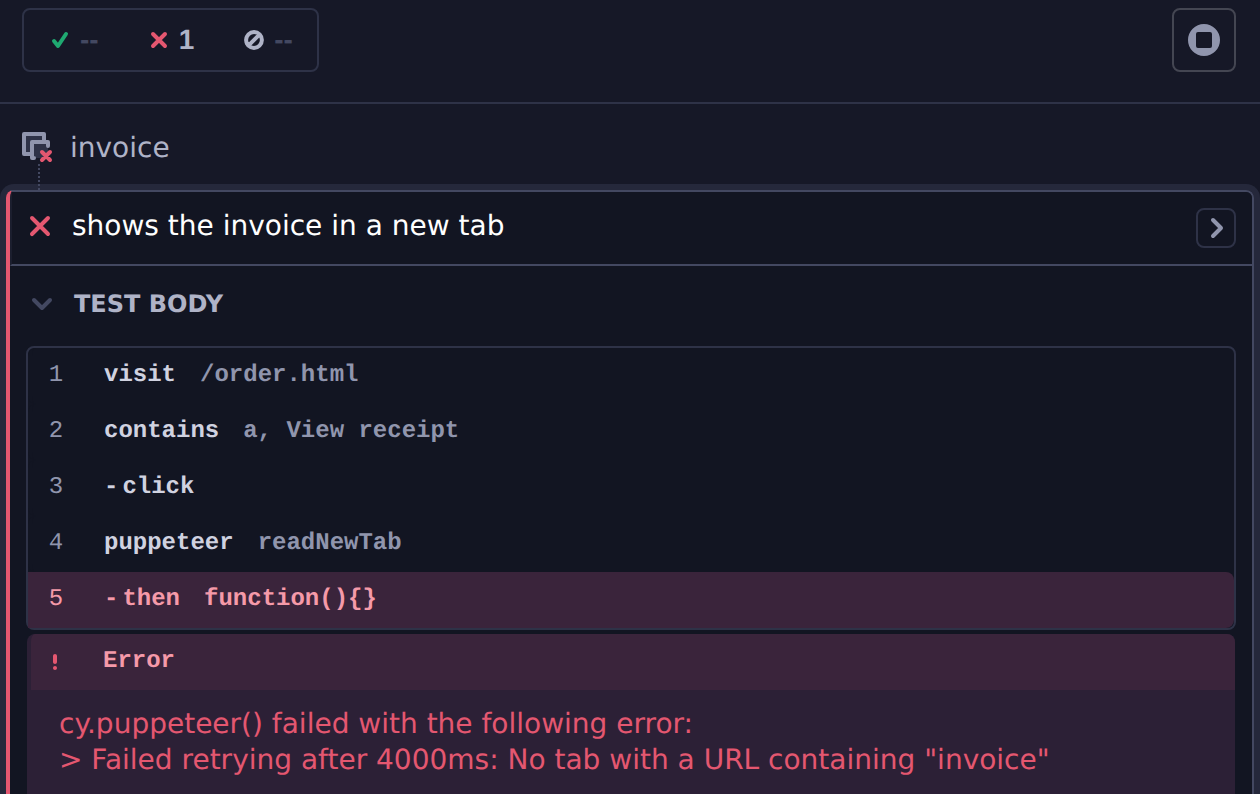
the last message your function threw. In this spec, the link opens
receipt.html, so readNewTab never finds a tab whose URL contains
"invoice":
cy.visit('/order.html')
cy.contains('a', 'View receipt').click()

cy.puppeteer('readNewTab', 'invoice')
The Command Log marks the puppeteer step as failed and shows the handler's
error:
Check that the tab opened and that its URL
contains what you're matching on. If it's slow to open, pass a longer timeout
to retry().
cy.puppeteer() times out waiting for a handler
The error says that cy.task('__cypressPuppeteer__') timed out, because
cy.puppeteer() runs on cy.task(). A handler ran longer than
taskTimeout. Look for a
waitForSelector() or navigation that never finishes, or a page.screenshot()
in Electron, which never finishes for a tab your app opened. Otherwise, raise
taskTimeout for tests with slow handlers.
Protocol errors from Target.createTarget or createBrowserContext
Protocol error (Target.createTarget): Not supported and
Protocol error (Target.createBrowserContext): Failed to create browser context
mean the handler called browser.newPage() or browser.createBrowserContext()
in Electron, which supports neither. Run the spec in Chrome, Chromium, or Edge.
Only browsers in the Chromium family are supported
The spec ran in Firefox or WebKit. Switch to a Chromium-based browser.
@cypress/puppeteer does not work in Google Chrome v137 and higher
You ran headed Google Chrome 137 or later, which can't load the Cypress
extension. Use Chrome for Testing, Chromium, or Electron for headed runs, or run
Chrome headlessly with cypress run.
Cannot communicate with the Cypress Chrome extension
The plugin couldn't bring the Cypress tab back to the front because the Cypress
extension didn't respond. Check that the extension is enabled at
chrome://extensions/ in the browser Cypress launched, and that your
organization's browser policy allows it
(Allow the Cypress Chrome extension).
Lost the reference to the browser after a config reload
Your Cypress config reloaded without the browser relaunching. Close the browser and open it again from Cypress.