API Testing in Cypress
Cypress tests REST and GraphQL APIs directly, with no browser navigation and no
separate tool. cy.request() sends a real HTTP request
and yields the response, so you can assert on status codes, response bodies,
headers, and timing in the same specs, the same config, and the same CI job that
already run your UI tests.
That makes Cypress a practical place to test authentication flows, CRUD
workflows, validation errors, and pagination, and to seed application state over
HTTP instead of clicking through a form to reach it. This guide covers writing
your first API test, what cy.request() does under the hood, and the patterns
that come up most: authentication, error responses, file uploads, GraphQL,
polling, recording fixtures, and combining API calls with UI tests.
This guide covers the requests your test makes with
cy.request().
To observe, wait on, or stub the requests your application makes, see Intercepting network requests.
Why test APIs with Cypress
Most teams already own a Cypress suite for their UI. Adding API tests to it means one runner, one config, one CI job, and one place to look when something breaks. You get a few concrete wins:
- Faster feedback on the contract. An API test that fails tells you the backend changed. A UI test that fails could mean the backend changed, a selector moved, or a race condition surfaced. Testing the endpoint directly removes that ambiguity.
- Setup and teardown that is faster than clicking. Creating a user, seeding an order, or logging in over HTTP takes milliseconds. Doing the same through the UI takes seconds, and it re-tests code paths you already cover elsewhere.
- Coverage for the parts of the backend the UI never reaches. Validation errors, permission boundaries, rate limits, and pagination edges are often hard to trigger from a form but trivial to trigger with a request.
- Real inspection, locally and in CI. Every request shows up in the Command Log with its method, status, and URL, and clicking it prints the full request and response to your browser console. That works in open mode and, through Test Replay, on a run that already finished in CI.
- Tests that span both layers. Because API calls and UI commands live in the same chain, you can seed state over HTTP, drive the app through its interface, then verify over HTTP that the backend really persisted the change.
Cypress runs API tests in the end-to-end testing type.
The command you will use most is cy.request(), which
makes a real HTTP request and yields the response.
Write your first API test
Set a baseUrl (optional)
You can pass a full URL to cy.request() and start writing tests right away, so
this step is not required. Setting baseUrl is a convenience: it lets every
request use a relative path, and it lets you point the same specs at a different
environment by changing one value.
- cypress.config.js
- cypress.config.ts
const { defineConfig } = require('cypress')

module.exports = defineConfig({
  e2e: {
    baseUrl: 'http://localhost:3001',
  },
})
import { defineConfig } from 'cypress'

export default defineConfig({
  e2e: {
    baseUrl: 'http://localhost:3001',
  },
})
// with a baseUrl set
cy.request('/users')

// without one, pass the full URL
cy.request('http://localhost:3001/users')
Create the spec
describe('GET /users', () => {
  it('returns a list of users', () => {
    cy.request('GET', '/users').then((response) => {
      expect(response.status).to.eq(200)
      expect(response.body.results).to.have.length.greaterThan(1)
    })
  })
})
Run it
- npm
- Yarn
- pnpm
- Bun
npx cypress run --spec 'cypress/e2e/api/users.cy.js'
yarn cypress run --spec 'cypress/e2e/api/users.cy.js'
pnpm cypress run --spec 'cypress/e2e/api/users.cy.js'
bunx cypress run --spec 'cypress/e2e/api/users.cy.js'
That is a complete API test. No page has to be visited first, and no browser
navigation happens. cy.request() resolves the relative /users against
baseUrl and yields the response.
Anatomy of the response
cy.request() yields a response object. These are the properties you will
assert on most often:
| Property | Description |
|---|---|
status | The HTTP status code, for example 200 |
statusText | The status text, for example 'OK' |
body | The response body, parsed into an object when the response Content-Type ends in json |
headers | The response headers |
duration | How long the request took, in milliseconds |
isOkStatusCode | true for 2xx and 3xx responses |
requestHeaders | The headers Cypress actually sent, including cookies it attached for you |
requestBody | The body Cypress actually sent |
redirects | Present when redirects were followed, as an array like ['301: http://localhost:3001/new'] |
allRequestResponses | Every request and response in the chain, useful when redirects were followed |
Body parsing follows the response, not the request. If the server returns
Content-Type: application/json, response.body is an object. Otherwise it is
a string, even if you sent a JSON request body.
You can assert with .then() for multiple checks, or chain assertions directly
when you only care about one value:
// several assertions against one response
cy.request('/users/1').then((response) => {
  expect(response.status).to.eq(200)
  expect(response.body).to.have.property('email')
  expect(response.duration).to.be.lessThan(1000)
})

// a single value, read as a sentence
cy.request('/users/1').its('body.username').should('eq', 'jdoe')

// implicit assertion on the whole body
cy.request('/users/1').its('body').should('deep.include', {
  id: 1,
  role: 'admin',
})
How cy.request() works
Understanding the mechanics prevents most of the surprises people hit.
When you call cy.request(), the driver hands the options to the Cypress Node
process over its websocket connection, and Node makes the HTTP request. The
browser is never asked to make the call.
That single fact explains the behaviors below.
| Behavior | Why |
|---|---|
| The request never appears in the browser DevTools Network tab | It is not a browser request, so the browser has nothing to report |
cy.intercept() cannot spy on or stub it | Interception works on browser traffic flowing through the Cypress proxy, and this request never enters that proxy |
| CORS and same-origin policy do not apply | Those are browser rules, and no browser is involved. You can request any host |
| Cookies still work, against the real browser jar | See cookies are shared with the browser |
The User-Agent matches the browser under test | Cypress forwards the browser's user agent so the server sees a consistent client |
| Invalid or self-signed TLS certificates do not fail the request | Certificate verification is relaxed, which keeps requests against staging environments working |
A few more defaults worth knowing:
- Non-
2xx/3xxresponses fail the test.failOnStatusCodedefaults totrue. Set it tofalsewhen the error response is what you are testing. - Redirects are followed.
followRedirectdefaults totrue. Set it tofalseto assert on theLocationheader viaresponse.redirectedToUrl. - Object bodies are serialized for you. When
bodyis an object or boolean, Cypress JSON-serializes it and setsContent-Type: application/json. A string body is sent as-is with no content type added. - Transient network errors are retried.
retryOnNetworkFailuredefaults totrueand retries up to 4 times. Status code failures are not retried unless you opt in withretryOnStatusCodeFailure. - The timeout is
responseTimeout, notdefaultCommandTimeout. Override it per request with thetimeoutoption.
Cookies are shared with the browser
cy.request() does not keep its own cookie jar. Before sending, Cypress asks
the browser for the cookies that match the request URL and attaches them.
When the response comes back with Set-Cookie, Cypress writes those cookies
into the browser, honoring expiry and removing cookies the server cleared.
The jar is shared in both directions, which is what makes hybrid tests work:
- Log in over HTTP, continue in the UI. A
cy.request()to your login endpoint leaves the session cookie in the browser, so the nextcy.visit()loads an authenticated page. No form to fill in, no waiting on a redirect. - Log in through the UI, continue over HTTP. A session established by
clicking through your real login form is carried into every subsequent
cy.request(), so you can assert against authenticated endpoints without re-authenticating or hand-building a token. - Test what logging out actually does. Because the server's
Set-Cookieclearing lands in the real browser jar, you can call the logout endpoint and then assert that the UI treats the user as signed out.
A dedicated API testing tool runs beside the browser rather than inside it, so its cookies and your application's cookies are separate worlds. Bridging them means exporting a token and re-injecting it, which tests your plumbing as much as your app.
Common scenarios
Test a full CRUD lifecycle
Cypress commands are chainable, so a create-read-update-delete flow reads top to bottom. Capture the id from the create response and carry it forward.
describe('/articles', () => {
  it('creates, reads, updates, and deletes an article', () => {
    cy.request('POST', '/articles', {
      title: 'Testing APIs with Cypress',
      status: 'draft',
    })
      .then((response) => {
        expect(response.status).to.eq(201)
        expect(response.body).to.include({ status: 'draft' })

        return response.body.id
      })
      .then((articleId) => {
        cy.request(`/articles/${articleId}`)
          .its('body.title')
          .should('eq', 'Testing APIs with Cypress')

        cy.request('PATCH', `/articles/${articleId}`, { status: 'published' })
          .its('body.status')
          .should('eq', 'published')

        cy.request('DELETE', `/articles/${articleId}`)
          .its('status')
          .should('eq', 204)

        cy.request({
          url: `/articles/${articleId}`,
          failOnStatusCode: false,
        })
          .its('status')
          .should('eq', 404)
      })
  })
})
Authenticate once and reuse the session
Logging in over HTTP is the fastest way to get an authenticated test. Wrap it in
cy.session() so the result is cached and restored
instead of re-run for every test.
When the API authenticates with a cookie, cy.request() picks it up for free,
because Cypress reads the browser cookie jar on every request.
Cypress.Commands.add('loginByApi', (username, password) => {
  cy.session(
    ['loginByApi', username],
    () => {
      cy.request('POST', '/auth/login', { username, password })
        .its('status')
        .should('eq', 200)
    },
    {
      cacheAcrossSpecs: true,
      validate() {
        cy.request('/auth/me').its('status').should('eq', 200)
      },
    }
  )
})
When it authenticates with a bearer token instead, store the token during login
and send it explicitly. cy.session() caches localStorage alongside cookies,
so the token survives the restore.
const authToken = () => window.localStorage.getItem('authToken')

Cypress.Commands.add('loginByApi', (username, password) => {
  cy.session(
    ['loginByApi', username],
    () => {
      cy.request('POST', '/auth/login', { username, password }).then(
        (response) => {
          expect(response.status).to.eq(200)
          window.localStorage.setItem('authToken', response.body.token)
        }
      )
    },
    {
      cacheAcrossSpecs: true,
      validate() {
        cy.request({
          url: '/auth/me',
          headers: { authorization: `Bearer ${authToken()}` },
        })
          .its('status')
          .should('eq', 200)
      },
    }
  )
})
Keep the credentials themselves in
environment variables, never in the spec,
and read them with cy.env() so they stay in the Node
process instead of being hydrated into the browser.
describe('GET /orders', () => {
  beforeEach(() => {
    cy.env(['username', 'password']).then(({ username, password }) => {
      cy.loginByApi(username, password)
    })
  })

  it('returns orders belonging only to the signed-in customer', () => {
    cy.env(['customerId']).then(({ customerId }) => {
      cy.request({
        url: '/orders',
        headers: { authorization: `Bearer ${authToken()}` },
      })
        .its('body.orders')
        .should('have.length.greaterThan', 0)
        .each((order) => {
          expect(order.customerId).to.eq(customerId)
        })
    })
  })
})
Repeating the same headers object in every test is a sign you want a custom
command. See organize an API test suite for a
cy.api() wrapper that fills in the auth header and base path.
Assert on error responses
Error paths are usually the least tested part of an API and the cheapest to
cover here. Set failOnStatusCode: false so Cypress yields the response instead
of failing the test.
describe('POST /orders validation', () => {
  it('rejects an order with no line items', () => {
    cy.request({
      method: 'POST',
      url: '/orders',
      body: { lineItems: [] },
      failOnStatusCode: false,
    }).then((response) => {
      expect(response.status).to.eq(422)
      expect(response.body.errors).to.deep.include({
        field: 'lineItems',
        message: 'must contain at least one item',
      })
    })
  })

  it('refuses an unauthenticated request', () => {
    cy.request({
      url: '/orders',
      headers: { authorization: '' },
      failOnStatusCode: false,
    })
      .its('status')
      .should('eq', 401)
  })

  it('hides an order belonging to another customer behind a 404', () => {
    cy.request({
      url: '/orders/does-not-belong-to-me',
      failOnStatusCode: false,
    }).then((response) => {
      expect(response.status).to.eq(404)
      expect(response.body).to.not.have.property('customerId')
    })
  })
})
Send query parameters and walk pagination
The qs option merges an object into the URL's query string, so you do not have
to build and encode it yourself.
it('paginates search results', () => {
  cy.request({
    url: '/products/search',
    qs: { q: 'wireless keyboard', page: 1, perPage: 25 },
  }).then((response) => {
    expect(response.status).to.eq(200)
    expect(response.body.items).to.have.length(25)
    expect(response.body.page).to.eq(1)

    cy.request({
      url: '/products/search',
      qs: { q: 'wireless keyboard', page: 2, perPage: 25 },
    }).then((secondPage) => {
      const firstIds = response.body.items.map((item) => item.id)
      const secondIds = secondPage.body.items.map((item) => item.id)

      expect(secondIds).to.not.have.members(firstIds)
    })
  })
})
Validate the shape of a response
Asserting on values catches data bugs. Asserting on shape catches contract breaks, which are the changes most likely to reach production unnoticed.
it('returns every field the checkout page depends on', () => {
  cy.request('/cart')
    .its('body')
    .then((cart) => {
      expect(cart).to.have.all.keys(
        'id',
        'items',
        'subtotal',
        'tax',
        'total',
        'currency'
      )

      expect(cart.currency).to.be.oneOf(['USD', 'EUR', 'GBP'])
      expect(cart.total).to.be.a('number')

      cart.items.forEach((item) => {
        expect(item).to.include.all.keys('sku', 'quantity', 'unitPrice')
        expect(item.quantity).to.be.greaterThan(0)
      })
    })
})
Upload a file
Pass a FormData instance as the body. Cypress encodes it and sets the
multipart/form-data content type with the correct boundary.
it('accepts an avatar upload', () => {
  // image fixtures are read as base64 by default
  cy.fixture('avatar.png').then((image) => {
    const formData = new FormData()

    formData.append(
      'file',
      Cypress.Blob.base64StringToBlob(image, 'image/png'),
      'avatar.png'
    )
    formData.append('visibility', 'public')

    cy.request({
      method: 'POST',
      url: '/users/me/avatar',
      body: formData,
    }).then((response) => {
      expect(response.status).to.eq(201)
      expect(response.body.url).to.match(/avatar\.png$/)
    })
  })
})
Query a GraphQL API
GraphQL is a single endpoint taking a JSON body, so no special handling is
needed. Assert on body.data, and assert that body.errors is absent, because
GraphQL returns 200 even for query errors.
const gql = (query, variables) =>
cy.request('POST', '/graphql', { query, variables })
it('fetches a user with their recent orders', () => {
gql(
`query User($id: ID!) {
user(id: $id) {
id
email
orders(last: 3) { id total }
}
}`,
{ id: '1' }
).then((response) => {
expect(response.status).to.eq(200)
expect(response.body).to.not.have.property('errors')
expect(response.body.data.user.orders).to.have.length.of.at.most(3)
})
})
Poll an asynchronous job
When an endpoint kicks off background work, poll until it finishes. A recursive function gives you a bounded retry with a clear failure message.
const waitForExport = (exportId, attemptsLeft = 10) => {
  if (attemptsLeft === 0) {
    throw new Error(`Export ${exportId} never completed`)
  }

  return cy.request(`/exports/${exportId}`).then((response) => {
    if (response.body.status === 'complete') {
      return response.body
    }

    cy.wait(1000)

    return waitForExport(exportId, attemptsLeft - 1)
  })
}

it('generates a CSV export', () => {
  cy.request('POST', '/exports', { format: 'csv' })
    .its('body.id')
    .then((exportId) => waitForExport(exportId))
    .then((completed) => {
      expect(completed.downloadUrl).to.be.a('string')

      cy.request(completed.downloadUrl)
        .its('body')
        .should('contain', 'order_id,total,currency')
    })
})
Save a response as a fixture
Writing a real response to disk with cy.writeFile()
turns a live endpoint into reusable test data. Point it at your fixtures folder
and the file becomes available to cy.fixture() like
any hand-written fixture.
it('records the product catalog for later use', () => {
  cy.request('/products').then((response) => {
    expect(response.status).to.eq(200)

    cy.writeFile('cypress/fixtures/products.json', response.body)
  })
})
The payoff comes in the tests that read it back. A UI test can stub the same endpoint with the recorded response, so it runs fast and deterministically against a payload the server really produced:
it('renders every product in the catalog', () => {
  cy.intercept('GET', '/products', { fixture: 'products.json' }).as('products')

  cy.visit('/catalog')
  cy.wait('@products')

  cy.fixture('products').then((products) => {
    cy.get('[data-cy="product-card"]').should('have.length', products.length)
  })
})
You do not have to record the whole response. Pull out the values later tests need and write those instead:
cy.request('/users?role=admin').then((response) => {
  cy.writeFile('cypress/fixtures/admin.json', {
    id: response.body.results[0].id,
    email: response.body.results[0].email,
    capturedAt: new Date().toISOString(),
  })
})
Combine API calls with UI tests
This is the pattern that a separate API testing tool cannot give you, because it depends on the request and the browser sharing one session. Seed state over HTTP, drive the application through its interface, then confirm over HTTP that the change persisted.
describe('checkout', () => {
  beforeEach(() => {
    cy.env(['username', 'password']).then(({ username, password }) => {
      cy.loginByApi(username, password)
    })

    // set up the cart over HTTP instead of clicking through the catalog
    cy.request('POST', '/cart/items', { sku: 'KB-102', quantity: 1 })
  })

  it('places an order and persists it on the server', () => {
    cy.visit('/checkout')
    cy.get('[data-cy="place-order"]').click()
    cy.contains('Thanks for your order').should('be.visible')

    // the UI says it worked, now confirm the backend agrees
    cy.request('/orders')
      .its('body.orders.0')
      .should('include', { status: 'confirmed' })
      .its('lineItems.0.sku')
      .should('eq', 'KB-102')
  })
})
The setup skipped the UI. Logging in and filling a cart are not what this test is checking, so they run over HTTP in milliseconds. The clicking is spent only on the behavior under test. Cutting UI setup out of tests that are not about that setup is usually the single largest speed win available in an end-to-end suite.
The assertion outlived the UI. "Thanks for your order" proves a message
rendered. cy.request('/orders') proves an order exists. A UI-only test passes
against a front end that shows a confirmation and silently drops the request.
Plenty of what an application does leaves no trace on screen, and those effects are where UI-only suites go blind:
it('records an audit entry when an admin changes a role', () => {
  cy.visit('/admin/users/42')
  cy.get('[data-cy="role"]').select('editor')
  cy.get('[data-cy="save"]').click()
  cy.contains('Saved').should('be.visible')

  // nothing on screen shows this, but it is the compliance requirement
  cy.request('/audit-log?subject=user:42')
    .its('body.entries.0')
    .should('include', {
      action: 'role.changed',
      from: 'viewer',
      to: 'editor',
    })
})
Webhooks queued, emails recorded, search indexes updated, caches invalidated, analytics events emitted: all of it is assertable in the same test that triggered it, without leaving Cypress.
Organize an API test suite
A few conventions keep an API suite readable as it grows:
- Group specs by resource, not by verb.
cypress/e2e/api/users.cy.jsholds every test for/users. Inside it, use adescribeblock per endpoint (GET /users,POST /users) so failures name the endpoint that broke. - Wrap repeated request setup in a custom command. Auth headers, an API
version prefix, and a default
failOnStatusCodebelong in one custom command, not in every test. - Keep large payloads in fixtures. Request bodies live better in
cypress/fixtures/and load withcy.fixture(). Responses can go the other way, recorded to a fixture withcy.writeFile(). See save a response as a fixture. - Reset state between tests with
cy.task().cy.request()talks to your API. When you need to talk to the database directly, usecy.task(), which runs in Node. - Put hosts and credentials in environment variables. See environment variables for per-environment configuration.
- Alias responses you need later with
.as()instead of assigning to alet, so the value is available across commands.
Cypress.Commands.add('api', (options) => {
  return cy.env(['apiToken']).then(({ apiToken }) => {
    return cy.request({
      ...options,
      url: `/api/v2${options.url}`,
      headers: {
        accept: 'application/json',
        authorization: `Bearer ${apiToken}`,
        ...options.headers,
      },
    })
  })
})
cy.api({ url: '/users/me' }).its('body.role').should('eq', 'admin')
Keep an API suite fast
Cypress starts a browser for each spec file. That cost is paid per spec, not per test, so the way to keep an API suite fast is to amortize it rather than multiply it.
Put many tests in one spec. A spec with 200 API tests pays the startup cost once. Two hundred specs with one test each pay it 200 times. This is the opposite of the instinct that serves UI suites well, where small specs parallelize nicely, and it is the single biggest factor in how fast an API suite runs.
Parallelize by spec, not within one. Cypress Cloud distributes spec files across machines, so concurrency comes from having several substantial API specs, not from splitting one spec finer. Grouping by resource, as described above, tends to produce the right granularity on its own.
Turn off test isolation for API-only suites. Between tests, Cypress resets
the browser by visiting about:blank and clearing cookies and storage across
all domains. A spec that never renders a page gets no benefit from that reset,
and testIsolation: false skips it.
describe('/users', { testIsolation: false }, () => {
  before(() => {
    cy.env(['username', 'password']).then(({ username, password }) => {
      cy.loginByApi(username, password)
    })
  })

  it('lists users', () => {
    cy.request('/users').its('status').should('eq', 200)
  })

  it('reads a single user', () => {
    cy.request('/users/1').its('body.id').should('eq', 1)
  })
})
Cookies now persist across the tests in that block, which is usually what you
want: authenticate once in a before hook and every test in the spec inherits
the session. It also means one test can leave state behind for the next, so keep
each test's own setup explicit.
Skip cy.visit() entirely. An API test needs no page. As soon as a spec
visits one, it pays for navigation, page load, and network idle on every test
that does it.
Debug API tests
When a request behaves unexpectedly, the Command Log is the fastest way in.
While you write tests
Every cy.request() renders as METHOD STATUS URL, with a colored indicator
showing whether the status was successful.
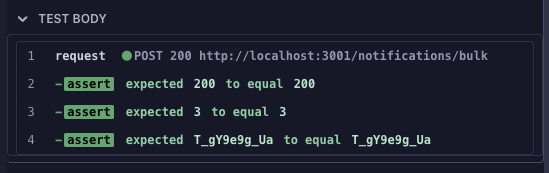
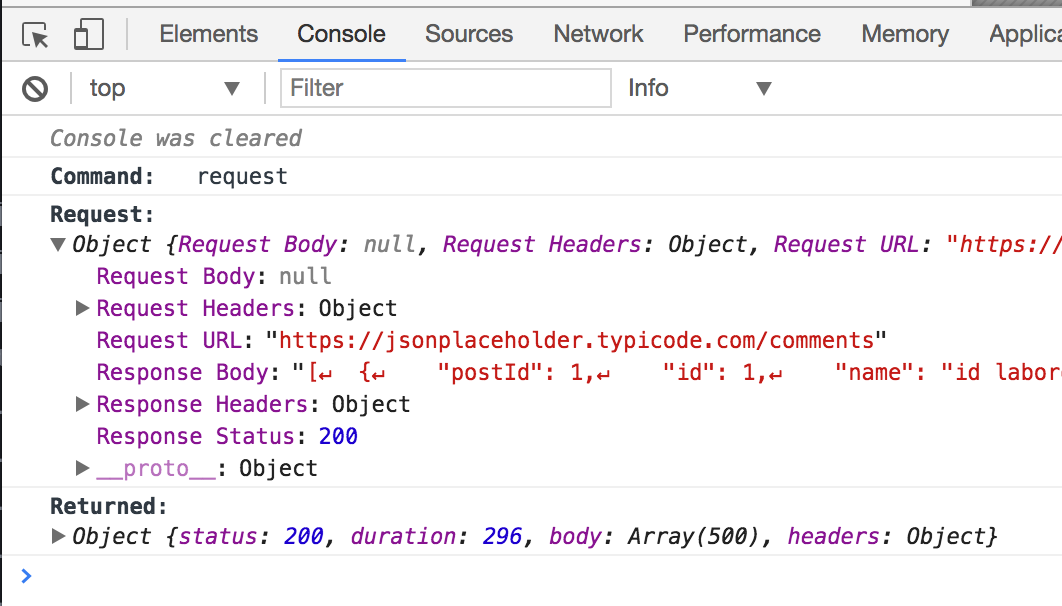
Click the entry and Cypress prints the full detail to the browser console: the request URL, headers, and body it sent, the response status, headers, and body it received, and the value the command yielded. When redirects were followed, every hop is listed.
After a run in CI
The same inspection works on a run that already finished.
Test Replay records the command log for each
test, so you can open the failing run in Cypress Cloud, click the cy.request()
command in the replay, and get the same request and response detail printed to
your browser console. Open DevTools before you click, since the console is where
the detail appears.
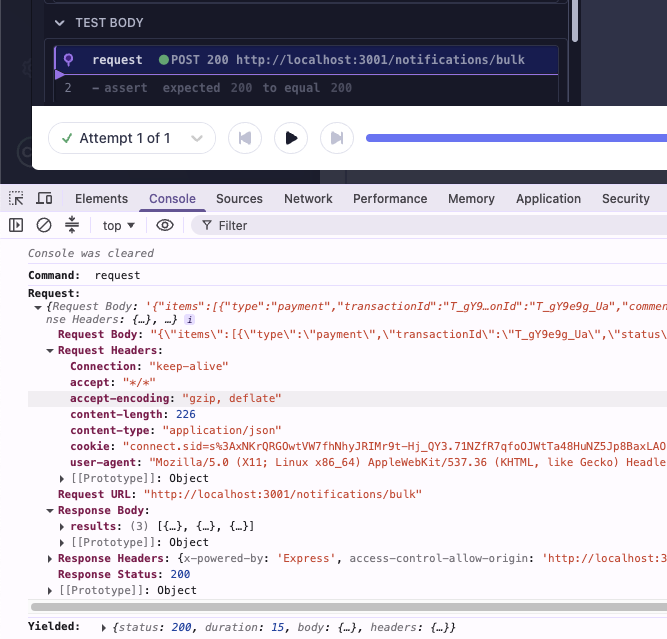
This closes the loop that usually makes API failures in CI painful. Rather than re-running the suite locally with extra logging added to guess at what the server returned, you read the actual request and response from the run that failed.
Choose the right tool
| You want to | Use |
|---|---|
| Call an endpoint directly and assert on its response | cy.request() |
| Assert on, wait for, or stub a request your app makes | cy.intercept() |
| Run code in Node, such as a database query or file I/O | cy.task() |
For the full picture on stubbing and waiting for application traffic, see Intercepting network requests.
See also
cy.request()- full option and response referencecy.intercept()cy.session()cy.task()cy.writeFile()- recording a response as a fixture- Intercepting network requests - stubbing and waiting on traffic your application makes
- Test Replay - inspecting requests from a run that already finished in CI
- Recipes: Logging In