Visual Testing in Cypress
What you'll learn
- Why visual testing catches bugs that functional tests miss
- How visual testing works: baselines, diffs, and review
- How to choose between open source plugins and commercial services
- How to write reliable visual tests and what to snapshot
- The visual testing services with official Cypress integrations
Why visual testing?
Functional tests verify that your application behaves correctly: a user can type into a form, click a button, and see the expected result. But an application can pass every functional test and still ship visibly broken: a CSS change misaligns elements, a brand color renders wrong, a custom font silently falls back to a default, or an icon renders at the wrong size. Visual testing verifies that your application looks correct.
Consider this functional test of a TodoMVC application:
- End-to-End Test
- Component Test
it('completes todo', () => {
  cy.visit('/') // opens TodoMVC running at "baseUrl"
  cy.get('.new-todo').type('write tests{enter}')
  cy.contains('.todo-list li', 'write tests').find('.toggle').check()

  cy.contains('.todo-list li', 'write tests').should('have.class', 'completed')
})
it('completes todo', () => {
  cy.mount(<Todos />)
  cy.get('.new-todo').type('write tests{enter}')
  cy.contains('.todo-list li', 'write tests').find('.toggle').check()

  cy.contains('.todo-list li', 'write tests').should('have.class', 'completed')
})
This test confirms the todo is marked completed, but it says nothing about whether the completed todo looks completed. You could assert individual CSS properties:
cy.get('.completed').should('have.css', 'text-decoration', 'line-through')
cy.get('.completed').should('have.css', 'color', 'rgb(217,217,217)')
These assertions are brittle and incomplete. They break when design tokens change, they only check the exact properties you thought to assert, and they can't verify things like an SVG rendering correctly, shapes drawn to a canvas, element overlap, or the overall layout of a page. Covering appearance property-by-property quickly becomes cumbersome to write and maintain.
Visual testing solves this by comparing an image of your application against a known-good baseline, so any unexpected visible change is caught, whether or not you thought to assert about it.
How visual testing works
Visual testing tools for Cypress follow the same general workflow:
- Capture: During your Cypress test, a command captures an image of the page or a specific element. Because the capture happens inside your test, you can drive the application into any state first (logged in, mid-workflow, with a modal open) using the Cypress commands you already know.
- Compare: The captured image is compared against a previously approved baseline image. If the difference exceeds a configured threshold, the comparison fails.
- Review: You review the reported differences. If the change is unintended, you've caught a visual regression. If the change is intentional, you approve the new image as the baseline for future runs.
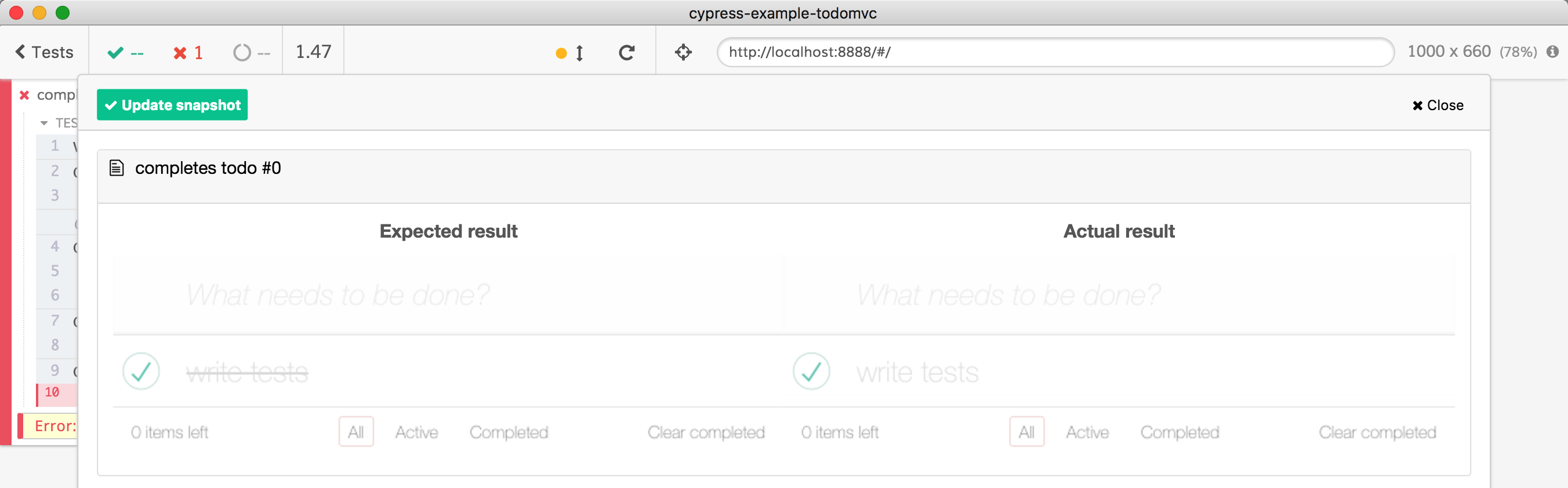
For example, suppose a refactor accidentally removed the line-through style
from completed todos:
.todo-list li.completed label {
  color: #d9d9d9;
  /* removed the line-through */
}
A functional test asserting the completed class still passes, but a visual
comparison fails and shows exactly what changed: the baseline image
(Expected result) has the label text with the line through, while the new
image (Actual result) does not:
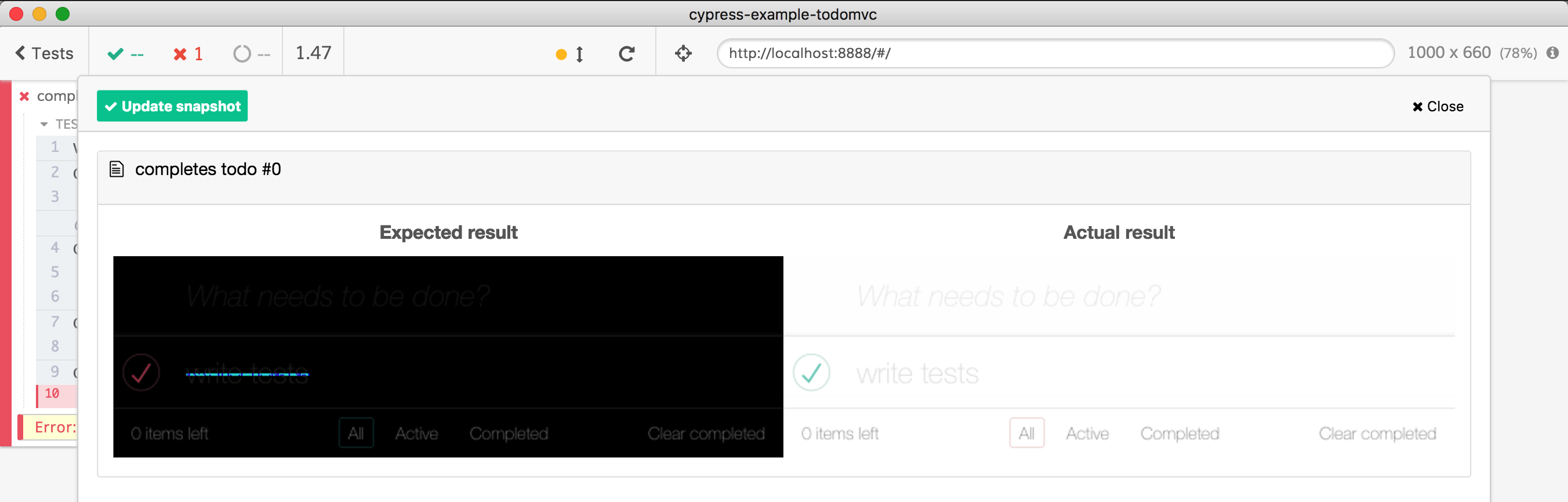
Most tools also provide a difference view that highlights the changed pixels:
Cypress does not perform image comparison itself. The built-in
cy.screenshot() command captures images but does
not compare them. Instead, Cypress provides a stable platform for
plugins and integrations that add visual testing,
so you can choose the approach that fits your team.
Accessibility testing is a great companion to visual testing. Accessibility scans assert on visual aspects of your application that image comparison can't evaluate on its own, like whether text has sufficient color contrast against its background, and they check them against defined standards rather than a baseline image. See our accessibility testing guide and Cypress Accessibility in Cypress Cloud to learn more.
Choosing a visual testing solution
Visual testing tools for Cypress fall into two broad categories: open source plugins that compare images in your own infrastructure, and commercial services that handle comparison and review in their cloud.
| Open source plugins | Commercial services | |
|---|---|---|
| Cost | Free | Paid subscription |
| Image comparison | Pixel-by-pixel, on your machine or in CI | Rendered and compared in the service's cloud |
| Baseline management | Image files you store and update, usually in your repo | Managed by the service with an approval workflow |
| Reviewing changes | Diff images from local runs or CI artifacts | Web dashboard with pull request integration |
| Cross-browser & responsive coverage | One environment per configured run | Many browsers and viewport widths per snapshot |
| Rendering consistency | Your responsibility (Docker, pinned browsers) | Handled by the service's infrastructure |
Whichever you choose, the practices in Writing reliable visual tests below apply.
Open source plugins
Open source plugins run the image comparison locally (or in your CI), typically adding a custom command that captures a screenshot and diffs it pixel-by-pixel against a baseline image stored alongside your code. They are free, keep your images in your own infrastructure, and are a great way to get started.
The tradeoff is that you manage the workflow yourself: storing and updating baselines, reviewing diffs from CI artifacts, and keeping the rendering environment consistent so pixel comparisons don't produce false positives (see Use a consistent rendering environment below).
Actively maintained plugins include:
If you want an open source option with a review workflow, Pixeleye is a self-hostable visual review platform with a Cypress integration, a middle ground between local pixel diffing and a commercial service.
See the Visual Testing section of our plugins list for the full set.
Each plugin has its own setup and command names, but usage follows the same shape. Drive the app to the state you want, then take a snapshot:
it('completes todo', () => {
  cy.visit('/')
  cy.get('.new-todo').type('write tests{enter}')
  cy.contains('.todo-list li', 'write tests').find('.toggle').check()

  cy.contains('.todo-list li', 'write tests').should('have.class', 'completed')

  // capture and compare against the stored baseline
  // (command name varies by plugin)
  cy.compareSnapshot('completed-todo')
})
Commercial services
Commercial visual testing services handle capture, storage, comparison, and review for you. Instead of (or in addition to) diffing raw pixels locally, most of these services upload a snapshot of the page from your test run and render it in their own consistent cloud infrastructure, often across multiple browsers and viewport widths at once. They provide a web-based review workflow where your team approves or rejects visual changes, and they integrate with pull requests so visual review becomes part of your code review process.
These services handle baseline management, cross-browser rendering, rendering environment consistency, and team review in exchange for a subscription.
The services with official Cypress integrations are described in Visual testing services below.
Writing reliable visual tests
Visual tests fail for one of two reasons: the application changed, or something else changed, like test data, timing, fonts, or the rendering environment. The value of visual testing depends on eliminating that second category, so failures always mean something.
The first four practices below all serve a single goal: make every test run render exactly the same pixels, by controlling both what your application displays and the environment it renders in. The last practice covers what to snapshot in the first place.
Wait for the page to stabilize before snapshotting
Best Practice: Take a snapshot only after you confirm the page is done changing.
Snapshot commands capture whatever is on screen at that moment. If the application is still rendering, animating, or waiting on data, you'll capture an intermediate state and get a false failure. Use a functional assertion to confirm the page has updated before taking the snapshot:
cy.get('.new-todo').type('write tests{enter}')
// assert the new item is displayed before snapshotting,
// otherwise the snapshot can be taken before the app re-renders
cy.contains('.todo-list li', 'write tests')
cy.mySnapshotCommand()
Also consider disabling CSS animations and transitions in your test
environment, or waiting for them to finish, so a snapshot never lands
mid-animation. Note that Cypress's
waitForAnimations and animationDistanceThreshold
configuration options only apply to action commands like
.click(). They ensure an element has stopped moving
before Cypress interacts with it, but they don't prevent a snapshot from
capturing an animation still in progress elsewhere on the page.
Use a consistent rendering environment
Best Practice: Generate and compare screenshots in the same environment, with a fixed viewport.
The same page can render slightly differently across operating systems, browser versions, display scaling, and installed fonts, enough to fail a pixel comparison even though nothing changed. If you use a plugin that compares pixels locally:
- Generate baselines in the same environment where comparisons run. For example, run both in the same Docker image in CI, rather than creating baselines on a laptop and comparing in CI.
- Set an explicit, consistent viewport size for your tests.
- Pin browser versions where possible.
Cloud-based services largely remove this problem by rendering snapshots in their own consistent infrastructure.
Control time-dependent content
Best Practice: Control the timestamp inside the application under test.
Displayed dates, times, and countdowns change on every run and will fail a
pixel comparison. Freeze the browser's clock with cy.clock()
so date-dependent content renders identically every time:
const now = new Date(2026, 1, 1)

cy.clock(now)
// ... test
cy.mySnapshotCommand()
Control application data
Best Practice: Use
cy.fixture() and network stubbing to make the
application render the same data every run.
Real API responses change over time, which makes screenshots change too. Stub
network calls with cy.intercept() to return the
same fixture data for every run:
cy.intercept('/api/items', { fixture: 'items' }).as('getItems')
// ... action
cy.wait('@getItems')
cy.mySnapshotCommand()
For dynamic content you can't control, such as ads, animated media, or third-party widgets, most visual testing tools let you hide or mask specific elements so they're excluded from comparison. Prefer masking a small region over raising the failure threshold for the whole page.
What should you visually test?
Best Practice: Snapshot the states that matter, and prefer element-level diffs over full pages.
Every snapshot is an image someone has to review when it changes. Snapshot key pages, shared components, and meaningful application states rather than adding a snapshot to every test. A small set of deliberate visual checkpoints stays maintainable; hundreds of incidental ones train your team to approve diffs without looking.
Prefer visual diffs of individual DOM elements over the entire page. Full-page snapshots are useful for catching layout-level regressions, but every component on the page becomes a reason for the snapshot to fail. Targeting a specific element keeps an unrelated change in component "X" from failing the visual tests for component "Y", and makes review faster because each diff has one clear owner.
Cypress Component Testing is a natural fit for visual testing: component tests render a single component in a controlled environment, the surface area is small, the data is fully controlled by the test, and a diff points directly at the component that changed. Several of the tools on this page support Cypress component tests as well as end-to-end tests.
Visual testing services
The following commercial services provide official Cypress integrations:
Applitools
Applitools Eyes uses AI-assisted comparison ("Visual AI") rather than strict pixel diffing. It supports end-to-end and component tests, cross-browser rendering, and root cause analysis of visual changes.
See Applitools' Cypress documentation.
Argos
Argos captures screenshots during your Cypress runs and provides a review workflow with CI and pull request integration to detect and approve visual changes.
See Argos' Cypress documentation.
Chromatic
Chromatic leverages your existing Cypress setup to enable visual testing of your application's UI. With the Chromatic plugin installed, Chromatic captures an archive of your UI while your Cypress tests run, then renders and diffs it in Chromatic's cloud.
See Chromatic's Cypress documentation and their blog on visual testing with Cypress.
Happo
Happo supports both full-page screenshots and component-level snapshots taken during Cypress tests, rendered across multiple browsers and screen sizes in Happo's infrastructure.
See Happo's Cypress documentation.
LambdaTest SmartUI
LambdaTest SmartUI captures screenshots during your Cypress tests via its SDK and compares them across browsers and resolutions on LambdaTest's cloud, with configurable comparison options and a web dashboard for reviewing changes.
See SmartUI's Cypress documentation.
Percy
Percy (from BrowserStack) captures DOM snapshots during your Cypress tests via
the cy.percySnapshot() command, then renders them across browsers and
responsive widths in Percy's cloud, with a review and approval workflow for
visual changes.
See Percy's Cypress documentation.
Sauce Labs Visual
Sauce Labs Visual adds visual testing to your Cypress tests through an official plugin, with automatic baseline creation, region ignoring, and DOM capture, reviewed on the Sauce Labs platform.
See Sauce Labs' Cypress documentation.
SmartBear VisualTest
SmartBear VisualTest adds visual regression commands to your Cypress tests for full-page, element, and multi-device captures, with a web dashboard for reviewing and approving changes.
See VisualTest's Cypress documentation.
Wopee.io
Wopee.io integrates with Cypress to add visual validation to your existing tests, with baselines managed and reviewed on the Wopee.io platform.
See Wopee.io's Cypress documentation.