Work with AI agents
UI Coverage gives your AI agent the grounded context it needs to improve your tests. For every recorded Cypress run, it reports which interactive elements and links your tests exercised, assigns a coverage score to each view, and names the exact untested controls to go after. It's all built from what really ran in the browser during Test Replay, and filtered through your configuration to focus on what already matters to you. Working from that report, an agent can find real coverage gaps and write tests that target them, rather than guessing at your app's structure.
What an AI agent can do with UI Coverage
Connected to your UI Coverage report, an agent can turn coverage gaps into concrete testing work:
- Turn "coverage dropped" into a work list: which views regressed, which elements are newly untested, and where the risk is concentrated.
- Prioritize missing scenarios: comparing missing coverage with your currently-tested user journeys can put the gaps in context.
- Draft tests for untested elements, and suggest the existing spec file that's the best home for them.
- Correlate gaps with ownership: group untested areas by team, feature, or route so the right people get the right list.
- Backfill incrementally: sequence the work from highest-risk to lowest instead of dumping every control on every page.
- Configure with intent: generate the configuration needed to ignore or group elements to remove a gap.
Your team still decides what "enough coverage" means for each area. The agent handles the triage, drafting, and bookkeeping around that judgment.
Quickstart
Three steps to your first useful result:
- Connect the MCP. Add Cypress Cloud MCP to your AI client by following Configuring the Cloud MCP.
- Ask for the riskiest view. Prompt: "Using Cypress Cloud, pull the UI Coverage report for the latest run on this branch and list the untested elements on the riskiest view."
- Act on one gap. Have the agent draft a test for one of those elements, review the diff, and run it.
The rest of this page deepens each step: better prompts, report tuning, and how to keep the score honest.
Query UI Coverage with Cypress Cloud MCP
Prompt your agent in natural language, and it selects the right tool for you.
UI Coverage MCP tools
An agent connected to Cloud MCP can call these UI Coverage tools, choosing them based on your prompt.
| Tool | What it returns |
|---|---|
cypress_get_ui_coverage_report | A run's high-level report: overall coverage score, tested and untested element and link counts, and the top 5 riskiest views (most untested elements first). |
cypress_get_ui_coverage_views | Paginated views for a run, sorted by most untested elements and links. Use it to browse past the top 5 in the report summary. |
cypress_get_ui_coverage_elements | Paginated interactive elements for a run. Filter by tested or untested, and optionally scope to a single view by name. |
These tools are read-only: they retrieve data and can't change your configuration, tests, or runs. Access is scoped to the projects your Cypress Cloud user can already see. For availability, limits, and security details, see the Cloud MCP reference.
How to prompt effectively
A few habits make every prompt land better:
- Say "Cypress Cloud" so the agent reaches for the MCP tools instead of guessing.
- Name the run with a branch, commit, or run URL, so the agent reads the report you mean.
- Start with the riskiest view and work one view at a time, rather than the whole app at once.
- Ask for a plan or a diff before any file changes, so you review intent before code lands.
- Use your own view names and paths. The examples below are patterns to adapt, not literal values; swap in the views, flows, and folders from your app.
Prompts to summarize and triage coverage
Point the agent at a run and ask it to summarize where the risk is.
Summarize coverage for a run
Pull the UI Coverage report for the latest run and surface the riskiest view.
Using Cypress Cloud, pull the UI Coverage report for the latest run on this branch. Give me the overall coverage score, the views with the most untested elements, and the specific untested elements on the riskiest view.
Find where new tests belong
List the untested elements on a view and suggest which spec should cover them.
Get UI Coverage report for the latest run on this branch. Pick the riskiest view, list its untested interactive elements, and suggest which existing spec file is the best place to add a test that exercises them.
Assess release readiness
Get a go/no-go on your critical flows, with the exact gaps blocking each one.
Using Cypress Cloud MCP, get the UI Coverage report for the latest run on this branch. For the views behind our most critical user flows, give me each view's coverage score and its untested interactive elements. Then give me a go/no-go: flag any critical view below our threshold (say 80%) and list the specific gaps blocking it.
Report coverage progress over a sprint
Summarize how coverage moved across recent runs into a shareable status update.
Using Cypress Cloud MCP, compare UI Coverage across the last 10 runs on main. Summarize how coverage moved over the sprint: the net score change, the views that improved the most, and the views that regressed. Format it as a short status update I can share with the team.
Prompts to plan and draft tests
Once the agent can read the report, ask it to produce a plan or a change rather than a summary.
Plan the coverage backfill
Turn untested elements into a risk-ordered, incremental test plan.
Using Cypress Cloud MCP, get UI Coverage for the latest run on our main branch. Build a backfill plan that groups untested elements by view, orders the views from most to least risky, and proposes small, reviewable batches of tests, starting with the views most critical to our users.
Write a Markdown test plan
Turn untested elements, links, and views into a Markdown test plan, prioritized against your PRD.
Using Cypress Cloud MCP, get the untested interactive elements, untested links, and riskiest views for the latest run on this branch. Write a Markdown test plan grouped by view: for each untested element or link, add a row with the user action to perform and the expected result. Then cross-reference our product requirements document (PRD) and move the flows it marks as required to the top of the plan.
Open a ticket for each untested area
Turn each view's gaps into a ready-to-file ticket, grouped by view.
Using Cypress Cloud MCP, group the untested interactive elements by view for the latest run on main. For each view with meaningful gaps, draft a ticket with a title, the list of untested elements, the user-facing risk, and a suggested test approach. If you have access to our issue tracker, create one ticket per view and link them under an epic; otherwise output them as Markdown I can paste in.
Diff coverage between two branches
Compare two branches' coverage scores and diff their untested elements to catch regressions or gains.
Using Cypress Cloud MCP, get the UI Coverage report for the latest run on this branch and for the latest run on main. Compare the overall coverage scores, then diff the untested interactive elements and links between the two runs: list what became untested on this branch (regressions) and what is now covered (gains), grouped by view. For each regression, point me to the spec or app change most likely responsible.
Draft tests for untested elements
Draft focused tests for untested elements on a view, diff-first.
You are a Cypress test author. Using Cypress Cloud, take the untested elements on the view I'm working on from the latest run. For each, draft a focused test using our existing data-cy selectors and add it to the closest matching spec in our e2e folder. Show me a diff before writing files.
Author tests in natural language with cy.prompt
Cover untested areas by describing each flow in plain language and letting cy.prompt write the Cypress commands.
Using Cypress Cloud, list the untested interactive elements on the riskiest view for the latest run. For each, add a test that uses cy.prompt to drive the flow in natural language: describe the user action to take and what to verify in plain English, and let cy.prompt generate the Cypress commands. Use the Cypress Author skill, if available, to create well-formed prompt steps following best practices. Put the tests in our e2e folder and show me a diff before writing files.
When the agent moves from finding gaps to authoring tests, pair it with Cypress AI Skills. The skills teach your AI tool to write Cypress tests the way an experienced Cypress engineer would, following best practices and matching your project's conventions.
To align risk with real-world usage, combine coverage data with your own analytics:
Prioritize gaps by traffic and risk
Cross-reference page traffic with coverage to prioritize backfill.
Here is a CSV of our most-visited pages from analytics. Cross-reference it with the latest UI Coverage report from Cypress Cloud to build a risk matrix where high-traffic pages with low coverage rank highest. Turn the top of that matrix into an incremental backfill plan.
Coverage data also points the other way, at tests you can safely trim:
Trim over-tested UI
Find elements your tests hit far more than needed and suggest redundant tests to cut.
Using Cypress Cloud MCP, list the tested interactive elements for the latest run on main, sorted by interaction count. Flag elements interacted with far more than their importance warrants (for example a nav link exercised by dozens of tests), and suggest which redundant tests we could consolidate or remove to speed up the suite without losing meaningful coverage.
Tune reports for better agent results
Agents produce better work from reports that already reflect what your team cares about. The same configuration that sharpens reports for human review also sharpens the context an agent reads over MCP.
A few high-value changes make the report sharper for both people and agents:
- Remove noise and stabilize identity so the agent reads clean element names instead of third-party clutter or the same button counted many ways. Filter out widgets you don't own, promote a stable attribute your app already renders, and group repeated controls so they count once.
- Count the interactions that reflect real usage so coverage isn't understated where your suite drives the UI through plugin or custom commands.
- Scope the report to the runs your agent triages with
profiles, so a smoke run and a full regression run each read the configuration that fits them.
See the configuration overview to get started. The goal is the same as for human review: a high-signal list of views and elements tied to ownership and critical flows, not an exhaustive list of every control on every page.
You can also let the agent draft that configuration for you. It reads the untested elements over MCP, spots the noise, and hands back rules to paste into your App Quality Config. To review the configuration a run actually used before changing it, open the run's Properties tab or read the config property from the Results API.
Draft configuration to cut noise
Have the agent read the untested elements and propose App Quality Config rules that remove noise.
First read https://docs.cypress.io/ui-coverage/configuration/overview.md for the App Quality configuration reference. Then use Cypress Cloud MCP to list the untested interactive elements for the latest run on this branch, flag third-party widgets and controls split apart by dynamic attributes, and propose App Quality Config rules (elementFilters, attributeFilters, elementGroups) to remove that noise. Show the JSON I can paste into the App Quality tab.
Keep coverage honest
Coverage measures whether your tests touch an element, not whether they confirm the desired behavior. An agent told to raise the score can write tests that click everything and assert nothing, so it's important to ground your coverage in the scenarios and outcomes that matter.
Ensure tests include assertions about the state of the application and the readiness of the DOM for the next step of the test.
For areas where assertions on non-interactive elements are critical to track, your code can use the data-cy-ui-interactive attribute to bring those elements into your coverage report.
Combine this with allowedInteractionCommands configuration to allow assertions to count as coverage for those elements. This adds an extra layer of guidance for your agent about what must be included in your tests.
Keep a person in the loop wherever judgment matters:
- Intent. Confirm the drafted test verifies the right behavior, not just that an element was interacted with.
- What's worth testing. Agents target trivial controls as eagerly as critical ones. You decide which gaps matter.
- Selectors. When your app lacks stable
data-*attributes, agent-written selectors can be brittle. Adddata-cyattributes rather than accept fragile ones, or have the agent author the test withcy.prompt, whose selectors self-heal as your app changes. - Intentional drops. A coverage decrease after removing a test is correct. Don't let an agent "fix" it by re-adding the test; instead, filter out the elements you do not intend to cover with tests.
Review and enforce coverage
Treat unexpected coverage movement as a quality gate, not noise to wave through, and wire that gate into your workflow so regressions surface before they merge:
- Use Branch Review to see exactly what changed between two runs: new untested elements, new links, and newly interactive parts of the app.
- Use monitoring and the Results API to track trends and wire coverage checks into CI.
- Use blocking flows when you need explicit thresholds or baselines before a merge.
An agent can draft tests, propose spec placement, and narrate diffs, but these gates keep a human in control of what merges. The signal that it is genuinely helping is your coverage score trending up across runs, which you can watch through monitoring and analytics.
Generate tests directly from the report
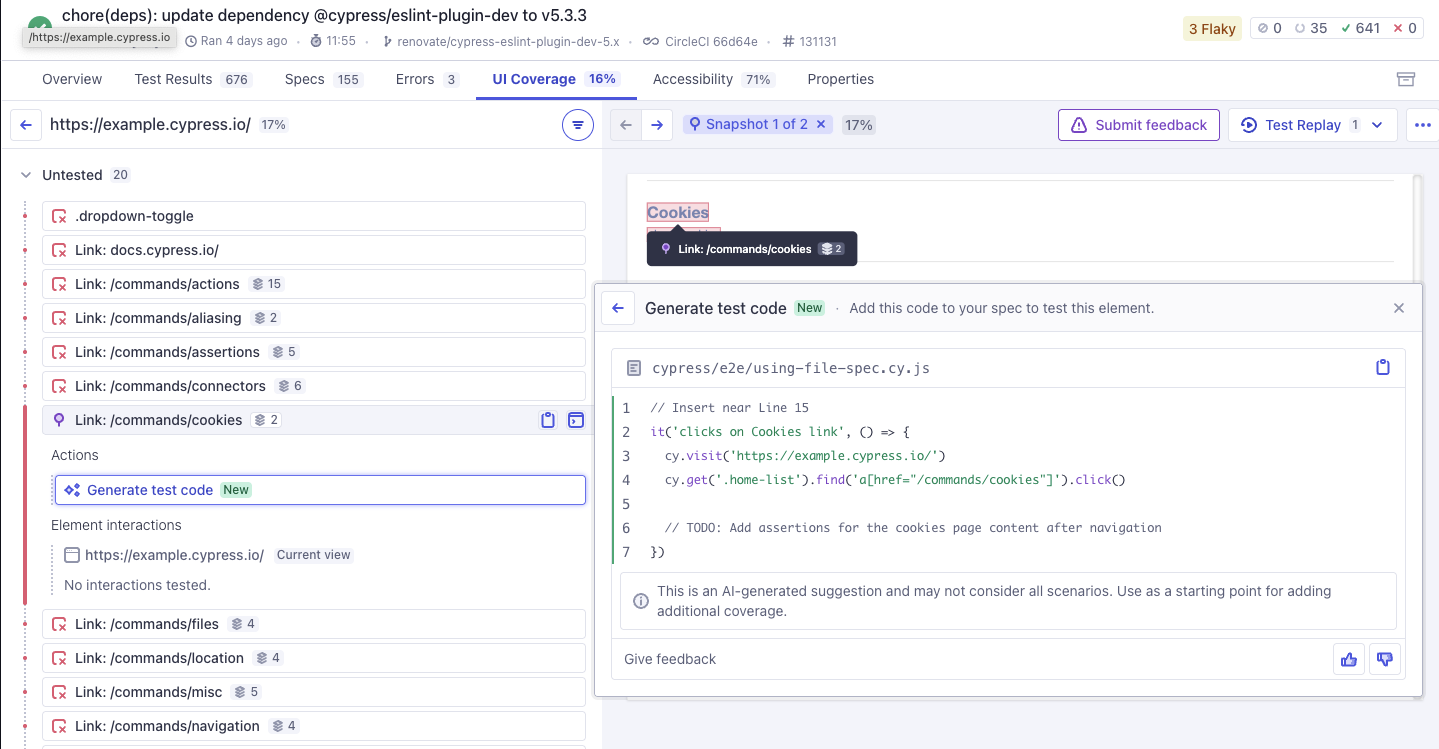
Prefer not to wire up an agent at all? Cypress Cloud can write the test for you. Select an untested element in a UI Coverage report and click Generate test code, and UI Coverage Test Generation drafts a Cypress test that navigates to the element and interacts with it, following your existing patterns.
Standardize across your team
These workflows pay off most when everyone gets the same results, not just one power user:
- Save your best prompts. Once a prompt works, store it as a reusable skill or custom instruction in your AI client so the whole team runs the same play.
- Make it a habit in the repo. Add a project rule to your agent's instructions file, such as "before adding tests, check UI Coverage for the affected view and cover the highest-risk gaps first."
- Focus the report. Cypress Cloud projects share one App Quality configuration so every teammate's agent reads the same high-signal report. Use
profilesto customize the config for different kinds of runs or different team ownership within a large project.
See also
- Cloud MCP: Agentic debugging: setup, available tools, limits, and security.
- UI Coverage FAQ: answers to common questions about using agents with UI Coverage.
- Configuration overview: every option for shaping your reports.
- Cypress AI Skills: teach your AI tool to author Cypress tests following best practices.
- UI Coverage Test Generation: generate a Cypress test for an untested element directly from the report.