Download reports
The download button at the top of a run's Accessibility report exports the run's violations as a file you can keep, share, or hand to an AI agent for analysis. It sits beside the Documentation link as a download icon; select it to choose either .csv or .json.
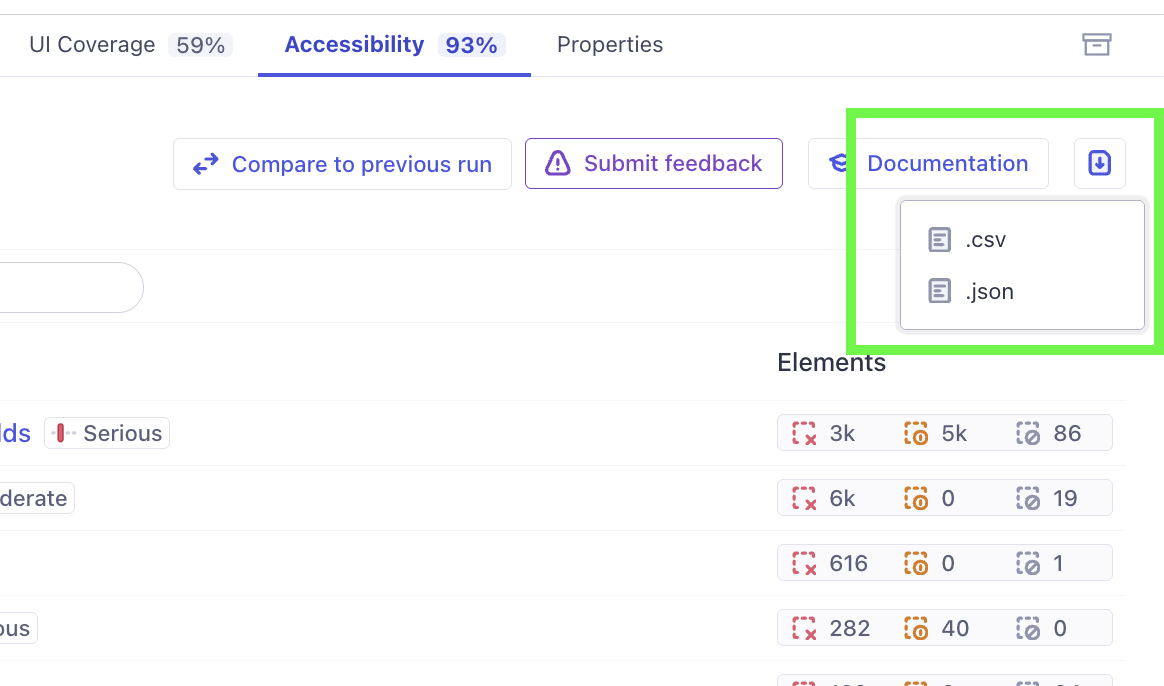
The export is a portable snapshot of a single run. Unlike the Results API (built for CI assertions) and Cypress Cloud MCP (built for live querying), a downloaded report needs no Cloud connection to work with after the fact. This makes it a good fit for:
- offline analysis
- custom spreadsheets and charts
- sharing with people who don't use Cypress Cloud
- comparing multiple runs in detail by downloading a file for each
For other ways to get results out of Cypress Cloud, see the Connect & extend overview.
What's in the file
Each row represents a single failed element for a single rule on a single view. Because an element can fail the same rule on more than one view, that element appears once per view. Both formats contain the same fields:
| Column | Description |
|---|---|
| Rule ID | The Axe Core® or Cypress rule identifier. |
| Description | A summary of what the rule checks. |
| Impact | The severity level: critical, serious, moderate, or minor. |
| Help | A short description of how to fix the issue. |
| Help URL | A link to the rule's documentation. |
| Tags | The standards and categories associated with the rule, such as wcag2aa. |
| Element | The selector identifying the failing element. |
| Element URL | A deep link into the Cloud report, filtered to this element. |
| Status | The element's status: fail, incomplete, or ignore (only fail is currently supported). |
| Failure Summaries | The specific reasons the element failed, as reported during the run. |
| View | The name of the page or component where the element was found. |
| View URL | A deep link into the Cloud report for this view. |
The Element URL and View URL columns link back to the live report in Cypress Cloud, so you (or an agent) can always jump from a row to the full DOM snapshot and context.
The .json export wraps the rows in an object with rows, rowCount, truncated, and columns fields. The truncated flag is true only if a run is large enough to exceed the export's row limit; typical runs are well within it. In the .csv export, multi-value fields such as Tags and Failure Summaries are JSON-encoded within their cell so they parse back cleanly.
Map the results to your components
If you configure component identification, the Element selector in each row reflects a true hierarchy of your components rather than a raw DOM path. This makes patterns easy to spot—such as one component being responsible for a large share of a run's violations—and lets an AI agent trace an issue to its source without re-parsing full-page HTML or crawling your codebase. See Work with AI agents for how this pays off.
Work with the downloaded file
A downloaded report is designed to be handed straight to an AI agent to interpret, chart, or compare against another run. For concrete prompts and workflows, see Work with a downloaded report.