Add component context - components
The components configuration adds context to the selectors in your accessibility reports. When an element has a violation, Cypress Accessibility shows a violation target selector that points to it. components lets you add your own component-identifying attributes, such as data-component-name, data-team, or data-page-area, to that selector, so a finding reads as [data-cy="signup"][data-component="IconButton"] instead of a bare [data-cy="signup"].
That extra context tells whoever picks up the issue, whether a developer, a Jira ticket, or an AI agent triaging through Cypress Cloud MCP, which component, team, or region the element belongs to, without having to open the page HTML or search the codebase to place it. Many teams already render attributes like these for testing or design-system tracing; when they exist, components puts them into your selectors in a predictable, consistent way.
Why use components?
- Place every finding in context: A selector like
[data-cy="row-action"][data-component="DataGridDeleteButton"]says exactly which component is responsible, where a bare identifier could be any button in your application. - Route issues to the right owner: Append an attribute like
data-teamand you can assign accessibility findings, or group them in a report, by the team that owns the DOM. - Speed up handoffs to people and AI: Selectors that carry component and page context can be dropped into a Jira ticket or handed to an LLM for triage without the surrounding page HTML.
- Cross-reference your design system: Attributes such as
data-design-system-versionin the selector let you correlate accessibility issues with the component library version that produced them.
How component attributes appear in selectors
Cypress Accessibility identifies each element with a stable selector, replacing the default Axe-Core® target so results for the same element can be deduplicated across the many snapshots in a run. That identifier is chosen from a prioritized list of attributes (significantAttributes followed by defaults like data-cy and id) and is usually the shortest thing that uniquely identifies the element.
Every attribute you list in componentAttributes is treated as required: wherever it appears on the element or one of its ancestors, Cypress keeps it in the selector. Take this button, which fails an accessibility check because its label text is hidden:
<button data-cy="signup" data-component="IconButton">
  <span style="display:none">Sign up now!</span>
</button>
By default, the violation target selector is just the identifier:
[data-cy="signup"]
Viewed on its own, that could be any button. List data-component as a component attribute:
{
  "accessibility": {
    "components": {
      "componentAttributes": [
        { "attributeName": "data-component", "includeInSelector": true }
      ]
    }
  }
}
Now the component name is appended, even though the selector was already unique:
[data-cy="signup"][data-component="IconButton"]
When a required attribute is on an ancestor instead of the element itself, Cypress adds it as context with a descendant combinator. Given a data-page-area on a wrapping section:
<section data-page-area="checkout">
  <button data-cy="pay"><span style="display:none">Pay</span></button>
</section>
listing data-page-area reports the button with that region in front:
[data-page-area="checkout"] [data-cy="pay"]
components adds context on top of whatever already identifies an element. To change which attribute identifies it, use significantAttributes instead.
Scope
The components object is only valid under an accessibility key in your App Quality configuration. Unlike significantAttributes or attributeFilters, it has no root-level or UI Coverage form. It can also be set inside a profiles entry to apply to tagged runs.
Setting components
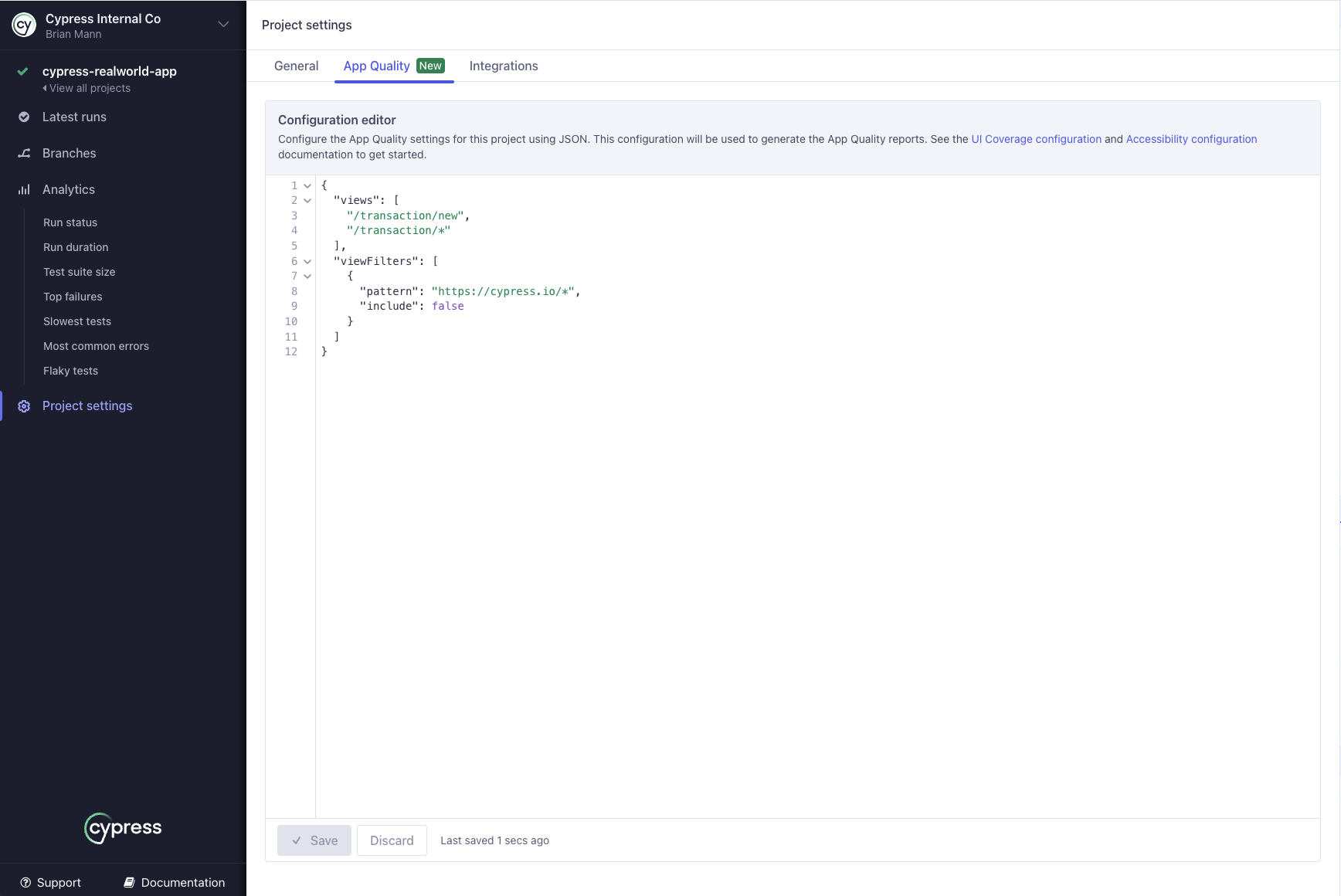
To add or edit components, open the App Quality tab in your project settings in Cypress Cloud. See Setting configuration for details, including how to regenerate past reports with a new configuration without rerunning your tests.
Syntax
{
  "accessibility": {
    "components": {
      "componentAttributes": [
        {
          "attributeName": string,
          "includeInSelector": boolean,
          "comment": string
        }
      ],
      "componentAttributeFilters": [
        {
          "attribute": string,
          "value": string,
          "include": boolean,
          "comment": string
        }
      ],
      "comment": string
    }
  }
}
componentAttributes
Each entry names an attribute to append to the selector when it's present on the element with the violation. Attribute names are stored in lowercase and must be unique in the list.
| Option | Required | Default | Description |
|---|---|---|---|
attributeName | Yes | The HTML attribute name to append, for example data-component-name. class is also supported. | |
includeInSelector | No | true | When true, the attribute is appended to the selector wherever the element has it. |
comment | No | A note for your team explaining why the entry exists. Comments never appear in reports. |
When includeInSelector is false, the entry is kept for documentation or future use but doesn't change selector generation, the same as leaving it out.
componentAttributeFilters
These filters fine-tune which attribute values are appended. They apply only to the attributes in componentAttributes, using the same regular-expression style as attributeFilters: attribute and value are regex patterns. For a given attribute value, the first rule whose attribute and value both match decides whether it's appended. A filter with no matching componentAttributes entry does nothing.
| Option | Required | Default | Description |
|---|---|---|---|
attribute | Yes | Regex matched against the component attribute's name. | |
value | No | .* | Regex matched against the attribute's value. |
include | No | true | When false, matching values are not appended to the selector. |
comment | No | A note for your team. Comments never appear in reports. |
Use include: false to keep a noisy or generic value out of your selectors, such as a layout primitive whose name adds no context, while still appending the meaningful ones.
You can also add a comment to the components object itself to document the whole block. Comments are for your team, never appear in reports, and are the supported place for notes because Cypress Cloud rejects properties it doesn't recognize. See Comments.
How are components rules applied?
Keep these behaviors in mind when building your configuration:
- Listed attributes are kept wherever they appear. A component attribute on the element is appended to its selector; the same attribute on an ancestor is added in front as descendant-combinator context. An element whose ancestor chain has none of the listed attributes is unaffected.
- They're added on top of the identifier, not instead of it. The element is still identified by
significantAttributesand the defaults; component attributes add context. They're added even when the selector is already unique. - They help with uniqueness and deduplication. Because a required attribute is part of the selector, one that distinguishes the element can make the selector shorter and more stable than the positional fallback Cypress would use otherwise, which keeps the same element from splitting into several across snapshots.
- On one element, appended attributes follow your list order. Multiple attributes appended to the same element appear in the order you list them in
componentAttributes. An attribute that already identifies the element isn't added a second time. - Default attribute filters don't apply here. The default filters that keep dynamic, UUID-like values out of identifying selectors don't touch component attributes.
componentAttributeFiltersare the only way to exclude component-attribute values, so list a rule if an attribute's value is sometimes noisy. classis supported. Listingclassas a component attribute appends the element's class value;componentAttributeFiltersapply to it the same way.
Validation rules
Cypress Cloud validates the whole configuration before saving it and rejects a components block that breaks any of these:
- Each
attributeNamemust be a valid HTML attribute name. Names are compared in lowercase and must be unique acrosscomponentAttributes. - Each
componentAttributeFiltersattributeandvaluemust be a valid regular expression. - No two
componentAttributeFiltersrules may be identical acrossattribute,value, andinclude. - Only the properties documented above are allowed. An unrecognized key is rejected rather than ignored.
Examples
Append the design-system component name
The button below fails button-name because its label is hidden. It carries a data-cy test id and a data-component name from the design system. Listing data-component appends the component name to the selector, so the finding names the component instead of a generic id.
Config
{
  "accessibility": {
    "components": {
      "componentAttributes": [
        { "attributeName": "data-component", "includeInSelector": true }
      ]
    }
  }
}
HTML
<button data-cy="signup" data-component="IconButton">
  <span style="display:none">Sign up now!</span>
</button>
Result
The violation target selector displayed in the report:
[data-cy="signup"][data-component="IconButton"]
Add component and team context together
componentAttributes is a list, so you can append more than one attribute. Here the design-system component name and the owning team are both added, so findings can be read, filtered, or assigned by either.
Config
{
  "accessibility": {
    "components": {
      "componentAttributes": [
        { "attributeName": "data-component", "includeInSelector": true },
        { "attributeName": "data-team", "includeInSelector": true }
      ]
    }
  }
}
HTML
<img
  data-testid="hero-banner"
  data-component="HeroBanner"
  data-team="marketing"
  src="hero.png"
/>
Result
The image fails image-alt, and its selector now shows the component and the team that owns it:
[data-testid="hero-banner"][data-component="HeroBanner"][data-team="marketing"]
Add the surrounding page region
Component attributes don't have to be on the element itself. When a listed attribute sits on an ancestor, such as a data-page-area on the wrapping landmark, Cypress adds it in front of the identifier as context, so a violation reads as belonging to a region of the page.
Config
{
  "accessibility": {
    "components": {
      "componentAttributes": [
        { "attributeName": "data-page-area", "includeInSelector": true }
      ]
    }
  }
}
HTML
<nav data-page-area="global-header">
  <button data-cy="menu-toggle">
    <span style="display:none">Open menu</span>
  </button>
</nav>
Result
The button is identified by its own data-cy, with the region prepended as ancestor context:
[data-page-area="global-header"] [data-cy="menu-toggle"]
Keep a generic component name out of selectors
Some component names add no context. A layout primitive like Box wraps elements all over the application, so appending it to every selector is noise. Keep data-component appended in general, but use a componentAttributeFilters rule to skip the values that don't help.
Config
{
  "accessibility": {
    "components": {
      "componentAttributes": [
        { "attributeName": "data-component", "includeInSelector": true }
      ],
      "componentAttributeFilters": [
        {
          "attribute": "data-component",
          "value": "^(Box|Stack|Flex)$",
          "include": false,
          "comment": "Layout primitives add no useful context"
        }
      ]
    }
  }
}
HTML
<button data-cy="row-delete" data-component="DataGridDeleteButton">Delete</button>
<button data-cy="page-close" data-component="Box">Close</button>
Result
The meaningful component name is appended; the layout primitive is filtered out, leaving that element on its identifier alone:
[data-cy="row-delete"][data-component="DataGridDeleteButton"]
[data-cy="page-close"]
After saving configuration changes, regenerate a recent run to preview the effect of your rules without rerunning your tests. See Setting configuration for how to regenerate a report.
How components compares to other options
Three configuration properties all work with attributes, but they do different jobs:
significantAttributeschooses the single attribute that identifies the element and becomes its selector.attributeFiltersremoves dynamic or generated attribute values from identification, so they can't be used as selectors.- components adds context to the selector, from the element or its ancestors, on top of whatever identifies the element, without changing which attribute identifies it.
For background on how Cypress picks identifiers, see Element identification.
See also
- Element identification: how elements are identified across snapshots.
significantAttributes: choose which attribute identifies an element.attributeFilters: stop dynamic or generated attribute values from identifying elements.- Inspecting violation details: where violation target selectors appear in reports.
- Work with AI agents: triage findings through Cypress Cloud MCP.
- Configuration overview: where to set configuration and regenerate reports.
- Cypress Accessibility FAQ: common questions and troubleshooting.