Webhooks Integration
Webhooks let Cypress Cloud send a real-time HTTP request to an endpoint you own whenever a selected event occurs, for example when a test run finishes, or when Cypress Accessibility or UI Coverage reports have finished processing.
Why Cypress Cloud Webhooks
A webhook lets you build custom automations: update a dashboard, open a
ticket, gate a deployment, or forward results into any internal system. For
example, you can use a run.completed event to:
- Triage runs programmatically for certain characteristics that require attention, then dive deeper using tools like Cypress Cloud CLI or MCP to retrieve specific failures or other details
- Automatically feed results into your own custom real-time reporting
- Create Jira issues based on failed runs
- Deliver customized Slack notifications, or notifications in any platform, based on criteria that are not customizable in Cypress Cloud
While Cypress Cloud already has many built-in methods of notifications related to run statuses (for example, Desktop notifications and Slack messages), webhooks deliver a raw JSON payload to your own service.
Getting started
You need two things to get started:
- The ability to manage webhooks for the project. You must be an Owner, Org Admin, or Team Admin. See User roles for details. Anyone who can view the project can view webhooks, but only those roles can create, edit, enable, disable, delete, test, or redeliver them.
- A publicly-reachable endpoint that accepts
POSTrequests. HTTPS is recommended. Cypress Cloud will not deliver to private, loopback, or internal network addresses (see Security). HTTP URLs are accepted, but be aware HTTP payloads travel unencrypted.
Webhooks are configured per project. You can create up to 5 webhooks per project.
Send to a no-code destination
You do not have to build and host your own receiver. The endpoint above can be a service you write, but it can just as easily be a URL provided by a tool you already use. If you would rather not run a server, point the Payload URL at a no-code or low-code platform, or at a SaaS tool's native inbound-webhook trigger.
- No-code and low-code platforms accept an incoming webhook, let you map the payload fields visually, and connect the result to hundreds of downstream apps: Zapier, Make, IFTTT, and n8n are common choices.
- Native inbound-webhook triggers in the tool you want to reach can receive the delivery directly, with no platform in between. Examples include Jira automation, PagerDuty, and Slack Workflow Builder, each of which can generate a webhook URL you paste in as the Payload URL.
For step-by-step, worked examples, including a zero-to-one walkthrough of a custom Slack message, see the Webhooks use-case guide.
Signature verification and no-code tools. We still recommend setting a
signing secret and verifying the
X-Cypress-Signature header wherever the destination supports custom
verification logic. Many no-code tools cannot compute an HMAC on the raw request
body, so they cannot verify the signature. If your destination cannot verify
signatures, reduce the risk another way:
- Keep the Payload URL secret. Treat it like a credential. Anyone who has it can send requests to it, so do not share it or commit it to a repository.
- Rely on the destination's own authentication. Many tools include a hard-to-guess token in the generated URL, or let you require an auth header or shared token on the inbound request. Use those controls when they are available.
A secret Payload URL is weaker than a verified signature, because it proves only that the caller knew the URL, not that the request came from Cypress Cloud and was not altered. Prefer signature verification when the destination supports it.
Create a webhook
-
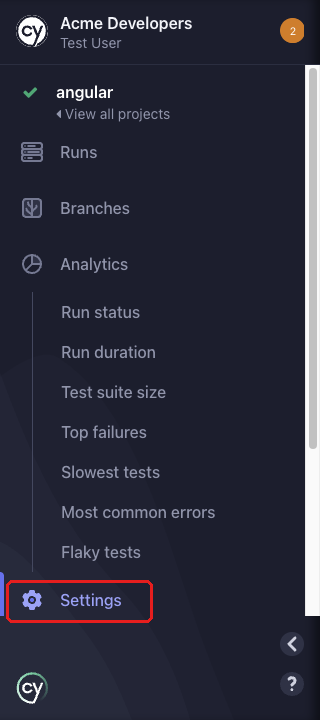
Open your project and click Settings at the bottom of the project sidebar.
-
Open the General tab and locate the Webhooks panel.
-
Click Add webhook.

In the Add webhook dialog, configure the following:
- Payload URL (required): The URL Cypress Cloud will send a
POSTrequest to, for examplehttps://example.com/receive-webhook. - Secret (optional, recommended): A signing secret used to verify that a request genuinely came from Cypress Cloud. Provide your own value (at least 16 characters) or click Generate secret to create a random one. Copy and store the secret somewhere safe. It is shown only once and cannot be viewed again. If you lose it, you can rotate it later by editing the webhook. See Verify webhook signatures.
- Custom Authorization header (optional): A header name and value sent
on every request, independent of the secret above, for an endpoint that
requires its own
Authorizationheader. The value is stored securely and cannot be viewed again after saving. - Events that will trigger webhook: Select which events should be delivered to this endpoint. At least one event is required.
- Enable this webhook: Whether the webhook is active. Enabled by default; disabled webhooks receive no deliveries.
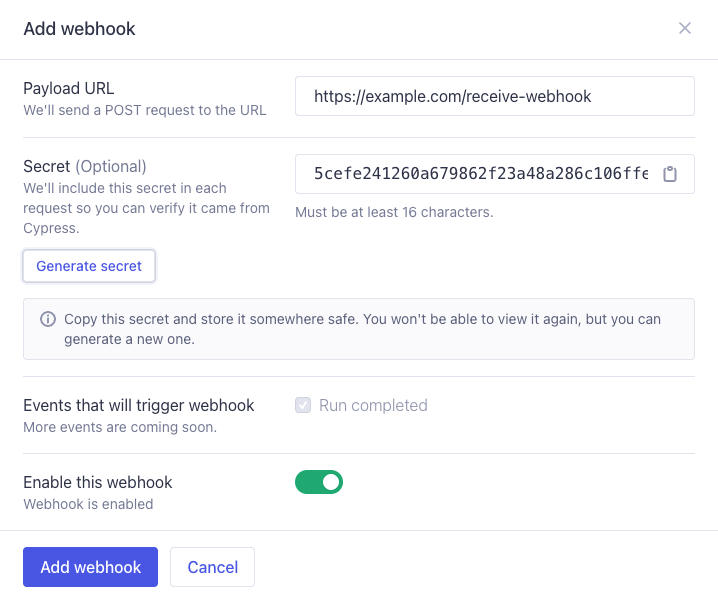
Click Add webhook to save. Cypress Cloud will begin delivering the selected events to your endpoint.
Send a test event
To confirm your endpoint is reachable and your verification logic works, click Send test on an enabled webhook and choose an event type from the menu. Cypress Cloud delivers a synthetic sample payload for that event type through the same signing and delivery pipeline as a real event, so it exercises your signature verification and parsing exactly as the real webhook event would. You can send a test for any event type, even one this webhook isn't currently subscribed to, so you can preview its payload before turning it on.
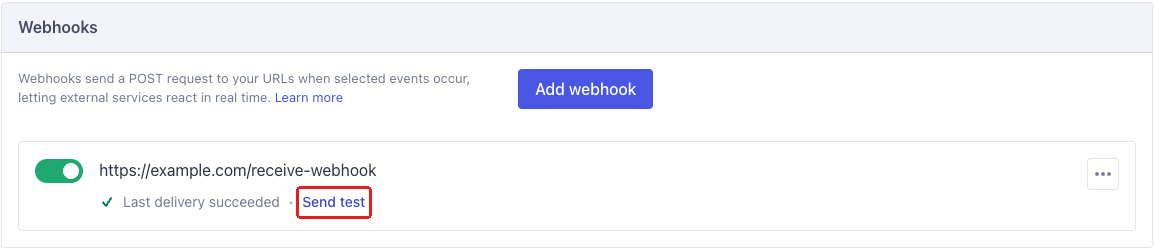
A test send uses realistic but fabricated data, not your project's actual latest run. See Payload for each event type's example request body. Test events are delivered once and are not retried, regardless of the outcome. The resulting delivery appears in the webhook's delivery history like any other.
Manage webhooks
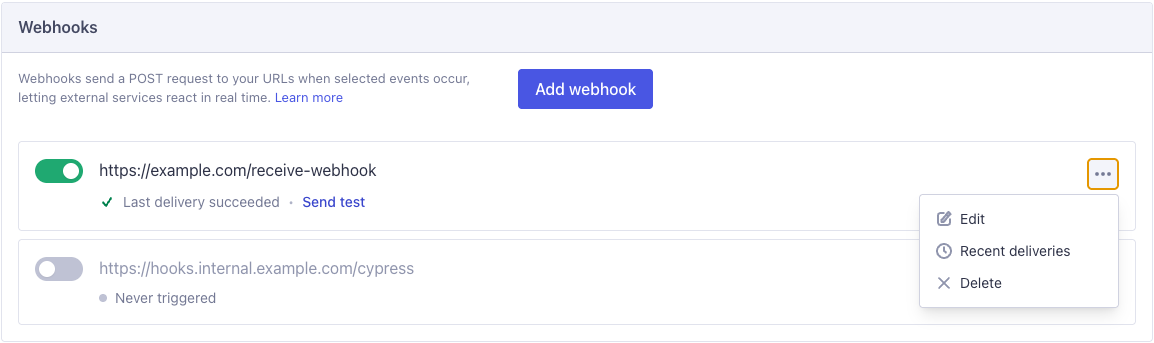
Each webhook appears as a row in the Webhooks panel showing its URL, an enable/disable toggle, and the status of its most recent delivery (for example, Last delivery succeeded, Retrying, Last delivery failed, Delivering…, or Never triggered). Use the inline controls and the Options (⋯) menu to manage it:
- Enable or disable: Toggle the switch on the row. A disabled webhook keeps its configuration but receives no deliveries.
- Edit: Open the Options menu and select Edit to change the URL, events,
secret, or custom Authorization header.
- Generate new secret: Leaving the Secret field blank keeps the existing secret. To rotate it, enter a new value (at least 16 characters) or click Generate new secret. Copy the new secret and store it somewhere safe. It is shown only once. After you save, the previous secret no longer verifies requests, so update your endpoint to use the new value.
- Custom Authorization header: Leaving the fields blank keeps the existing header. Enter a new name and value to set or rotate it. The value is shown only once and cannot be viewed again. You can also clear the header so later deliveries no longer include it.
- Recent deliveries: Open the Options menu and select Recent deliveries to review delivery history. See Delivery history and retries.
- Delete: Open the Options menu and select Delete. This permanently removes the webhook and its delivery history. This cannot be undone.
A project can have at most 5 webhooks. When you reach the limit, the Add webhook button is disabled until you delete an existing webhook.
Events
Select one or more of the following events when creating or editing a webhook:
| Event | Description |
|---|---|
run.completed | Sent when a Cypress Cloud run finished and resolves to one of the following states: passed, failed, errored, timedOut, or cancelled. |
run.accessibility.completed | Sent when a run's Accessibility report finishes processing. |
run.uiCoverage.completed | Sent when a run's UI Coverage report finishes processing. |
run.allSettled | Sent when the run and any Accessibility or UI Coverage reports for it have settled, with details for each. |
See Payload for each event type's fields and an example request body.
Payload
Cypress Cloud sends a POST request whose body is the event payload as JSON.
Metadata about the delivery travels in X-Cypress-* request headers rather than
in the body.
Request headers
Every delivery includes the following headers:
| Header | Description |
|---|---|
Content-Type | Always application/json. |
X-Cypress-Event | The event type, for example run.completed. |
X-Cypress-Event-Id | Unique ID for the event. Stable across retries. Use it to deduplicate. |
X-Cypress-Event-Version | The payload schema version, for example 1. |
X-Cypress-Request-Id | Unique ID for this individual delivery attempt. A new value on every retry. |
X-Cypress-Timestamp | The time the request was sent, as a Unix timestamp in seconds. |
X-Cypress-Idempotency-Key | Stable key for this event and webhook. Identical across retries of the same event. |
X-Cypress-Signature | HMAC-SHA256 signature of the payload. Only present when a signing secret is set. See Verify webhook signatures. |
Because X-Cypress-Event-Id (and X-Cypress-Idempotency-Key) stay constant
across retries, your endpoint may receive the same event more than once. Treat
delivery as at-least-once and make your handler idempotent by keying on
X-Cypress-Event-Id.
The signature covers only X-Cypress-Timestamp
and the request body. The other X-Cypress-* headers, including
X-Cypress-Event, X-Cypress-Event-Id, and X-Cypress-Idempotency-Key, are
not signed, so anyone who has seen a delivery can send it again with new values
in them and the signature still verifies.
- To ignore a delivery sent a second time, remember each
X-Cypress-Signatureyou accept until its timestamp falls outside your tolerance window, and answer a repeated one with200without processing it again. Keep deduplicating onX-Cypress-Event-Idas well: a retry from Cypress Cloud carries a new timestamp, and so a new signature. The two do different jobs: the signature catches a captured request sent again with new unsigned headers, andX-Cypress-Event-Idcatches Cypress Cloud's own retries.X-Cypress-Event-Idis idempotency for at-least-once delivery, not a security boundary. - Don't decide which event a request carries from
X-Cypress-Eventalone. The body does not always tell events apart either: arun.allSettledbody for a run without Accessibility or UI Coverage has the same fields as arun.completedbody. If your handler treats events differently, give each event its own webhook, with its own Payload URL and signing secret. A request that verifies with that secret can only be that webhook's event.
run.completed payload
The run.completed payload (version 1) is a flat JSON object with the
following fields:
| Field | Type | Description |
|---|---|---|
runNumber | number | The run's number in Cypress Cloud. |
runUrl | string | Link to the run in Cypress Cloud. |
projectId | string | The Project ID used for the run. |
projectName | string | The project name, which can be chosen in your Cypress Cloud settings. |
status | string | Run status: passed, failed, errored, timedOut, or cancelled. |
statusReason | string | Human-readable explanation of the status. |
createdAt | string | ISO 8601 timestamp when the run started. |
completedAt | string | null | ISO 8601 timestamp when the run finished. |
totalDuration | number | null | Total run duration in milliseconds. |
totalTests | number | null | Total number of tests. |
totalPassed | number | null | Number of passed tests. |
totalFailed | number | null | Number of failed tests. |
totalPending | number | null | Number of pending tests. |
totalSkipped | number | null | Number of skipped tests. |
flakyTestCount | number | null | Number of passing tests that failed at least one attempt and passed using retries. |
totalSpecs | number | null | Number of spec files. |
commitSha | string | null | The commit SHA the run was recorded against. |
commitBranch | string | null | The branch name. |
commitMessage | string | null | The commit message. |
commitAuthorName | string | null | The commit author's name. |
commitAuthorEmail | string | null | The commit author's email. |
commitUrl | string | null | Link to the commit. |
ciProvider | string | null | The detected CI provider, for example circleci. |
ciBuildId | string | null | The CI build ID. |
ciUrl | string | null | Link to the CI build. |
ciPullRequestId | string | null | The pull request ID, when available. |
ciPullRequestUrl | string | null | Link to the pull request, when available. |
tags | string[] | The tags the run was recorded with (sorted). |
groups | string[] | The run groups (sorted). |
Missing fields: If you are missing expected commit information or CI details, ensure the related environment variables are present in the context where Cypress executes. For example, when executing Cypress in a container, your CI identifiers and related build information may need to be set explicitly.
Example run.completed request body
{
  "runNumber": 42,
  "runUrl": "https://cloud.cypress.io/projects/my-project/runs/42",
  "projectId": "my-project",
  "projectName": "My Project",
  "status": "passed",
  "statusReason": "Run passed",
  "createdAt": "2026-01-01T00:00:00.000Z",
  "completedAt": "2026-01-01T00:05:00.000Z",
  "totalDuration": 300000,
  "totalTests": 100,
  "totalPassed": 95,
  "totalFailed": 0,
  "totalPending": 2,
  "totalSkipped": 3,
  "flakyTestCount": 0,
  "totalSpecs": 4,
  "commitSha": "abc123",
  "commitBranch": "main",
  "commitMessage": "fix: something",
  "commitAuthorName": "Ada Lovelace",
  "commitAuthorEmail": "ada@example.com",
  "commitUrl": "https://github.com/cypress-io/cypress-services/commit/abc123",
  "ciProvider": "circleci",
  "ciBuildId": "circleci-workflow-777",
  "ciUrl": "https://circleci.com/gh/cypress-io/cypress-services/555",
  "ciPullRequestId": null,
  "ciPullRequestUrl": null,
  "tags": ["canary", "nightly"],
  "groups": ["chrome", "firefox"]
}
run.accessibility.completed payload
Sent when a run's Accessibility report finishes processing.
| Field | Type | Description |
|---|---|---|
runNumber | number | The run's number in Cypress Cloud. |
runUrl | string | Link to the run in Cypress Cloud. |
projectId | string | The Project ID used for the run. |
projectName | string | The project name, which can be chosen in your Cypress Cloud settings. |
status | string | Run status: passed, failed, errored, timedOut, or cancelled. |
createdAt | string | ISO 8601 timestamp when the run started. |
completedAt | string | null | ISO 8601 timestamp when the run finished. |
commitSha | string | null | The commit SHA the run was recorded against. |
commitBranch | string | null | The branch name. |
accessibility object:
| Field | Type | Description |
|---|---|---|
status | string | Accessibility processing status: processed, processed_with_errors, or processing_failed. |
reportUrl | string | Link to the Accessibility report in Cypress Cloud. |
isPartialReport | boolean | true if the report is missing data for some specs. |
isReprocessedReport | boolean | true once the report has been regenerated at least once. |
score | number | null | Accessibility score. null when there's no readable report (for example a processing failure). |
violationCount | number | null | Total number of violations. |
violationCountsByImpact | object | null | Violation counts broken down by impact: critical, serious, moderate, minor. |
elementCountsByStatus | object | null | Element counts broken down by status: fail, incomplete, ignore. |
axeVersion | string | null | The axe-core version used to generate the report. |
status at the top level is the run's status; accessibility.status is
the Accessibility report's own processing status, and can differ (for
example a passed run whose Accessibility report processing_failed).
Example run.accessibility.completed request body
{
  "runNumber": 42,
  "runUrl": "https://cloud.cypress.io/projects/abc123/runs/42",
  "projectId": "abc123",
  "projectName": "Example Project",
  "status": "passed",
  "createdAt": "2026-01-01T00:00:00.000Z",
  "completedAt": "2026-01-01T00:01:36.000Z",
  "commitSha": "c5b1b1b6f5e2f6e2a1e6b1b1b6f5e2f6e2a1e6b1",
  "commitBranch": "main",
  "accessibility": {
    "status": "processed",
    "reportUrl": "https://cloud.cypress.io/projects/abc123/runs/42/accessibility",
    "isPartialReport": false,
    "isReprocessedReport": false,
    "score": 92,
    "violationCount": 6,
    "violationCountsByImpact": {
      "critical": 0,
      "serious": 2,
      "moderate": 3,
      "minor": 1
    },
    "elementCountsByStatus": {
      "fail": 6,
      "incomplete": 2,
      "ignore": 4
    },
    "axeVersion": "4.10.0"
  }
}
run.uiCoverage.completed payload
Sent when a run's UI Coverage report finishes processing.
| Field | Type | Description |
|---|---|---|
runNumber | number | The run's number in Cypress Cloud. |
runUrl | string | Link to the run in Cypress Cloud. |
projectId | string | The Project ID used for the run. |
projectName | string | The project name, which can be chosen in your Cypress Cloud settings. |
status | string | Run status: passed, failed, errored, timedOut, or cancelled. |
createdAt | string | ISO 8601 timestamp when the run started. |
completedAt | string | null | ISO 8601 timestamp when the run finished. |
commitSha | string | null | The commit SHA the run was recorded against. |
commitBranch | string | null | The branch name. |
uiCoverage object:
| Field | Type | Description |
|---|---|---|
status | string | UI Coverage processing status: processed, processed_with_errors, or processing_failed. |
reportUrl | string | Link to the UI Coverage report in Cypress Cloud. |
isPartialReport | boolean | true if the report is missing data for some specs. |
isReprocessedReport | boolean | true once the report has been regenerated at least once. |
coverage | number | null | UI Coverage score. null when there's no readable report (for example a processing failure). |
testedElementsCount | number | null | Number of interactive elements exercised by the run. |
untestedElementsCount | number | null | Number of interactive elements not exercised by the run. |
testedLinksCount | number | null | Number of links exercised by the run. |
untestedLinksCount | number | null | Number of links not exercised by the run. |
viewCount | number | null | Number of distinct views (pages) covered. |
status at the top level is the run's status; uiCoverage.status is the
UI Coverage report's own processing status, and can differ (for example a
passed run whose UI Coverage report processing_failed).
Example run.uiCoverage.completed request body
{
  "runNumber": 42,
  "runUrl": "https://cloud.cypress.io/projects/abc123/runs/42",
  "projectId": "abc123",
  "projectName": "Example Project",
  "status": "passed",
  "createdAt": "2026-01-01T00:00:00.000Z",
  "completedAt": "2026-01-01T00:01:36.000Z",
  "commitSha": "c5b1b1b6f5e2f6e2a1e6b1b1b6f5e2f6e2a1e6b1",
  "commitBranch": "main",
  "uiCoverage": {
    "status": "processed",
    "reportUrl": "https://cloud.cypress.io/projects/abc123/runs/42/ui-coverage",
    "isPartialReport": false,
    "isReprocessedReport": false,
    "coverage": 78,
    "testedElementsCount": 156,
    "untestedElementsCount": 44,
    "testedLinksCount": 32,
    "untestedLinksCount": 8,
    "viewCount": 12
  }
}
run.allSettled payload
Sent when everything expected for the run has settled: run.completed, plus any
Accessibility or UI Coverage report that the run produces. Subscribe to this
event if you want a single delivery per run instead of matching
run.completed, run.accessibility.completed, and run.uiCoverage.completed
independently. It also covers future post-run reporting without requiring you
to subscribe to each product event as it appears.
If the run does not use Accessibility or UI Coverage, run.allSettled still
fires once the run completes, with only the run.completed fields.
The payload contains every run.completed field, plus two optional objects:
| Field | Type | Description |
|---|---|---|
accessibility | object | Same fields as the accessibility object in run.accessibility.completed. Present only when the run produced an Accessibility report and your plan includes Cypress Accessibility. |
uiCoverage | object | Same fields as the uiCoverage object in run.uiCoverage.completed. Present only when the run produced a UI Coverage report and your plan includes UI Coverage. |
When an object does not apply, it is left out of the payload rather than set to
null.
Errors. On this event only, a section's status can also be
fetch_failed. That value means Cypress Cloud could not read the report after
retrying for about 15 minutes. The section's metrics are null, and
reportUrl still links to the report, so you can tell a failed fetch apart
from a product the run did not use. Product-specific events
(run.accessibility.completed and run.uiCoverage.completed) never use
fetch_failed; their status values stay
processed, processed_with_errors, or processing_failed.
Reprocessing. If an Accessibility or UI Coverage report is regenerated,
Cypress Cloud sends a new run.accessibility.completed or
run.uiCoverage.completed event for that report, and a new run.allSettled
event once everything for that attempt has settled. Each has a new
X-Cypress-Event-Id, and isReprocessedReport is true in the regenerated
section.
Example run.allSettled request body
{
  "runNumber": 42,
  "runUrl": "https://cloud.cypress.io/projects/abc123/runs/42",
  "projectId": "abc123",
  "projectName": "Example Project",
  "status": "failed",
  "statusReason": "Run failed",
  "createdAt": "2026-01-01T00:00:00.000Z",
  "completedAt": "2026-01-01T00:01:36.000Z",
  "totalDuration": 96000,
  "totalTests": 100,
  "totalPassed": 97,
  "totalFailed": 1,
  "totalPending": 1,
  "totalSkipped": 1,
  "flakyTestCount": 2,
  "totalSpecs": 4,
  "commitSha": "c5b1b1b6f5e2f6e2a1e6b1b1b6f5e2f6e2a1e6b1",
  "commitBranch": "main",
  "commitMessage": "fix: something",
  "commitAuthorName": "Ada Lovelace",
  "commitAuthorEmail": "ada@example.com",
  "commitUrl": "https://github.com/example/repo/commit/c5b1b1b6f5e2f6e2a1e6b1b1b6f5e2f6e2a1e6b1",
  "ciProvider": "circleci",
  "ciBuildId": "circleci-workflow-777",
  "ciUrl": "https://circleci.com/gh/example/repo/555",
  "ciPullRequestId": null,
  "ciPullRequestUrl": null,
  "tags": ["nightly"],
  "groups": ["chrome"],
  "accessibility": {
    "status": "processed",
    "reportUrl": "https://cloud.cypress.io/projects/abc123/runs/42/accessibility",
    "isPartialReport": false,
    "isReprocessedReport": false,
    "score": 92,
    "violationCount": 6,
    "violationCountsByImpact": {
      "critical": 0,
      "serious": 2,
      "moderate": 3,
      "minor": 1
    },
    "elementCountsByStatus": {
      "fail": 6,
      "incomplete": 2,
      "ignore": 4
    },
    "axeVersion": "4.10.0"
  },
  "uiCoverage": {
    "status": "processed",
    "reportUrl": "https://cloud.cypress.io/projects/abc123/runs/42/ui-coverage",
    "isPartialReport": false,
    "isReprocessedReport": false,
    "coverage": 78,
    "testedElementsCount": 156,
    "untestedElementsCount": 44,
    "testedLinksCount": 32,
    "untestedLinksCount": 8,
    "viewCount": 12
  }
}
Verify webhook signatures
When you configure a signing secret, Cypress Cloud signs every request so your endpoint can confirm that a payload genuinely came from Cypress Cloud and was not altered in transit. We strongly recommend setting a signing secret for every webhook. Because your Payload URL is a publicly reachable endpoint, anyone who discovers it could send it forged requests; verifying the signature lets your handler reject anything that isn't authentically from Cypress Cloud.
The signing secret provides three things:
- Authenticity: proof the request came from Cypress Cloud, not an impersonator.
- Integrity: proof the payload was not tampered with, since any change invalidates the signature.
- Replay protection: the signature covers a timestamp, so you can reject stale requests that are replayed later.
A signing secret does not encrypt the payload. Use HTTPS when the payload must stay confidential. Over HTTP, anyone on the network path can still read the request body and headers. The HMAC still proves the request came from Cypress Cloud and was not modified, because the secret itself is never sent.
How the signature is computed
When a secret is set, Cypress Cloud includes an X-Cypress-Signature header:
X-Cypress-Signature: sha256=<hex-encoded HMAC>
The signature is an HMAC-SHA256, keyed with your signing secret, of the
string `${timestamp}.${rawBody}` (the value of the X-Cypress-Timestamp
header, a literal ., then the exact raw request body as Cypress Cloud
sent it). The result is hex-encoded and prefixed with sha256=.
To verify a request:
- Read the
X-Cypress-SignatureandX-Cypress-Timestampheaders and the raw request body (before any JSON parsing; parsing and re-serializing can change the body and break verification). - Reject the request if the timestamp is too old (for example, more than five minutes) to guard against replay attacks. Step 5 depends on this window: without it, the record of accepted signatures has no natural bound.
- Recompute
HMAC-SHA256(secret, "${timestamp}.${rawBody}"), hex-encode it, and prefixsha256=. - Compare it to
X-Cypress-Signatureusing a constant-time comparison. - Ignore a signature you have already accepted within the tolerance window. The headers other than the timestamp and the signature are not signed (see Request headers).
If a webhook has no signing secret, Cypress Cloud still delivers events, but the
X-Cypress-Signature header is omitted. Configure a secret to enable
verification.
Verify a signature in your handler
The following example handlers add a route to an existing Express or Flask app.
They read the raw body, reject stale timestamps, recompute the HMAC, compare it
in constant time, and ignore a signature they have already accepted. They do
not show deduplication on X-Cypress-Event-Id (or X-Cypress-Idempotency-Key),
which a real handler still needs for retries. The record of accepted signatures
is kept in memory, in one process: with several worker processes (for example,
gunicorn --workers) or more than one instance, keep it in a store they share,
and with a threaded server, check and record a signature under one lock.
Node.js and Python examples
- Node.js
- Python
const crypto = require('crypto')

const SIGNING_SECRET = process.env.CYPRESS_WEBHOOK_SECRET
const TOLERANCE_SECONDS = 300

// Signatures accepted within the tolerance window, with their timestamps.
const acceptedSignatures = new Map()

// Register this route before express.json() or any other body parser.
// Those parsers consume the body and would break signature verification.
app.post(
  '/receive-webhook',
  express.raw({ type: 'application/json' }),
  (req, res) => {
    const signature = req.get('X-Cypress-Signature')
    const timestamp = req.get('X-Cypress-Timestamp')
    const rawBody = req.body // Buffer

    if (!signature || !timestamp) {
      return res.status(400).send('Missing signature headers')
    }

    // Reject stale requests to protect against replay attacks (5 minute window).
    // Check the format first: Number() turns anything else into NaN, and NaN
    // passes the comparison. A timestamp in seconds has at most 10 digits.
    const now = Date.now() / 1000
    if (
      !/^\d{1,10}$/.test(timestamp) ||
      Math.abs(now - Number(timestamp)) > TOLERANCE_SECONDS
    ) {
      return res.status(400).send('Timestamp outside of tolerance')
    }

    const expected =
      'sha256=' +
      crypto
        .createHmac('sha256', SIGNING_SECRET)
        .update(`${timestamp}.${rawBody.toString('utf8')}`)
        .digest('hex')

    const valid =
      signature.length === expected.length &&
      crypto.timingSafeEqual(Buffer.from(signature), Buffer.from(expected))

    if (!valid) {
      return res.status(401).send('Invalid signature')
    }

    // The X-Cypress-Event-Id header is not signed, so a delivery sent again
    // with a new ID still verifies. Its signature is the same, though.
    for (const [seen, seenTimestamp] of acceptedSignatures) {
      if (now - seenTimestamp > TOLERANCE_SECONDS) {
        acceptedSignatures.delete(seen)
      }
    }
    if (acceptedSignatures.has(signature)) {
      return res.status(200).send('Already received')
    }
    acceptedSignatures.set(signature, Number(timestamp))

    const event = JSON.parse(rawBody.toString('utf8'))
    // ...handle the event...

    res.status(200).send('ok')
  }
)
import hashlib
import hmac
import os
import time

from flask import abort, request

SIGNING_SECRET = os.environ["CYPRESS_WEBHOOK_SECRET"].encode()
TOLERANCE_SECONDS = 300

# Signatures accepted within the tolerance window, with their timestamps.
accepted_signatures = {}


@app.post("/receive-webhook")
def receive_webhook():
    signature = request.headers.get("X-Cypress-Signature", "")
    timestamp = request.headers.get("X-Cypress-Timestamp", "")
    # Bytes as received. Don't use request.json; parsing and re-serializing
    # can change the body and break verification.
    raw_body = request.get_data()

    if not signature or not timestamp:
        abort(400, "Missing signature headers")

    # Reject stale requests to protect against replay attacks (5 minute window).
    # Check the format first: int() raises on anything else, and on a very
    # long digit string, which Flask would answer with a 500. A timestamp in
    # seconds has at most 10 digits.
    now = time.time()
    if (
        not timestamp.isdecimal()
        or len(timestamp) > 10
        or abs(now - int(timestamp)) > TOLERANCE_SECONDS
    ):
        abort(400, "Timestamp outside of tolerance")

    signed = f"{timestamp}.".encode() + raw_body
    digest = hmac.new(SIGNING_SECRET, signed, hashlib.sha256).hexdigest()
    expected = f"sha256={digest}"

    if not hmac.compare_digest(signature, expected):
        abort(401, "Invalid signature")

    # The X-Cypress-Event-Id header is not signed, so a delivery sent again
    # with a new ID still verifies. Its signature is the same, though.
    for seen, seen_timestamp in list(accepted_signatures.items()):
        if now - seen_timestamp > TOLERANCE_SECONDS:
            del accepted_signatures[seen]
    if signature in accepted_signatures:
        return "Already received", 200
    accepted_signatures[signature] = int(timestamp)

    # event = json.loads(raw_body)
    # ...handle the event...

    return "ok", 200
Delivery history and retries
Open the Options menu on a webhook and select Recent deliveries to review its delivery history. Cypress Cloud retains up to 100 deliveries per webhook, newest first. Each entry shows the event type and version, timestamps, and a status. Expand a delivery to inspect the full per-attempt request and response: headers, bodies, response status, and any error details.
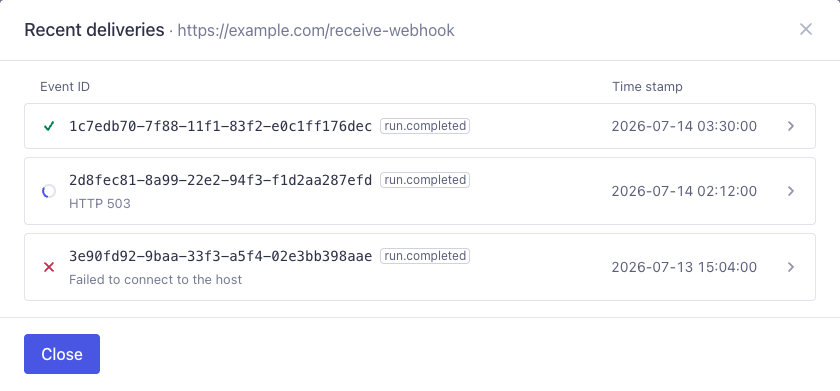
Delivery statuses:
- Delivered: The endpoint returned a success response.
- Pending: The delivery is queued or in progress.
- Retrying: An attempt failed and another is scheduled.
- Failed. No more retries.: The delivery failed and will not be retried.
Automatic retries are exhausted, the failure is not retryable (for example a
3xxor a4xxother than408or429), or the delivery was a test send.
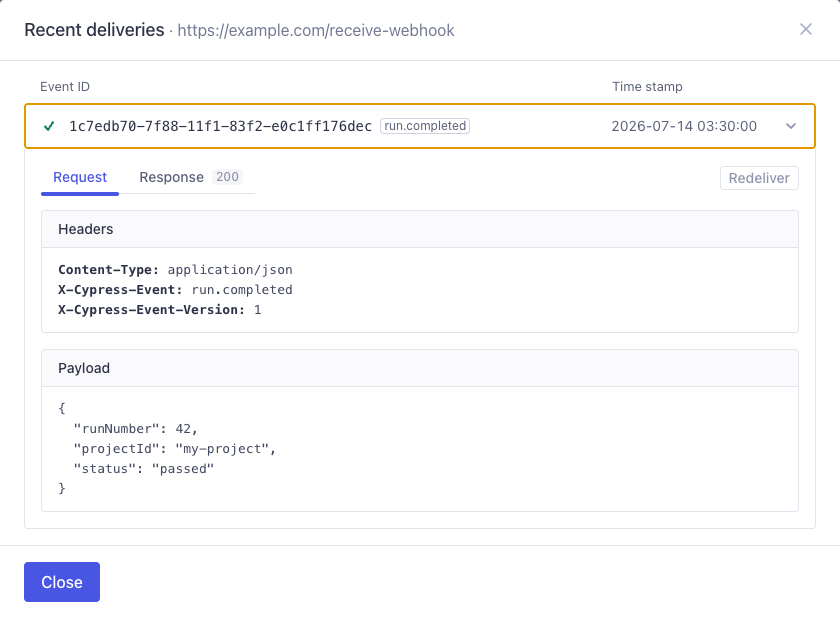
For your protection, sensitive request headers (such as Authorization and
Cookie) are redacted in the stored delivery history.
Retry behavior
If a delivery fails, Cypress Cloud retries it until it succeeds or reaches 10
total attempts (the first attempt plus up to 9 retries), using an exponential
backoff schedule with jitter. Cypress Cloud retries on network/transport errors
and on HTTP 408, 429, and 5xx responses. Other completed responses (3xx
and other 4xx) and blocked destinations are treated as permanent failures and
are not retried. Test sends are never retried.
Each attempt is listed under that delivery in Recent deliveries. Expand the delivery to see Attempt 1, Attempt 2, and so on. Automatic retries are tagged Retry; a redelivery you trigger is tagged Manual retry.
To resend a failed or exhausted delivery yourself, expand it in the Recent
deliveries dialog and choose Redeliver. A redelivery reuses the original
payload and keeps the same X-Cypress-Event-Id, so your idempotency logic still
recognizes it as the same event.
Security
We recommend that you always use an https:// Payload URL so payloads are encrypted in transit.
In addition, Cypress Cloud applies several protections to webhook delivery:
- Endpoint restrictions: Destination URLs are resolved and validated before each delivery. Requests to private, loopback, and link-local addresses are blocked to prevent server-side request forgery (SSRF).
- No redirects: Cypress Cloud does not follow HTTP redirects; the Payload URL must respond directly.
- Timeouts and limits: Each attempt times out after 10 seconds, and only the first 8 KB of your response body is read and stored.
- Secret storage: Signing secrets are encrypted at rest and are never returned by the Cypress Cloud API. A secret is shown only once, when you set it.
Troubleshooting
Run completed webhook fires too late
The run.completed webhook is delivered when Cypress Cloud marks the run as
complete. If you record in parallel or with multiple groups, Cypress Cloud waits
for the Run Completion Delay
(60 seconds by default) after the last known group finishes, in case more groups
still join. That wait is what delays the webhook, because if all tests haven't been recorded yet, the final state of the run is not known.
To complete the run as soon as your expected groups have finished, call the Run Completion API. Cypress Cloud then skips the remaining delay, and the webhook is delivered when in-progress groups finish.